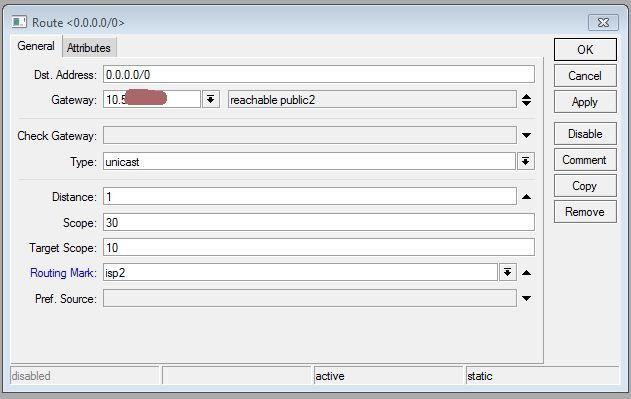
I am trying to understand this rule. My ISP set up a second wan I Asked the guy to hep me setup my Router for my private LAN so that all traffic from 192.168.0.100 would go through the new wan. He did this adding a new static route, a new gateway where all traffic with routing mark=pe3ny would go through this gate way and on new routing rule. I am trying to figure out how this work and I exported the whole thing.I can find only two places where the ISP2 is mentioned and that is in the new gateway and in the following rule:
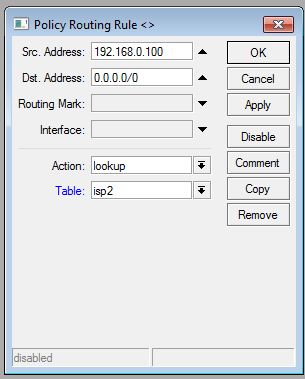
But this looks to me more like a lookup - does this rule place / create a routing table “ISP2” table and add a routing mark =ISP2 ?
Read in the Mikrotik manual that the routing table is automticly created when referred to. so I asume that the ISP2 routing table is then created be this gateway referring to the rule.
I read above as everything with the routing mark = isp2 goes through this gateway. But I still do not understand where the routing mark is added. There is only one more place in the entire setup where “ISP2” is mentioned and that is in the rule
Does above rule add the routing mark or how is all traffic with src addr 92.168.0.100 placed in the routing table “isp2” and can someone give me a hint as to where in the flow the routing mark is added?
when ISP2 default route is added - new routing table is created and routing entry is added to that. Then policy routing is matching packets with certain attributes and forwards them to routing table.
To add routing marks use ‘/ip firewall mangle’.
Policy Routing Rule is a place to make some actions on marked packets.
Also is possible to use marked packets with static routes.
That is exactly my point. The rules are working, so the routing mark must be added somewhere. But when I checked ip/firewall/mangle i could not find any mangle rule adding the “isp2” routing mark - Guaranteed! I made an export of the whole setup to notepad and search for “isp2” and the “isp2” is only mentioned two times in the entire set up and that is in ip/route and ip/route/rule.
So the ip/rute/rule must not only make the lookup, but in fact add the routing mark?
After setting up the wan interface “public 2” These three rules is all what was added and then it works - all traffic from 192.168.0.100 goes through the new internet connection.
I just can’t figure out where the routing mark is added that enables to route the traffic from 192.168.0.100 to public2. The only explanation I can find is that the rule
Does in fact look up all traffic originated from 192.168.0.100 and add the a routing mark = isp2 - or add the traffic from 192.168.0.100 to the routing table “isp2” and the packets are automatcily marked routing-mark=isp2 ???
That’s all that is needed. http://wiki.mikrotik.com/manual//ip/route/rule. Route rules with a type of lookup are the same as marking a packet with a routing mark in mangle. All you can look up by is the destination address, source address, and in-interface, though - but in your case that’s sufficient. It basically says "before routing, look at the rules. This rule says "don’t use the table ‘main’, use the table ‘isp2’. Routes in “/ip route” with a routing-mark are in the table named after the routing mark, and are not in the ‘main’ table. Marking packets with routing marks in mangle basically says “just use the table named after this routing mark for this packet”.
Thanks, fewi and Janisk. That makes sense. But difficult to know. I read the article suggested last night but was not able to see that this rule would in fact work the same way as a mangle rule.
usually i prefer mangle, since that allows for larger possibilities. also, when marking routing - you can mark connection with advanced settings and afterwards just mark packets according to marked connection matching just one attribute. and that usually is faster in the end, if a lot of attributes have to be used.
 in the end, if a lot of attributes have to be used.