Hi, all!
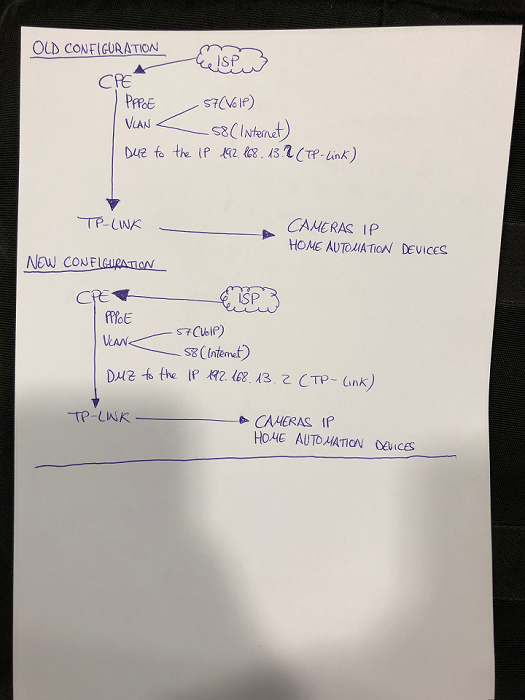
I have a Mikrotik with a PPPoE Client, working with Vlans, Vlan 57 for VoIP and 58 for internet, connected at the interface ethernet 2 in the mikrotik with a DMZ is connected one TP-LINK as main router. I can’t access by the WAN to the cameras and home automation devices.
Before putting the Mikrotik, I had internet service with a CPE with Vlans and DMZ like the mikrotik is configured, but with the CPE all works without problems, accessing to the IP cameras and Domotic things, by the WAN.
I attached the mikrotik code, and a explanatory scheme,
Why i can reach the IP cameras in the LAN, but not in the WAN with the mikrotik?
Configuration Code:
[Aitor@0000 - Toni] > /export hide-sensitive
# oct/25/2017 16:03:01 by RouterOS 6.41
# software id = 0B9L-C2WJ
#
# model = 2011UiAS-2HnD
# serial number = 46740494CBAF
/interface bridge
add name=bridge1
add name=bridge2
/interface ethernet
set [ find default-name=ether4 ] mac-address=64:D1:54:F7:0B:0C name=ether1
set [ find default-name=ether3 ] mac-address=64:D1:54:F7:0B:0D name=ether2
set [ find default-name=ether2 ] mac-address=64:D1:54:F7:0B:0E name=ether3
set [ find default-name=ether1 ] mac-address=64:D1:54:F7:0B:0F name=ether4
/interface wireless
set [ find default-name=wlan1 ] name=wlan3 ssid="0000 - Toni"
/interface vlan
add interface=ether2 name=vlan57LAN vlan-id=57
add interface=ether1 name=vlan57WAN vlan-id=57
add interface=ether1 name=vlan58WAN vlan-id=58
/interface pppoe-client
add add-default-route=yes disabled=no interface=vlan58WAN name=pppoe-out1 user=\
    trying1
/interface ethernet switch port
set 0 default-vlan-id=0
set 1 default-vlan-id=0
set 2 default-vlan-id=0
set 3 default-vlan-id=0
set 11 default-vlan-id=0
/interface list
add exclude=dynamic name=discover
/interface wireless security-profiles
set [ find default=yes ] supplicant-identity=MikroTik
/ip pool
add name=dhcp_pool1 ranges=192.168.13.2
/ip dhcp-server
add address-pool=dhcp_pool1 disabled=no interface=bridge2 lease-time=1d name=\
    dhcp1
/interface bridge port
add bridge=bridge1 hw=no interface=vlan57LAN
add bridge=bridge1 hw=no interface=vlan57WAN
add bridge=bridge2 hw=no interface=ether2
add bridge=bridge2 hw=no interface=ether3
add bridge=bridge2 hw=no interface=ether4
add bridge=bridge2 hw=no interface=*5
/ip neighbor discovery-settings
set discover-interface-list=discover
/interface list member
add interface=ether2 list=discover
add interface=ether3 list=discover
add interface=ether4 list=discover
add list=discover
add interface=vlan58WAN list=discover
add interface=vlan57WAN list=discover
add interface=vlan57LAN list=discover
add interface=bridge1 list=discover
add interface=bridge2 list=discover
add list=discover
/ip address
add address=192.168.13.1/24 interface=ether2 network=192.168.13.0
/ip dhcp-server network
add address=192.168.13.0/24 dns-server=8.8.8.8,1.1.1.1 gateway=192.168.13.1 \
    netmask=24
/ip firewall filter
add action=drop chain=input comment="Drop Invalid connections" \
    connection-state=invalid
add action=accept chain=input comment="Allow Established connections" \
    connection-state=established
add action=accept chain=input comment="Allow ICMP" protocol=icmp
add action=drop chain=input comment="Drop everything else"
add action=drop chain=forward comment="drop invalid connections" \
    connection-state=invalid protocol=tcp
add action=accept chain=forward comment="allow already established connections" \
    connection-state=established
add action=accept chain=forward comment="allow related connections" \
    connection-state=related
/ip firewall nat
# no interface
add action=masquerade chain=srcnat out-interface=pppoe-out1 src-address=\
    0.0.0.0/0
# no interface
add action=dst-nat chain=dstnat in-interface=pppoe-out1 to-addresses=\
    192.168.13.2
/ip service
set telnet disabled=yes
set ftp disabled=yes
set ssh disabled=yes
set api disabled=yes
set api-ssl disabled=yes
/lcd interface pages
set 0 interfaces=wlan3
/system clock
set time-zone-name=Europe/Madrid
/system identity
set name="0000 - Toni"
/tool bandwidth-server
set enabled=no
/tool mac-server
set allowed-interface-list=none
[Aitor@0000 - Toni] >