Hello, dear community. I’d like that you help me with process decision making. This is my first post here, sorry if i posted it in wrong place. This is my network map and what i want to achieve. Can it be done by using mikrotik? Can someone help with minimal manual how can i do this. I’ll be very appreciated for any help or tips. Thanks
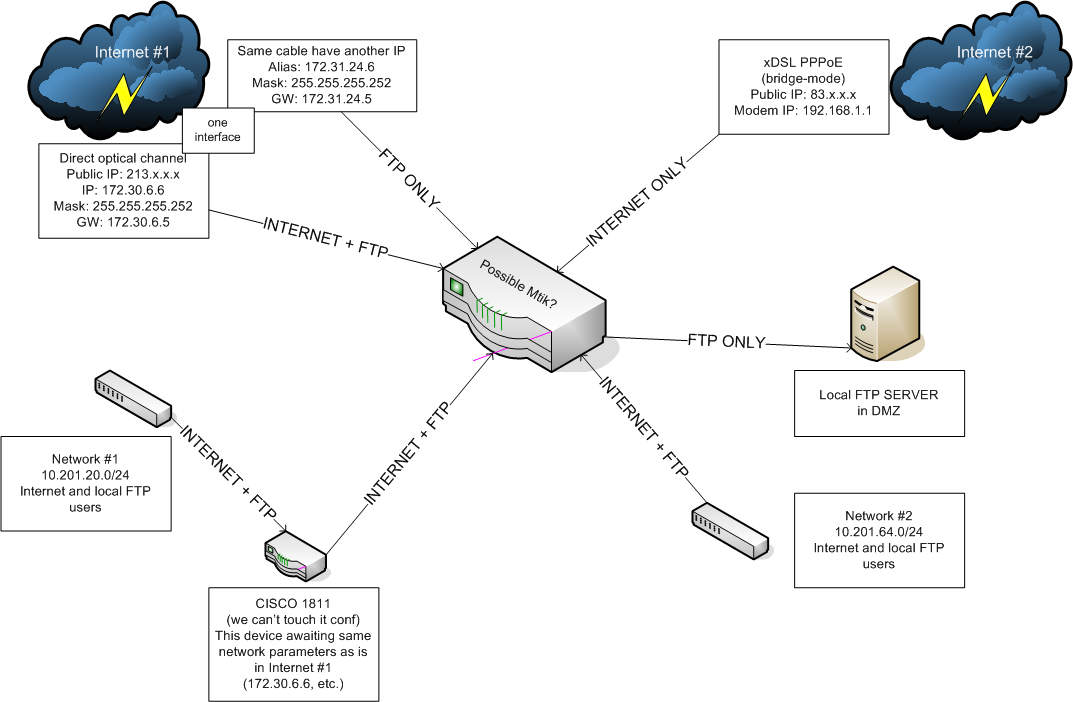
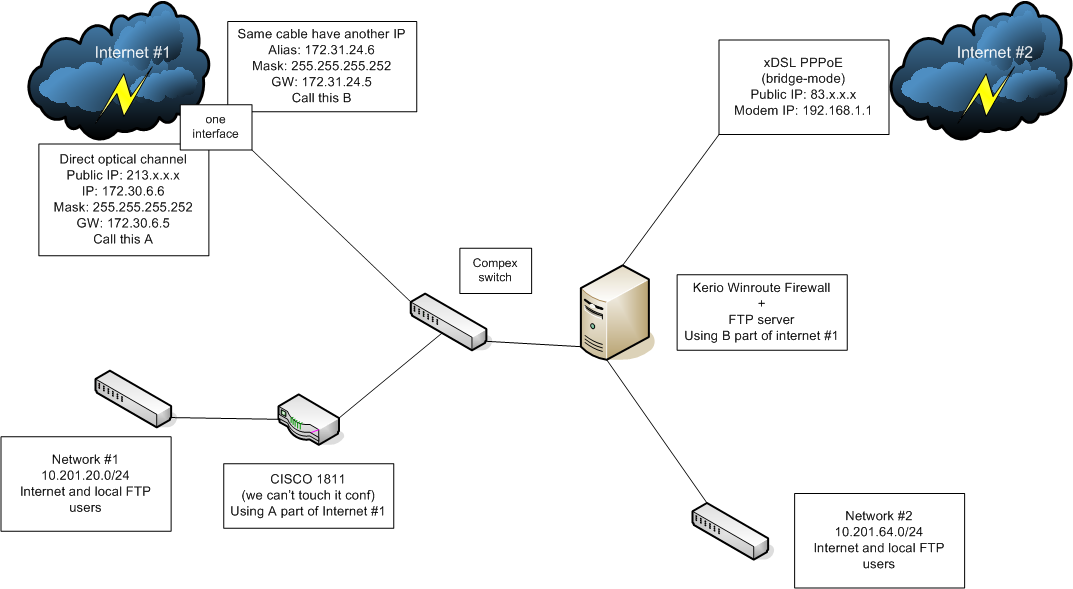
Ours current configuration
of course it’s possible, but need more info. you will have several uplinks, do you plan to use some load balancing, or send certain users through one, and some through the other? what are the other requirements, bandwidth shaping, firewall?
Thanks for fast answer. I’ll give any info, just ask. Users from network #1 can use internet #1 only and FTP. Network #2 users can use both internet #1 and internet #2 and FTP also (it’s logical to use load balancing in this case, right?). No other special requirements, users are browsing sites, sending email’s, chatting in ICQ. But no torrents or something high-load.
PS. In our current configuration network #2 users are behind the Kerio NAT. FTP users comes from network #2 and from internet #1 alias through compex switch to ftp server (routing). Also we planned to access ours FTP server from internet #1 (213.x.x.x)
What’s the story with the 1811? While you can get around not being able to configure it I’d consider it a patchwork solution that hinders the flexibility of configurations.
the story is simple it can be configured by headquarter company only, so we haven’t password for it
question of the day, how to split one interface into bridge (A ↔ CISCO) and private network (B ↔ mikrotik), is it possible? how? can i use this bridge in third network (network #2)?
The most important question, then, is whether or not you have proper authorization to touch the network at all.
ok, i contacted with hq and for now 20.0/24 doesn’t require to access inner ftp server and cisco network configuration can be changed
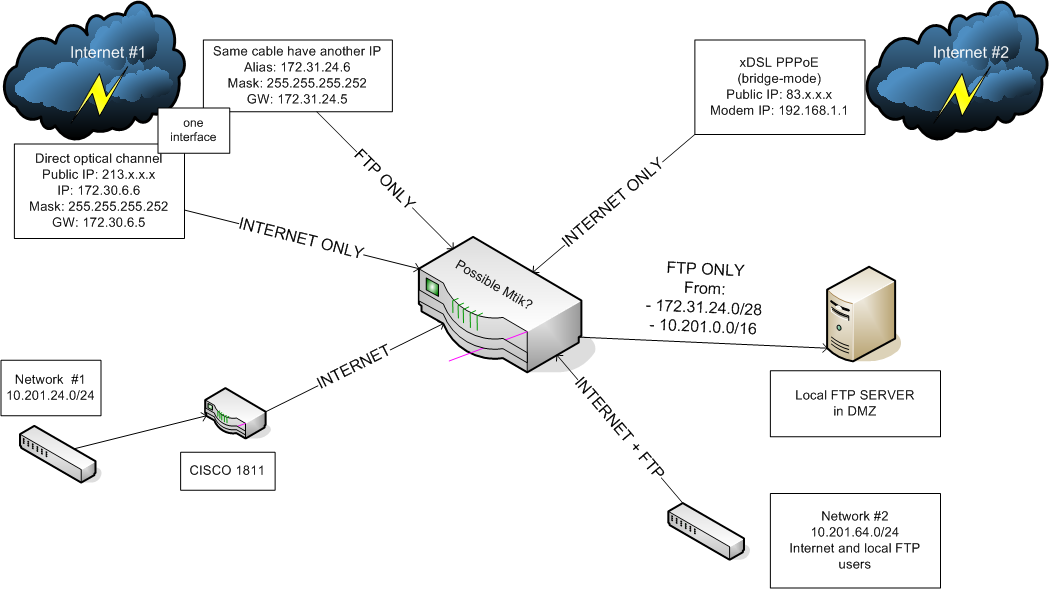
in this case everything getting simplier, in my opinion we need:
- network #1: load balance between internet #1 (cable) and #2 (pppoe)
- network #2: use internet #1 only (cable)
- 172.31.24.0/28 passthrough mtik to ftp (and only to ftp)
- 10.201.0.0/16 passthrough mtik to ftp
I don’t know the physical proximity of the gear, but if you can I’d pull the 1811 out and do everything from the mikrotik router. The 1811 is a good piece of gear but it’s just going to add more complexity without any real benefits.
If not then you’re going to have to configure a /30 between them and add routes.
The load balancing isn’t difficult and then just use firewall rules to control access to the FTP server.
Is it the best setup? No, but that’ll get it working and you can improve it as time goes on.
i can’t pull 1811 because it used to connect 20.0/24 to other offices and hq
can mikrotik route/nat ip aliases?
It will do everything the 1811 will minus Cisco proprietary things like EIGRP. Mikrotik is very capable and a lot more flexible, but Cisco has enterprise level reliability and quality assurance behind it. There’s good reason it’s the industry standard.
The setup you show negates that reliability factor because it will be connected to the mikrotik device anyway. The only caveat being if the 1811 is being used for a Cisco specific VPN setup. I haven’t personally done much with Mikrotik VPN wise but I gather it can be quirky depending on the protocol.
Depending on how it’s set up it could very well be more practical to put the connection to the mikrotik on the internal side of the 1811 and set up OSPF between the two.
The most I can do is guess at the moment based on the topology you showed. I don’t know anything about the details of the current configuration or the goals of the new setup.
To be honest though and coming from the network engineering side of things if your employer has already invested in Cisco infrastructure as the standard I’d advise against mixing other gear in without it being approved by the HQ IT office. The last thing anyone trying to manage a network wants is a piece of undocumented rogue gear that deviates from the expected standard and no one is trained on. If you get hit by a bus tomorrow and the mikrotik gear is fried by lightning what’s the operational continuity and disaster recovery plan like? The last thing I want is to send one of my CCNA network monkeys out and have him call me and say he doesn’t know what the hell a piece of gear is or to even begin to configure it.
ok, i understand, then i’ll will setup simple transparent bridge from internet #1 (172.30.6.0/30) to cisco router and refuse to use internet #1 in 64.0/24 network, i’m started with following config:
I. define static ip’s for all interfaces
/ip address
add address=192.168.1.32/24 interface=ether1 – dsl modem
add address=10.201.64.251/24 interface=ether2 – local network
add address=172.30.6.6/30 interface=ether3 – cable main, internet
add address=172.31.24.6/30 interface=ether3 – cable alias, FTP only
add address=172.32.7.6/24 interface=ether4 – ftp server
add address=172.33.25.6/24 interface=ether5 – cisco routerII. configure internet #2 for 64.0/24 network
add interface pppoe – ether1:
/interface pppoe-client add name=xDSL interface=ether1 user=dsl_login password=dsl_password add-default-route=yes use-peer-dns=yes disabled=noallow 64.0/24 to use internet #2:
/ip firewall nat add chain=srcnat src-address=10.201.64.0/24 action=masqueradedefine filters:
/ ip firewall filter
add chain=input connection-state=established comment=”Accept established connections”
add chain=input connection-state=related comment=”Accept related connections”
add chain=input connection-state=invalid action=drop comment=”Drop invalid connections”
add chain=input protocol=udp action=accept comment=”UDP” disabled=no
add chain=input protocol=icmp limit=50/5s,2 comment=”Allow limited pings”
add chain=input protocol=icmp action=drop comment=”Drop excess pings”
add chain=input in-interface=ether2 src-address=10.201.64.0/24 comment=”From our LAN” action=accept
add chain=input action=log log-prefix=”DROP INPUT” comment=”Log everything else”
add chain=input action=drop comment=”Drop everything else”allow to use dns:
/ip dns set allow-remote-requests=yesIII. configure transparent bridge between internet #1 and cisco
/interface
bridge add name=cisco_bridge
bridge port add interface=ether3 bridge=cisco_bridge
bridge port add interface=ether5 bridge=cisco_bridge…
now i have three questions:
- how to split 172.31.24.0/30 from bridge?
- how to route 172.31.24.0/30 and 10.201.0.0/16 to the ftp server 172.32.7.6/24?
- can i do this in v3.30 of the router? i mean assign multiple subnets to one interface
trying to answer my questions:
2) it must be mangle, i guess, firstly we must mark packets from networks to the ftp server at prerouting chain
/ip firewall mangle
add action=mark-routing chain=prerouting src-address=172.31.24.5/30 dst-address=172.29.4.5/30 new-routing-mark=ftp_flow_a
add action=mark-routing chain=prerouting src-address=10.201.0.0/16 dst-address=172.29.4.5/30 new-routing-mark=ftp_flow_b
and then change the routing list
/ip route
add dst-address=172.29.4.5/30 gateway=172.29.4.6 routing-mark=ftp_flow_a
add dst-address=172.29.4.5/30 gateway=10.201.64.251 routing-mark=ftp_flow_b
is this correct?
trying to answer my own questions:
3) load balancing over multiple subnets can’t be done in v3, but load balancing over multiple gateways can be
and general question is one, i don’t know the answer…
ps. but i can keep compex switch and route 172.30/172.31 through it… and say good bye to windows