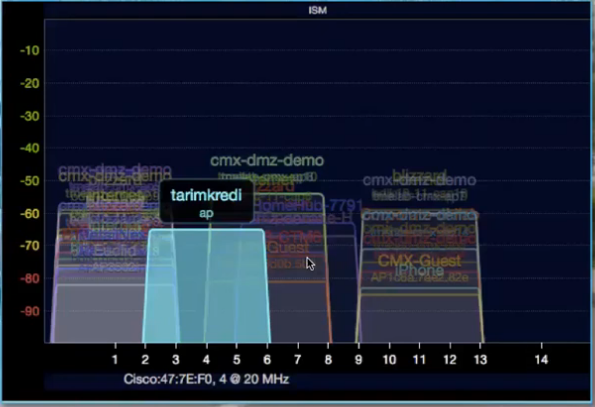
I need some help as per subject line. Have an estate where ± 1500 Mikrotik units are deployed at each Apartment / Flat, 99% of these Mikrotiks are Hap Lites with the odd Hap AC2 here and there.
The problem is, some of these apartments/flats are very small, i.e. 1 bedroom units with only a single wall between the one units bedroom and the one next to it. They are also multi story buildings.
Now you getting interference from all these units around you, i.e. had a situation so bad the other day, that the person could not even connect to their own mikrotik wifi which was like 2 meters away from them. Had to reduce the WiFi channel to 20MHz, did a frequency scan and selected the least used frequency and set it to 2GHz G only and only then could the customer connect.
My question is, how can I set these routers wifi to not impact each other and is there a way to reduce the “noise / interference” from other units. My initial thinking is to run a script remotely and reduce all routers to only 20MHz channel width and only use 2GHz G only, or is there better ways for situations like these?
On the 2G radio only channel 1, 6 and 11 have no overlap (depending on country legislation, there could be more channels). Besides 2G has a higher penetration than 5G.
To summarize:
lower transmission power to absolute minimum reuirements
select channels to get least interference
on 2G radio only use 20MHz bandwidth…period
do (only if possible) use 5G radio (40MHz bandwidth, tranmission to lower power and select channels with least interference)
Sounds like one is screwed to provide a decent service per room at least wirelessly.
Wired is easy. Perhaps a general building wifi with internet access only so that all can use smart phones but not networked at all.
It is a bit of a “damned if you do and damned if you don’t” situation. The customers want to sit in their bedroom and get the full speed of the internet they pay for on wifi, so if you set settings accordingly, then you cause interference for others
Set antenna gain to like 16 dB to lower the TX power, if the rooms are so small there’s no point blasting the signal all over the complex. On the devices that support 5 GHz, disable 2.4 GHz radio and use 5 GHz only.
As erlinden said, cut down the Rx power as much as yuou can. I think you can safely reduce it to 21-22.
As for channels, the 1, 6 and 11 is definitely the only way to go. I had channels set to automatic in my installation, and the situation wasn’t good at all. Just create three channel values one below the other, and the AP will auto decide what to use.
Also, connect to your CAPs and see the signal levels on them, bg analyser, if adjacent same channel APs are below -80 db signal , you are safe, but aim for less. I managed to get my installation so APs don’t see other APs on the same channel at all.
As for 5GHz vs 2.4GHz, I think that is overrated. It is hard to set up 2.4, but signal propagation is really good and if you do it right it will work as a dream.
There are many phone apps that measure signal strength e.g WiFi Analyser
You need to choose the right location for your WiFi router. As close as possible to the users and as close as possible to the centre of the flat.
Choose the right free channel depending on the range used. For 2.4, for example, choose the least busy of the 1.6.11 bands.
But always the best solution is to use the cable
Hmm, it’s a quite interesting situation. That’s true, you can’t have much 2.4 Ghz Wi-Fi in a small environment. What about if set up common hallway-based powerful enough Wi-Fi APs, and set 802.1x authentication for each user. Then you will be able to limit their Internet based on their tariff plan.
Be aware that 34 SSID (count as “#SSID * #AP”) with default setting and 1Mbps basic rate (802.11b enabled) will consume ALL available airtime in a channel just for the beacons.
The channel load will be 100% just idling. Ok with the better 6 Mbps you need 204 SSID to fill that up.
But 30% airtime wasted is already a lot ! So the usefull limit is more 10 or 60 APP*SSID with a signal stronger than -96dBm, per channel.
Signal at 1 or 6 Mbps goes very far!!
Increasing the minimum basic rate to 9 Mbps, 12Mbps or even 18 Mbps will reduce further the airtime usage. But some clients might have problems to connect with this setting.
You should only be using 20MHz anyway, on 2.4GHz band.
Do not use 40MHz on 2.4GHz. There is already not enough space in normal circumstances - never mind in your apartment blocks. Don’t try to use twice as much channel space as normal.