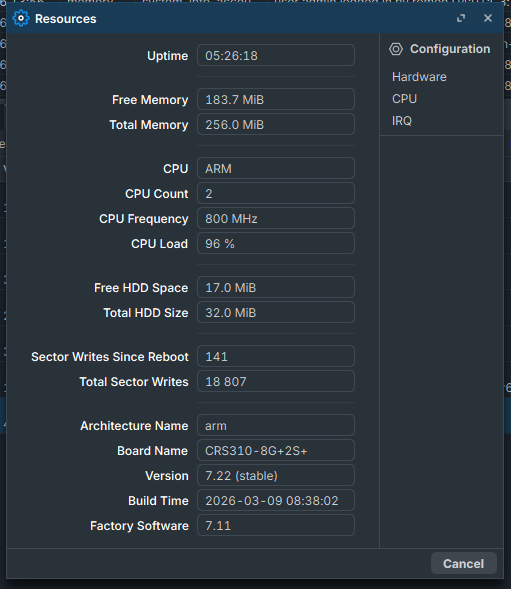
Hello. I need a little help getting L3 Hardware offload to work. Main switch is a CRS310-8G+2S+ with a CRS305-1G-4S+ attached on SFP+ port 2 of the CRS310. The large transfer is from a machine on CRS310's Ether 7 to a machine on CRS305's SPF+ #2. Neither switch is doing L3 HW offload. I have hw offload enabled on the bridge and each port. When I attempt a large transfer the cpu pegs at 100% and most of the network except that transfer slows down. Traffic is being passed on the same vlan.They are not being used a a router as that is handled by an OPNsense machine on CRS310's SFR+ port 1. IP Firewall is not in use on either. All Vlans are on a single bridge and all ports have the bridge tagged. Vlan filtering is enabled on the bridge. Both are on RouterOS 7.22. I am not sure what I am doing wrong and any help is appreciated.
CRS310 Config:
# 2026-03-26 14:20:47 by RouterOS 7.22
# software id = xxx
#
# model = CRS310-8G+2S+
# serial number = xxxx
/interface bridge
add admin-mac=xxxx auto-mac=no comment="BRIDGE FOR LAN" \
    ingress-filtering=no name=bridge priority=0x4000 vlan-filtering=yes
/interface ethernet
set [ find default-name=ether1 ] name="ether1 Talyn"
set [ find default-name=ether2 ] name="ether2 Home Assistant"
set [ find default-name=ether3 ] name="ether3 Blue Iris"
set [ find default-name=ether4 ] name="ether4 Ruckus R650"
set [ find default-name=ether6 ] name="ether6 Proxmox"
set [ find default-name=ether7 ] name="ether7 Brocade Switch"
set [ find default-name=ether8 ] name="ether8 Cisco Switch"
set [ find default-name=sfp-sfpplus1 ] auto-negotiation=no name=\
    "sfp-sfpplus1 SFP+ Switch"
set [ find default-name=sfp-sfpplus2 ] auto-negotiation=no name=\
    "sfp-sfpplus2 OPNsense"
/interface vlan
add comment="Main VLAN" interface=bridge name=vlan10 vlan-id=10
add comment=VLAN20 interface=bridge name=vlan20 vlan-id=20
add comment="IOT VLAN" interface=bridge name=vlan30 vlan-id=30
add comment="CAM VLAN" interface=bridge name=vlan31 vlan-id=31
add comment=Guest interface=bridge name=vlan40 vlan-id=40
/interface list
add name=WAN
add name=LAN
add include=all name=management
/ip smb users
add name=drive
/routing id
add disabled=no id=192.168.1.5 name=id-1 select-dynamic-id=\
    only-static,only-vrf select-from-vrf=main
/routing pimsm instance
add disabled=yes name=pimsm-instance1 vrf=main
/disk settings
set auto-media-interface=bridge auto-smb-user=""
/ip smb
set domain=NT_DOMAIN enabled=yes
/interface bridge port
add bridge=bridge frame-types=admit-only-untagged-and-priority-tagged \
    interface="ether1 Talyn" pvid=10
add bridge=bridge frame-types=admit-only-untagged-and-priority-tagged \
    interface="ether2 Home Assistant" pvid=10
add bridge=bridge frame-types=admit-only-untagged-and-priority-tagged \
    interface="ether3 Blue Iris" pvid=10
add bridge=bridge interface="ether4 Ruckus R650" pvid=10
add bridge=bridge frame-types=admit-only-untagged-and-priority-tagged \
    interface=ether5 pvid=10
add bridge=bridge frame-types=admit-only-untagged-and-priority-tagged \
    interface="ether6 Proxmox" pvid=10
add bridge=bridge frame-types=admit-only-vlan-tagged interface=\
    "ether7 Brocade Switch"
add bridge=bridge frame-types=admit-only-vlan-tagged interface=\
    "ether8 Cisco Switch"
add bridge=bridge frame-types=admit-only-vlan-tagged interface=\
    "sfp-sfpplus1 SFP+ Switch"
add bridge=bridge frame-types=admit-only-vlan-tagged interface=\
    "sfp-sfpplus2 OPNsense" pvid=10 trusted=yes
/interface ethernet switch l3hw-settings
set autorestart=yes ipv6-hw=yes
/ip firewall connection tracking
set udp-timeout=10s
/ip neighbor discovery-settings
set discover-interface-list=management lldp-med-net-policy-vlan=1
/ip settings
set icmp-rate-limit=100
/interface bridge vlan
add bridge=bridge comment="Guest VLAN" tagged=\
    "sfp-sfpplus2 OPNsense,ether4 Ruckus R650,ether8 Cisco Switch,bridge" \
    vlan-ids=40
add bridge=bridge comment="Main VLAN" tagged="sfp-sfpplus2 OPNsense,sfp-sfpplu\
    s1 SFP+ Switch,ether8 Cisco Switch,ether7 Brocade Switch,bridge" \
    untagged="ether1 Talyn,ether2 Home Assistant,ether3 Blue Iris,ether5,ether\
    6 Proxmox" vlan-ids=10
add bridge=bridge comment="IOT VLAN" tagged="sfp-sfpplus2 OPNsense,ether4 Ruck\
    us R650,ether8 Cisco Switch,ether7 Brocade Switch,bridge" vlan-ids=30
add bridge=bridge comment="20 VLAN" tagged="sfp-sfpplus2 OPNsense,sfp-sfpplus1\
    \_SFP+ Switch,ether8 Cisco Switch,ether7 Brocade Switch,bridge" vlan-ids=\
    20
add bridge=bridge comment="CAM VLAN" tagged="sfp-sfpplus2 OPNsense,ether8 Cisc\
    o Switch,ether4 Ruckus R650,ether7 Brocade Switch,bridge" vlan-ids=31
/interface detect-internet
set internet-interface-list=all lan-interface-list=LAN wan-interface-list=WAN
/interface ethernet switch
set 0 l3-hw-offloading=yes
/interface list member
add interface="ether1 Talyn" list=LAN
add interface="ether2 Home Assistant" list=LAN
add interface="ether3 Blue Iris" list=LAN
add interface="ether4 Ruckus R650" list=LAN
add interface=ether5 list=LAN
add interface="ether6 Proxmox" list=LAN
add interface="ether7 Brocade Switch" list=LAN
add interface="ether8 Cisco Switch" list=LAN
add interface="sfp-sfpplus1 SFP+ Switch" list=LAN
add interface="sfp-sfpplus2 OPNsense" list=LAN
add interface="ether1 Talyn" list=management
add interface="ether2 Home Assistant" list=management
add interface="ether3 Blue Iris" list=management
add interface="ether4 Ruckus R650" list=management
add interface=ether5 list=management
add interface="ether6 Proxmox" list=management
add interface="ether7 Brocade Switch" list=management
add interface="ether8 Cisco Switch" list=management
add interface="sfp-sfpplus1 SFP+ Switch" list=management
add interface="sfp-sfpplus2 OPNsense" list=management
add interface=vlan10 list=management
add disabled=yes interface=bridge list=management
/interface ovpn-server server
add mac-address=FE:00:AE:20:49:ED name=ovpn-server1
/ip dhcp-client
add interface=vlan10 name=bridge
/ip dns
set servers=192.168.1.1
/ip dns static
add address=192.168.1.5 match-subdomain=yes name=MikroTik type=A
/ip hotspot profile
set [ find default=yes ] html-directory=hotspot
/ip ipsec profile
set [ find default=yes ] dpd-interval=2m dpd-maximum-failures=5
/ip route
add disabled=yes distance=1 dst-address=0.0.0.0/0 gateway=192.168.1.1 \
    routing-table=main scope=30 suppress-hw-offload=no target-scope=10
add distance=1 gateway=192.168.1.1
add distance=1 gateway=192.168.1.1
/ip smb shares
set [ find default=yes ] disabled=no
/ip tftp
add
/ip upnp interfaces
add disabled=yes interface=bridge type=internal
/ipv6 dhcp-client
add interface=bridge pool-prefix-length=64 request=address
/ipv6 nd
set [ find default=yes ] advertise-dns=yes
/routing igmp-proxy interface
add comment=Test disabled=yes
/snmp
set enabled=yes trap-interfaces=all trap-version=2
/system clock
set time-zone-name=America/New_York
/system health settings
set fan-min-speed-percent=10%
/system ntp client
set enabled=yes
/system ntp client servers
add address=192.168.1.1
/system package local-update update-package-source
add address=192.168.1.5 user=admin
/tool mac-server
set allowed-interface-list=management
/tool mac-server mac-winbox
set allowed-interface-list=management
/tool romon
set enabled=yes id=D4:01:C3:6A:54:34
/tool romon port
add interface=management
/tool traffic-generator packet-template
add data=random header-stack=mac,ip,tcp ip-dst=192.168.1.5 ip-gateway=\
    192.168.1.6 mac-dst=28:52:61:41:CD:89/FF:FF:FF:FF:FF:FF name=\
    packet-template1
/tool traffic-generator stream
add mbps=5 name=str1 packet-size=512 tx-template=packet-template1
CRS305 conifg:
# 2026-03-26 14:21:47 by RouterOS 7.22
# software id = xxx
#
# model = CRS305-1G-4S+
# serial number = xxx
/interface bridge
add admin-mac=xxx auto-mac=no comment="SFP+ Bridge" \
    ingress-filtering=no name=bridge port-cost-mode=short vlan-filtering=yes
/interface ethernet
set [ find default-name=sfp-sfpplus1 ] auto-negotiation=no
set [ find default-name=sfp-sfpplus2 ] auto-negotiation=no
set [ find default-name=sfp-sfpplus3 ] auto-negotiation=no
/interface vlan
add comment="Main VLAN" interface=bridge name=vlan10 vlan-id=10
add comment=VLAN20 interface=sfp-sfpplus1 name=vlan20 vlan-id=20
add comment="IOT VLAN" interface=sfp-sfpplus1 name=vlan30 vlan-id=30
add comment="Guest VLAN" interface=bridge name=vlan40 vlan-id=40
/interface list
add name=WAN
add name=LAN
add include=all name=manage
/ip smb
set enabled=no
/interface bridge port
add bridge=bridge disabled=yes frame-types=\
    admit-only-untagged-and-priority-tagged interface=ether1 \
    internal-path-cost=10 path-cost=10 pvid=10
add bridge=bridge frame-types=admit-only-vlan-tagged interface=sfp-sfpplus1 \
    internal-path-cost=10 path-cost=10
add bridge=bridge frame-types=admit-only-untagged-and-priority-tagged \
    interface=sfp-sfpplus2 internal-path-cost=10 path-cost=10 pvid=10
add bridge=bridge frame-types=admit-only-untagged-and-priority-tagged \
    interface=sfp-sfpplus3 internal-path-cost=10 path-cost=10 pvid=10
add bridge=bridge interface=sfp-sfpplus4 internal-path-cost=10 path-cost=10 \
    pvid=10
/interface ethernet switch l3hw-settings
set autorestart=yes
/ip firewall connection tracking
set udp-timeout=10s
/ip neighbor discovery-settings
set discover-interface-list=manage
/interface bridge vlan
# ether1 not a bridge port
add bridge=bridge comment="Main VLAN" tagged=sfp-sfpplus1,bridge untagged=\
    sfp-sfpplus2,sfp-sfpplus3,ether1 vlan-ids=10
add bridge=bridge comment="Guest VLAN" tagged=bridge vlan-ids=40
add bridge=bridge comment="IOT Vlan" tagged=sfp-sfpplus1,bridge vlan-ids=30
add bridge=bridge comment=VLAN20 vlan-ids=20
/interface ethernet switch
set 0 l3-hw-offloading=yes
/interface list member
add interface=sfp-sfpplus1 list=LAN
add interface=sfp-sfpplus2 list=LAN
add interface=sfp-sfpplus3 list=LAN
add interface=sfp-sfpplus4 list=LAN
add interface=ether1 list=manage
add interface=bridge list=manage
add interface=sfp-sfpplus1 list=manage
add interface=sfp-sfpplus2 list=manage
add interface=sfp-sfpplus3 list=manage
add interface=sfp-sfpplus4 list=manage
add interface=vlan10 list=manage
add interface=ether1 list=LAN
/interface ovpn-server server
add mac-address=FE:8A:AA:4F:0E:8E name=ovpn-server1
/ip address
add address=192.168.1.4/24 comment=defconf disabled=yes interface=ether1 \
    network=192.168.1.0
add address=192.168.1.131/24 comment=defconf disabled=yes interface=bridge \
    network=192.168.1.0
/ip dhcp-client
add interface=vlan10 name=client1
/ip dns
set servers=192.168.1.1
/ip hotspot profile
set [ find default=yes ] html-directory=hotspot
/ip ipsec profile
set [ find default=yes ] dpd-interval=2m dpd-maximum-failures=5
/ip route
add distance=1 gateway=192.168.1.1
/ip tftp
add
/ipv6 dhcp-client
add interface=bridge pool-prefix-length=64 request=address
/ipv6 nd
set [ find default=yes ] advertise-dns=yes
/snmp
set enabled=yes trap-interfaces=all trap-version=2
/system clock
set time-zone-name=America/New_York
/system identity
set name="MikroTik SFP+"
/system ntp client
set enabled=yes
/system ntp client servers
add address=192.168.1.1
/tool mac-server
set allowed-interface-list=manage
/tool mac-server mac-winbox
set allowed-interface-list=manage
/tool romon
set enabled=yes id=D4:01:C3:71:79:51
CRS 310:
[admin@MikroTik] > /interface/bridge/port/print
Flags: I - INACTIVE; H - HW-OFFLOAD
Columns: INTERFACE, BRIDGE, HW, HORIZON, TRUSTED, TRUSTED-RA, FAST-LEAVE, BPDU-GUARD, EDGE, POINT-TO-POINT, PVID, FRAME-TYPES
#    INTERFACE                 BRIDGE  HW   HORIZON  TRUSTED  TRUSTED-RA  FAST-LEAVE  BPDU-GUARD  EDGE  POINT-TO-POINT  PVID  FRAME-TYPES
0  H ether1 Talyn              bridge  yes  none     no       no          no          no          auto  auto              10  admit-only-untagged-and-priority-tagged
1  H ether2 Home Assistant     bridge  yes  none     no       no          no          no          auto  auto              10  admit-only-untagged-and-priority-tagged
2  H ether3 Blue Iris          bridge  yes  none     no       no          no          no          auto  auto              10  admit-only-untagged-and-priority-tagged
3  H ether4 Ruckus R650        bridge  yes  none     no       no          no          no          auto  auto              10  admit-all
4 IH ether5                    bridge  yes  none     no       no          no          no          auto  auto              10  admit-only-untagged-and-priority-tagged
5  H ether6 Proxmox            bridge  yes  none     no       no          no          no          auto  auto              10  admit-only-untagged-and-priority-tagged
6  H ether7 Brocade Switch     bridge  yes  none     no       no          no          no          auto  auto               1  admit-only-vlan-tagged
7  H ether8 Cisco Switch       bridge  yes  none     no       no          no          no          auto  auto               1  admit-only-vlan-tagged
8  H sfp-sfpplus1 SFP+ Switch  bridge  yes  none     no       no          no          no          auto  auto               1  admit-only-vlan-tagged
9  H sfp-sfpplus2 OPNsense     bridge  yes  none     yes      no          no          no          auto  auto              10  admit-only-vlan-tagged
[admin@MikroTik] >
CRS305:
[admin@MikroTik SFP+] >  /interface/bridge/port/print
Flags: I - INACTIVE; H - HW-OFFLOAD
Columns: INTERFACE, BRIDGE, HW, HORIZON, TRUSTED, TRUSTED-RA, FAST-LEAVE, PATH-COST, INTERNAL-PATH-COST, BPDU-GUARD, EDGE, POINT-TO-POINT, PVID, FRAME-TYPES
#    INTERFACE     BRIDGE  HW   HORIZON  TRUSTED  TRUSTED-RA  FAST-LEAVE  PATH-COST  INTERNAL-PATH-COST  BPDU-GUARD  EDGE  POINT-TO-POINT  PVID  FRAME-TYPES
0  H ether1        bridge  yes  none     no       no          no                 10                  10  no          auto  auto              10  admit-only-untagged-and-priority-tagged
1  H sfp-sfpplus1  bridge  yes  none     no       no          no                 10                  10  no          auto  auto               1  admit-only-vlan-tagged
2  H sfp-sfpplus2  bridge  yes  none     no       no          no                 10                  10  no          auto  auto              10  admit-only-untagged-and-priority-tagged
3  H sfp-sfpplus3  bridge  yes  none     no       no          no                 10                  10  no          auto  auto              10  admit-only-untagged-and-priority-tagged
4 IH sfp-sfpplus4  bridge  yes  none     no       no          no                 10                  10  no          auto  auto              10  admit-all