Hi Mikrotik team,
You’ve been doing some great work on non-Windows apps..
Any chance we will see NetInstall for MacOS?
Hi Mikrotik team,
You’ve been doing some great work on non-Windows apps..
Any chance we will see NetInstall for MacOS?
I did not try, but I think netinstall-cli should work.
As far as I know, netinstall-cli is a static compiled binary, so it should work
Of course, if you want the GUI, there is no official Netinstall. You could give a try with Wine, WinBox 3 works correctly with Wine, Netinstall should.
I’m interested in your feedback if you try the Wine one
If it existed, I’d still tell you to do it this way instead.
You could use
Agreed, use a VM. I’ve used a Windows VM on my Macs for netinstall these last five years, as I can pass through whichever dongle or onboard Ethernet interface (or VLAN-tagged virtual interface) that is plugged into the router or switch to the VM, and I don’t have to mess with NetInstall picking the wrong interface.
For me it is working by running Netinstall with Wine under Mac. Netinstalled device many time running it like that.
Side note: This actually one of the nice benefits of macOS for networking. You can easily use VLAN trunk/hybrid. AFAIK, on Windows VLAN tagging requires driver support. 
Today I had to netinstall again and could not make it work with CrossOver and netinstall for windows. I guess pure wine would work but I didn’t want to try as I already use CrossOver. But, using UTM with the Ubuntu 14.04 x64 VM from the UTM gallery in emulation mode and the virtual network adapter bridged to my belkin ethernet-dongle I could very successfully netinstall by using netinstall-cli on my Apple M1 macbook. At first the emulation was extremely slow, but with more memory and 4 cpu cores it became usable.
I already package up CHR for UTM so it works like UTM gallery... I'll see about a UTM package with netinstall at some point, since that be handy and I use a container on RouterOS today.
And, it perform much better with Alpine or more basic Debian/etc., than full OS+GUI.
I’m also using CrossOver wine build, free build provided by Gcenx with Sikarugir (ex. Kegworks/Wineskin). Issue (device was not netbooted) that I was facing on Mac, until figured out, was not related to Wine itelf, it was due to Mac firewall (it should be disabled) and wifi interface (also disabled or wifi interface service needs to be in lower priority than ethernet interface service used for Netinstall in network settings).
Issue can be also can be related to USB network adapter used - Netinstall - RouterOS - MikroTik Documentation :
Some computers have a network interface (especially USB Ethernet adapters) that tend to create an extra link flap, which is enough for Netinstall to fail to detect a device that is in Etherboot mode. In such a case you can use a switch between your device and your computer or a router in bridge mode to prevent this issue
P.S.
Also, there was issue with Netinstall error “Could not find network interface“ when Netinstall was unable to find ethernet interface when started before MT device was powered on, because on Mac for my USB network adapter interface is inactive until there is power on connected device (same as when cable is disconnected). To workaround this I needed to start Netinstall after powering device (while holding reset button) and when network interface on Mac entered in state connected (monitored in Network settings).
Yes. My linked article explains why this is expected. Wine brings all the problems the VM scheme solves, and more.
Wow, thank you. Your approach and article are truly helpful. UTM+Alpine(x86_64) got me a fast and working netinstall VM with 336MB of disk usage vs. 6GB of the Ubuntu 14.04 VM.
Using primarily Macs, I looked at the Windows option in Wine (which I used for Winbox 3) or Windows on a dual boot Mac for Netinstall, and instead used a spare x86 box with Ubuntu. CLI looked, and I think is, far easier than any Windows option for this task. Next time I would do it on the Mac via UTM & Linux. I have Debian there already.
FWIW, I did a little experiment here using just Ubuntu kernel and initrd, in UTM, using Apple Virtualization mode to see what dependancies netinstall-cli has...
Turns out netinstall-cli is really just a "pure" static binary, so in my "Linux-From-Scratch-As-Apple-VM" approach, using just an initramfs, seems to work to bring netinstall:
(initramfs)  ip link set enp0s1 up
(initramfs)  ip addr add 192.168.88.99/24 dev enp0s1
(initramfs)   mkdir /app
(initramfs)  mount /dev/vdb /app
[   19.748968] EXT4-fs (vdb): mounting ext2 file system using the ext4 subsystem
[   19.750767] EXT4-fs (vdb): warning: mounting unchecked fs, running e2fsck is recommended
[   19.761391] EXT4-fs (vdb): mounted filesystem without journal. Opts: (null). Quota mode: none.
(initramfs)  cd /app
(initramfs)  ./netinstall-cli -r -v -b -a 192.168.88.101 *-arm.npk
[   20.637695] process '/netinstall-cli' started with executable stack
Version: 7.21(2026-01-12 14:08:02)
Will remove branding
Will reset to default config
Using interface enp0s1
Using interface enp0s1
Waiting for Link-UP on enp0s1
Waiting for RouterBOARD...
Could not determine architecture for BOOTP request from 00:E0:4C:04:14:9D
Could not determine architecture for BOOTP request from 00:E0:4C:04:14:9D
Could not determine architecture for BOOTP request from 74:4D:28:8F:E4:85
Could not determine architecture for BOOTP request from 00:E0:4C:04:14:9D
Could not determine architecture for BOOTP request from 00:E0:4C:04:14:9D
Received a BOOTP request from 74:4D:28:8F:E4:85 (arm)
Assigned 192.168.88.101 to 74:4D:28:8F:E4:85
Booting device 74:4D:28:8F:E4:85 into setup mode
Formatting device 74:4D:28:8F:E4:85
Could not determine architecture for BOOTP request from 00:E0:4C:04:14:9D
Sending packages to device 74:4D:28:8F:E4:85
Packages sent to device 74:4D:28:8F:E4:85
Rebooting device 74:4D:28:8F:E4:85
Successfully finished installing device 74:4D:28:8F:E4:85
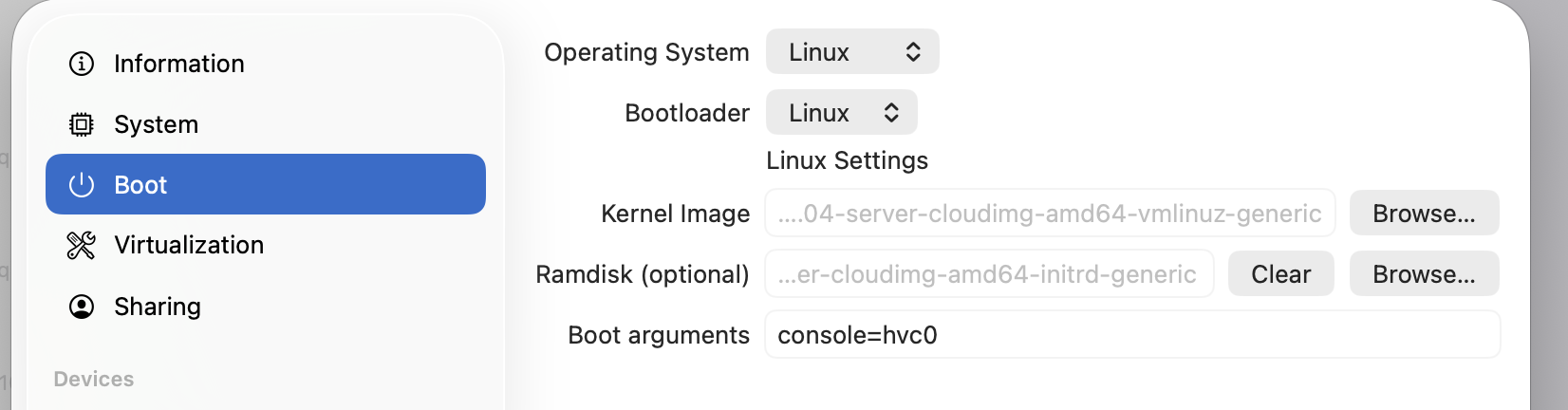
Specifically, I configured just the Linux kernel and initrd/busybox in UTM... so it comes up in seconds. And takes ~50Mb for the needed Linux things to boot, plus whatever netinstall/package take. On Intel, kernel used is ubuntu-21.04-server-cloudimg-amd64-vmlinuz-generic and ubuntu-21.04-server-cloudimg-amd64-initrd-generic.
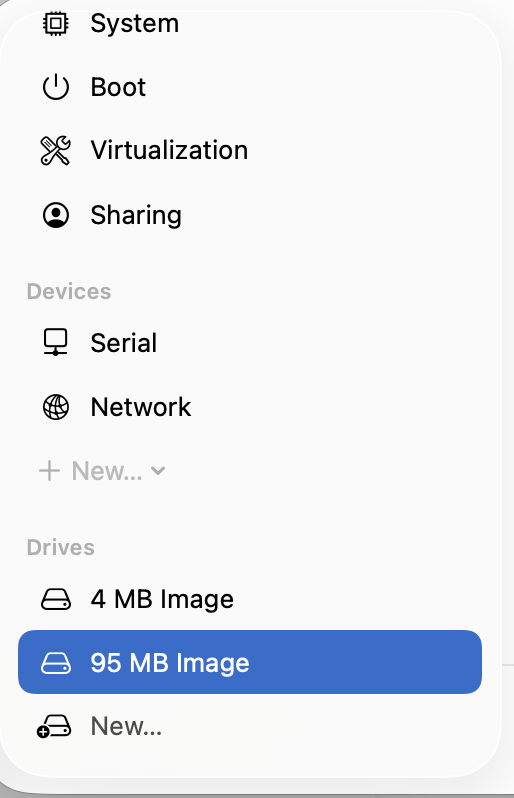
ubuntu-*-cloudimg-arm64-* images from:With the boot arg console=hvc0 being needed, since there is no "display", only serial. So need also remove the "Display" from UTM, and add an 2nd Disk in UTM (I used Apple Sparse mode, so even the RW package repo disk is compressed, see 95MB (which Linux thinks is 1GB).
I don't have Apple Silcon-based Mac to test RN. But if you have UTM on Apple Silicon, Rosetta should kick in to run the X86 netinstall-cli, when using Apple Virtualization mode in UTM, with an ARM64 Linux kernel. See Apple docs:
In macOS 13 and later on Mac computers with Apple silicon chips, the Virtualization framework supports Rosetta in ARM Linux virtual machines (VMs). Rosetta is a translation process that allows users to run apps that contain x86_64 instructions on Apple silicon.
I still have to think about how to package this.... RN I used a 2nd virtual disk (/dev/vdb) to store the netinstall and package (since RAM disk is gone after reboot). It needs to be formatted once using mke2fs /dev/vdb and used dhclient to pull DHCP from UTM shared network. Then wget (with http url, since no SSL) can be used to get netinstall and NPKs, while on a "shared" network in VM to allow internet.
If you reconnect UTM machine to a "Bridge" network and have an Ethernet dongle (or built-in ethernet) connected to MikroTik device, this worked:
 ip link set enp0s1 up
 ip addr add 192.168.88.99/24 dev enp0s1
 mkdir /app
 mount /dev/vdb /app
chmod a+x /app/netinstall-cli
/app/netinstall-cli -r -v -b -a 192.168.88.101 *-arm.npk
This has to be repeated per boot start netinstall from the initramfs... So need to think about how to package this – I'm not the kernel hacking expert – but know there are better ways than cut-and-paste. But this is pretty lightweight, and could even be packaged in to simple SwiftUI app, since the same Apple Virtualization config is pretty trivial to do in Swift within an App (and Apple framework support Rosetta, so this should work on ARM64).
Anyway, more conceptual, but looks possible.
Wow! I wasn’t expecting so much interaction on this topic.
My reason for asking about MacOS version of Net Install is that I’m seeing more Macs used by colleagues and customers - they are even featuring in Mikrotik’s own YouTube videos. Maybe people are having enough of Windows 11 ads and Windows Recall is maybe one privacy step too far.
I’m not keen on running VMs, emulators etc. When you are on site with a customer and some dependency is missing or out of date, or just won’t run… that’s not a good time to find out and troubleshoot.
Similarly, if I’m remotely supporting somebody, there’s a huge difference to put an easy to download and supported MacOS program onto someone else’s machine than hacking something together on the fly.
So.. ideally Mikrotik will consider a MacOS Netinstall to go alongside Winbox etc. Then I can leave my Windows PC at the office