In general I like the upcoming NetMetal ax and L23UGSR-5HaxD2HaxD, as an alternative in Mikrotik’s “custom LTE router” lineup…
But some feedback based on specs…
Any reason it does not support USB 3.0? This kinda limits it for use with high-speed LTE networks because of the USB bus speed with USB 2.0 (since CPU looks like it can handle CAT18+). And the LtAP, wAPacR, M33 all support USB 3.0 via miniPCIe, while these newer AX model don’t. Perhaps the SoC doesn’t have USB3 controller, dunno. But USB 2.0 is limiting (and annoying since often modem modules like Sierra/Telit come in USB 3.0 mode, so have to be switched before use)
Surprised it doesn’t have an M.2 slot since that’s what’s need for most 5G modem modules these days. There just not a lot of newer LTE/5G modems in miniPCIe FF.
Voltage specs is <30 volts, so yet another model without 48V PoE. Dealing with all the different PoE specs is PITA, and since can’t often mix 24V passive for uplink with 48V 802.11at APs on same switch (certainly not in Mikrotik’s switch products, and mixed voltage switches rare elsewhere too).
A 2nd SIM slot like LtAP would have been nice. Or some eUICC/eSIM hardware on board be even better…
Summary: In my LTE use cases, we use wAPacR (with 16M flash) today, so IPQ-5010 on these models still be an upgrade… but just that it’s annoying replacing those we lose 48V and USB 3.0, but get more flash, better processor, and AX. (And current LtAP and RBM33 for LTE are MIPS, so no BTH/ZT/container/etc, unlike the ARM).
Fair point. But annoying since always some compromise to upgrade. I still have quite a few RB953s I’d like to upgrade, and still no decent replacement board. And the wAPacR have the 16MB flash problem and slower CPU, but do support USB 3.0 miniPCI modems.
I think more just bad combo of USB2 & miniPCIe, instead of having an M.2 slot. Higher category LTE/5G miniPCIe modems ship with USB3, and theoretically need USB3 speeds. And there not a lot of miniPCIe modems that support PCIe, most use the USB lines on miniPCIe header. While M.2 LTE/5G typically DO support the PCIe bus offered NetMetal-ax / L23 – in which case the USB port speed wouldn’t matter.
So perhaps my bigger grip is the lack of the M.2 slot.
In my opinion, this is a TERRIBLE release by MikroTik. I’ve emailed them and have nearly mirrored these concerns with support. I’m vocal, and we all should be.
I’ve been asking them to create a “Pro” version of outdoor AX access points.
Lastly, this passive 24v-30v input makes us cry. This is not a direct replacement for existing NetMetal AC2’s – as they support 802af/at standard.
What happened to the days MikroTik allowed multiple powering options. We can pick either low voltage [24v], or just use standard 802af/at POE…
Their competitors no longer use 24volts.
This also limits network switching options, as we will need dedicated POE switching hardware to power these Access Points.
Perhaps MikroTik is looking to sell more of their own POE Switches. That is okay, however -they need to have the appropriate hardware. Chicken and egg scenario.
We are considering moving to alternative vendor for specific clients… MikroTik fits niche market verticals. We only use MikroTik Wireless for specific use cases.
Surprised it doesn’t have an M.2 slot since that’s what’s need for most 5G modem modules these days. There just not a lot of newer LTE/5G modems in miniPCIe FF.
Good find, that seems like good news. Perhaps they just compromised, for now(?), so they could get the AX part of a newer NetMetal / “RouterBoard” out. Placing a connector is different problem, than designing a whole board. And M.2 might require more testing on software side… Hopefully that’s the story.
While my needs are LTE, the miniPCIe does mean it work with the LoRaWAN modules. And those modules are only miniPCI, so M.2 kinda screw you if you wanted LoRaWAN. Case for both, I guess.
How can you use this radio? simply seems not working.
Where is country=debug?
why web connected with a good signal it not work ad more than 6Mbps?
the new interface/wifi instead of classic interface/wireless it’s terrifing
Seriously? So… I’m starting to consider Ubiquiti for all Wi-Fi solutions instead of MikroTik, and for LTE, NR specifically maybe I will go back to Teltonika.
I’ve been playing with NetMetal AX for about 3 weeks, here are my thoughts:
WIFI speed: I see around 700-800Mbps with Apple desktop clients (~ -55dBm) with one of two CPU cores maxing out at 100% load.
Disclaimer I’m using Multi connection mode on speedtest.net as a “speed testing tool”.
MiniPCIe vs m.2 - it has only USB2.0 MiniPCIe seems to be the right call since m.2 supports USB3.0 and MiniPCIe usually supports USB2.0
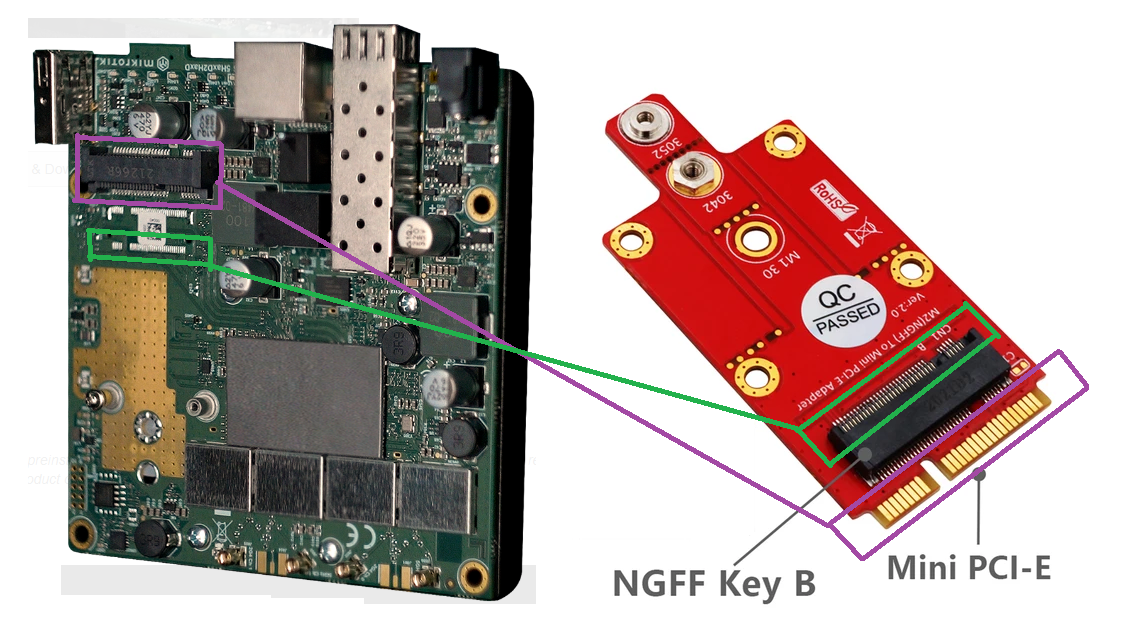
MiniPCIe to m.2 converter work fine, I’m testing R11ml-RG502Q-EA 5G module right now, but you need an adapter with sim slot, I assume m.2/MiniPCIe connectors have different pinout for sim card slots
USB2.0 vs USB3.0 - I don’t think it’s a big deal, running. speed test with 5G (WIFI to 5G) modem I see ~300Mbps (again multi connection speedtest.net) with close to 95% one CPU core load, so my guess that CPU will be the limiting factor here since USB2.0 can realistically do round 350-400Mbps
.
guess … this isn’t a fully regular term … there are pictures on the mikrotik support site, showing to ‘isolate’ the USB3 related pins on a mini-PCIe-card to allow correct initializationn of the modem ( resident on this very mini-PCIe-[form-factor]-card ) … so why ‘define’ usb3-related pins on such a card … and when - on top - not supported … why isolate them ?
. https://wiki.mikrotik.com/wiki/Manual:Peripherals
.
For some modems with USB3.0 support in some cases USB3.0 pins need to be isolated to ensure correct initialization:
.
m.2b and mini-PCIe are just physical interface-standards commonly used with gsm, gprs, umts and lteX-modems ( along with storage- and wifi-stuff )
. https://www.delock.de/infothek/M.2/M.2_e.html
.
it seems to me … that industry is adopting usb3 rather than PCIe as a datacom-protocol, for LTE-speeds > 300MBit/s (DL) … cat6, cat16, cat18 … wse … it’s just a ‘feeling’
.
¯_(ツ)_/¯ … in biology some specimen are certainly over-categorized … but for modern datacom-interfaces …the-big-of-it-all-whats-what-vademecum (physically and protocol-wise) seems to be still in the cooking
.
there is information about everything … on the web … but … subversioned … fragmented and iffy phrased
.
[ my opinion: the extra-tiny rf-connectors on m2.b formfactor cards really give me the creeps … the ones on the mini-PCIe-cards aren’t fun … … but the m2.b-size is for guys with ablutomania-grade issues ]
I believe that the original standard included only USB2.0 for MiniPCIe, but later (probably around 2015) PCI-SIG added USB3.0, that’s why there is some incompatibility there, I have MC7455 which doesn’t work with NetMetal AX (i didn’t try to “isolate” USB3.0 pins, but I’m sure it will work that way), but it’s working without issue with RB33G/LtAP
Standards, right?