The release notes on 6.42 show Mikrotik removed almost all the useful functionality. As I was using it to do a variety of things like sense internet connections, monitor network paths, monitor network devices, monitor devices on the network and even light LEDs based on a network device status. I also used it to sense when a router had internet access and then run DDNS. I used it to send txt msgs about the status of a wide variety of things.. So the loss of Netwatch has been a significant blow for me.
Mikrotik has not explained this removal of a really useful RouterOS feature. As far as i can remember this is the first time Mikrotik has removed any feature.
I dont understand WHY it was deprecated.
For some applications im now considering buying Ubiquiti devices as they run a open OS and so I can install any tools I want. Ive never needed a tool not already provided by RouterOS until now. I have some purchases coming up and I need to know what the fate of Netwatch will be. If Mikrotik is not going to restore it, I will need to swap out all customer routers for Ubiquiti to gain the ability to do “netwatch” like functions. For me this would end a very long relationship with Mikrotik that goes back to when they first started making PC Boards and i had to put them in enclosures.
As far as I know this is the only info on this total. From the 6.42 changelog:
*) netwatch - limit to read, write, test and reboot policies for Netwatch script execution;
So far I was always thinking that the newly introduced limitation of netwatch script privileges is so frustrating for you because you would have to rewrite the configurations to accommodate the new approach.
But this post contradicts such understanding pretty much.
I have used netwatch myself for some months and all the time it was really disappointing for me that it could not tolerate some share of lost responses. So if the monitored address was accessible e.g. through a wireless link with sporadically occurring inteference, a single lost ping response was triggering the down-script action as if the monitored device was indeed down, whilst in fact it only indicated an otherwise tolerable amount of packet loss.
So from using down-script and up-script in netwatch, I’ve moved to use of scheduled scripts which watch address-lists populated by responses to netwatch-generated pings (where the lifetime of the item on the address-list is a multiple of the distance between ping requests sent). The privileges (policies) of these scripts and scheduler jobs are configured individually, and it is up to you whether you use a single script to evaluate the state of all monitored addresses or whether you use one script per each address.
On one hand, I fully agree with you that netwatch should be permitted to do anything you wish; on the other hand, I do understand that as it could be misused to bypass users’ policy restrictions, Mikrotik had to do something about it. But my approach would be to assign policies to netwatch items the same way they are associated with scheduler jobs and scripts, and to allow the user to assign to the netwatch item he creates only policies with which his own account is configured (which I believe is the case with scheduler jobs and scripts).
If this approach would satisfy you, why not send a constructive ticket to support@mikrotik.com suggesting this?
The underlying issue is that you are trying to make Netwatch execute a script, that requires permissions it does not have.
Is this not a reasonable requirement? A read only user can’t create FULL permission accounts. Is that not reasonable?
How would I trigger a alert based on Netwatch if I cant email ? The idea is that Netwatch can watch and alert ? How can i trigger a set of events when a connection is up or down ?
Netwatch used to have these permissions. It no longer does.
What good is Netwatch if it cant trigger scripts ?
Why cant Netwatch have the permissions it needs to trigger scripts ? For 8+ years it did.
I can trigger scripts securely in UBNT and Cisco can do this. Only Mikrotik cant. So this does seem unreasonable to not have this functionality.
Currently I use scheduler and just run it every 15 mins. Its not a ideal solution. The script above for DynDNS works, just not from Netwatch. You will want to comment out “:set dyndnsForce true” if you run this from scheduler.
Can anyone provide an example of Netwatch with single line script that is not working but you think that Netwatch should be able to execute it. Please provide single command example. At the moment, we have not seen any actual case (besides misconfiguration due to policies) where this would be a problem.
Hmmm… I can check more later once I am offsite. I am using RC19 currently and this works from Winbox. Make sure to set permissions. Read/write/test.. Make sure you have the DynDNS account info correct. In Winbox does it show it ran it ? IE count is increased ?
I am avoiding 6.42.x because i had bad experiences with it. Im using 6.41.4 on my production gear because its my last KNOWN stable. HOWEVER IT HAS KNOWN SECURITY ISSUES.. Also I recommend a NAND format and then a netinstall to be SURE your system is clean IF you can do that.
I think tho that its something simple tho for you, maybe just script permissions ?
First of all, thank you for your time.
The system is clean, netinstall performed approximately a month ago and afterwards all settings were reconfigured manually.
The script runs, but it hangs. I can see the logs saying that the IP has renewed but in fact it hasn’t. The credentials are fine because I use them for manual login at no-ip.com Web site successfully.
I had to stop using dyndns and reverted to /ip cloud implementation in order to workaround the lack of services.
Nevertheless, I do care to revert to no-ip.org ddns services soon.
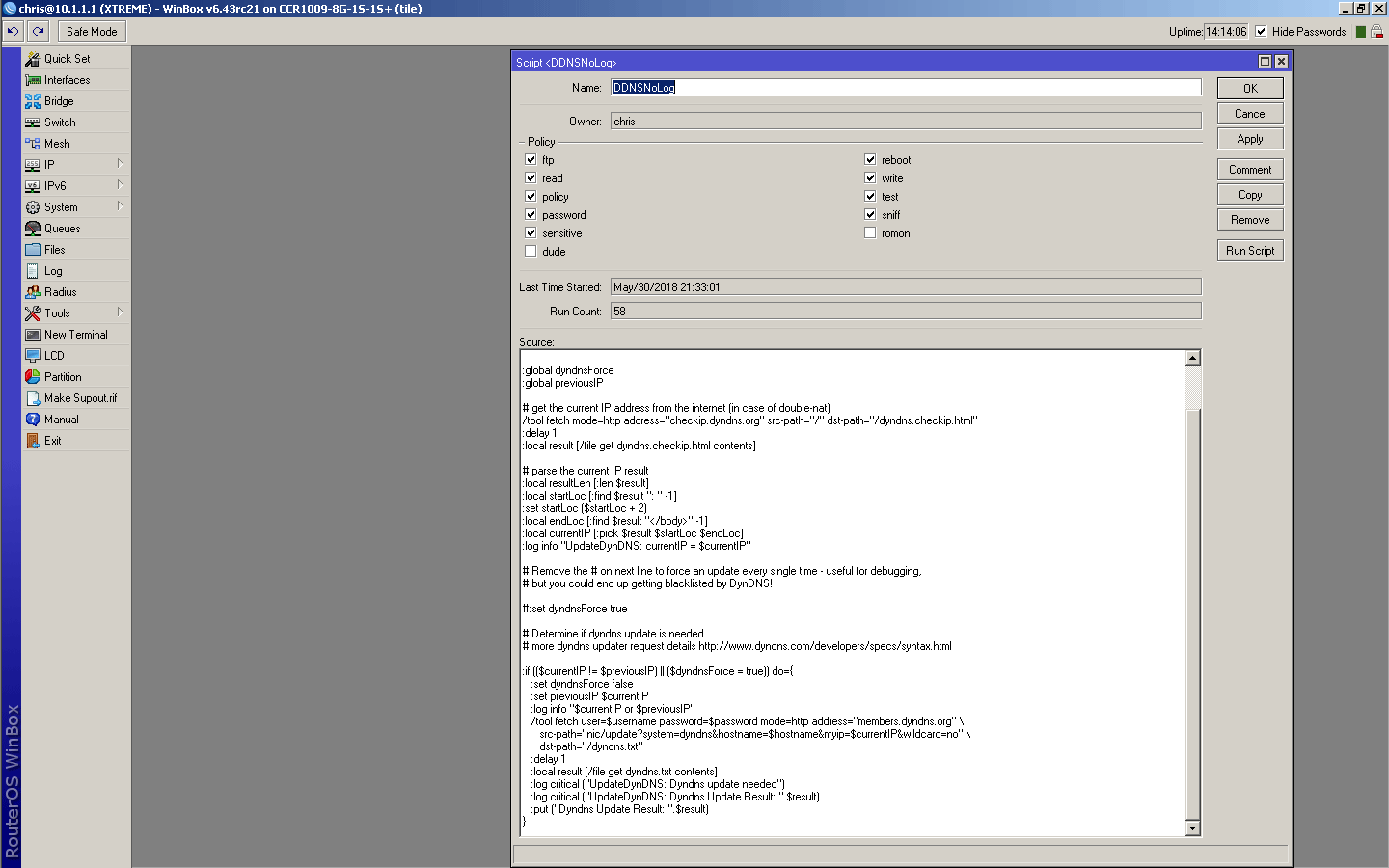
I have fully tested the DynDNS script executing it from winbox on RouterOS 6.43RC21 on a CCR1009-8G-1S-1S+ and it works. It updates DynDNS.. I scrambled my MAC which causes a cable modem to provide a new IP I then ran the script and reloaded DynDNS and watched it update in near real time. I did this 3 times to be sure. So on this version of OS on this hardware I can confirm it does work.
I had all the permissions checked.
This script is slightly different as it does less logging.
Go delete any related files before running it. Run it twice to make sure.
# Set needed variables
:local username "your username"
:local password "your password"
:local hostname "your host name"

:global dyndnsForce
:global previousIP

# get the current IP address from the internet (in case of double-nat)
/tool fetch mode=http address="checkip.dyndns.org" src-path="/" dst-path="/dyndns.checkip.html"
:delay 1
:local result [/file get dyndns.checkip.html contents]

# parse the current IP result
:local resultLen [:len $result]
:local startLoc [:find $result ": " -1]
:set startLoc ($startLoc + 2)
:local endLoc [:find $result "</body>" -1]
:local currentIP [:pick $result $startLoc $endLoc]
:log info "UpdateDynDNS: currentIP = $currentIP"

# Remove the # on next line to force an update every single time - useful for debugging,
# but you could end up getting blacklisted by DynDNS!

#:set dyndnsForce true

# Determine if dyndns update is needed
# more dyndns updater request details http://www.dyndns.com/developers/specs/syntax.html

:if (($currentIP != $previousIP) || ($dyndnsForce = true)) do={
   :set dyndnsForce false
   :set previousIP $currentIP
   :log info "$currentIP or $previousIP"
   /tool fetch user=$username password=$password mode=http address="members.dyndns.org" \
      src-path="nic/update?system=dyndns&hostname=$hostname&myip=$currentIP&wildcard=no" \
      dst-path="/dyndns.txt"
   :delay 1
   :local result [/file get dyndns.txt contents]
   :log critical ("UpdateDynDNS: Dyndns update needed")
   :log critical ("UpdateDynDNS: Dyndns Update Result: ".$result)
   :put ("Dyndns Update Result: ".$result)
}
If your script does not work, then it is because to one or multiple lines that can not be executed. You can debug your script and find out which line was the first that did not allow for the script to run properly. This is the command that we are looking for.
FYI - we did already recieve complaints with examples from this same topic. And as suspected problem was script requires, for example, romon policy, but Netwatch does not have persmission to use romon. Key is to disable romon policy within script (that is not actually used) and everything is working again.