Netwatch Failover Script

I have a failover working with netwatch rules and ive been trying to mess around with a way to break the connections tied to specific WANs so that when the failover happens

I can swiftly break all the connections only tied to the WAN that failed

I’ll add my forward chain rules.. routes.. mangle and netwatch rules.

I was wondering if doing this in any way breaks fast track before im using Mangle (even tho that particular network, I have rules above that are capturing those packets before fast track, but just kind want to know.)

And while testing, I do notice that fail over works, but connecting to the same site that I was connected to before does take a bit to re-establish, ive confirmed in connection tracking that the connections are actually cleared too.

Thank you !

Forward Chain

[joshhboss@CCR2116] /ip/firewall/filter> print where chain=forward
Flags: X - disabled, I - invalid; D - dynamic 
 0  D ;;; special dummy rule to show fasttrack counters
      chain=forward action=passthrough 

 1    ;;; SimpleQueue Established,Related, SRC
      chain=forward action=accept connection-state=established,related src-address-list=SimpleQueueList log=no log-prefix="" 

 2    ;;; SimpleQueue Established,Related, DST
      chain=forward action=accept connection-state=established,related dst-address-list=SimpleQueueList log=no log-prefix="" 

 3    ;;; defconf: fasttrack
      chain=forward action=fasttrack-connection hw-offload=yes connection-state=established,related connection-mark=no-mark log=no log-prefix="" 

 4    ;;; defconf: accept established,related, untracked
      chain=forward action=accept connection-state=established,related,untracked 

 5    ;;; defconf: drop invalid
      chain=forward action=drop connection-state=invalid 

 6    ;;; Allow-AP-TO-Controllers
      chain=forward action=accept src-address-list=10AP-Management dst-address-list=AllowRemoteControllers log=no log-prefix="" 

 7    ;;; AllowInternet For LAN
      chain=forward action=accept in-interface-list=EV-LAN out-interface-list=WAN log=no log-prefix="" 

 8    ;;; Allow Authorized ALL
      chain=forward action=accept src-address-list=Authorized log=no log-prefix="" 

 9 X  ;;; AllPortForwarding
      chain=forward action=accept connection-state="" connection-nat-state=dstnat in-interface-list=WAN log=no log-prefix="" 

10    ;;; DROP ALL ELSE
      chain=forward action=drop log=no log-prefix=""

Routes

[joshhboss@CCR2116] /ip/route> print where dynamic=no
Flags: A - ACTIVE; s - STATIC
Columns: DST-ADDRESS, GATEWAY, DISTANCE
#    DST-ADDRESS  GATEWAY       DISTANCE
;;; WAN2
0  s 0.0.0.0/0    192.168.95.1         2
;;; WAN1
1 As 0.0.0.0/0    192.168.2.1          1
;;; WAN2-dns
2 As 1.0.0.1/32   192.168.95.1         1
;;; WAN1-dns
3 As 1.1.1.1/32   192.168.2.1          1
;;; WAN1-21
4 As 0.0.0.0/0    192.168.95.1         1
;;; WAN2-21
5  s 0.0.0.0/0    192.168.2.1          2

Mangle

[joshhboss@CCR2116] /ip/firewall/mangle> print where dynamic=no
Flags: X - disabled, I - invalid; D - dynamic 
 3    chain=prerouting action=mark-connection new-connection-mark=useWAN2 passthrough=yes connection-state=new in-interface=250Vlan log=no log-prefix=""

Netwatch

add comment="Internet Test - WAN2" disabled=no down-script=\
    "/ip route disable [find where comment=WAN1-21]\r\
    \n/ip firewall connection\r\
    \n:foreach idc in=[find where (timeout>60) || (connection-mark=useWAN2)] do={\r\
    \n    remove [find where .id=\$idc]\r\
    \n}\r\
    \n" host=1.0.0.1 http-codes="" test-script="" thr-avg=700ms thr-jitter=2s thr-max=2s thr-stdev=500ms type=icmp up-script=\
    "/ip route enable [find where comment=WAN1-21]\r\
    \n/ip firewall connection\r\
    \n:foreach idc in=[find where (timeout>60) || (connection-mark=useWAN2)] do={\r\
    \n    remove [find where .id=\$idc]\r\
    \n}\r\
    \n"

I did originally try and just have

/ip route enable [find where comment=WAN1-21]
/ip firewall connection remove [find where connection-mark=useWAN2]
Going out a WAN is already going to “break” fasttrack (and not covered by rule anyway). And traffic covered by your SimpleQueueList won’t be fasttracked either. So whatever else local would be — but the counters for the fasttrack rule should show the amount of traffic.

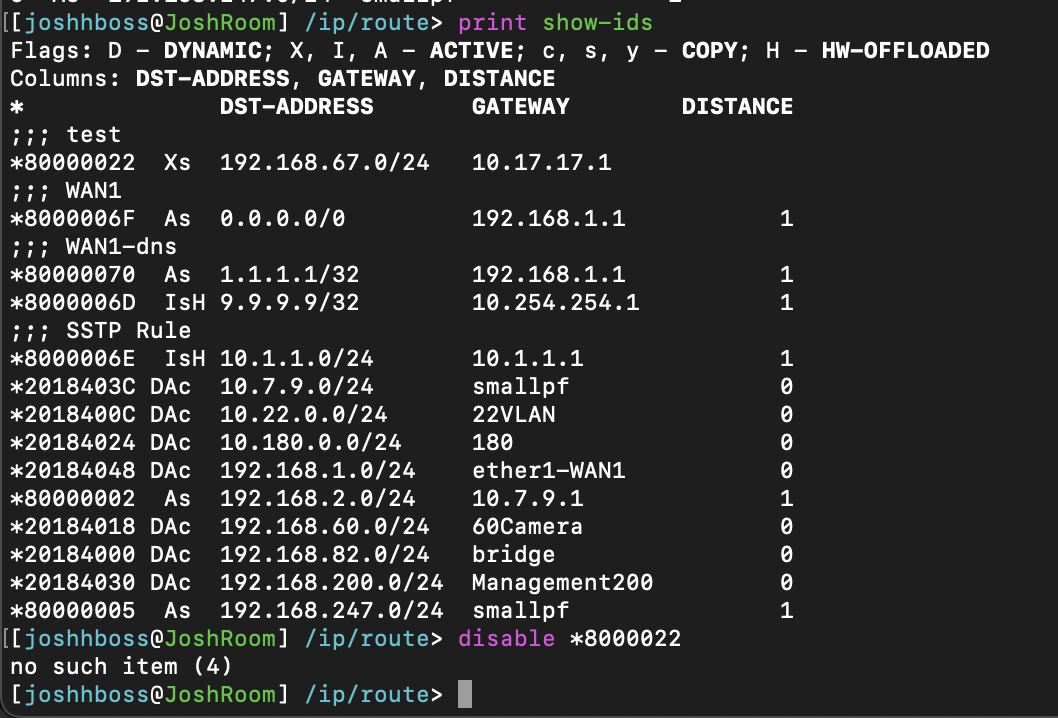
Also, if you have static routes for you WAN, you can use the .id (/ip/route/print show-ids) of the route instead of a /ip/route/find. i.e.
/ip route enable [find where comment=WAN1-21]

If you don’t have a lot of routers, it’s likely insignificant compared with TCP re-establishments. But find ain’t fast against the route table.

Im sorry I dont understand the “Going out a WAN is already going to “break” fasttrack” I mean traffic routed to the internet is fasttrack right ? forgive me, im a newbie and I kind of missed what you meant by that

I attached me trying to use the .id but I think im doing it wrong

EDITTTT!!
Sorry I had the wrong amount of 0’s lol..

So using .ids will execute the commands faster ?
and they wont change if the tables receive new routes ?
Screenshot 2024-01-30 at 8.29.53 PM.png

You may want to cut-and-paste the .id… you forget a zero in the ID. :wink:

And I might have been sloppy, if the WAN is a physical port, then it could be fast-tracked. Since rule covers already established/related, the mangle would have already been done when the rule hits. But you have a rule connection-mark=no-mark, while WAN connection would have a mark.

If route is static and you only edit them, then .id is stable. Essentially the .id is assigned by the /ip/route/add — so if you remove it, and then add same again, only then will it get a new .id.

I doubt it be noticeable, so if there any chance the .id would change… you may be better off with find. If you had hundreds/thousands of routes, all the “route search” commands get slow and using an .id if possible becomes more important.

Any thoughts on the approach of marking the packets in the event of an internet failure, so netwatch scripts can only clear those connections

 [joshhboss@CCR2116] /ip/firewall/mangle> print where dynamic=no
Flags: X - disabled, I - invalid; D - dynamic 
 3    chain=prerouting action=mark-connection new-connection-mark=useWAN2 passthrough=yes connection-state=new in-interface=250Vlan log=no log-prefix=""

and my netwatch rules.. rule 1 vs rule 2

Rule 1

 add comment="Internet Test - WAN2" disabled=no down-script=\
    "/ip route disable [find where comment=WAN1-21]\r\
    \n/ip firewall connection\r\
    \n:foreach idc in=[find where (timeout>60) || (connection-mark=useWAN2)] do={\r\
    \n    remove [find where .id=\$idc]\r\
    \n}\r\
    \n" host=1.0.0.1 http-codes="" test-script="" thr-avg=700ms thr-jitter=2s thr-max=2s thr-stdev=500ms type=icmp up-script=\
    "/ip route enable [find where comment=WAN1-21]\r\
    \n/ip firewall connection\r\
    \n:foreach idc in=[find where (timeout>60) || (connection-mark=useWAN2)] do={\r\
    \n    remove [find where .id=\$idc]\r\
    \n}\r\
    \n"

Rule 2

/ip route enable [find where comment=WAN1-21]
/ip firewall connection remove [find where connection-mark=useWAN2]

I picked up the approach through different ideas I put together from different responses ive gotten from this forum and reddit. (im sure im not the first person thats tried this before.)
My test was really just triggering the rule with a drop output rule to 1.0.0.1 on the output chain at the top of my rules.. and then refreshing a site like.. “ifconfig.io
and just noticed that at times it just would refresh at all with the new public ip.. watching YouTube videos live would get interrupted but would self heal after about 10 to 15 seconds (in the worse cases)

dont know if this is the best way to test.. but hey.. like I might of mention.. im a veteran newb

Well, whether you even need to find the connections, depends on the specific NAT rule you’re using…

In your /ip/firewall/nat, using if your using two “action=masquerade”, on for each WAN, will cause flush the connections. From https://help.mikrotik.com/docs/display/ROS/NAT#NAT-Masquerade:

Every time when interface disconnects and/or its IP address changes, the router will clear all masqueraded connection tracking entries related to the interface, this way improving system recovery time after public IP change. If srcnat is used instead of masquerade, connection tracking entries remain and connections can simply resume after a link failure.

SO… if you are using a “action=srcnat” to a specific address in your NAT rules, then connections are NOT flush & you’d need your code for that. And in that case, you’d want it after the disable.

Thank you!!

Netwatch takes time to detect, that is somewhat controllable. But it also takes some time for the client to detect the problem, which is not controllable. Basically an app needs to timeout – just dropping the connection does not tell the app the connection is dead… app/client has to figure that out… but why it varies what happens with the ISP changes.


Easiest is probably using Routing > Rules, and using the netwatch host your pinging as dst-address and then pick the action drop. You can disable/enable that cause the ping to fail. Possible to do same in firewall filter (and more advanced things to drop only some of the pings to netwatch host)

You might try using YouTube in Chrome (which use QUIC which UDP) and YouTube in Safari/Firefox/Edge (which use TCP) and try the failover in each. I suspect you might see a difference between UDP and TCP. And in YouTube, there is the “Stats for Nerds” if you right-click on the video, which show frames loads… you see the pattern will vary when it figures out the failover.

I’m going to try that today..

Thank you