Most of the documents that I have seen in the web talking about setting up CapsMan relates to a network where Microtik provides all the services. The network that I had to work with was more complex were we had some Mikrotik Devices in a mix of lot of other network components. This would most likely reflect a more likely scenario. The network in question was something like this with all Aps being Mikrotik AX APs
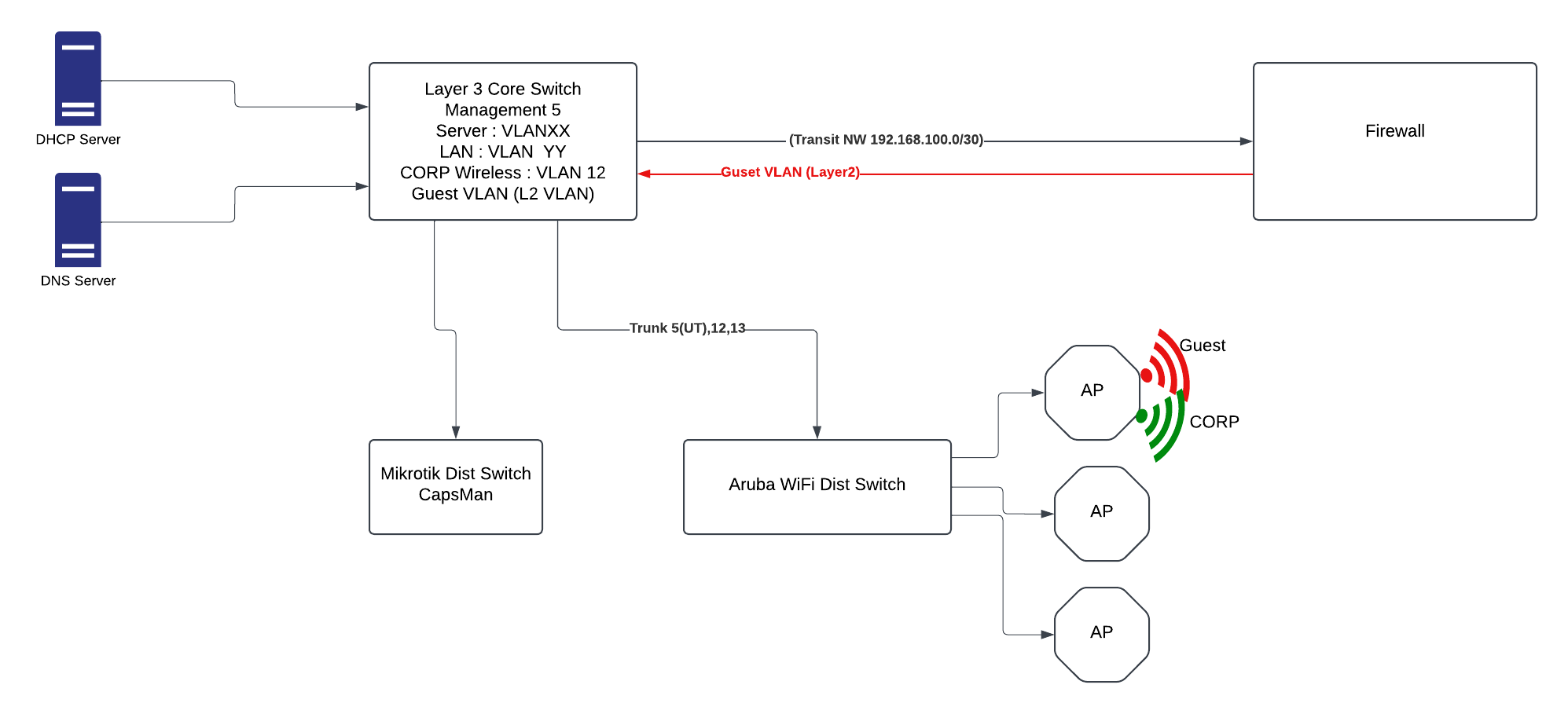
hat I found was that there was not much documentation regarding the latest version of Capsman and how to configure the network with multiple SSID and bands. After a lot of trial and error and thanks to the excellent video from Mikrotik regarding regarding the new CapsMan I think I might have managed to get what I want with all the Aps being configured from CapsMan. I would also like to get some experts on this forum to chime in on if this is the right approach.
This is how I went on. For reference the requirement is as follows
• The org uses VLAN 5 (untagged) as the Management VLAN
• VLAN 12 is the Corp VLAN
• VLAN 13 is the guest VLAN
• All VLANs are managed at the Layer 3 switch except for 13 which is on the firewall.
• CORP SSID should be available in both 5GHz and 2.4GHz
• Guest SSID should only be available on 2.4GHz
The first step was to create the management access to the APs via untagged VLAN 5. I followed the procedure in this linkhttps://help.mikrotik.com/docs/spaces/ROS/pages/328068/Bridging+and+Switching#BridgingandSwitching-Managementaccessconfiguration to get this done. In addition to what is in the document I configured the PVID of the bridge also to be 5 (MGT)
Configuration of CapsMan Switch
/interface/wifi/channel/add name=CH5 band=5ghz-ax width=20/40mhz disabled=no

/interface/wifi/channel/add name=CH2 band=2ghz-ax width=20mhz disabled=no
Now create the datapaths
/interface/wifi/datapath/add name=Corp_DP bridge=bridge1 vlan-id=12
/interface/wifi/datapath/add name=Guest_DP bridge=bridge1 vlan-id=13
Now create security Profiles
/interface/wifi/security/add name=Corp_Sec authentication-types=wpa2-psk,wpa3-psk encryption=ccmp,ccmp-256, gcmp, gcmp256 passphrase=XXXXXXXXXX wps=disable

/interface/wifi/security/add name=Guest_Sec authentication-types=wpa2-psk,wpa3-psk encryption=ccmp,ccmp-256, gcmp, gcmp256 passphrase=YYYYYYYYYY wps=disable
Create the Capsman Configurations
/interface/wifi/configuration/add name=Corp_CF5 mode=ap ssid=CORP country=Canada channel=CH5 datapath=Corp_DP security=Corp_Sec

/interface/wifi/configuration/add name=Corp_CF2 mode=ap ssid=CORP country=Canada channel=CH2 datapath=Corp_DP security=Corp_Sec

/interface/wifi/configuration/add name=Guest_CF2 mode=ap ssid=Guest country=Canada channel=CH2 datapath=Guest_DP security=Guest_Sec
Now Turn on CapsMan (Capsman Interface is ether 24)
/interface/wifi/capsman set interfaces=ether24 certificate=auto ca-certificate=auto upgrade-policy=require-same-version enabled=yes
As the final step in the Capsman create the provisioning entries
/interface/wifi/provisioning/add action=create-dynamic-enabled supported-bands=5ghz-ax master-configuration=Corp_CF5

/interface/wifi/provisioning> add action=create-dynamic-enabled supported-bands=2ghz-ax master-configuration=Corp_CF2 slave-configurations=Guest_CF2
Configuring the CAPS
First create the tagged VLANs in the bridge VLAN table for the trunk port
/interface/bridge/vlan/add bridge=bridge1 tagged=ether1 vlan-ids=12

/interface/bridge/vlan/add bridge=bridge1 tagged=ether1 vlan-ids=13
Now my bridge VLAN table looks like this
BRIDGE VLAN-IDS CURRENT-TAGGED CURRENT-UNTAGGED
0 bridge1 5 bridge1 ether1
1 bridge1 12 ether1
2 bridge1 13 ether1
Create the local datapath in the AP
/interface/wifi/datapath/add name=cadp bridge=bridge1
Now configure the wifi interfaces to accept connection from Capsman and assign to the bridge on the local AP
set wifi1 configuration.manager=capsman datapath=capdp
set wifi2 configuration.manager=capsman datapath=capdp
Finally turn on CAP in the APS
/interface/wifi/cap/set enabled=yes discovery-interfaces=MGT caps-man-addresses=172.xx.xx.xx slaves-datapath=cadp
Everything seems to be working as expected with the users being placed on the correct VLANs and getting the correct address via DHCP