New CRS125-24G-1S, new Mikrotik user, Vlan isolation

Hi

I am new to Mikrotik, coming from Cisco (ages ago) and smartswitches (Dlink DGS3200-10 and Zyxel gs1900-24e).
Bought a CRS125-24G-1S as I needed a managed switch with some more advanced features (primarily netflow, and advanced port mirroring).

But I am having some issues understanding some of the settings.
What I am trying to figure out, is how to setup following:

Port 1-10 default vlan+management
Port 13-14 vlan300 untagged
Port 16 vlan500 untagged
Port 17-18 vlan800 untagged, vlan900 tagged
Port 19 default vlan, vlan300+500 tagged
Port 20-22 vlan1000 untagged
Port 23-24 mirror ports
Port 11,12,15,sfp disabled for now

All vlans are routed/firewalled on seperate router (UBNT ERL) through port 18, 19 and 20.
No vlans must be able to communicate with one another on the switch.
All management may only be done through default vlan.

I am scratching my head to figure this out while messing around with both interface and switch settings while looking through http://wiki.mikrotik.com/wiki/Manual:TOC and http://wiki.mikrotik.com/wiki/Manual:CRS_examples without any luck on achieving the above. Mostly regarding the master/slave setup of the ports (can’t seem to figure out if this is needed for my setup, but I end up with 1 master port on port 1 which both can be accessed and used with its slaves, and seveal master interfaces which can’t be accessed) and how to get full isolation between the vlans and making sure only default vlan can access management on the switch.

When coming from fairly limited and simple switches (more or less just setting a checkmark and vlanid), this seems like rocketscience for me :slight_smile:
So far i’ve been using the webgui, but feel free to help out in both CLI, Webgui or Winbox.

Any help is appriciated.

Looking into details on http://wiki.mikrotik.com/wiki/Manual:CRS_examples i note the following:

Multiple master-port configuration is designed as fast and simple port isolation solution, but it limits part of VLAN functionality supported by CRS switch-chip. For advanced configurations use one master-port within CRS switch chip for all ports, configure VLANs and isolate port groups with port isolation profile configuration.

Looking under port isolation, i read the following:

The first part of port isolation configuration is setting the Uplink port – set port profile to 0 for ether2

Does this combined mean, that I can only have one uplink port, or am I missing something?

Can someone explain which vlan functionalities that are being limited?

Multiple master-port configuration is designed as fast and simple port isolation solution, but it limits part of VLAN functionality supported by CRS switch-chip.

If I’m correct, it works this way: you put all interfaces on master port - this works like normal switch. Do the same but with vlans and you can separate traffic. But put some interfaces on on master and some other to other master and you will end up with 2 independent switches (so it would work like 2 vlans to some extend). If you take that config and start adding vlans, you would be still running 2 independent switches. you may have the same vlan on both groups (different master ports) but the traffic will not be traversing between them.

Does it make sense?

Thanks for the reply.
Sort of yes. But if I make several master ports, won’t I loose the new masterports physical interface capabilities? Or did i misinterpret that (saw it somewhere in the routerOS manual)?

However, what functionality will I be missing here:

Note: Multiple master-port configuration is designed as fast and simple port isolation solution, > but it limits a part of VLAN functionality supported by CRS switch-chip> . For advanced configurations use one master-port within CRS switch chip for all ports, configure VLANs and isolate port groups with port isolation profile configuration.

Will it be the functionality to route over the CPU? in that case, this won’t be an issue, as all routing will be on a different router. But as it says switch chip, it looks like it means something else.

I will be testing out the port isolation the upcoming weekend.

After a short vacation i’ve had time to try out some things, but i can’t seem to get it functioning as i want it to.

What i’m trying to do is something like this:
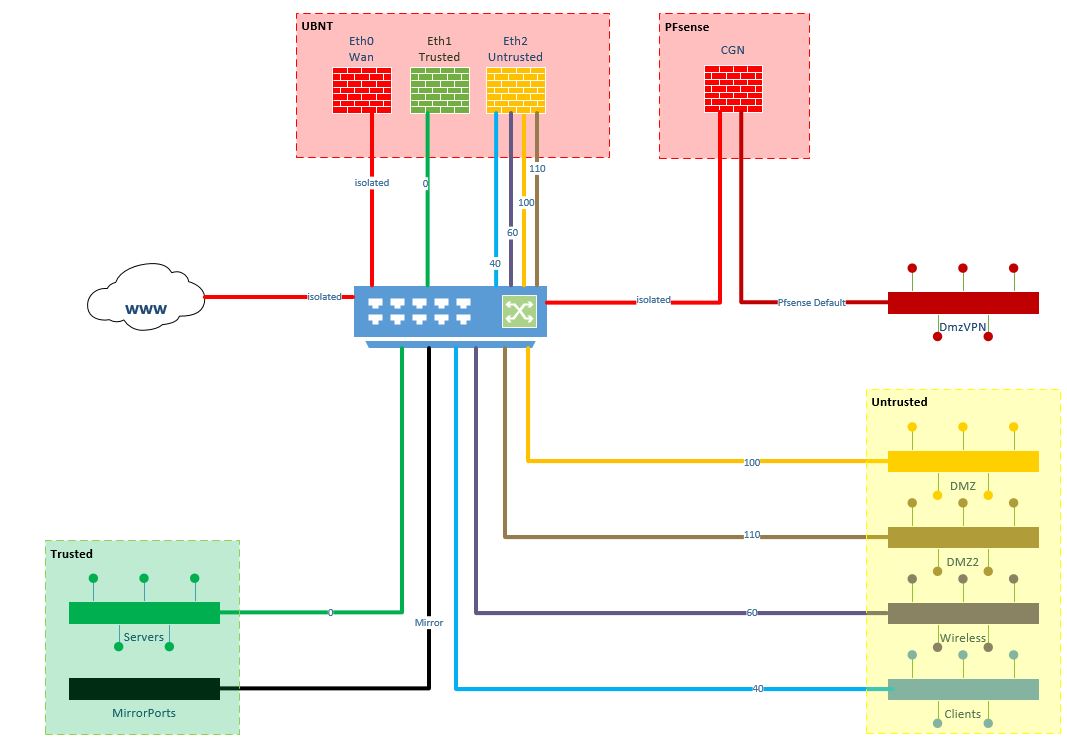
vlans.JPG
However, i can’t seem to get the vlans isolated. See config outputs below.

A short test, when having a client in port 1-12 or 19-24, it can’t be seen from port 13-18. However, all traffic from eg. port 13-17 can be seen from port 18 as untagged traffic.The idea is, that traffic going out through port 18 is only tagged.

What i figured out was, that it is not possible to do the vlan configs i want to, if i change the master etherport. Only in my isolated area (port 20-22) is this possible, as i won’t be using vlan’s here.

Can anybody help me out with how i can seperate all the vlans?
And how can i stop the default traffic from being send out through any other ports than 1-12?

Let me know if you need any information.

rough table of pseudo settings
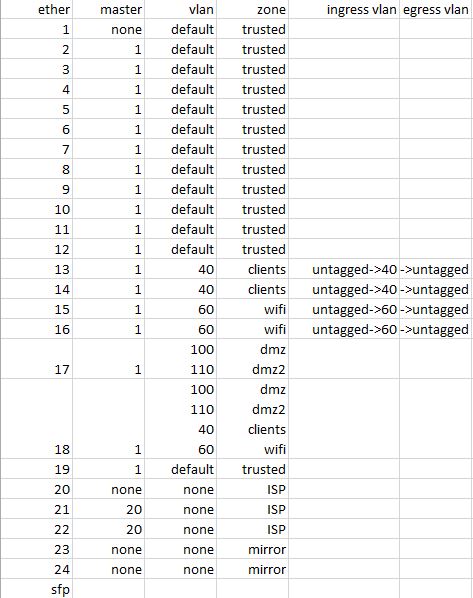
table.JPG
interface ethernet print

Flags: X - disabled, R - running, S - slave
 #    NAME                                         MTU MAC-ADDRESS       ARP        MASTER-PORT                                      SWITCH
 0 R  ;;; Trusted - Default vlan
      ether1-master                               1500 E4:8D:8C:A7:C8:B7 enabled    none                                             switch1
 1  S ether2                                      1500 E4:8D:8C:A7:C8:B8 enabled    ether1-master                                    switch1
 2  S ether3                                      1500 E4:8D:8C:A7:C8:B9 enabled    ether1-master                                    switch1
 3  S ether4                                      1500 E4:8D:8C:A7:C8:BA enabled    ether1-master                                    switch1
 4  S ether5                                      1500 E4:8D:8C:A7:C8:BB enabled    ether1-master                                    switch1
 5  S ether6                                      1500 E4:8D:8C:A7:C8:BC enabled    ether1-master                                    switch1
 6  S ether7                                      1500 E4:8D:8C:A7:C8:BD enabled    ether1-master                                    switch1
 7  S ether8                                      1500 E4:8D:8C:A7:C8:BE enabled    ether1-master                                    switch1
 8  S ether9                                      1500 E4:8D:8C:A7:C8:BF enabled    ether1-master                                    switch1
 9  S ether10                                     1500 E4:8D:8C:A7:C8:C0 enabled    ether1-master                                    switch1
10  S ether11                                     1500 E4:8D:8C:A7:C8:C1 enabled    ether1-master                                    switch1
11  S ether12                                     1500 E4:8D:8C:A7:C8:C2 enabled    ether1-master                                    switch1
12  S ;;; Untrusted - clients
      ether13                                     1500 E4:8D:8C:A7:C8:C3 enabled    ether1-master                                    switch1
13  S ether14                                     1500 E4:8D:8C:A7:C8:C4 enabled    ether1-master                                    switch1
14 RS ;;; Untrusted - wifi
      ether15                                     1500 E4:8D:8C:A7:C8:C5 enabled    ether1-master                                    switch1
15  S ether16                                     1500 E4:8D:8C:A7:C8:C6 enabled    ether1-master                                    switch1
16  S ;;; Untrusted - vmware dmz
      ether17                                     1500 E4:8D:8C:A7:C8:C7 enabled    ether1-master                                    switch1
17 RS ;;; Untrusted - ubnt
      ether18                                     1500 E4:8D:8C:A7:C8:C8 enabled    ether1-master                                    switch1
18  S ;;; Trusted - ubnt
      ether19                                     1500 E4:8D:8C:A7:C8:C9 enabled    ether1-master                                    switch1
19    ;;; Isolated - ISP
      ether20                                     1500 E4:8D:8C:A7:C8:CA enabled    none                                             switch1
20  S ether21                                     1500 E4:8D:8C:A7:C8:CB enabled    ether20                                          switch1
21  S ether22                                     1500 E4:8D:8C:A7:C8:CC enabled    ether20                                          switch1
22 R  ;;; Mirror0
      ether23                                     1500 E4:8D:8C:A7:C8:CD enabled    none                                             switch1
23    ;;; Mirror1
      ether24                                     1500 E4:8D:8C:A7:C8:CE enabled    none                                             switch1
24  S ;;; N/A
      sfp1                                        1500 E4:8D:8C:A7:C8:CF enabled    ether1-master                                    switch

interface ethernet switch vlan print

Flags: X - disabled, I - invalid, D - dynamic
 #   VLAN-ID PORTS                                                            SVL LEARN FLOOD INGRESS-MIRROR QOS-GROUP
 0        40 ether13                                                          no  yes   no    no             none
             ether14
             ether18
 1        60 ether15                                                          no  yes   no    no             none
             ether16
             ether18
 2       100 ether17                                                          no  yes   no    no             none
             ether18
 3       110 ether17                                                          no  yes   no    no             none
             ether18
 4 D    4091 ether20                                                          no  yes   no    no             none
             ether21
             ether22
             switch1-cpu
 5 D    4095 ether23                                                          no  no    no    no             none
             ether24
             switch1-cpu

interface ethernet switch ingress-vlan-translation print

Flags: X - disabled, I - invalid, D - dynamic
 0   ports=ether13,ether14 service-vlan-format=any customer-vlan-format=untagged-or-tagged new-service-vid=0 new-customer-vid=40 pcp-propagation=no sa-learning=yes

 1   ports=ether15,ether16 service-vlan-format=any customer-vlan-format=untagged-or-tagged new-service-vid=0 new-customer-vid=60 pcp-propagation=no sa-learning=yes

 2 D ports=ether20,ether21,ether22 service-vlan-format=any customer-vlan-format=any new-customer-vid=4091 pcp-propagation=no sa-learning=yes

 3 D ports=ether23,ether24 service-vlan-format=any customer-vlan-format=any new-customer-vid=4095 pcp-propagation=no sa-learning=no

interface ethernet switch egress-vlan-translation print

Flags: X - disabled, I - invalid, D - dynamic
 0   ports=ether13,ether14 service-vlan-format=untagged-or-tagged customer-vlan-format=tagged customer-vid=40 pcp-propagation=no

 1   ports=ether15,ether16 service-vlan-format=untagged-or-tagged customer-vlan-format=tagged customer-vid=60 pcp-propagation=no

interface ethernet switch egress-vlan-tag print

Flags: X - disabled, I - invalid, D - dynamic
 #   VLAN-ID TAGGED-PORTS
 0 D    4095
 1 D    4091
 2        60 ether18
 3       100 ether17
             ether18
 4       110 ether17
             ether18
 5        40 ether18

This is a little weird in my optics, maybe there is a reasonable explanation.

Had my testmachines powered down with the same config running.
Now booted them to test if changning

interface ethernet switch ingress-vlan-translation print
Flags: X - disabled, I - invalid, D - dynamic
 0   ports=ether13,ether14 service-vlan-format=any customer-vlan-format=untagged-or-tagged new-service-vid=0 new-customer-vid=40 pcp-propagation=no sa-learning=yes

 1   ports=ether15,ether16 service-vlan-format=any customer-vlan-format=untagged-or-tagged new-service-vid=0 new-customer-vid=60 pcp-propagation=no sa-learning=yes

 2 D ports=ether20,ether21,ether22 service-vlan-format=any customer-vlan-format=any new-customer-vid=4091 pcp-propagation=no sa-learning=yes

 3 D ports=ether23,ether24 service-vlan-format=any customer-vlan-format=any new-customer-vid=4095 pcp-propagation=no sa-learning=no

to

interface ethernet switch ingress-vlan-translation print
Flags: X - disabled, I - invalid, D - dynamic
 0   ports=ether13,ether14 service-vlan-format=any customer-vlan-format=any new-service-vid=0 new-customer-vid=40 pcp-propagation=no sa-learning=yes

 1   ports=ether15,ether16 service-vlan-format=any customer-vlan-format=any new-service-vid=0 new-customer-vid=60 pcp-propagation=no sa-learning=yes

 2 D ports=ether20,ether21,ether22 service-vlan-format=any customer-vlan-format=any new-customer-vid=4091 pcp-propagation=no sa-learning=yes

 3 D ports=ether23,ether24 service-vlan-format=any customer-vlan-format=any new-customer-vid=4095 pcp-propagation=no sa-learning=no

(untagged-or-tagged to any) would help, when this happened:
When first pinging from machine on port 13 to a machine on port 18 (both had no vlan’s tagged on local NIC), pinging timed out.
After changing NIC to vlan40 on machine on port 18, the ping was echoing fine.
After setting the NIC to no vlan on the machine on port 18, pinging would continue without any issue.

How is this possible? FDB? Rebooting the switch did nothing, pinging would continue after boot and cant clear dynamic MAC’s.
Edit: Might be a vmware thing. Vlan was set to all. Setting to default (0) would stop the ping. Connecting a physical machine wouldnt allow it either without vlan set.
(still looking for answer on the above topic though)

Might have found a working config copy/pasting from various other configs and testing a little.
Any pointers on this? Something that could be different, is unnecessary or could lead to leaks across vlans?
Any way to optimize it? Haven’t testet performance yet, all routing/CPU intensive operations should be handled by seperate router/firewall or am i missing something?

/interface ethernet
set [ find default-name=ether1 ] master-port=none comment=trusted
set [ find default-name=ether2 ] master-port=ether1 comment=trusted
set [ find default-name=ether3 ] master-port=ether1 comment=trusted
set [ find default-name=ether4 ] master-port=ether1 comment=trusted
set [ find default-name=ether5 ] master-port=ether1 comment=trusted
set [ find default-name=ether6 ] master-port=ether1 comment=trusted
set [ find default-name=ether7 ] master-port=ether1 comment=trusted
set [ find default-name=ether8 ] master-port=ether1 comment=trusted
set [ find default-name=ether9 ] master-port=ether1 comment=trusted
set [ find default-name=ether10 ] master-port=ether1 comment=trusted
set [ find default-name=ether11 ] master-port=ether1 comment=trusted
set [ find default-name=ether12 ] master-port=ether1 comment=trusted
set [ find default-name=ether13 ] master-port=ether1 comment=untrusted_clients
set [ find default-name=ether14 ] master-port=ether1 comment=untrusted_clients
set [ find default-name=ether15 ] master-port=ether1 comment=untrusted_wifi
set [ find default-name=ether16 ] master-port=ether1 comment=untrusted_wifi
set [ find default-name=ether17 ] master-port=ether1 comment=untrusted_vm_dmz
set [ find default-name=ether18 ] master-port=ether1 comment=untrusted_ubnt
set [ find default-name=ether19 ] master-port=ether1 comment=trusted_ubnt
set [ find default-name=ether20 ] master-port=none comment=isolated_ISP
set [ find default-name=ether21 ] master-port=ether20 comment=isolated_ISP
set [ find default-name=ether22 ] master-port=ether20 comment=isolated_ISP
set [ find default-name=ether23 ] master-port=none comment=mirror0
set [ find default-name=ether24 ] master-port=none comment=mirror1

/interface ethernet switch vlan
add vlan-id=1 ports=ether1,ether2,ether3,ether4,ether5,ether6,ether7,ether8,ether9,ether10,ether11,ether12,ether19,switch1-cpu
add vlan-id=40 ports=ether13,ether14,ether18,switch1-cpu learn=yes
add vlan-id=60 ports=ether15,ether16,ether18,switch1-cpu learn=yes
add vlan-id=100 ports=ether17,ether18,switch1-cpu learn=yes
add vlan-id=110 ports=ether17,ether18,switch1-cpu learn=yes 

/interface ethernet switch ingress-vlan-translation
add customer-vid=0 customer-vlan-format=untagged-or-tagged new-customer-vid=1 ports=ether1,ether2,ether3,ether4,ether5,ether6,ether7,ether8,ether9,ether10,ether11,ether12,ether19 sa-learning=yes
add customer-vid=0 customer-vlan-format=untagged-or-tagged new-customer-vid=40 ports=ether13,ether14 sa-learning=yes
add customer-vid=0 customer-vlan-format=untagged-or-tagged new-customer-vid=60 ports=ether15,ether16 sa-learning=yes

/interface ethernet switch egress-vlan-tag
add tagged-ports=switch1-cpu vlan-id=1
add tagged-ports=ether18,switch1-cpu vlan-id=40
add tagged-ports=ether18,switch1-cpu vlan-id=60
add tagged-ports=ether18,switch1-cpu vlan-id=100
add tagged-ports=ether18,switch1-cpu vlan-id=110

/interface vlan 
add interface=ether1 name=vlan1 vlan-id=1

/ip address 
add address=10.0.0.6/24 interface=vlan1 network=10.0.0.0
/ip route 
add distance=1 gateway=10.0.0.1

/interface ethernet switch set drop-if-invalid-or-src-port-not-member-of-vlan-on-ports=ether1,ether2,ether3,ether4,ether5,ether6,ether7,ether8,ether9,ether10,ether11,ether12,ether13,ether14,ether15,ether16,ether17,ether18,ether19

/ip service disable 0,1,5,7
/ip socks set enabled=no
/tool bandwidth-server set enabled=no
/tool mac-server set [find] disabled=yes
/tool mac-server mac-winbox set [find] disabled=yes
/tool mac-server ping set enabled=no
/tool romon set enabled=no
/ip neighbor discovery settings set default=no default-for-dynamic=no
/ip neighbor discovery set [find] discover=no

Once you get things set up in the VLAN tables, etc. you need to make sure you set forward-unknown-vlans to off, or set drop-if-invalid-or-src-port-not-member-of-vlan-on-ports to the ports you want to isolate.

If you don’t have vlans set up properly you may lose access to router and need to reset and try again.

/interface ethernet switch
set forward-unknown-vlan=no

I’ve set:

/interface ethernet switch set drop-if-invalid-or-src-port-not-member-of-vlan-on-ports=ether1,ether2,ether3,ether4,ether5,ether6,ether7,ether8,ether9,ether10,ether11,ether12,ether13,ether14,ether15,ether16,ether17,ether18,ether19

Port 20-24 are not members of the same master port.

And also the following:

/interface ethernet switch vlan
add vlan-id=1 ports=ether1,ether2,ether3,ether4,ether5,ether6,ether7,ether8,ether9,ether10,ether11,ether12,ether19,switch1-cpu
add vlan-id=40 ports=ether13,ether14,ether18,switch1-cpu learn=yes
add vlan-id=60 ports=ether15,ether16,ether18,switch1-cpu learn=yes
add vlan-id=100 ports=ether17,ether18,switch1-cpu learn=yes
add vlan-id=110 ports=ether17,ether18,switch1-cpu learn=yes

So if i set

/interface ethernet switch
set forward-unknown-vlan=no

Will all vlans either tagged with vlan 1, 40, 60, 100, 110 or if untagged be forwarded (as is what i intend).

Sorry didn’t see that line.

Untagged vlans would have to be authorized as well in the vlan table, use vlan-id 0 for untagged authorization.

Edit: That’s if you’re not tagging them all, which it looks like you are as vlan 1.

Otherwise what you have should isolate them.

I will give that a try later. Thank you :slight_smile:

Had some tagged traffic which shouldn’t be allowed on some ports, so changed a couple of settings (switch-cpu was set to all ports and vlan100+110 was missing on port 17).
I didnt’t add vlan0 to the vlan table, but I can ping between port 21 and 22 (isolated port group) with the “set forward-unknown-vlan=no” setting. Am I missing a setting, or will untagged be allowed regardless of being in the vlan table? I can see in the FDB that vlan0 is part of SVL, has this something to do with it?

Another thing. When is learn and sa-learning needed?

## setup ports
/interface ethernet
set [ find default-name=ether1 ] master-port=none comment=trusted
set [ find default-name=ether2 ] master-port=ether1 comment=trusted
set [ find default-name=ether3 ] master-port=ether1 comment=trusted
set [ find default-name=ether4 ] master-port=ether1 comment=trusted
set [ find default-name=ether5 ] master-port=ether1 comment=trusted
set [ find default-name=ether6 ] master-port=ether1 comment=trusted
set [ find default-name=ether7 ] master-port=ether1 comment=trusted
set [ find default-name=ether8 ] master-port=ether1 comment=trusted
set [ find default-name=ether9 ] master-port=ether1 comment=trusted
set [ find default-name=ether10 ] master-port=ether1 comment=trusted
set [ find default-name=ether11 ] master-port=ether1 comment=trusted
set [ find default-name=ether12 ] master-port=ether1 comment=trusted
set [ find default-name=ether13 ] master-port=ether1 comment=untrusted_clients
set [ find default-name=ether14 ] master-port=ether1 comment=untrusted_clients
set [ find default-name=ether15 ] master-port=ether1 comment=untrusted_wifi
set [ find default-name=ether16 ] master-port=ether1 comment=untrusted_wifi
set [ find default-name=ether17 ] master-port=ether1 comment=untrusted_vm_dmz
set [ find default-name=ether18 ] master-port=ether1 comment=untrusted_ubnt
set [ find default-name=ether19 ] master-port=ether1 comment=trusted_ubnt
set [ find default-name=ether20 ] master-port=none comment=isolated_ISP
set [ find default-name=ether21 ] master-port=ether20 comment=isolated_ISP
set [ find default-name=ether22 ] master-port=ether20 comment=isolated_ISP
set [ find default-name=ether23 ] master-port=none comment=mirror0
set [ find default-name=ether24 ] master-port=none comment=mirror1

## setup l2 vlans REMARK SWITCH CPU REMOVED FROM  40,60,100,110
/interface ethernet switch vlan
add vlan-id=1 ports=ether1,ether2,ether3,ether4,ether5,ether6,ether7,ether8,ether9,ether10,ether11,ether12,ether19,switch1-cpu learn=yes
add vlan-id=40 ports=ether13,ether14,ether18 learn=yes
add vlan-id=60 ports=ether15,ether16,ether18 learn=yes
add vlan-id=100 ports=ether17,ether18 learn=yes
add vlan-id=110 ports=ether17,ether18 learn=yes 

## L2 vlan ingress translation
/interface ethernet switch ingress-vlan-translation
add customer-vid=0 customer-vlan-format=untagged-or-tagged new-customer-vid=1 ports=ether1,ether2,ether3,ether4,ether5,ether6,ether7,ether8,ether9,ether10,ether11,ether12,ether19 sa-learning=yes
add customer-vid=0 customer-vlan-format=untagged-or-tagged new-customer-vid=40 ports=ether13,ether14 sa-learning=yes
add customer-vid=0 customer-vlan-format=untagged-or-tagged new-customer-vid=60 ports=ether15,ether16 sa-learning=yes

## L2 vlan egress tag REMARK SWITCH CPU REMOVED FROM  40,60,100,110, ADDED 17 to 100+110
/interface ethernet switch egress-vlan-tag
add tagged-ports=switch1-cpu vlan-id=1
add tagged-ports=ether18 vlan-id=40
add tagged-ports=ether18 vlan-id=60
add tagged-ports=ether17,ether18 vlan-id=100
add tagged-ports=ether17,ether18 vlan-id=110

## L3 vlan
/interface vlan
add interface=ether1 name=vlan1 vlan-id=1  comment=mgmt

## Management
/ip address 
add address=10.0.0.6/24 interface=vlan1 network=10.0.0.0
/ip route 
add distance=1 gateway=10.0.0.1

## vlan leak prevention
/interface ethernet switch 
set drop-if-invalid-or-src-port-not-member-of-vlan-on-ports=ether1,ether2,ether3,ether4,ether5,ether6,ether7,ether8,ether9,ether10,ether11,ether12,ether13,ether14,ether15,ether16,ether17,ether18,ether19
set forward-unknown-vlan=no

## hardening
/ip service disable 0,1,5,7
/ip socks set enabled=no
/tool bandwidth-server set enabled=no
/tool mac-server set [find] disabled=yes
/tool mac-server mac-winbox set [find] disabled=yes
/tool mac-server ping set enabled=no
/tool romon set enabled=no
/ip neighbor discovery settings set default=no default-for-dynamic=no
/ip neighbor discovery set [find] discover=no

SA Learning is source address learning which is the basic difference between a switch and a hub. Without SA learning turned on the switch doesn’t know which port in a switch group a device is on and has to send it out to all of them.

Normally if you don’t set up anything in the vlan tables the switch will act like a normal switch and forward all vlans to all ports. Since you have two master port groups and you have no rules for ports 20-22 it may be simply acting as a switch for that group. (Guessing)

Super. Thank you.

So it looks like I’m close to (or have) achieved the following:

port 1-12,19
Traffic to and from the ports is untagged.
Can only communicate between the ports and with the switch management.

port 13-14
Traffic to and from the ports is untagged.
No tagged traffic.
Can only communicate between the ports and with router attached to port 18 tagged with vlan 40

port 15-16
Traffic to and from the ports is untagged.
No tagged traffic.
Can only communicate between the ports and with router attached to port 18 tagged with vlan 60

port 17
No untagged traffic.
Member of vlan 100 and 110.
Only devices tagged with vlan 100 or 110 can communicate.
Can only communicate with port 18 tagged with either vlan 100 or 110.

port 18
Attached to router with vlan 40,60,100 and 110 interfaces.
No untagged traffic.
Only devices tagged with vlan 40,60,100 or 110 can communicate with this port.

port 19
Attached to router with interface without vlan.
No tagged traffic.
Can only communicate with port 1-12 and switch management.

port 20-22
Connected to ISP on port 20.
Port 21 and 22 are for 2 WAN ip’s. Connected to 2 routers without vlan.
No tagged traffic.
Isolated from all other ports.

port 23-24
Isolated from all other ports.
Used for mirroring.

Just ran in to something during my tests.
If putting devices without vlan tags on port 15 (vlan ingress tag 60) and mirroring port 18 (egress tag 40,60,100,110) and sniffing on it, I can see untagged ARPs from the untagged device on port 15.
Is this normal behavior? I tried setting both port 15 and 18 to “drop-if-no-vlan-assignment-on-ports”, but this wouldn’t stop the ARPs going from port 15 to 18.

EDIT: Also saw upnp broadcast without vlan tag from device on port 15 sniffed on port 18.

EDIT#2: Traffic from port 15 is not tagged with vlan 15, even though ingress tag is set to 60. But disabling the ingress translation, the communication from the host stops.

EDIT#3: Sniffing on port 15 reveals the same. Traffic originating from host on port 15 has no tags, but from port 18 has.
So: Is the traffic only tagged within the switch itself like:
HostA (no vlan tag) → port 15 → mirror traffic for sniffing → translate to vlan 60 → port 18 → vlan 60 stripped → mirror traffic for sniffing → HostB (vlan60 tagged)
and
HostB (vlan60 tagged) → port 18 → mirror traffic for sniffing → port 15 → vlan60 stripped and package untagged → mirror traffic for sniffing → HostB (no vlan tag).
Changing vlan on hostB to eg. 40 (also member and tagged on port 18) will stop the traffic, so the vlan separation works.

I’m just trying to understand the logic of how the switch works.

EDIT#4: Mirror setting caused the stripping of vlan tags. Was set to (by me, sigh): egress-mirror0: ether23,original. Changed to egress-mirror0: ether23,modified, tags was present.