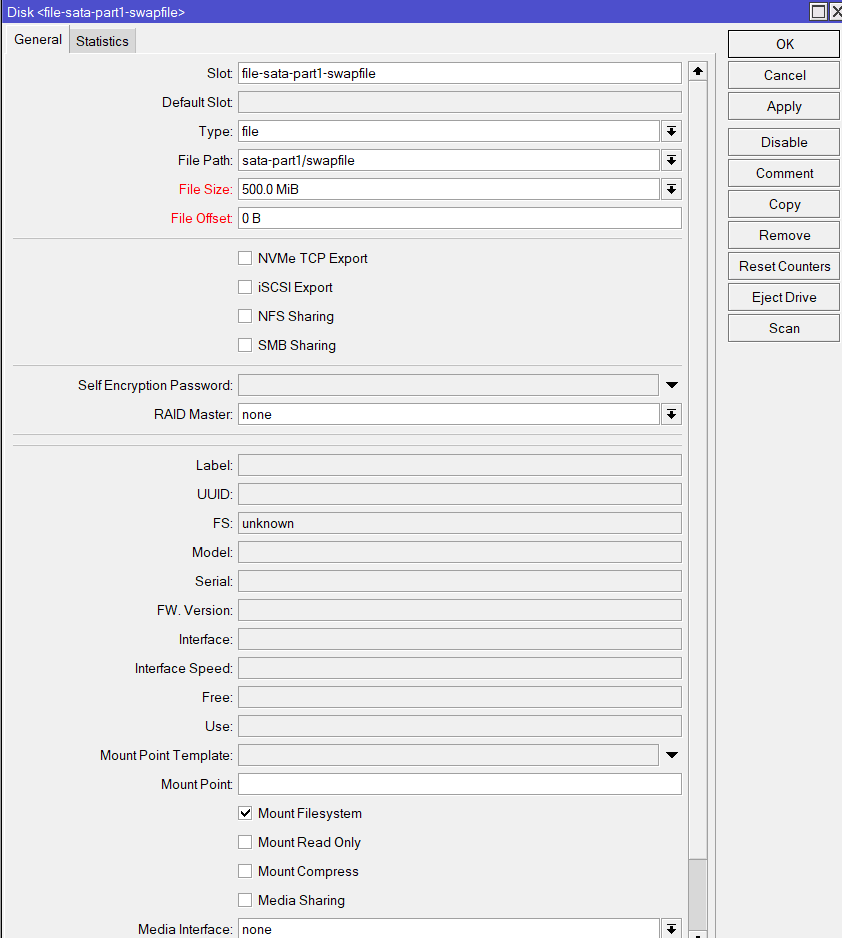
On my RBAHx4 Dude Edition I tried setting up a swap file but it doesn’t seem to work:
/disk add type=file file-path=sata-part1/swapfile file-size=500M swap=yes
Thanks, I hadn’t seen the video…
SWAP file it’s much slower (I only tried with hAp ac2), if you can add a small partition to use as SWAP.
I just wanted to try it. It doesn’t work.
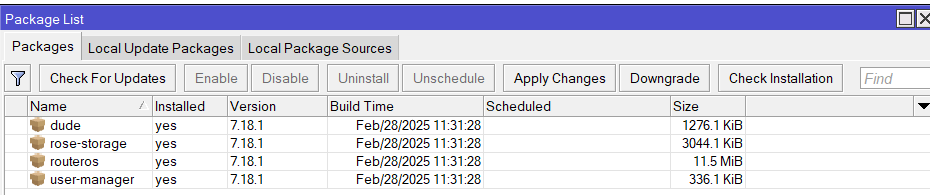
It seems that for the SWAP file you need to install rose
/disk add type=file file-path=usb1/swapfile file-size=1G swap=yes
failure: not supported without rose-storage package
rose-storage is present.
I’m preparing an external SSD for use as storage (ext4) and swap in RouterOS.
What’s the correct way to set up the swap partition? Should I format it as Linux swap (gdisk type 8200) and run mkswap?
I’m confused because RouterOS doesn’t seem to recognize swap partitions.
Just format the partition as "wipe" on ROS and use something like:
disk/set usb1-part2 swap=yes
Can someone explain what the end-user usefulness or benefit of ROSE (or any directly attached) storage would be to an MT router?
Maybe in the form of: Just like with a smartphone I have access to multiple forms of communications, information, location apps, and so many other other things with me at all times, by adding 100MB to 10TB of directly accessibly storage by the ROS, I can <------->.
Dunno, I thought it was so Larsa can fly around and sniff sweet smelling MT equipment. 
ROSE (RouterOS Enterprise) package adds data center functionality to RouterOS - for supporting disk monitoring, improved formatting, RAIDs, rsync, iSCSI ,NVMe over TCP, NFS. This functionality currently is supported on arm, arm64, x86 and tile platforms.
I can understand and even relate easier to Larsa’s sniffing switches easier than I can understand the usefulness of 1TB directly connected to a router.
Is the idea that a router with ROSE and storage becomes NAS?
Think low-cost HCI (hyper-converged infrastructure). Most hardware sits there spinning its wheels (figuratively), so why not give it other tasks to do?
For smaller routers, it doesn’t make much sense, but if you have a USB3 port on the router, you can share an external hard drive with all the computers/phones/tablets in your home without hardly any effort. With enough RAM and some disk space, you can run containers, which are like adding apps to your router. Popular containers include Pi-Hole and other ad blockers, Home Assistant, Uptime Kuma, Nextcloud, and so on. ARM machines in particular are much cheaper to run than an old spare PC, and quiet too.
The big boys (CCR2116,2216,RDS2216) have room for internal storage, ample cores and RAM to load even more containers (I run about 7 on my office 2116). Imagine them being used as branch office devices where a business can deploy an all-in-one box that routes Internet traffic, provides VPN access, serves files, runs an internal file or document server, etc. Or for home labs where you might want to tinker with the other hardware, but need something that just stays put (like a router). Put the drives in, set up storage, and the router/storage box just does its job in the background.
In the ISP/MSP side, these could be useful as content stores, edge caches, etc.
Managing storage requires administrative tools for restructuring, error handling, and backup/restore. All of these are missing in ROS. In other words, this solution is not suitable for mission-critical applications.
Maybe it’s work in progress. They will probably be implemented in the future.
A roadmap would be interesting. It would be useful for customers to be able to plan their future purchases based on what implementations they are following.
But Mikrotik doesn’t work that way…
A roadmap would be interesting. It would be useful for customers to be able to plan their future purchases based on what implementations they are following.
But Mikrotik doesn’t work that way…
Can you clarify what you mean by “restructuring” and “error handling”?
- you can monitor SMART stats in /disk print stats for errors
- we have full support for rsync for backups/restores
- backups with btrfs snapshots, snapshot transfers
- btrfs builtin data replication across multiple disks with separate data/metadata profiles on live filesystem
- automatic error handling in RAID with parity/mirror disks
- any number of hot spares to automatically rebuild parity/mirror disks upon failure
- manual replacing and of parity/mirror disks and rebuild
Normis, thanks for the reply and details on existing features. But let’s be real here—while these are basic storage functions, they’re nowhere near the administrative tools that actual enterprise (or even small office/home office) NAS solutions provide.
Restructuring – More than just RAID
- Restructuring isn’t just about manually swapping disks in a RAID array. Enterprise NAS solutions allow volume resizing, dynamic storage pools, and flexible LVM management.
- With QNAP, Synology, and even budget NAS devices, you can easily expand storage, migrate volumes, and allocate resources dynamically—without manually juggling RAID arrays.
- In ROS, if you want to restructure storage, it looks like the only option is “start over”—not really enterprise-friendly.
Error Handling – What happens when things go south?
- Sure, you can check SMART stats, but that’s only helpful before a failure. What about real-time, automated health monitoring that predicts failures and prevents downtime?
- Enterprise NAS systems don’t just log errors; they have self-healing file systems, proactive failure notifications, and automated data recovery.
- When a file system corruption occurs (which it inevitably will at some point), what’s the recommended ROS solution? Send the disk (or whole server) to Mikrotik support and put the business on hold?
Backup & Restore – Rsync alone isn’t enough
- Rsync is great—for manual backups. But real NAS solutions provide scheduled, incremental, and versioned backups with built-in policy management.
- Enterprise-grade NAS solutions have seamless cloud/hybrid backups and integration with industry-standard tools like Veeam, CommVault, or even Synology Hyper Backup.
- Btrfs snapshots are nice, but without a user-friendly way to manage, restore, and automate them, they’re just another manual workaround. And if Btrfs fails, you’re out of luck.
- A proper backup solution must be able to back up the entire unit, including containers and configurations. A cold restore should be able to recover everything from scratch, not just some random files when everything is up an running.
The Big Picture
Right now, MikroTik’s approach to storage feels more like a DIY Linux server setup with all the admin tools stripped out than an enterprise storage solution. If ROS is meant to compete with similar SMB tech as QNAP or Synology, then it needs actual administrative tools, not just CLI commands and basic RAID functions.
The hardware is solid, but without proper management features, this isn’t a realistic option for mission-critical environments. Are there any plans to add a real admin interface, more automation, and enterprise-level storage tools in future updates? Because that’s what’s missing.
Otherwise, for now, I’m sorry to say this is IMO more of a “tinkerer’s NAS” than a serious storage solution.
the drive behind RDS: https://youtu.be/LGAwubEU92A?si=pkeK0dBYeN_u6Uii
Putting lipstick on a pig but since someone called it “Kermit the NAS,” I guess it’s more like putting lipstick on Miss Piggy! 
As I understood it, the product idea started with:
Genomics researchers: we need a network storage.
Mikrotik: challenge accepted! When you have a ROS - everything is a router.
But I like the idea/intention to combine router/storage and save on energy. And as Druvis said, maybe more useful as edge storage or something that is not as criticial.