For what is worth, find attached a spreadsheet with a quick comparisons of the specifications of the two “plain” Hex’s and of the two Hex_S’s.
The new Hex S (2025) seemingly has exactly the same architecture/block diagram as the Hex refresh (with the added SFP, of course).
If/when the known issues with ether1 on the Hex refresh (that likely will affect also the SFP on the new Hex S ) will be solved, it seems like a winner in several aspects.
It seems to me that (again if the performance will be adequate) - while being a no brainer replacement for the traditional Hex S, costing 10 dollars LESS , it represents for only 10 bucks more a very serious competitor to the “plain” Hex refresh E50UG.
While the 20 dollars difference between the old models Hex and the Hex S was relevant, in practice the good Mikrotik guys halved the difference between the new models, and the S is 48V/802.3af/at compatible. New_Hexes.xls (32 KB)
I would be happier if they changed the default firewall rules… add action=accept chain=input comment=“Users & Admin to Services” in-interface-list=LAN
add action=drop chain=input comment=“drop all else” add action=accept chain=forward comment=“internet traffic” in-interface-list=LAN out-interface-list=WAN
add action=accept chain=forward comment=“port forwarding” connection-nat-state=dstnat disabled=yes { enable if required or remove }
add action=drop chain=forward comment=“drop all else”
but yes, the plain 50, will have short life span if for only $10 more buck one can throw in a 2.5 port.
The speed declared Is exactly the same for the hex refresh and for the new hex S.
(same chips and block diagram)
For ten bucks more you get a SFP cage and 802.3af/at compatibility.
Even if the real throughput of the SFP is only 1 GB, It still is one port more than the plain hex (refresh).
Of course if the 2.5 Gb behaves like the ether1 of the hex refresh , working in practice at 1/5 or less than the expected speed, if until yesterday Mikrotik had a problem, starting today they would have two problems.
Interesting, in the video they specifically talk about using the SFP port with 2 Gbps ISP connection. I suppose for large packet size + FastTrack it will reach that indeed (3646 Mbps listed). Another potential use is local connection to something like a NAS. Pity the SFP is not switched in hardware but with software bridging should reach 2.5 Gbps according to specifications.
Another minor but useful improvement is ARM 64-bit. I don’t run containers on routers but heard it’s difficult to find 32-bit ones.
I agree, it seems like a killer of the regular hEX. It’s actually $9 (69 - 59.95). Would be interested to see reports on eth1 and SFP performance in real life.
I wish they didn’t use CPU-bound eth1 for PoE-in, since it’s a candidate for trunk uplink. And even without any issues the link is limited to 1 Gbps, no good for a trunk.
what a nonsence upgrade again… 2,5 GBit SFP and CPU is able route not even 1 GBit… I can not imagine how to use this device? Is it swtich with SFP? Why they cll it router when it has no CPU power to bz a router for 2,5 GBit?
I also find the arm/arm64 difference really interesting.
Also, the link in “Support and Downloads” points to the arm64 package, but the “Test Results” part seems to be copied over from the “hEX Refresh” verbatim - I mean the throughput is expected to be similar, but not to the last decimal.
At least according to getic.com, these devices are shipping. Does anyone actually have one?
There are apparently some problems with the separate (ether1) port on the Refresh model in some configurations (as detailed on this forum and elsewhere.) I have no proof, but my guess is that this is related to some sort of driver problem. It would be really interesting to see how this plays out on the “S”.
Also I would expect a boost in software crypto throughput for the 64 bit software, which makes the difference between the two models very interesting, given their very similar price points… I always thought the decision to run 32 bit versions on 64 bit systems was because of the difference in RAM footprint, but with 512 MB it is clear that these device can handle the 64 bit version.
I read somewhere here on the forum about the E50UG that the chip is 64-bit while the OS is 32-bit. I wonder if this note from documentation is still valid even for hEX S:
For devices with EN7562CT CPU like the hEX Refresh, only arm32v5 container images are supported, meaning a limited number of containers can be run.
The note implies this is a chip limitation. Also, the plural form (“devices”) used at the time when no other EN7562CT devices existed makes me think the new hEX S still won’t be able to run 64-bit containers. Or maybe 64-bit is just a chip feature that can be enabled if selected during production (kind of like selecting how to use PCIe lanes available on x86 chipsets).
I doubt the hEX S refresh will be running 64-bit RouterOS.
The original Youtube video about the hEX refresh, as well as the original brochure, both talk about “64-bit ARM”. But then MikroTik walked that back later. The current version of the hEX refresh brochure is nearly identical, but they scrubbed all references to “64-bit” from it, and added an “EDIT:” comment to the Youtube video description clarifying it will run in “ARM32 mode”.
If you look at the hEX S refresh brochure, it also doesn’t mention “64-bit” anywhere on it. It’s only on the main Specifications tab of the product description where it says anything about “64-bit”. I have seen MikroTik make mistakes before in the specifications, and I expect that they will update that to remove any reference to “64-bit” from it, to match the regular hEX refresh. This mistake was probably just a hold-over from whatever was going on with the non-“S” model in the early days of putting together its marketing materials, since it’s almost certain they were both developed in tandem.
I am having a hard time actually coming up with any concrete information about this SoC. Like the last hEX, it’s another MediaTek part, except that it is being marketed under their subsidiary Airoha, who publishes no datasheets on it (at least as far as I can tell, on the publicly accessible part of their site). Since it seems to be a relatively new part, it would be shocking if it were not 64-bit. But both of these I think are the first MediaTek-based products using ARM instruction sets that MikroTik has manufactured, and so perhaps there is some limitation in the SoC that prevents it from being able to run the ROS7 ARMv8 binary code (missing some instructions?), and they aren’t willing to make any compromises in how they build the ARM64 package to accommodate those limitations or to build and distribute a second “type” of ARM64 package (admittedly would get confusing), so they opted to just have it run ARMv7 code instead? Honestly, for a little $60 router, it’s hard to argue that it’s unreasonable, although I can understand the disappointment…
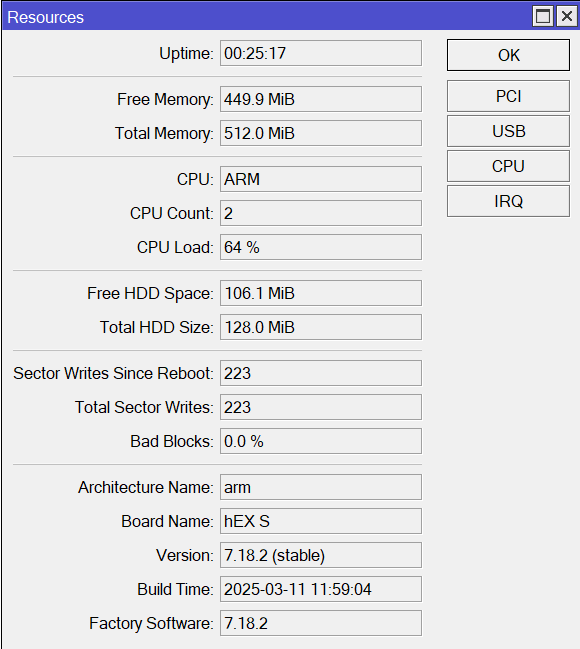
I can confirm hEX S (2025) uses the arm (32-bit) architecture just as the hEX (2025) and does not use the ARM64 architecture as mentioned in the product page.
Thanks for reporting. Have you had a chance to test eth1 port performance? E.g. plugging in eth1 with default configuration to your LAN switch, plugging in a laptop or a desktop to eth2-5, and running iperf3 tests should be enough to see if it suffers from the same issue as non-S variant.
So far, I haven’t been able to reproduce the problem reported here. I connected an RB4011 to ether1 (directly connected to CPU) and my laptop to ether5 (connected to switch chip). I get 945Mbps both in TX as in RX when testing from the laptop using btest.exe. This is with the default (out-of-the-box) config and using RouterOS v7.18.2. I also tested v7.19.1 and see the same results. I see ~840Mbps when I disable FastTrack.
To be fair there’s a really good chance that it uses the exact same PHY with the same connection to the SoC. I don’t know if you’re willing to get out the screwdriver and magnifying glass, but I’d bet a soft drink that the chip used for ether1 is the EN8801, and the one for the sfp is the optical version of the EN8811. EDIT: It would also be my guess that the reason why the SFP port is 2.5G capable is that the EN8801 (1GbE) is only available in copper, while the EN8811 (2.5GbE) is the one available in both copper and optical (SerDes) versions.
Again, this is just an educated guess, but the problem seems to be not that the CPU runs out of power, but related to situations in which flow control would be required. I consider it a clue of some significance that even the counters for RX and TX pause are totally absent for ether1.
Thanks for the testing and reporting! Are you otherwise satisfied with the device?
I see your point.
Just to be sure, I opened my Hex Refresh.
No provisions at all for additional components that I can see at first sight (read: not for the obvious things like SFP port or POE Out) so at least the circuit board itself is indeed expected to be different from HEX S Refresh.
While the block diagram is identical (except for that extra SFP connection), PCB wise it’s different enough then.
If you tested your device and see no limited performance, then it’s really odd why Hex Refresh has this problem (I may have to rerun some tests with mine).
That problem with RX throughput on ether1 of hEX refresh does not seem to be universal…some people have the problem, some people don’t. It’s not clear yet exactly why. Some have speculated it may have something to do with some weird interop issue with the device it is uplinking to, as at least a couple of people have put a dumb switch between their hEX and their ISP uplink, and “fixed” the problem that way.
So just because @FezzFest has not seen the problem with his hEX S refresh does not mean it doesn’t have the problem, or that MT changed something between the two designs that would account for or work around whatever that issue is. It could just be that he was lucky, and wouldn’t have had the problem with the regular hEX refresh either. The only way to know for sure would be to take a hEX S refresh over to somebody who has a hEX refresh and who is suffering from the problem, and have them swap out the hEX for the hEX S with identical programming while placing it in an identical situation (plugged into the exact same internet connection, etc.), and see if the problem still happens. So we will have to wait for somebody with a poorly-performing hEX refresh to “take one for the team” and order an S to try out.
Either that, or wait for there to be a larger sample size of hEX S owners who can weigh in. If literally nobody with the hEX S comes forward with this same complaint after it has been on the market for a few months, then perhaps it dodged that bullet after all…
Someone in this post mentiones I bought my first Mikrotik Device.
Main reason they gave is that the device does not have enough memory to justify use of 64-bit.
If this is the true reason, I’m hoping they will leave the choice to be made by users to use arm32 or arm64.
There are only few benefits of using 64-bit OS over 32-bit. One is memory limits, for 32-bit x86 that’s somewhere between 2GB and 3GB of RAM and not many Routerboard devices come close to that limit.
The other benefit of using 64-bit variant is certainty of availability of some more modern instructions, not available on older 32-bit variants … this legacy is very much of an issue on x86 architecture, I guess not so much on arm architecture. And possibility of relying on modern instructions (such as SIMD instructions) can make quite some difference in speed in certain use cases. Yes, apps can work around this by including multiple code paths and selection of which to execute (slower with legacy instructions used when modern instructions are not available) is then performed at run time. But that means larger apps.
I’m not familiar with arm instruction sets available on CPUs used in various RB devices, but I’m guessing that some CPUs don’t offer any speedup when used in 64-bit mode while RAM consumption does increase when running 64-bit OS and apps.
 ) will be solved, it seems like a winner in several aspects.
 , it represents for only 10 bucks more a very serious competitor to the “plain” Hex refresh E50UG.
 Honestly, for a little $60 router, it’s hard to argue that it’s unreasonable, although I can understand the disappointment…