Ziter
June 19, 2026, 7:20pm
1
Hello,
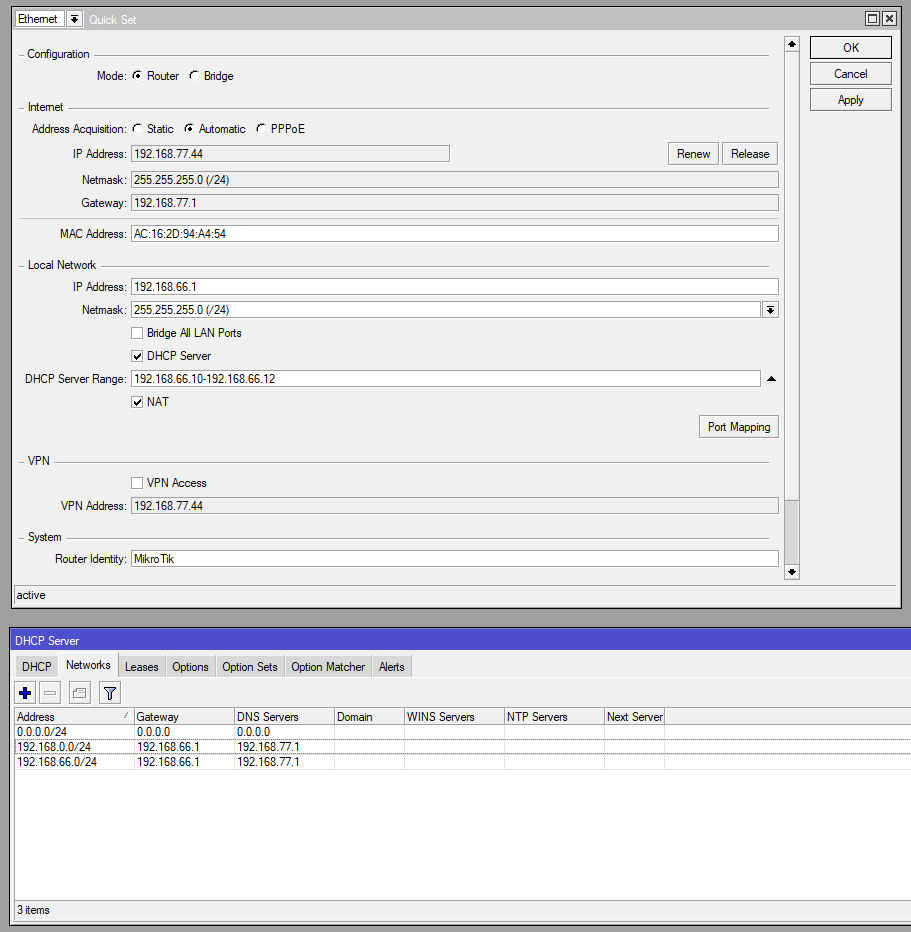
Could you please check my settings? Two subnets - neither has internet access.
In additional - do you have any comments about my firewall?
Thank you in advance.
2026-06-19 21:07:55 by RouterOS 7.21.4

software id = xxx

/interface bridge
add name=bridge1
add name=bridge2
/interface ethernet
set [ find default-name=ether6 ] disable-running-check=no name=ether1
set [ find default-name=ether7 ] disable-running-check=no name=ether2
set [ find default-name=ether8 ] disable-running-check=no name=ether3
set [ find default-name=ether9 ] disable-running-check=no name=ether4
set [ find default-name=ether10 ] disable-running-check=no name=ether5
set [ find default-name=ether1 ] disable-running-check=no name=ether6
set [ find default-name=ether3 ] disable-running-check=no name=ether7
set [ find default-name=ether4 ] disable-running-check=no name=ether8
set [ find default-name=ether2 ] disable-running-check=no name=ether9
set [ find default-name=ether5 ] disable-running-check=no name=ether10
/interface list
add name=WAN
add name=LAN
/ip pool
add name=dhcp1 ranges=192.168.66.10-192.168.66.12
add name=dhcp2 ranges=192.168.0.10-192.168.0.12
/ip dhcp-server
add address-pool=dhcp1 interface=bridge1 name=dhcp1
add address-pool=dhcp2 interface=bridge2 name=dhcp2
/interface bridge port
add bridge=bridge1 interface=ether2
add bridge=bridge1 interface=ether3
add bridge=bridge1 interface=ether4
add bridge=bridge1 interface=ether5
add bridge=bridge1 interface=ether6
add bridge=bridge1 interface=ether7
add bridge=bridge1 interface=ether8
add bridge=bridge2 interface=ether9
add bridge=bridge2 interface=ether10
/interface list member
add interface=ether1 list=WAN
add interface=bridge1 list=LAN
add interface=bridge2 list=LAN
/ip address
add address=192.168.66.1/24 interface=bridge1 network=192.168.66.0
add address=192.168.0.1/24 interface=bridge2 network=192.168.0.0
/ip dhcp-client
add default-route-tables=main interface=ether1
/ip dhcp-server network
add address=0.0.0.0/24 dns-server=0.0.0.0 gateway=0.0.0.0 netmask=24
add address=192.168.0.0/24 dns-server=192.168.66.1 gateway=192.168.66.1
netmask=24
add address=192.168.66.0/24 dns-server=192.168.66.1 gateway=192.168.66.1
netmask=24
/ip dns
set servers=192.168.77.1
/ip firewall address-list
add address=192.168.66.10 comment="admin desktop" list=Authorized
add address=192.168.66.11 comment="admin laptop" list=Authorized
add address=192.168.66.12 comment="admin smartphone" list=Authorized
add address=192.168.0.10 comment="admin desktop2" list=Authorized
add address=192.168.0.11 comment="admin laptop2" list=Authorized
/ip firewall filter
add action=accept chain=input comment=
"Accept: established, related, untracked." connection-state=
established,related,untracked
add action=drop chain=input comment="Drop invalid." connection-state=invalid
add action=accept chain=input comment="Accept ICMP." protocol=icmp
add action=accept chain=input comment="Authorized hosts." src-address-list=
Authorized
add action=accept chain=input comment="DNS udp." dst-port=53
in-interface-list=LAN protocol=udp
add action=accept chain=input comment="DNS tcp." dst-port=53
in-interface-list=LAN protocol=tcp
add action=accept chain=input comment="Accept: Winbox - temporary for tests."
dst-port=8291 in-interface=ether1 protocol=tcp
add action=drop chain=input comment="Drop all else."
add action=fasttrack-connection chain=forward comment=Fasttrack.
connection-state=established,related
add action=accept chain=forward comment=
"Accept: established, related, untracked." connection-state=
established,related,untracked
add action=drop chain=forward comment="Drop invalid." connection-state=
invalid
add action=accept chain=forward comment="Internet traffic."
in-interface-list=LAN out-interface-list=WAN
add action=accept chain=forward comment="Port forwarding."
connection-nat-state=dstnat
add action=drop chain=forward comment="Drop all else."
/ip firewall nat
add action=masquerade chain=srcnat out-interface-list=WAN
add action=masquerade chain=srcnat comment=HairpinNat dst-address=
192.168.66.0/24 src-address=192.168.66.0/24
/ip route
add disabled=yes dst-address=0.0.0.0/0 gateway=192.168.77.1
/ip service
set ftp disabled=yes
set ssh disabled=yes
set telnet disabled=yes
set www disabled=yes
/system clock
set time-zone-name=Europe/London
/system package update
set channel=long-term
Ziter
June 19, 2026, 8:28pm
2
I think it's a DNS problem.
When I changed the DNS to Internet Gateway (192.168.77.1), I have internet access on the first subnet (192.168.66.0/24).
Unfortunately, there's no internet access on the second subnet (192.168.0.0/24).
The 0.0.0.0/24 DHCP network entry should be removed as well as the netmask parameter from the rest
Also, never change settings from the Quickset after the router has been deployed since the effects are unpredictable. Better to put 1.1.1.1 or 8.8.8.8 as DNS server and enable remote requests:
/ip dns
set servers=8.8.8.8,1.1.1.1 allow-remote-requests=yes
You should have 192.168.0.1 gateway and dns server in this network.
Ziter
June 19, 2026, 8:42pm
6
TheCat12:
Also, never change settings from the Quickset after the router has been deployed since the effects are unpredictable. Better to put 1.1.1.1 or 8.8.8.8 as DNS server and enable remote requests:
/ip dns
set servers=8.8.8.8,1.1.1.1 allow-remote-requests=yes
There's still no internet access on the second subnet (192.168.0.0/24).
Did you correct the .0.1 network per teslasystems' suggestion?
Ziter
June 19, 2026, 8:45pm
9
Do you have any comments about my firewall rules?
I don't see anything from /ip/dhcp-server/lease
Ziter
June 19, 2026, 8:58pm
11
Thanks for comment.
This is a test system with a narrow group of ip addresses for leases and I have control over the 'Authorized' address leases.
/ip pool
add name=dhcp1 ranges=192.168.66.10-192.168.66.12
add name=dhcp2 ranges=192.168.0.10-192.168.0.12

/ip firewall address-list
add address=192.168.66.10 comment="admin desktop" list=Authorized
add address=192.168.66.11 comment="admin laptop" list=Authorized
add address=192.168.66.12 comment="admin smartphone" list=Authorized
add address=192.168.0.10 comment="admin desktop2" list=Authorized
add address=192.168.0.11 comment="admin laptop2" list=Authorized
add address=192.168.66.12 comment="admin smartphone2" list=Authorized
There is no ip assigned address because I connected from the WAN side to download the configuration.
anav
June 20, 2026, 1:14pm
12
Seeing as you fixed the gross errors and removed the unecessary stuff, and its working, not much to add.
Make sure your Authorized dhcp leases are made static! Also the wifi ones, you will need to turn off (if IOS ) the hide mac or whatever its called, so the router sees your actual mac each time.
Personal choice: I would modify line to this, which adds additional borders on the accept.
Missing the lo interface entry in input chain for 127.0.0.1 but perhaps this is not required in your case. Others can chime in if better to include.
This should never be done if connected to the internet:
Especially since using the default port................
Why do you have port forwarding enabled if you have no DST NAT aka no actual port forwardings.
Ziter
June 21, 2026, 11:11am
13
Clear - got it.
Done!
Done!
The router was behind NAT - when I configured it.
Have there been any recent known vulnerabilities to hacking via winbox?
Now I have one redirection.
I also changed the configuration a bit:
I removed the second bridge (no longer needed, I think I'll implement vlans ),
disabled the "admin" account,
changed the port for winbox,
added cake qos,
and changed dns to nextdns.
Thank you for your feedback!
If you have a moment, please take a look at my current configuration.
2026-06-21 12:47:03 by RouterOS 7.21.4 / software id = xxxx-xxxx

/interface bridge
add name=bridge
/interface ethernet
set [ find default-name=ether7 ] disable-running-check=no name=ether1
set [ find default-name=ether8 ] disable-running-check=no name=ether2
set [ find default-name=ether9 ] disable-running-check=no name=ether3
set [ find default-name=ether10 ] disable-running-check=no name=ether4
set [ find default-name=ether1 ] disable-running-check=no name=ether5
set [ find default-name=ether2 ] disable-running-check=no name=ether6
set [ find default-name=ether4 ] disable-running-check=no name=ether7
set [ find default-name=ether6 ] disable-running-check=no name=ether8
set [ find default-name=ether3 ] disable-running-check=no name=ether9
set [ find default-name=ether5 ] disable-running-check=no name=ether10
/interface list
add name=WAN
add name=LAN
/ip pool
add name=dhcp ranges=192.168.77.10-192.168.77.70
/ip dhcp-server
add address-pool=dhcp interface=bridge name=dhcp
/queue type
add cake-diffserv=besteffort cake-flowmode=dual-dsthost cake-nat=yes
cake-rtt=30ms cake-rtt-scheme=regional kind=cake name=cake-rx
add cake-ack-filter=filter cake-diffserv=besteffort cake-flowmode=
dual-srchost cake-nat=yes cake-rtt=30ms cake-rtt-scheme=regional kind=
cake name=cake-tx
/queue simple
add max-limit=1000M/100M name=queue1 queue=cake-rx/cake-tx target=ether1
total-queue=default
/interface bridge port
add bridge=bridge interface=ether2
add bridge=bridge interface=ether3
add bridge=bridge interface=ether4
add bridge=bridge interface=ether5
add bridge=bridge interface=ether6
add bridge=bridge interface=ether7
add bridge=bridge interface=ether8
add bridge=bridge interface=ether9
add bridge=bridge interface=ether10
/interface detect-internet
set detect-interface-list=all
/interface list member
add interface=ether1 list=WAN
add interface=bridge list=LAN
/ip address
add address=192.168.77.1/24 interface=bridge network=192.168.77.0
/ip dhcp-client
add default-route-tables=main interface=ether1
/ip dhcp-server lease
add address=192.168.77.70 client-id=1:8:55:31:11:1:44 comment=
"laptop" mac-address=09:56:31:1D:11:45 server=dhcp
...
/ip dhcp-server network
add address=192.168.77.0/24 dns-server=192.168.77.1 gateway=192.168.77.1
netmask=24
/ip dns
set allow-remote-requests=yes use-doh-server=
https://dns.nextdns.io/xxxxx/Mikrotik verify-doh-cert=yes
/ip dns static
add address=50.00.00.0 name=dns.nextdns.io type=A
add address=50.00.00.0 name=dns.nextdns.io type=A
add address=25842:a82570:: name=dns.nextdns.io type=AAAA
add address=2a001:992c1:: name=dns.nextdns.io type=AAAA
/ip firewall address-list
add address=192.168.77.10 list=Authorized
...
add address=192.168.77.70 list=Authorized
/ip firewall filter
add action=accept chain=input comment=
"Accept: established, related, untracked." connection-state=
established,related,untracked
add action=drop chain=input comment="Drop invalid." connection-state=invalid
add action=accept chain=input comment="Accept ICMP." protocol=icmp
add action=accept chain=input comment=Loopback. dst-address=127.0.0.1
add action=accept chain=input comment="Authorized hosts." in-interface-list=
LAN src-address-list=Authorized
add action=accept chain=input comment="DNS udp." dst-port=53
in-interface-list=LAN protocol=udp
add action=accept chain=input comment="DNS tcp." dst-port=53
in-interface-list=LAN protocol=tcp
add action=accept chain=input comment=
"Accept: Winbox from WAN - temporary for tests." disabled=yes dst-port=
8291 in-interface=ether1 protocol=tcp
add action=drop chain=input comment="Drop all else."
add action=fasttrack-connection chain=forward comment=Fasttrack.
connection-state=established,related
add action=accept chain=forward comment=
"Accept: established, related, untracked." connection-state=
established,related,untracked
add action=drop chain=forward comment="Drop invalid." connection-state=
invalid
add action=accept chain=forward comment="Internet traffic."
in-interface-list=LAN out-interface-list=WAN
add action=accept chain=forward comment="Port forwarding."
connection-nat-state=dstnat
add action=drop chain=forward comment="Drop all else."
/ip firewall nat
add action=masquerade chain=srcnat out-interface-list=WAN
add action=masquerade chain=srcnat comment=HairpinNat dst-address=
192.168.66.0/24 src-address=192.168.66.0/24
add action=dst-nat chain=dstnat comment="Forward to terminal." dst-port=12000
in-interface-list=WAN protocol=tcp to-addresses=192.168.77.48 to-ports=
12000
/ip route
add disabled=yes dst-address=0.0.0.0/0 gateway=192.168.77.1
/ip service
set ftp disabled=yes
set ssh disabled=yes
set telnet disabled=yes
set www disabled=yes
set winbox port=9999
/system clock
set time-zone-name=Europe/London
/system package update
set channel=long-term
anav
June 21, 2026, 1:57pm
14
Remove the above rule it is known to have caused issues in the past and its value is questionable.
SInce you have both internal and external users for the server, one should adjust both the firewall rules and DSTNAT rules accordingly. The current form of the firewall rule already allows for this eventuality and is fine.
add action=dst-nat chain=dstnat comment="Forward to terminal." dst-port=12000dst-address=static-WANIP protocol=tcp to-addresses=192.168.77.48
if dynamic then it would look like:add action=dst-nat chain=dstnat comment="Forward to terminal." dst-port=12000dst-address-list=MyWAN protocol=tcp to-addresses=192.168.77.48
With the required following additional entry ( ensure ip my cloud is enabled etc. )address=mynetname.net list=MyWAN
Ziter
June 21, 2026, 3:06pm
15
/interface detect-internet set detect-interface-list=none
Done.
anav:
For the dstnat rule depends on if the public IP is static, in this case ( and note to ports not required if same as dst ports )
add action=dst-nat chain=dstnat comment="Forward to terminal." dst-port=12000dst-address=static-WANIP protocol=tcp to-addresses=192.168.77.48
/ip firewall natadd action=dst-nat chain=dstnat dst-port=12000 dst-address=xxx.xxx.xxx.xxx protocol=tcp to-addresses=192.168.77.48 comment="Forward to terminal."
Done.
Many thanks for your advice !
I have one more issue. I'm having trouble with the backup script below.
/system scriptadd dont-require-permissions=no name=ExportConfig owner=admin policy=ftp,reboot,read,write,policy,test,password,sniff,sensitive,romon source=":local databiezaca [/system clock get date]\r\n:local dzien [ :pick $databbiezaca 4 6 ]\r\n:local mies [ :pick $databbiezaca 0 3 ]\r\n:local rok [ :pick $databbiezaca 7 11 ]\r\n:local plik ""\r\n#:set plik ("$[/system identity get name]"."_"."$rok"."$mies"."$dzien")\r\n:set plik ("$[/system identity get name]")\r\n:log info "Eksportuje konfiguracje $plik"\r\n/export file="$plik"\r\n/system backup save name="$plik"\r\n/tool e-mail send to=me@post.com subject=("Konfiguracja $plik ($[/system resource get architecture-name]/$[/system resource get version]) @ $[/system clock get date] $[/system clock get time]") file="$plik.rsc,$plik.backup" \r\n"
There is a problem in line 11.
:local databiezaca [/system clock get date]:local dzien [ :pick $databbiezaca 4 6 ]:local mies [ :pick $databbiezaca 0 3 ]:local rok [ :pick $databbiezaca 7 11 ]:local plik ""#:set plik ("$[/system identity get name]"."_"."$rok"."$mies"."$dzien"):set plik ("$[/system identity get name]"):log info "Eksportuje konfiguracje $plik"/export file="$plik"/system backup save name="$plik"/tool e-mail send to=me@post.com subject=("Konfiguracja $plik ($[/system resource get architecture-name]/$[/system resource get version]) @ $[/system clock get date] $[/system clock get time]") file="$plik.rsc,$plik.backup"
Email is well configured - it sends test messages.
/tool e-mailset certificate-verification=no from=me@post.com port=465 server=mail.x.datacenter.com tls=yes user=pme@post.com
anav
June 21, 2026, 8:17pm
16
Beyond my scope, but for many here thats easy peasy so perhaps one will chime in.
I'm also a novice in scripting but what stands out to me is that you can set the plik variable directly instead of through command:
:local plik [/system identity get name]
The quotation marks in these lines can be omitted here:
/export file="$plik"/system backup save name="$plik"
as well as probably in file= in the email sending line. However, the recipient email should be surrounded by quotation marks. All in all:
/tool e-mail send to="me@post.com" subject=("Konfiguracja $plik ($[/system resource get architecture-name]/$[/system resource get version]) @ $[/system clock get date] $[/system clock get time]") file=$plik.rsc,$plik.backup
Ziter
June 21, 2026, 9:37pm
18
TheCat12:
I'm also a novice in scripting but what stands out to me is that you can set the plik variable directly instead of through command:
:local plik [/system identity get name]
The quotation marks in these lines can be omitted here:
/export file="$plik"/system backup save name="$plik"
as well as probably in file= in the email sending line. However, the recipient email should be surrounded by quotation marks. All in all:
/tool e-mail send to="me@post.com" subject=("Konfiguracja $plik ($[/system resource get architecture-name]/$[/system resource get version]) @ $[/system clock get date] $[/system clock get time]") file=$plik.rsc,$plik.backup
Thank you for your efforts, but it does not work.
Ziter
June 22, 2026, 9:44pm
19
One more question:
Shouldn't this forward rule include: "to-ports", as below?
add action=dst-nat chain=dstnat comment="Forward to terminal." dst-address=xxx.xxx.xxx.xxx dst-port=12000 protocol=tcp to-addresses=192.168.77.48 to-ports=12000
anav
June 22, 2026, 9:46pm
20
Try reading the note provided with that particular edit!