First I would like to say thank you to the Mikrotik community for allowing this question to be posted and for the general support / knowledge base that has been created online for people like me.
I have been given the task of setting up my family’s home network. I have spent 100hrs so far on reading about the basics and this is what I have settled on.
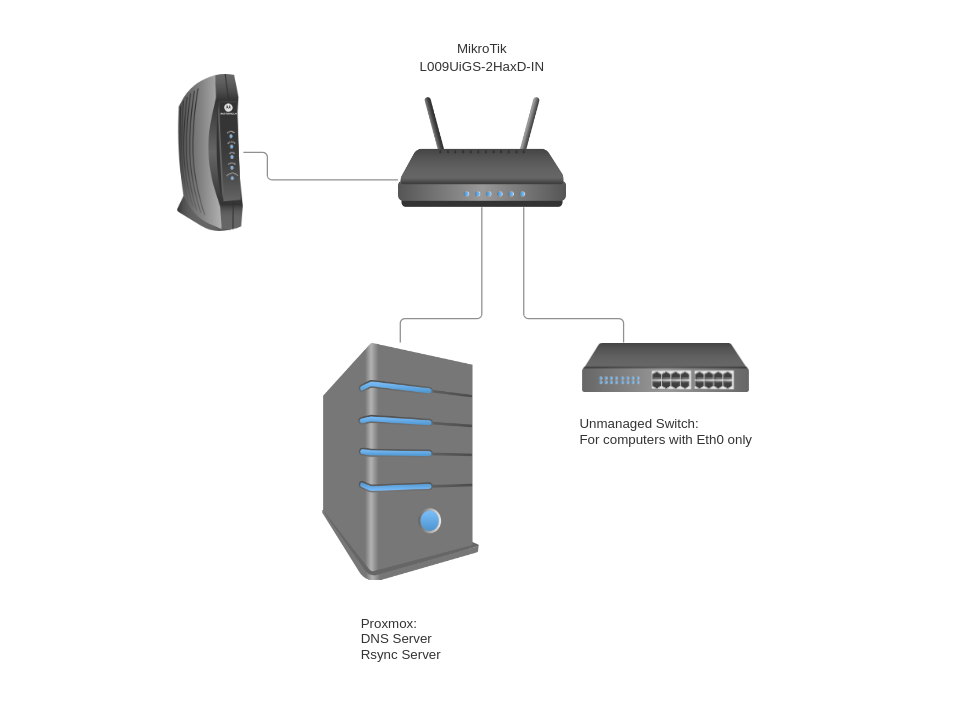
I ordered a Mikrotik L009 router that is wifi capable. I also have a small mini pc that I would like to integrate into the network stack for custom DNS, RSync, search engine, and a couple other tasks. I also have an unmanaged switch that will be used alongside wifi to provide internet to eth0 only devices.
It looks like there is a myriad of ways to set this all up. Here is what I have come up with.
eth1: wan port with dhcp client to grab IP from ISP
eth2: proxmox cluster hosting utilities
eth3: unmanaged switch with dhcp server
wifi1: wifi with dhcp server.
Is there anything I could do better? Any advice you pros have for me?
Should I be using VLANs? Should I bridge eth2-8 and wifi1?
Concur, if you have never worked with MT before tis a bit of a curve but do not deviate from default settings for the most part unless you know the ramficactions.
Best is to continue to read and absorb knowledge so that you can ask questions.
Also I believe the L09 series recently has a path to upgrade to arm64 from arm32.
Hopefully others will chime in on how to accomplish this, or is it worth it!!
You are right in that there is a steep learning curve. I specifically decided upon this path as I understand the value of granular routing controls.
I will have a look at the default config and quick set options that are provided when the router is first powered on. My biggest concern was firewall rules and that multiple YouTube videos have basically said if you go with the default config/quick set tool, not to play around in the other settings. Can you confirm this is true?
If I can use the default firewall/config, all I would need to do is set up a few static IPs for my network utilities and configure a management port. It would be much easier than a custom config to start. I do not want any forward facing ports or utilities. I have looked at IP Services and have disabled everything except for WinBox.
Hi, thank you for your reply. Do you recommend setting up vlan1 for the wifi/unmanaged eth0 switch, and vlan2 for the network utilities. I am having a hard time understanding from documentation if I can set up vlans for specific ports/utilities.
i.e. I want to set up DNS (Pihole) on a static IP then set NAT rules to force clients to use this DNS server. What would be the best way to apply vlans to this logic?
Eth1, cool. While you are doing WAN stuff, you might want to check if the ISP device has a bridge or passthrough or modem-only mode so that your MT router gets the public IP.
Eth2,3,wifi: These will all be assigned to the bridge. And the DHCP server will be assigned to that. DHCP server is a function that you should only have running once per IP subnet. So without VLANs that’s generally run on the main router. I can’t tell if you’re thinking you need to do something with the switch to “assign” the DHCP server there. You don’t. The router’s DHCP server will respond with an IP for any client that requests one, by default any device connecting through the bridge on the L009. Your Proxmox machine won’t request one if you set a static IP on it, and that’s fine. But you don’t need to “turn off” DHCP for that interface.
On default/quickset - I see these as two different things. If you hard reset the L009 it will have the default config. That’s a good starting point. I like to do that and then export the config to a file for reference. Then, as I’m adding functions and configs I have a baseline for comparison. If you use the “QuickSet” interface later, that’s where you don’t want to do much further fiddling. You use that and leave it alone.
On your VLAN question - you definitely shouldn’t use VLAN1. Read the 12 rules that @anav posted - rule 1 & 2. That’s the default internal VLAN ID on Mikrotik, and weird stuff can happen if you assign it explicitly to interfaces. Use VLAN10 and VLAN20 or something like that.
But I wouldn’t start there. Since you’re new to the platform and networking, I would rather step into it in stages. Something like:
Set up default config on L009. Configure wifi. Test device connections with all dynamic addressing.
Set up PiHole (or consider using the Mikrotik DNS Adlist function instead). Test this. Consider whether you need anything in the firewall config or just assign the DNS address via DHCP server. At minimum I would start with the assignment via DHCP.
Set up a “guest” or “iot” wifi SSID that uses a public DNS to bypass the ad-blocking (useful for some websites when they’re not working properly with DNS ad-blocking).
When all that is working make another export .rsc. Reset the device to no default config, applying the .rsc during reset (using the “Run after reset” option in the Reset Configuration UI. Debug this as-needed. Once you get that working you’ve got a script you can use to quickly get back to a working config no matter what happens with the further experimentation.
Set up VLANs and do whatever other experimentation you want…
Thanks for the reply. That really cleared some stuff up for me. I went ahead and set up my network using your stages, with frequent config exports along the way. How I went about it all was rather basic, but gave me the time to put theory into practice. I finally got the DNS server, local reverse proxy, and search engine up an hour ago. Most likely I will end up tearing it all apart one weekend and redoing it all given what I know now. Not all wars are fought in a day
Huge thanks to everyone in the thread for the help. I am sure I will be back with more complex questions, but this will be enough to get me started on the Mikrotik platform for a while.