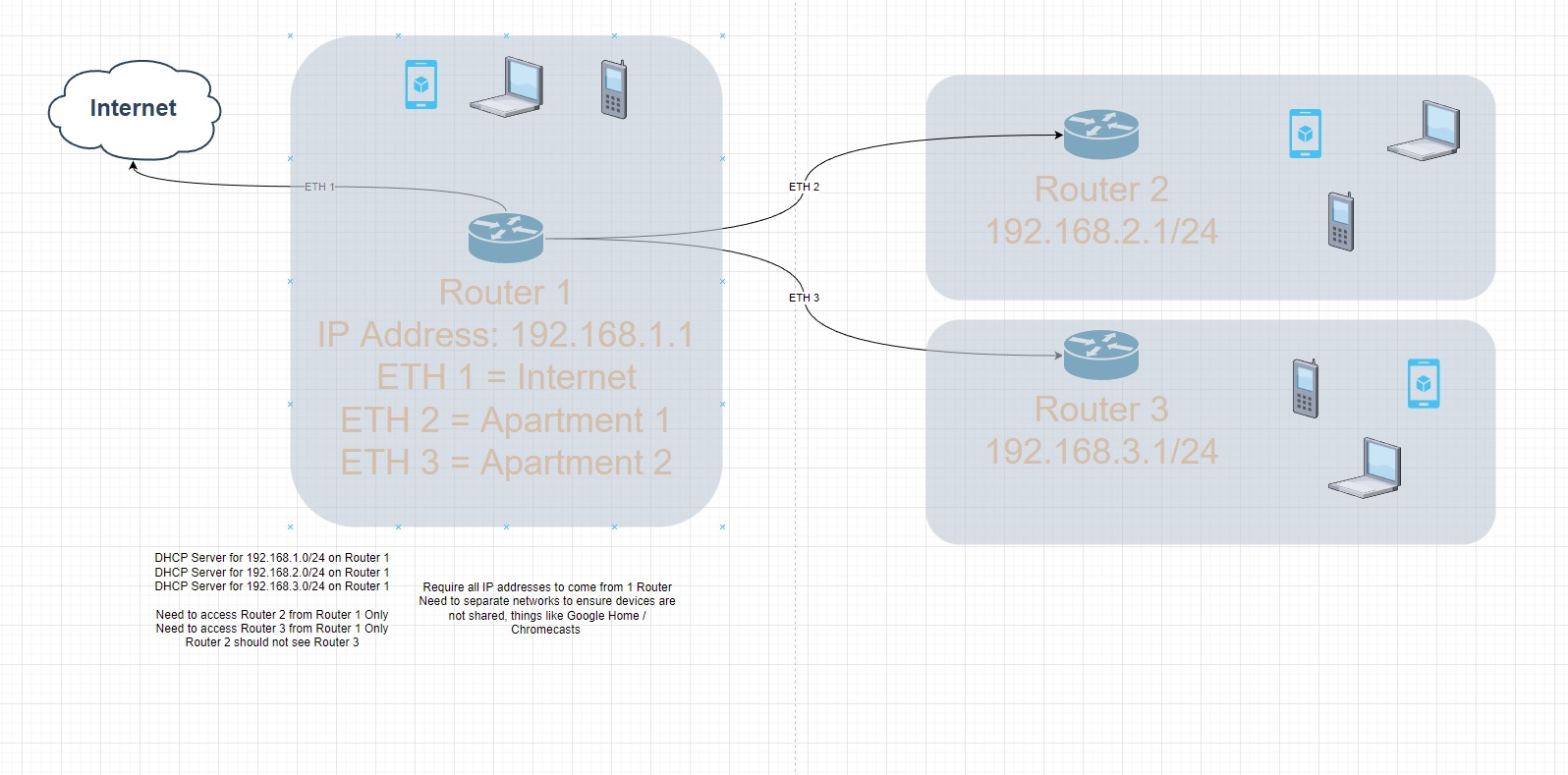
For starters, post current (non-working) config of main router … execute /export hide-sensitive file=anynameyouwish in terminal window, copy file off device, open it using text editor, redact any remaining sensitive information (such as device serial number, any username or password, …), then copy-paste it here inside [__code] [/code] block.
Hi mkx
Woonstel 2 is the port that I would like to use to connect to 2nd Mikrotik router.
# jul/19/2022 14:32:41 by RouterOS 6.48.6
#
# model = RBD52G-5HacD2HnD
/caps-man configuration
add country="south africa" distance=indoors installation=indoor mode=ap name=\
    cfg1 security.authentication-types=wpa-psk,wpa2-psk security.encryption=\
    aes-ccm ssid=Test
/interface bridge
add admin-mac= auto-mac=no name=bridge
/interface ethernet
set [ find default-name=ether1 ] name="0 internet"
set [ find default-name=ether2 ] name=Kantoor
set [ find default-name=ether4 ] name=LinkToMITGranite
set [ find default-name=ether3 ] name="Woonstel 1"
set [ find default-name=ether5 ] name="Woonstel 2"
/interface wireless
set [ find default-name=wlan1 ] antenna-gain=0 band=2ghz-b/g/n channel-width=\
    20/40mhz-Ce country="south africa" disabled=no frequency=2437 \
    installation=indoor mode=ap-bridge ssid=iiDENTIFii station-roaming=\
    enabled wireless-protocol=802.11 wmm-support=enabled
set [ find default-name=wlan2 ] antenna-gain=0 band=5ghz-a/n/ac \
    channel-width=20/40/80mhz-XXXX country="south africa" disabled=no \
    distance=indoors frequency=5500 frequency-mode=manual-txpower mode=\
    ap-bridge ssid=iiDENTIFii station-roaming=enabled wireless-protocol=\
    802.11
add disabled=no keepalive-frames=disabled mac-address=C6:AD:34:0B:61:C7 \
    master-interface=wlan1 multicast-buffering=disabled name=wlan3 ssid=\
    iiDENTIFii1-2G wds-cost-range=0 wds-default-cost=0 wps-mode=disabled
add disabled=no mac-address=C6:AD:34:0B:61:C8 master-interface=wlan2 name=\
    wlan4 ssid=iiDENTIFii1-5G wds-default-bridge=bridge wps-mode=disabled
/interface list
add comment=defconf name=WAN
add comment=defconf name=LAN
/interface wireless security-profiles
set [ find default=yes ] authentication-types=wpa-psk,wpa2-psk eap-methods="" \
    group-key-update=1h mode=dynamic-keys supplicant-identity=MikroTik
/ip pool
add name=dhcp ranges=192.168.1.20-192.168.1.120
add name=5mbps_Pool ranges=172.16.0.2-172.16.0.254
add name=10mbps_Pool ranges=172.16.1.2-172.16.1.254
add name=20mbps_Pool ranges=172.16.2.2-172.16.2.254
add name=Riaan_Pool ranges=172.16.1.2-172.16.1.254
add name=Jean ranges=172.16.3.2-172.16.3.254
add name=dhcp_eth4 ranges=192.168.1.220-192.168.1.255
add name=dhcp_eth3 ranges=192.168.1.180-192.168.1.219
add comment=Kantoor name=Kantoor ranges=192.168.2.10-192.168.2.100
add comment="Link to MIT" name=Riaan ranges=192.168.3.10-192.168.3.100
add comment="Woonstel 1" name="Woonstel 1" ranges=192.168.4.10-192.168.4.100
add comment="Woonstel 2" name="Woonstel 2" ranges=192.168.5.10-192.168.5.100
/ip dhcp-server
add address-pool=dhcp disabled=no interface=bridge lease-time=23h name=\
    defconf
add address-pool=Kantoor interface=Kantoor name=Kantoor
add address-pool=Riaan interface=LinkToMITGranite name=Riaan
add address-pool="Woonstel 1" interface="Woonstel 1" name="Woonstel 1"
add address-pool="Woonstel 2" disabled=no interface="Woonstel 2" name=\
    "Woonstel 2"
/ipv6 dhcp-server
add address-pool=dhcpv6-1 interface=bridge name=server1
/ipv6 pool
add name=dhcpv6-1 prefix=2a03:7900:6::/48 prefix-length=56
/ppp profile
add dns-server=208.67.220.220,208.67.222.222 local-address=172.16.0.1 name=\
    5mbps_Connection remote-address=5mbps_Pool
add dns-server=8.8.8.8 local-address=172.16.1.1 name=10mbps_Connection \
    remote-address=10mbps_Pool use-compression=yes use-encryption=yes
add dns-server=8.8.8.8 local-address=172.16.2.1 name=20mbps_Connection \
    remote-address=20mbps_Pool
add dns-server=208.67.220.220,208.67.222.222 local-address=172.16.1.1 name=\
    Riaan remote-address=Riaan_Pool use-compression=yes use-encryption=yes
add dns-server=8.8.8.8 local-address=172.16.3.1 name=Jean remote-address=Jean \
    use-compression=yes use-encryption=yes
/queue simple
add burst-limit=128/128 burst-threshold=128/128 burst-time=1s/1s disabled=yes \
    limit-at=128/128 max-limit=128/128 name=RateLimit priority=1/1 target=\
    Kantoor,Kantoor
add burst-limit=10M/10M burst-threshold=1k/1k burst-time=1s/1s disabled=yes \
    limit-at=10M/10M max-limit=10M/10M name="Jurina Mac" priority=1/1 target=\
    192.168.1.12/32
add burst-limit=1024/1024 burst-threshold=1024/1024 burst-time=1s/1s \
    disabled=yes limit-at=1024/1024 max-limit=1024/1024 name=ZTE priority=1/1 \
    target=192.168.1.36/32
add disabled=yes dst=192.168.1.66/32 max-limit=30M/30M name="Jannie AMD" \
    target=""
/queue type
add kind=pcq name=5mbps_download pcq-burst-rate=6M pcq-classifier=dst-address \
    pcq-rate=3M
add kind=pcq name=5mbps_upload pcq-classifier=src-address pcq-rate=3M
add kind=pcq name=10mbps_download pcq-classifier=dst-address pcq-rate=10M
add kind=pcq name=10mbps_upload pcq-classifier=src-address pcq-rate=10M
add kind=pcq name=20mbps_download pcq-classifier=dst-address pcq-rate=20M
add kind=pcq name=20mbps_upload pcq-classifier=src-address pcq-rate=20M
add kind=pcq name=Balance_Upload pcq-classifier=src-address pcq-rate=410M
add kind=pcq name=ExternalTotal_Upload pcq-classifier=src-address pcq-rate=\
    20M
add kind=pcq name=Balance_Download pcq-classifier=dst-address pcq-rate=410M
add kind=pcq name=ExternalTotal_Download pcq-classifier=dst-address pcq-rate=\
    20M
add kind=pcq name=500Mbps_download pcq-classifier=dst-address pcq-rate=500M
add kind=pcq name=500mbps_Upload pcq-classifier=src-address pcq-rate=500M
/queue simple
add comment=UNKOWN disabled=yes limit-at=256k/256k max-limit=256k/256k name=\
    UNKOWN packet-marks=UNKOWN-Packets queue=default/default target="" \
    total-queue=synchronous-default
add disabled=yes name=Whatsapp packet-marks=Whatsapp-Packets priority=1/1 \
    queue=500mbps_Upload/500Mbps_download target="" total-queue=\
    wireless-default
add disabled=yes name=Zoom_Meetings packet-marks=ZOOM-Packet priority=1/1 \
    queue=500mbps_Upload/500Mbps_download target="" total-queue=\
    wireless-default
add disabled=yes name=Azure packet-marks=Azure-Work-Packets priority=1/1 \
    queue=500mbps_Upload/500Mbps_download target="" total-queue=\
    synchronous-default
add disabled=yes name=Warzone packet-marks=Worzone-Packets priority=1/1 \
    queue=500mbps_Upload/500Mbps_download target="" total-queue=\
    ethernet-default
add disabled=yes name=Fabriek_Total queue=5mbps_upload/5mbps_download target=\
    172.16.0.0/24 time=6h-17h,sun,mon,tue,wed,thu,fri,sat total-queue=\
    wireless-default
add disabled=yes name=Riaan_Total priority=6/6 queue=\
    5mbps_upload/5mbps_download target=172.16.1.0/24 time=\
    6h-17h,mon,tue,wed,thu,fri total-queue=wireless-default
add disabled=yes limit-at=128k/128k max-limit=128k/128k name=Riaan_Game_Foon \
    packet-marks=Block-Packets priority=7/7 target=172.16.1.0/24 total-queue=\
    ethernet-default
add disabled=yes limit-at=384k/384k max-limit=384k/384k name=Riaan_Google \
    packet-marks=GoogleServices-Packets priority=7/7 target=172.16.1.0/24 \
    total-queue=ethernet-default
add disabled=yes limit-at=512k/512k max-limit=512k/512k name=Riaan_Facebook \
    packet-marks=Facebook-Packets target=172.16.1.0/24 total-queue=\
    ethernet-default
add disabled=yes limit-at=1M/1M max-limit=1M/1M name=Riaan_Netflix \
    packet-marks=Netflix-Packet priority=7/7 target=172.16.1.0/24 \
    total-queue=ethernet-default
add disabled=yes limit-at=1M/1M max-limit=1M/1M name=Riaan_Disney \
    packet-marks=Disney-Packets priority=7/7 target=172.16.1.0/24 \
    total-queue=ethernet-default
add disabled=yes limit-at=10M/10M max-limit=10M/10M name=Woonstel_Netflix \
    packet-marks=Netflix-Packet priority=7/7 target=192.168.1.46/32 \
    total-queue=ethernet-default
add disabled=yes limit-at=10M/10M max-limit=10M/10M name=Woonstel_Youtube \
    packet-marks=Youtube-Packets priority=7/7 target=192.168.1.46/32 \
    total-queue=ethernet-default
add disabled=yes name=Netflix packet-marks=Netflix-Packet priority=7/7 queue=\
    20mbps_upload/20mbps_download target="" total-queue=wireless-default
add disabled=yes name=Facebook packet-marks=Facebook-Packets queue=\
    20mbps_upload/20mbps_download target="" total-queue=wireless-default
add disabled=yes name=Youtube packet-marks=Youtube-Packets queue=\
    500mbps_Upload/500Mbps_download target="" total-queue=wireless-default
add disabled=yes limit-at=5M/5M max-limit=5M/5M name=Kantoor priority=8/1 \
    queue=default/default target=Kantoor
add comment="Limit Internal to 40/40 after hours" disabled=yes name=Internal \
    priority=7/7 queue=Balance_Upload/Balance_Download target="" total-queue=\
    ethernet-default
add disabled=yes name=Fabriek queue=5mbps_upload/5mbps_download target=\
    172.16.0.0/24 total-queue=wireless-default
add disabled=yes name=Jean priority=6/6 queue=20mbps_upload/20mbps_download \
    target=172.16.3.0/24 time=6h-17h,sun,mon,tue,wed,thu,fri,sat total-queue=\
    wireless-default
add disabled=yes max-limit=1M/30M name=GamesUpdates packet-marks=\
    GamesUpdates-Packets target="" total-queue=wireless-default
add disabled=yes name=ExternalTotal queue=\
    ExternalTotal_Upload/ExternalTotal_Download target=""
add disabled=yes name=20mbps_Clients queue=20mbps_upload/20mbps_download \
    target=172.16.2.0/24 time=6h-1d,sun,mon,tue,wed,thu,fri,sat total-queue=\
    wireless-default
add disabled=yes name=10mbps_Clients priority=6/6 queue=\
    10mbps_upload/10mbps_download target=172.16.1.0/24 time=\
    6h-17h,sun,mon,tue,wed,thu,fri,sat total-queue=wireless-default
add disabled=yes limit-at=8k/8k max-limit=8k/8k name=KannieFoon queue=\
    default/default target=192.168.1.66/32
/queue tree
add disabled=yes name=Internal parent=global queue=Balance_Upload
/system logging action
add disk-file-count=10 disk-file-name=dnsToFile disk-lines-per-file=50000 \
    disk-stop-on-full=yes name=dnsToFile target=disk
/user group
set full policy="local,telnet,ssh,ftp,reboot,read,write,policy,test,winbox,pas\
    sword,web,sniff,sensitive,api,romon,dude,tikapp"
/caps-man provisioning
add action=create-dynamic-enabled master-configuration=cfg1
/interface bridge port
add bridge=bridge comment=defconf interface=LinkToMITGranite
add bridge=bridge comment=defconf interface=wlan1
add bridge=bridge comment=defconf interface=wlan2
add bridge=bridge interface=wlan3
add bridge=bridge interface=wlan4
add bridge=bridge interface=Kantoor
add bridge=bridge interface="Woonstel 1"
/interface bridge settings
set use-ip-firewall=yes use-ip-firewall-for-pppoe=yes
/ip neighbor discovery-settings
set discover-interface-list=all
/interface list member
add comment=defconf interface=bridge list=LAN
add comment=defconf interface="0 internet" list=WAN
add list=WAN
/interface pppoe-server server
add authentication=pap disabled=no interface=bridge one-session-per-host=yes \
    service-name=WISP_PPPoE_Server
/interface wireless access-list
add disabled=yes interface=wlan1 signal-range=-55
add authentication=no disabled=yes forwarding=no interface=wlan2 \
    signal-range=-120..-51
add disabled=yes interface=wlan2 signal-range=-50
add authentication=no disabled=yes forwarding=no interface=wlan1 \
    signal-range=-120..-56
/interface wireless cap
set caps-man-addresses=172.0.0.1 interfaces=wlan1,wlan2
/ip address
add address=192.168.1.1/24 comment=defconf interface=bridge network=\
    192.168.1.0
add address=192.168.2.1/24 interface=Kantoor network=192.168.2.0
add address=192.168.3.1/24 interface=LinkToMITGranite network=192.168.3.0
add address=192.168.4.1/24 comment="Woonstel 1" interface="Woonstel 1" \
    network=192.168.4.0
add address=192.168.5.1/24 comment="Woonstel 1" interface="Woonstel 2" \
    network=192.168.5.0
/ip arp
add address=192.168.1.7 interface=bridge mac-address=F0:9F:C2:4C:67:A8
/ip dhcp-client
add comment=defconf disabled=no interface="0 internet" use-peer-dns=no
/ip dhcp-server lease
add address=192.168.1.4 client-id=4C:5E:0C:45:E0:A9 comment="Riaan SXT" \
    mac-address=4C:5E:0C:45:E0:A9
add address=192.168.1.5 client-id=6C:3B:6B:C7:BD:A8 comment="Woonstel Router" \
    mac-address=6C:3B:6B:C7:BD:A8
add address=192.168.1.7 client-id=F0:9F:C2:4C:67:A8 comment=\
    "LinkToMITGranite PowerBeam" mac-address=F0:9F:C2:4C:67:A8
add address=192.168.1.6 client-id=00:27:22:D6:D4:15 comment=\
    "LinkToMITGranite Grid" mac-address=00:27:22:D6:D4:15
add address=192.168.1.8 comment="SXT ac" mac-address=08:55:31:F5:D0:D0
add address=192.168.1.3 client-id=1:cc:2d:e0:c8:9a:d4 mac-address=\
    CC:2D:E0:C8:9A:D4 server=defconf
add address=192.168.1.11 client-id=1:7c:a7:b0:90:1c:33 comment=Kamera \
    mac-address=7C:A7:B0:90:1C:33 server=defconf
add address=192.168.1.9 client-id=1:74:da:88:e4:c5:cd comment=Router \
    mac-address=74:DA:88:E4:C5:CD server=defconf
add address=192.168.1.13 comment="Google Nest" mac-address=AC:67:84:0E:86:7E \
    server=defconf
add address=192.168.1.52 client-id=1:20:1f:3b:29:9b:c0 mac-address=\
    20:1F:3B:29:9B:C0 server=defconf
add address=192.168.1.12 comment=PlugPump mac-address=CC:50:E3:FE:35:98 \
    server=defconf
add address=192.168.1.24 client-id=1:0:24:7e:5:b4:24 comment="Jurina Laptop" \
    mac-address=00:24:7E:05:B4:24 server=defconf
add address=192.168.1.21 client-id=1:b8:8d:12:2e:a8:66 comment=\
    "Jurina Macbook" mac-address=B8:8D:12:2E:A8:66 server=defconf
add address=192.168.1.30 client-id=1:12:9d:72:23:e3:2f comment="Tina Foon" \
    mac-address=12:9D:72:23:E3:2F server=defconf
add address=192.168.1.22 client-id=1:a0:99:9b:3:dc:c9 comment=\
    "Jannie Macbook" mac-address=A0:99:9B:03:DC:C9 server=defconf
add address=192.168.1.10 client-id=1:38:9d:92:f1:7f:7d comment=Printer \
    mac-address=38:9D:92:F1:7F:7D server=defconf
add address=192.168.1.32 client-id=1:32:98:3:ae:80:9b comment="Jannie Foon" \
    mac-address=32:98:03:AE:80:9B server=defconf
add address=192.168.1.50 client-id=1:b0:1c:c:94:b8:4d comment="Juriaan TV" \
    mac-address=B0:1C:0C:94:B8:4D server=defconf
add address=192.168.1.33 client-id=1:4a:7c:3:94:d3:9 mac-address=\
    4A:7C:03:94:D3:09 server=defconf
add address=192.168.1.72 client-id=1:b4:2e:99:ad:0:69 mac-address=\
    B4:2E:99:AD:00:69 server=defconf
/ip dhcp-server network
add address=192.168.1.0/24 comment=defconf dns-server=\
    192.168.1.1,208.67.220.220,208.67.222.222 gateway=192.168.1.1
add address=192.168.2.0/24 comment=Kantoor dns-server=192.168.1.1 gateway=\
    192.168.2.1
add address=192.168.3.0/24 comment=Riaan dns-server=192.168.1.1 gateway=\
    192.168.3.1
add address=192.168.4.0/24 comment="Woonstel 1" dns-server=192.168.1.1 \
    gateway=192.168.4.1
add address=192.168.5.0/24 comment="Woonstel 2" dns-server=8.8.8.8 gateway=\
    192.168.5.1
/ip dns
set allow-remote-requests=yes servers=\
    192.168.1.1,208.67.220.220,208.67.222.222
/ip dns static
add address=192.168.1.1 comment=defconf name=iiDentifii
add address=192.168.1.66 name=lekejan2.co.za
add address=102.37.17.55 comment="Direct to Azure" disabled=yes name=\
    qa.iidentifii.com
add address=102.37.11.134 comment="Direct to Azure" disabled=yes name=\
    sbapi.1identity.co
add address=102.37.22.144 disabled=yes name=alphaportal.iidentifii.com
add address=197.97.45.170 disabled=yes name=ecapre.bidvestbank.local
add address=40.127.11.12 comment=ABSA disabled=yes name=\
    absaapi.iidentifii.com
add address=102.37.18.246 comment=ABSA disabled=yes name=\
    absaapi.iidentifii.com
add address=102.37.22.144 comment="Core API" disabled=yes name=\
    dev.1identity.co
add address=10.0.0.1 comment=NewStaticIP disabled=yes name=\
    qawebapi.iidentifii.com
add address=192.168.1.72 name=iidentifii.internal.co.za
/ip firewall address-list
add address=47.74.193.5 list=drop_traffic
add address=69.171.250.34 list=drop_traffic
add address=47.74.170.157 list=drop_traffic
add address=51.89.1.49 list=drop_traffic
add address=35.201.90.210 list=drop_traffic
add address=192.243.59.12 list=drop_traffic
add address=104.94.85.218 list=drop_traffic
add address=172.67.73.245 list=drop_traffic
add address=139.45.197.146 list=drop_traffic
add address=51.178.195.174 list=drop_traffic
add address=139.45.197.236 list=drop_traffic
add address=172.67.203.55 list=drop_traffic
add address=62.204.41.56 list=drop_traffic
add address=213.6.253.70 list=drop_traffic
add address=193.106.191.92 list=drop_traffic
/ip firewall filter
add action=fasttrack-connection chain=forward comment="Fasstrack DNS" \
    dst-port=53 protocol=tcp
add action=fasttrack-connection chain=forward comment="Fasstrack DNS" \
    dst-port=53 protocol=udp
add action=add-dst-to-address-list address-list=Meetings \
    address-list-timeout=4d chain=forward comment=Meetings disabled=yes \
    dst-address=74.125.250.67
add action=add-dst-to-address-list address-list=Meetings \
    address-list-timeout=4d chain=forward comment=Meetings disabled=yes \
    dst-address=52.113.205.0/24
add action=add-dst-to-address-list address-list=Meetings \
    address-list-timeout=4d chain=forward comment=Meetings disabled=yes \
    dst-address=52.115.137.0/24
add action=add-dst-to-address-list address-list=Meetings \
    address-list-timeout=4d chain=forward comment=Meetings disabled=yes \
    dst-address=52.114.231.0/24
add action=add-dst-to-address-list address-list=Meetings \
    address-list-timeout=4d chain=forward comment=Meetings disabled=yes \
    dst-address=52.114.74.0/24
add action=add-dst-to-address-list address-list=Meetings \
    address-list-timeout=4d chain=forward comment=Meetings disabled=yes \
    dst-address=172.217.170.110
add action=add-dst-to-address-list address-list=Meetings \
    address-list-timeout=4d chain=forward comment=Meetings disabled=yes \
    dst-address=74.125.250.67
add action=add-dst-to-address-list address-list=UNKOWN-LIMITED \
    address-list-timeout=4d chain=forward comment=UNKOWN-LIMITED disabled=yes \
    dst-address=2.17.204.158
add action=add-dst-to-address-list address-list=UNKOWN-LIMITED \
    address-list-timeout=4d chain=forward comment=UNKOWN-LIMITED disabled=yes \
    dst-address=216.58.223.144
add action=add-dst-to-address-list address-list=WARZONE address-list-timeout=\
    4d chain=forward comment=WARZONE disabled=yes dst-address=34.120.203.0/24
add action=add-dst-to-address-list address-list=WARZONE address-list-timeout=\
    4d chain=forward comment=WARZONE disabled=yes dst-address=197.80.200.35
add action=add-dst-to-address-list address-list=WARZONE address-list-timeout=\
    4d chain=forward comment=WARZONE disabled=yes dst-address=197.84.209.0/24
add action=add-dst-to-address-list address-list=WARZONE address-list-timeout=\
    4d chain=forward comment=WARZONE disabled=yes dst-address=197.80.200.22
add action=add-dst-to-address-list address-list=WARZONE address-list-timeout=\
    4d chain=forward comment=WARZONE disabled=yes dst-address=8.247.0.0/24
add action=add-dst-to-address-list address-list=WARZONE address-list-timeout=\
    4d chain=forward comment=WARZONE disabled=yes dst-address=185.34.106.0/24
add action=add-dst-to-address-list address-list=Whatsapp \
    address-list-timeout=4d chain=forward comment=Whatsapp disabled=yes \
    dst-address=41.150.33.102
add action=add-dst-to-address-list address-list=Whatsapp \
    address-list-timeout=4d chain=forward comment=Whatsapp disabled=yes \
    dst-address=102.132.100.0/24
add action=add-dst-to-address-list address-list=Whatsapp \
    address-list-timeout=4d chain=forward comment=Whatsapp disabled=yes \
    dst-address=196.25.84.214
add action=add-dst-to-address-list address-list=Netflix address-list-timeout=\
    4d chain=forward comment=Netflix disabled=yes dst-address=155.93.240.0/24
add action=add-dst-to-address-list address-list=DisneyPlus \
    address-list-timeout=4d chain=forward comment=DisneyPlus disabled=yes \
    dst-address=196.26.85.0/24
add action=add-dst-to-address-list address-list=GameUpdates \
    address-list-timeout=4d chain=forward comment=GamesUpdates disabled=yes \
    dst-address=8.247.244.0/24
add action=add-dst-to-address-list address-list=GameUpdates \
    address-list-timeout=4d chain=forward comment=GamesUpdates disabled=yes \
    dst-address=172.217.170.0/24
add action=add-dst-to-address-list address-list=GameUpdates \
    address-list-timeout=4d chain=forward comment=GameUpdates disabled=yes \
    dst-address=95.100.108.0/24
add action=add-dst-to-address-list address-list=GameUpdates \
    address-list-timeout=4d chain=forward comment=GameUpdates disabled=yes \
    dst-address=205.185.216.0/24
add action=add-dst-to-address-list address-list=GoogleServices \
    address-list-timeout=4d chain=forward comment=GoogleServices disabled=yes \
    dst-address=142.250.0.0/16
add action=add-dst-to-address-list address-list=GoogleServices \
    address-list-timeout=4d chain=forward comment=GoogleServices disabled=yes \
    dst-address=216.239.36.0/24
add action=add-dst-to-address-list address-list=GoogleServices \
    address-list-timeout=4d chain=forward comment=GoogleServices disabled=yes \
    dst-address=172.217.0.0/16
add action=add-dst-to-address-list address-list=Azure-Work \
    address-list-timeout=4d chain=forward comment=Azure-Work disabled=yes \
    dst-address=102.37.22.0/24
add action=add-dst-to-address-list address-list=Azure-Work \
    address-list-timeout=4d chain=forward comment=Azure-Work disabled=yes \
    dst-address=102.37.17.0/24
add action=add-dst-to-address-list address-list=Youtube address-list-timeout=\
    4d chain=forward comment=YoutubeMedia disabled=yes dst-address=\
    154.0.9.0/24
add action=accept chain=forward comment="PPTP Server" disabled=yes \
    dst-address=192.168.1.6 dst-port=1723 protocol=tcp
add action=accept chain=forward comment="PPTP Server" disabled=yes protocol=\
    gre
add action=drop chain=forward comment="wifi cam" disabled=yes src-address=\
    192.168.1.63
add action=drop chain=forward disabled=yes dst-port=8877 protocol=udp
add action=drop chain=forward comment="Drop Tablet" disabled=yes src-address=\
    192.168.1.26
add action=drop chain=forward disabled=yes src-address-list=drop_traffic
add action=drop chain=forward disabled=yes dst-address-list=drop_traffic
add action=drop chain=input disabled=yes dst-address-list=drop_traffic
add action=drop chain=forward disabled=yes dst-port=5222,5228,5229 protocol=\
    tcp
add action=drop chain=input comment="This rule is a problem for google home" \
    disabled=yes dst-port=5222,5228,5229 protocol=tcp
add action=drop chain=input comment="defconf: drop invalid" connection-state=\
    invalid
add action=drop chain=forward comment="defconf: drop invalid" \
    connection-state=invalid
add action=drop chain=forward comment=\
    "defconf: drop all from WAN not DSTNATed" connection-nat-state=!dstnat \
    connection-state=new in-interface-list=WAN
add action=accept chain=forward comment="defconf: accept in ipsec policy" \
    ipsec-policy=in,ipsec
add action=accept chain=forward comment="defconf: accept out ipsec policy" \
    ipsec-policy=out,ipsec
add action=accept chain=forward comment=\
    "defconf: accept established,related, untracked" connection-state=\
    established,related,untracked
add action=accept chain=input comment=\
    "defconf: accept established,related,untracked" connection-state=\
    established,related,untracked
add action=accept chain=input comment="defconf: accept ICMP" protocol=icmp
add action=accept chain=input comment=\
    "defconf: accept to local loopback (for CAPsMAN)" dst-address=127.0.0.1
add action=fasttrack-connection chain=forward comment="defconf: fasttrack" \
    connection-state=established,related disabled=yes
/ip firewall mangle
add action=mark-connection chain=prerouting comment=GoogleServices \
    dst-address-list=GoogleServices new-connection-mark=\
    GoogleServices-Connection passthrough=yes
add action=mark-packet chain=prerouting connection-mark=\
    GoogleServices-Connection new-packet-mark=GoogleServices-Packets \
    passthrough=no
add action=mark-connection chain=prerouting comment=Netflix dst-address-list=\
    Netflix new-connection-mark=Netflix-Connection passthrough=yes
add action=mark-packet chain=prerouting comment=Netflix connection-mark=\
    Netflix-Connection new-packet-mark=Netflix-Packet passthrough=no
add action=mark-connection chain=prerouting comment="ZOOM Connection Marker" \
    dst-port=8801 new-connection-mark="ZOOM Marker" passthrough=yes protocol=\
    udp
add action=mark-packet chain=prerouting comment=Zoom connection-mark=\
    "ZOOM Marker" new-packet-mark=ZOOM-Packet passthrough=no
add action=mark-connection chain=prerouting comment=Meetings \
    dst-address-list=Meetings new-connection-mark="ZOOM Marker" passthrough=\
    yes
add action=mark-packet chain=prerouting comment=Meeting connection-mark=\
    "ZOOM Marker" new-packet-mark=ZOOM-Packet passthrough=no
add action=mark-connection chain=prerouting comment=Facebook \
    dst-address-list=Facebook new-connection-mark=Facebook-Connection \
    passthrough=yes
add action=mark-packet chain=prerouting connection-mark=Facebook-Connection \
    new-packet-mark=Facebook-Packets passthrough=no
add action=mark-connection chain=prerouting comment=Whatsapp \
    dst-address-list=Whatsapp new-connection-mark=Whatsapp-Connection \
    passthrough=yes
add action=mark-packet chain=prerouting connection-mark=Whatsapp-Connection \
    new-packet-mark=Whatsapp-Packets passthrough=no
add action=mark-connection chain=prerouting comment=Azure dst-address-list=\
    Azure-Work new-connection-mark=Azure-Work-Connection passthrough=yes
add action=mark-packet chain=prerouting connection-mark=Azure-Work-Connection \
    new-packet-mark=Azure-Work-Packets passthrough=no
add action=mark-connection chain=prerouting comment=Azure dst-address-list=\
    WARZONE new-connection-mark=Worzone-Connection passthrough=yes
add action=mark-packet chain=prerouting connection-mark=Worzone-Connection \
    new-packet-mark=Worzone-Packets passthrough=no
add action=mark-connection chain=prerouting comment=Block dst-address=\
    154.0.4.177 new-connection-mark=Block-Connection passthrough=yes
add action=mark-packet chain=prerouting comment=Block connection-mark=\
    Block-Connection new-packet-mark=Block-Packets passthrough=no
add action=mark-connection chain=prerouting comment=UNKOWN dst-address-list=\
    UNKOWN-LIMITED new-connection-mark=UNKOWN-Connection passthrough=yes
add action=mark-packet chain=prerouting comment=UNKOWN connection-mark=\
    UNKOWN-Connection new-packet-mark=UNKOWN-Packets passthrough=no
add action=mark-connection chain=prerouting comment=Youtube-Connection \
    dst-address-list=Youtube new-connection-mark=Youtube-Connection \
    passthrough=yes
add action=mark-packet chain=prerouting comment=Youtube connection-mark=\
    Youtube-Connection new-packet-mark=Youtube-Packets passthrough=no
add action=mark-packet chain=prerouting comment=Disney connection-mark=\
    Disney-Connection new-packet-mark=Disney-Packets passthrough=no
add action=mark-connection chain=prerouting comment=Disney-Connection \
    dst-address-list=DisneyPlus new-connection-mark=Disney-Connection \
    passthrough=yes
add action=mark-connection chain=prerouting comment=\
    "0840591804 From 2021-10-05" new-connection-mark=0840591804-Marker \
    passthrough=yes src-address=172.16.1.4
add action=mark-packet chain=prerouting connection-mark=0840591804-Marker \
    new-packet-mark=0840591804-Packet passthrough=no
add action=mark-connection chain=prerouting comment=Fabriek \
    new-connection-mark=Fabriek-Marker passthrough=yes src-address=172.16.0.5
add action=mark-packet chain=prerouting comment=Fabriek connection-mark=\
    Fabriek-Marker new-packet-mark=Fabriek-Packet passthrough=no
/ip firewall nat
add action=src-nat chain=srcnat disabled=yes out-interface=Kantoor \
    to-addresses=192.168.2.0/24
add action=src-nat chain=srcnat disabled=yes out-interface="Woonstel 1" \
    to-addresses=192.168.4.0/24
add action=src-nat chain=srcnat disabled=yes out-interface="Woonstel 2" \
    to-addresses=192.168.5.0/24
add action=dst-nat chain=dstnat disabled=yes dst-address=192.168.5.0/24 \
    in-interface="Woonstel 2" to-addresses=192.168.5.0/24
add action=src-nat chain=srcnat disabled=yes out-interface=LinkToMITGranite \
    to-addresses=192.168.3.7
add action=masquerade chain=srcnat comment="defconf: masquerade" \
    out-interface="0 internet"
add action=masquerade chain=srcnat comment="defconf: masquerade" disabled=yes \
    out-interface-list=WAN
add action=dst-nat chain=dstnat disabled=yes dst-address=155.93.227.87 \
    dst-port=8081 protocol=tcp to-addresses=192.168.1.60 to-ports=8081
add action=dst-nat chain=dstnat disabled=yes dst-address=155.93.227.87 \
    dst-port=8082 protocol=tcp to-addresses=192.168.1.148 to-ports=8082
add action=dst-nat chain=dstnat disabled=yes dst-address=102.132.208.212 \
    dst-port=8093 protocol=tcp to-addresses=192.168.1.52 to-ports=8093
add action=dst-nat chain=dstnat disabled=yes dst-address=102.132.252.246 \
    dst-port=8877 protocol=udp to-addresses=192.168.1.90 to-ports=8877
add action=dst-nat chain=dstnat comment="PPTP Server" disabled=yes dst-port=\
    1723 protocol=tcp to-addresses=192.168.1.5
add action=masquerade chain=srcnat comment="PPTP Server" disabled=yes
/ip firewall service-port
set ftp disabled=yes
set tftp disabled=yes
set irc disabled=yes
set sip disabled=yes
set pptp disabled=yes
set udplite disabled=yes
/ip route
add distance=1 dst-address=172.16.1.0/24 gateway=LinkToMITGranite
/ip service
set telnet disabled=yes
set ftp disabled=yes
set www address=192.168.1.0/24,192.168.2.0/24
set ssh disabled=yes
set api-ssl disabled=yes
/ip traffic-flow target
add dst-address=192.168.1.1
/ip upnp
set enabled=yes
/ip upnp interfaces
add forced-ip=155.93.227.87 interface=wlan1 type=external
add interface=bridge type=internal
/ipv6 nd
add interface=bridge managed-address-configuration=yes other-configuration=\
    yes
/ipv6 nd prefix
add autonomous=no interface=bridge
/ppp secret
add disabled=yes name=test5mbps profile=5mbps_Connection service=pppoe
add disabled=yes name=test10mbps profile=10mbps_Connection remote-address=\
    172.16.1.3 service=pppoe
add disabled=yes name=test20mbps profile=20mbps_Connection service=pppoe
add comment=ABCxyz123 name=0840591804 profile=Riaan remote-address=172.16.1.4 \
    service=pppoe
add comment=MiT2021 limit-bytes-in=1073741824 name=Fabriek profile=\
    5mbps_Connection remote-address=172.16.0.5 service=pppoe
add comment=Jean2021 name=Jean profile=Jean remote-address=172.16.3.4 \
    service=pppoe
add comment=20211010 name=MIT profile=5mbps_Connection remote-address=\
    172.16.0.6 service=pppoe
/system clock
set time-zone-name=Africa/Johannesburg
/system identity
set name=Jannie-hAP-acG
/system logging
add action=dnsToFile disabled=yes topics=dns
/system package update
set channel=long-term
/system scheduler
add interval=1h name=UpdateIP on-event="#--------------- Change Values in this\
    \_section to match your setup ------------------\r\
    \n\r\
    \n# User account info of OpenDNS\r\
    \n\r\
    \n# Update-only password (obtained from OpenDNS Support). With two-factor \
    authentication enabled, the use of an update only password is required. \r\
    \n\r\
    \n:local odnsuser \"\"\r\
    \n:local odnspass \"\"\r\
    \n\r\
    \n# Set the hostname or label of network to be updated. This is the name o\
    f your OpenDNS network on the Dashboard. \r\
    \n# Hostnames with spaces are unsupported. Replace the value in the quotat\
    ions below with your host name.\r\
    \n# Only one host is supported\r\
    \n# Use \"all.dnsomatic.com\" for the matichost to update all items in dns\
    omatic with this IP.\r\
    \n\r\
    \n# Note, you must have admin or edit (Read/Write/Grant in the OpenDNS Das\
    hboard) to update IP addresses. \r\
    \n\r\
    \n:local odnshost \"Home\"\r\
    \n\r\
    \n# Change to the name of interface that gets the changing IP address\r\
    \n\r\
    \n# May not be needed for your model number - commenting out this line may\
    \_still work for single interface devices or if this is not supplied in th\
    e DNS-O-Matic script currently being used\r\
    \n\r\
    \n:local inetinterface \"ether1\"\r\
    \n\r\
    \n#-----------------------------------------------------------------------\
    -------------\r\
    \n\r\
    \n# No more changes needed, one optional change\r\
    \n\r\
    \n:global previousIP;\r\
    \n\r\
    \n:log info \"Fetching current IP\"\r\
    \n\r\
    \n# Get the current public IP using DNS-O-Matic service.\r\
    \n/tool fetch url=\"http://myip.dnsomatic.com/\" mode=http dst-path=mypubl\
    icip.txt\r\
    \n\r\
    \n# Read the current public IP into the currentIP variable.\r\
    \n:local currentIP [/file get mypublicip.txt contents]\r\
    \n\r\
    \n:log info \"Fetched current IP as \$currentIP\"\r\
    \n\r\
    \n# --------- Optional check to only run if the IP has changed (one line: \
    :if)\r\
    \n\r\
    \n# to disable, set line below to: \":if (\$currentIP != 1) do={\"\r\
    \n\r\
    \n:if (\$currentIP != \$previousIP) do={\r\
    \n:log info \"OpenDNS: Update needed\"\r\
    \n:set previousIP \$currentIP\r\
    \n\r\
    \n# The update URL. Note the \"\\3F\" is hex for question mark (\?). Requi\
    red since \? is a special character in commands.\r\
    \n\r\
    \n# Some older editions of the MicroTik/WinBox OS require the following li\
    ne instead (http) whereas newer versions require https.\r\
    \n\r\
    \n# :local url \"http://updates.opendns.com/nic/update\\3Fhostname=\$odnsh\
    ost\"\r\
    \n\r\
    \n\r\
    \n:local url \"https://updates.opendns.com/nic/update\\3Fhostname=\$odnsho\
    st\"\r\
    \n:log info \"OpenDNS: Sending update for \$odnshost\"\r\
    \n\r\
    \n/tool fetch url=(\$url) user=\ password=\ mode=http ds\
    t-path=(\"/net_odns.txt\")\r\
    \n\r\
    \n:delay 2;\r\
    \n\r\
    \n:local odnsReply [/file get net_odns.txt contents];\r\
    \n\r\
    \n:log info \"OpenDNS update complete.\"\r\
    \n\r\
    \n:log info \"OpenDNS reply was \$odnsReply\";\r\
    \n\r\
    \n} else={\r\
    \n\r\
    \n:log info \"OpenDNS: Previous IP \$previousIP and current IP equal, no u\
    pdate need\"\r\
    \n}" policy=\
    ftp,reboot,read,write,policy,test,password,sniff,sensitive,romon \
    start-date=oct/27/2020 start-time=21:14:15
/system script
add dont-require-permissions=no name=OpenDNS owner=Jannie policy=\
    read,policy,test,sniff source="#--------------- Change Values in this sect\
    ion to match your setup ------------------\r\
    \n\r\
    \n# User account info of OpenDNS\r\
    \n\r\
    \n# Update-only password (obtained from OpenDNS Support). With two-factor \
    authentication enabled, the use of an update only password is required. \r\
    \n\r\
    \n:local odnsuser \""\r\
    \n:local odnspass \""\r\
    \n\r\
    \n# Set the hostname or label of network to be updated. This is the name o\
    f your OpenDNS network on the Dashboard. \r\
    \n# Hostnames with spaces are unsupported. Replace the value in the quotat\
    ions below with your host name.\r\
    \n# Only one host is supported\r\
    \n# Use \"all.dnsomatic.com\" for the matichost to update all items in dns\
    omatic with this IP.\r\
    \n\r\
    \n# Note, you must have admin or edit (Read/Write/Grant in the OpenDNS Das\
    hboard) to update IP addresses. \r\
    \n\r\
    \n:local odnshost \"Home\"\r\
    \n\r\
    \n# Change to the name of interface that gets the changing IP address\r\
    \n\r\
    \n# May not be needed for your model number - commenting out this line may\
    \_still work for single interface devices or if this is not supplied in th\
    e DNS-O-Matic script currently being used\r\
    \n\r\
    \n:local inetinterface \"ether1\"\r\
    \n\r\
    \n#-----------------------------------------------------------------------\
    -------------\r\
    \n\r\
    \n# No more changes needed, one optional change\r\
    \n\r\
    \n:global previousIP;\r\
    \n\r\
    \n:log info \"Fetching current IP\"\r\
    \n\r\
    \n# Get the current public IP using DNS-O-Matic service.\r\
    \n/tool fetch url=\"http://myip.dnsomatic.com/\" mode=http dst-path=mypubl\
    icip.txt\r\
    \n\r\
    \n# Read the current public IP into the currentIP variable.\r\
    \n:local currentIP [/file get mypublicip.txt contents]\r\
    \n\r\
    \n:log info \"Fetched current IP as \$currentIP\"\r\
    \n\r\
    \n# --------- Optional check to only run if the IP has changed (one line: \
    :if)\r\
    \n\r\
    \n# to disable, set line below to: \":if (\$currentIP != 1) do={\"\r\
    \n\r\
    \n:if (\$currentIP != \$previousIP) do={\r\
    \n:log info \"OpenDNS: Update needed\"\r\
    \n:set previousIP \$currentIP\r\
    \n\r\
    \n# The update URL. Note the \"\\3F\" is hex for question mark (\?). Requi\
    red since \? is a special character in commands.\r\
    \n\r\
    \n# Some older editions of the MicroTik/WinBox OS require the following li\
    ne instead (http) whereas newer versions require https.\r\
    \n\r\
    \n# :local url \"http://updates.opendns.com/nic/update\\3Fhostname=\$odnsh\
    ost\"\r\
    \n\r\
    \n\r\
    \n:local url \"https://updates.opendns.com/nic/update\\3Fhostname=\$odnsho\
    st\"\r\
    \n:log info \"OpenDNS: Sending update for \$odnshost\"\r\
    \n\r\
    \n/tool fetch url=(\$url) user=\ password=\ mode=http ds\
    t-path=(\"/net_odns.txt\")\r\
    \n\r\
    \n:delay 2;\r\
    \n\r\
    \n:local odnsReply [/file get net_odns.txt contents];\r\
    \n\r\
    \n:log info \"OpenDNS update complete.\"\r\
    \n\r\
    \n:log info \"OpenDNS reply was \$odnsReply\";\r\
    \n\r\
    \n} else={\r\
    \n\r\
    \n:log info \"OpenDNS: Previous IP \$previousIP and current IP equal, no u\
    pdate need\"\r\
    \n}"
/tool graphing interface
add interface=LinkToMITGranite
add interface="Woonstel 1"
add interface="0 internet"
/tool graphing queue
add
add simple-queue=Riaan_Total
add simple-queue=Fabriek
 )))
)))