No-IP & DNSdynamic update

Exellent working script for update DDNS of NO-IP in conjunction with DNSdynamic Sevices.
Debugging and checking done.
Made because of the unreliability of long-term work without confirmation on NO-IP service.


I am sorry for my bad english

# No-IP, DNSdynamic update

#--------------- Change Values in this section to match your setup ------------------

#User account info
:local noipuser "NO-IP_User_Name"
:local noippass "NO-IP_password"
:local dnsdynamicuser "DNSdynamic_User_Name"
:local dnsdynamicpass "DNSdynamic_password"
:local noiphost "NO-IP_host"
:local dnsdynamichost "DNSdynamic_host"

# Change to the name of interface that gets the dynamic IP address
:local inetinterface "Internet_Interface_Name"

#-------------------No more changes need---------------------------------------------

:global previousIP

:if ([/interface get $inetinterface value-name=running]) do={
# Get the current IP on the interface
   :local currentIP [/ip address get [find interface="$inetinterface" disabled=no] address]

# Strip the net mask off the IP address
   :for i from=( [:len $currentIP] - 1) to=0 do={
       :if ( [:pick $currentIP $i] = "/") do={ 
           :set currentIP [:pick $currentIP 0 $i]
       } 
   }

   :if ($currentIP != $previousIP) do={
       :log info "IP: Current IP $currentIP is not equal to previous IP, update needed"
       :set previousIP $currentIP

# The update No-Ip URL. Note the "\3F" is hex for question mark (?). Required since ? is a special character in commands.
       :local url "http://dynupdate.no-ip.com/nic/update\3Fmyip=$currentIP"
       :local noiphostarray
       :set noiphostarray [:toarray $noiphost]
       :foreach host in=$noiphostarray do={
           :log info "No-IP: Sending update for $host"
           /tool fetch url=($url . "&hostname=$host") user=$noipuser password=$noippass mode=http dst-path=("no-ip_ddns_update-" . $host . ".txt")
           :log info "No-IP: Host $host updated on No-IP with IP $currentIP"
       }

# The update dnsdynamic URL. Note the "\3F" is hex for question mark (?). Required since ? is a special character in commands.
       :local url "https://www.dnsdynamic.org/nic/nic/update\3Fmyip=$currentIP"
       :local dnsdynamichostarray
       :set dnsdynamichostarray [:toarray $dnsdynamichost]
       :foreach host in=$dnsdynamichostarray do={
           :log info "dnsdynamic: Sending update for $host"
           /tool fetch url=($url . "&hostname=$host") user=$dnsdynamicuser password=$dnsdynamicpass mode=http dst-path=("dnsdynamic_ddns_update-" . $host . ".txt")
           :log info "dnsdynamic: Host $host updated on dnsdynamic with IP $currentIP"
       }
   }  else={
       :log info "IP: Previous IP $previousIP is equal to current IP, no update needed"
   }
} else={
   :log info "IP: $inetinterface is not currently running, so therefore will not update."
}

Hi Shlyahov,
I use this script found on this forum, it works with no-ip and it doesn’t require an interface so you can use with failover :wink: Hope it is usefull for you and others people.
# Atualização automática de DNS Dinâmico NO-IP

#--------------- Defina os valores nessa sessão para configurar ------------------

# Informações de acesso NO-IP
:local noipuser "EMAIL OU NOME DE LOGIN DO NOIP"
:local noippass "SENHA DE LOGIN"

# Defina o nome do servidor da web a ter o IP atualizado.
# O nome do servidor não aceita espaços. Substitua o valor entre as aspas pelo nome(URL) do seu servidor.
# Para especificar vários servidores, separe-os com vírgulas.
:local noiphost "HOST, EX.: host.ddns.net"


#------------------------------------------------------------------------------------
# Não precisa alterar mais nada

:global previousIP

/tool fetch url="http://myip.dnsomatic.com/" mode=http dst-path=mypublicip.txt
:local currentIP [file get mypublicip.txt contents]

# Strip the net mask off the IP address
   :for i from=( [:len $currentIP] - 1) to=0 do={
       :if ( [:pick $currentIP $i] = "/") do={ 
           :set currentIP [:pick $currentIP 0 $i]
       } 
 }

   :if ($currentIP != $previousIP) do={
       :log info "No-IP: O ip atual $currentIP não é igual ao IP anterior, atualização necessária"
       :set previousIP $currentIP

# The update URL. Note the "\3F" is hex for question mark (?). Required since ? is a special character in commands.
       :local url "http://dynupdate.no-ip.com/nic/update\3Fmyip=$currentIP"
       :local noiphostarray
       :set noiphostarray [:toarray $noiphost]
       :foreach host in=$noiphostarray do={
           :log info "No-IP: Sending update for $host"
           /tool fetch url=($url . "&hostname=$host") user=$noipuser password=$noippass mode=http dst-path=("no-ip_ddns_update-" . $host . ".txt")
           :log info "No-IP: Servidor $host atualizado com o IP $currentIP"
       }
   }  else={
       :log info "No-IP: IP anterior $previousIP é igual o IP atual, atualização não necessária."
   }

Non of them are working for me. I have to login at noip.com and manually change ip given from RB log and hit Update hostname.

Which errors?

Log
06:12:13 system,info router rebooted
06:12:20 pppoe,ppp,info pppoe-out1_VDSL: initializing…
06:12:20 pppoe,ppp,info pppoe-out1_VDSL: connecting…
06:12:21 interface,info ether5 link up (speed 100M, full duplex)
06:12:23 interface,info ether4 link up (speed 100M, full duplex)
06:12:25 pppoe,ppp,info pppoe-out1_VDSL: authenticated
06:12:25 pppoe,ppp,info pppoe-out1_VDSL: connected
06:12:25 system,info item added
06:15:37 script,info IP: Current IP 83.x.x.x is not equal to previous IP, update needed
06:15:37 script,info No-IP: Sending update for domain.ddns.net
06:47:17 script,info IP: Current IP 83.x.x.x is not equal to previous IP, update needed
06:47:17 script,info No-IP: Sending update for domain.ddns.net

here I delete file no-ip_ddns_update-domain.ddns.net.txt from “Files”
Fetch file contain nochg IP.

08:02:40 script,info IP: Current IP 83.x.x.x is not equal to previous IP, update needed
08:02:40 script,info No-IP: Sending update for domain.ddns.net
08:02:40 info fetch: file “no-ip_ddns_update-domain.ddns.net.txt” downloaded
08:02:41 script,info No-IP: Host domain.ddns.net updated on No-IP with IP 83.x.x.x
08:02:41 script,info dnsdynamic: Sending update for DNSdynamic_host
08:32:16 script,info IP: Current IP 83.x.x.x is not equal to previous IP, update needed
08:32:16 script,info No-IP: Sending update for domain.ddns.net
09:07:16 script,info IP: Current IP 83.x.x.x is not equal to previous IP, update needed
09:07:16 script,info No-IP: Sending update for domain.ddns.net

Scheduler:
name=“no-ip” start-time=startup interval=35m on-event=/system script run no-ip owner=“kuba” policy=ftp,read,write,test run-count=27 next-run=22:32:16

FAQ noip:
nochg IP_ADDRESS Success IP address is current, no update performed. Followed by a space and the IP address that it is currently set to.

Support from noip said "After reviewing our logs for this hostname I am seeing the result “badauth”. It looks like the username or password inputted into the DDNS settings are wrong. It could also be that you have a special characters, like %&#…? This could cause issues, too. "
I have checked twice login and pass in script and is OK.
I disabled IP–>Cloud.

Noip support ask me to use this script.
Why I'm not getting fetch txt file now?
Can somebody test it on v6.39rc58 and newest firmware for motherboard 3.33?

\

No-IP automatic Dynamic DNS update

#--------------- Change Values in this section to match your setup ------------------

No-IP User account info

:local noipuser "your@email.com"
:local noippass "yourpassword"

Set the hostname or label of network to be updated.

Hostnames with spaces are unsupported. Replace the value in the quotations below with your host names.

To specify multiple hosts, separate them with commas.

:local noiphost "yourname.ddns.net"

Change to the name of interface that gets the dynamic IP address

:local inetinterface "yourinterface"
#------------------------------------------------------------------------------------

No more changes need

#:global previousIP;
:if ([/interface get $inetinterface value-name=running]) do={

Get the current IP on the interface

:local currentIP [/ip address get [find interface="$inetinterface" disabled=no] address];

Strip the net mask off the IP address

:for i from=( [:len $currentIP] - 1) to=0 do={
:if ( [:pick $currentIP $i] = "/") do={
:set currentIP [:pick $currentIP 0 $i];
}
}
:local previousIP [:resolve "$noiphost"];
:log info "DNS IP: $previousIP, interface IP: $currentIP";
:if ($currentIP != $previousIP) do={
:log info "No-IP: Current IP $currentIP is not equal to previous IP $previousIP, update needed";

:set previousIP $currentIP;

:local url "http://dynupdate.no-ip.com/nic/update\3Fmyip=$currentIP";
:log info "No-IP: Sending update for $noiphost";
/tool fetch url=($url . "&hostname=$noiphost") user=$noipuser password=$noippass mode=http dst-path=("no-ip_ddns_update-" . $host . ".txt")
:log info "No-IP: Host $noiphost updated on No-IP with IP $currentIP";

} else={
:log info "No-IP: Previous IP $previousIP is equal to current IP, no update needed";
}
} else={
:log info "No-IP: $inetinterface is not currently running, so therefore will not update.";
}

enable cloud DDNS
or use this
/ip cloud set ddns-enabled=yesthen try to use this
{
:local noipuser “your@email.com
:local noippass “yourpassword”

:local noiphost “yourname.ddns.net
:local inetinterface “yourinterface”

:global previousIP;

:if ([/interface get $inetinterface value-name=running]) do={

:local currentIP [/ip cloud get public-address];


:for i from=( [:len $currentIP] - 1) to=0 do={
:if ( [:pick $currentIP $i] = “/”) do={
:set currentIP [:pick $currentIP 0 $i]
}
}

:if ($currentIP != $previousIP) do={
:log info “No-IP: Current IP $currentIP is not equal to previous IP, update needed”
:set previousIP $currentIP


:local url “http://dynupdate.no-ip.com/nic/update\3Fmyip=$currentIP
:local noiphostarray
:set noiphostarray [:toarray $noiphost]
:foreach host in=$noiphostarray do={
:log info “No-IP: Sending update for $host”
/tool fetch url=($url . “&hostname=$host”) user=$noipuser password=$noippass mode=http dst-path=(“no-ip_ddns_update-” . $host . “.txt”)
:log info “No-IP: Host $host updated on No-IP with IP $currentIP”
}
} else={
:log info “No-IP: Previous IP $previousIP is equal to current IP, no update needed”
}
} else={
:log info “No-IP: $inetinterface is not currently running, so therefore will not update.”
}
}

Thanks but I’m using now freedns.afraid.org

ver 6.38.3 has none of the scripts working for No-IP…

can someone help please?

try this

https://wiki.mikrotik.com/wiki/Dynamic_DNS_Update_Script_for_No-IP_DNS

that was the same one i was using before the routeros upgraded.

after the upgrade it stopped working.

Hi try this script
its working on 6.40.x and 6.41.x RC

# No-IP automatic Dynamic DNS update

:local noipuser "username"
:local noippass "password"
:local noiphost "hostname-kamu.ddns.net"
:local inetinterface "ether-inet"

:global currentIP
:global previousIP

:if ([/interface get $inetinterface value-name=running]) do={
 :local currentIP [/ip address get [find interface="$inetinterface" disabled=no] address]
 :for i from=( [:len $currentIP] - 1) to=0 do={
 :if ( [:pick $currentIP $i] = "/") do={ 
 :set currentIP [:pick $currentIP 0 $i]
 } 
 }

:if ($currentIP != $previousIP) do={
 :log info "No-IP Updater: Current IP address $currentIP is not equal to previous IP, update needed"
 :set previousIP $currentIP

:local url "http://dynupdate.no-ip.com/nic/update\3Fmyip=$currentIP"
 :local noiphostarray
 :set noiphostarray [:toarray $noiphost]
 :foreach host in=$noiphostarray do={
 :log info "No-IP Updater: Sending update for $host"
 /tool fetch url=($url . "&hostname=$host") user=$noipuser password=$noippass mode=http dst-path=("no-ip_ddns_update-" . $host . ".txt")
 :log info "No-IP Updater: Update change requested. Hostname $host will be updated with $currentIP"
 }
 } else={
 :log info "No-IP Updater: Previous IP address $previousIP is equal to current IP, no update needed"
 }
} else={
 :log info "No-IP Updater: $inetinterface is not currently running, so therefore will not update"
}

i have problem with version 6.36.in log,it write : “No-IP Updater: Previous IP address 42.x.x.x is equal to current IP, no update needed”.But i check at noip,ip dont update anything.Please help me

This is a new script, which is running in versión 6.46.8


System/Script/Add

Name:“Update_NOIP” or anyone you want

Policy: check
-Don´t Require Permissions
-read
-write
-test


##############Script Settings##################

:local NOIPUser "your_no-ip_user"
:local NOIPPass "your_no-ip_pass"
:local WANInter "your_external_interface"
:local NOIPDomain "hostname.no-ip.net"

###############################################

# Get the current IP on the interface
:local currentIP [/ip address get [find interface="$WANInter" disabled=no] address]

# Strip the net mask off the IP address
   :for i from=( [:len $currentIP] - 1) to=0 do={
       :if ( [:pick $currentIP $i] = "/") do={ 
           :set currentIP [:pick $currentIP 0 $i]
       } 
   }

:if ([:resolve $NOIPDomain] != $currentIP) do={
      /tool fetch mode=http user=$NOIPUser password=$NOIPPass url="http://dynupdate.no-ip.com/nic/update\3Fhostname=$NOIPDomain&myip=$currentIP" keep-result=no
      :log info "NO-IP Update: $NOIPDomain - $currentIP"
}

System/Scheduler/Add

Name: Any you want
Start Date: “Oct/30/2020” for example
Start Time: “00:00:00” for example
Interval:“00:00:10” or anyone you want
Policy: check
-read
-write
-test
On Event:“Update_NOIP” or the name you put the script


ortegaav’s asnwer still works like a charm. Tested by routerboard rb750gr3 version 6.49.7 . Tks u guys.

Worked great for me also on RB4011iGS+ with RouterOS 7.13.1, thank you.

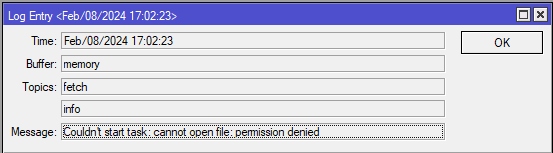
Since december 2023 this script not works for me. Device: RB4011iGS+5HacQ2HnD
But from v7.13.4 I’ve got a log line:
mtikscripterror.jpg
The Script settings are:
mtikscripterror1.jpg

Might try adding “ftp” policy.

Amm0 Thank you it works. (But why ftp the name of this right?)

It does not work for me.
Mikrotik is in bridge mode behind an ISP’s router. Mikrotik is added to DMZ on the isp router.
I run the script but the IP does not get updated on no-ip.
routerOS v6.49.10
On logging I created a script log (w/ action : memory) but I see no errors and no log about what the script has done.

I have also created the following just to test if an update of the IP to 3.0.3.3 will happen:
/tool fetch mode=http url=“http://myUSERNAME:myPASSWORD@dynupdate.no-ip.com/nic/update?hostname=MYDNSNAME.ddns.net&myip=3.0.3.3
but it did not happen. When I inserted the line to a web browser, the IP updated to 3.0.3.3 in the NO-IP serverS

Any suggestions please?
Very beginner here