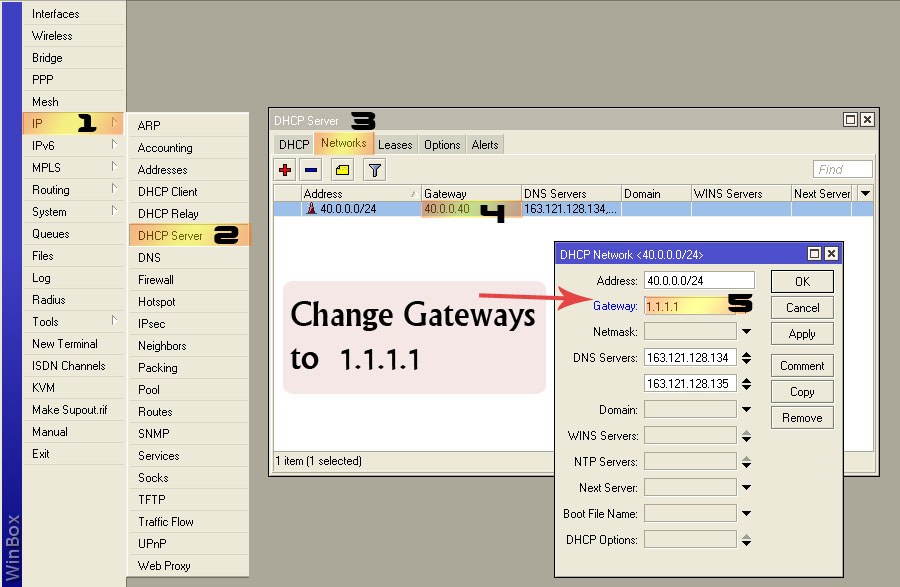
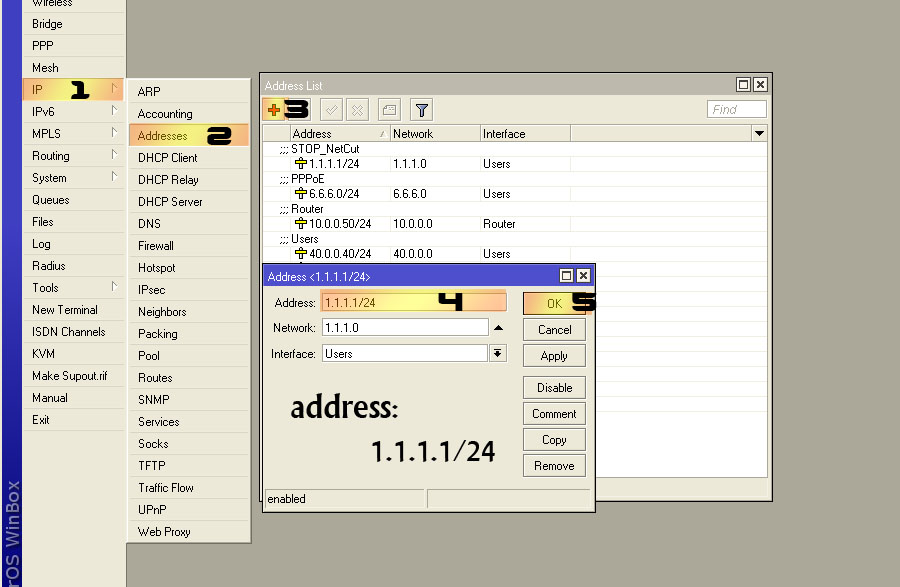
If you give users a default gateway via DHCP that isn’t on the subnet that their address is on, then they can’t reach it. A default gateway must by definition be on the same network as the IP address used to reach it. The whole purpose of a default gateway is to be a router that can be used when the destination IP address is not on the local network.
I tried it first, and second. Two separate machines. On both:
IE and Chrome stall. They get the dns resolution, but after that, there are no webpages.
Ping gets solid “request timed out”.
Which 100% works?
It will work only if you assign a static ip/gateway in your client machines.
EDIT: I set the 1.1.1.1/24 ip on the wrong interface. Now that it is set on the correct interface, it does work.
I did not check if NetCut works, just the network.
What OS? The only way this could work is via a recursive route (route to that gateway via a local IP, which isn’t the case here), or by a client implementation that ARPs for addresses outside of its own subnet and a router that does proxy ARP (which a Hotspot does at least when Universal NAT is on). That client implementation would be broken - a default gateway outside of the local network is not a valid configuration.
@fewi: You know me. I test everything. My first attempt at this, I assigned the 1.1.1.1/24 ip to my WAN interface. No go. That was the first and second attempt. Then I removed 1.1.1.1/24 from the WAN and assigned it to the same LAN interface as the primary ip subnet (localnet). It worked. ??
My setup was ether2 assigned 192.168.1.1/24 and 1.1.1.1/24. I followed the example, and it works as a network. I have not tried NetCut. Both clients were WinXP machines.
Yes, on windows.
I seem to remember a scenario where we were using a FreeBSD router which also got somehow a gateway assigned out of the network (don’t remember the exact reason anymore) and didn’t work.
When we connected a windows machine directly, it worked straight away. It 'll probably only work with windows clients. (which covers a lot of course, but still…)
It’s the same behaviour as when you specify Netmask as 32. (Netmask 32 - will block all client-to-client connectivity). And yes it does work only on Windows. On Linux and other Unixes an interface addresses have to be configured statically or dhcp-client has to ignore gateway IP taken from server.
To my surprise this works on OS X as well as Linux (Debian). The routing tables show a quad zero route to 1.1.1.1, and a host specific route (/32) for 1.1.1.1 via the interface that received the DHCP lease. So a recursive route gets inserted, and that’s why the non-local default gateway works.
I would have bet money these stacks wouldn’t behave that way. Can someone test Windows Vista and 7? And maybe check the routing tables of Windows (“route print”) to see how it recursively resolves the gateway? Does anyone know if this is documented behavior?
Very nice find. By the way, there is no need to use a /24 for the ‘fake’ gateway, a /32 is sufficient. It probably also shouldn’t be 1.1.1.1, because that is a real public IP address that has been assigned to APNIC - they may never use it since it’s used in so many examples and documentation, but it’s still bad practice to use it within your network. Any RFC1918 address would fulfill the same purpose and is safe to use.
As far as netcut goes - I’ve never used it, but this just makes the users of netcut have to perform an extra step: first get an actual DHCP lease and note down the gateway you get assigned, then use netcut, and then manually enter the routes required.
Ok, nice to know.
But concerning netcut, do you guys have many problems with this?
Personally, I never had any complaints or signs anyone was playing with it within our networks. (and I sure hope murphy and his law stays home now!)
not sure I follow, shouldn’t the DHCP also service the PC that runs netcut? which then get the gateway address, no?
netcut user can still obtain the same gateway address just as normal DHCP client. more over, even if you set MAC filter to reply address lease request to known client’s MAC, after netCut user spoof the MAC, they can still gain the same.