I just bought ten of this router to arrange safe covid home work for my colleagues but no way to have wifi safe connections working.(pc and voip phone)
Router details
# nov/25/2020 11:54:04 by RouterOS 6.45.8
# software id = U4P9-TJ0K
#
# model = RBD52G-5HacD2HnD
I was just able to have it working without wireless security.
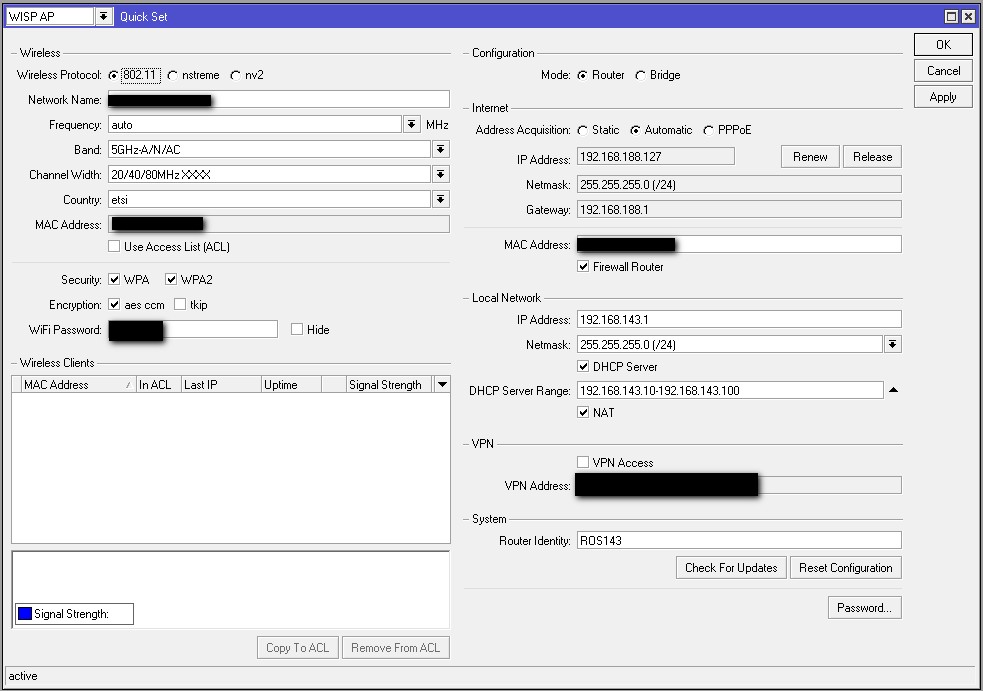
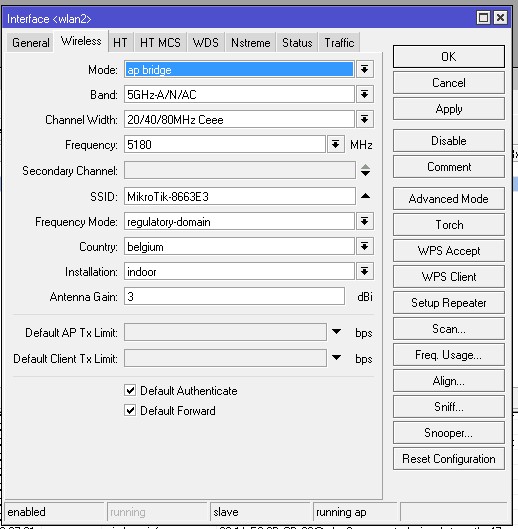
Initial setup done according picture attached
log file showing the following
11:46:36 wireless,debug wlan2: 00:1A:E8:9D:CD:80 attempts to associate
11:46:36 wireless,debug wlan2: 00:1A:E8:9D:CD:80 not in local ACL, by default accept
11:46:36 wireless,info 00:1A:E8:9D:CD:80@wlan2: connected, signal strength -41
11:46:41 wireless,info 00:1A:E8:9D:CD:80@wlan2: disconnected, unicast key exchange timeout
11:46:43 wireless,debug wlan2: 00:1A:E8:9D:CD:80 attempts to associate
11:46:43 wireless,debug wlan2: 00:1A:E8:9D:CD:80 not in local ACL, by default accept
11:46:43 wireless,info 00:1A:E8:9D:CD:80@wlan2: connected, signal strength -42
11:46:48 wireless,info 00:1A:E8:9D:CD:80@wlan2: disconnected, unicast key exchange timeout
11:46:51 wireless,debug wlan2: 00:1A:E8:9D:CD:80 attempts to associate
11:46:51 wireless,debug wlan2: reject 00:1A:E8:9D:CD:80, banned (last failure - unicast key exchange timeout)
11:47:06 wireless,debug wlan2: 00:1A:E8:9D:CD:80 attempts to associate
11:47:06 wireless,debug wlan2: 00:1A:E8:9D:CD:80 not in local ACL, by default accept
11:47:06 wireless,info 00:1A:E8:9D:CD:80@wlan2: connected, signal strength -45
11:47:11 wireless,info 00:1A:E8:9D:CD:80@wlan2: disconnected, unicast key exchange timeout
11:47:12 system,info,account user admin logged in from 192.168.4.24 via telnet
11:47:14 wireless,debug wlan2: 00:1A:E8:9D:CD:80 attempts to associate
11:47:14 wireless,debug wlan2: reject 00:1A:E8:9D:CD:80, banned (last failure - unicast key exchange timeout)
I need to have this working as soon as possible.
Do i miss something
Can somebody help me
Thanks in advance
Checked again and there was probably a typo in wpa key, just typed again on both sides (router and voip phone). Seems to work ok right now
Like it was told to not use quick config is there a problem in my config here below ?
Thanks for your support
# nov/25/2020 13:43:34 by RouterOS 6.45.8
# software id = U4P9-TJ0K
#
# model = RBD52G-5HacD2HnD
# serial number = D7160C92BB37
/interface bridge
add admin-mac=48:8F:5A:86:63:DE auto-mac=no comment=defconf name=bridge
/interface l2tp-client
add connect-to=xxxxxxxxxxxxxx disabled=no name=xxxxxx user=xxxxxxxxx
/interface wireless
set [ find default-name=wlan1 ] band=2ghz-b/g/n channel-width=20/40mhz-XX \
    disabled=no distance=indoors frequency=auto installation=indoor mode=\
    ap-bridge ssid=MikroTik-8663E2 wireless-protocol=802.11
set [ find default-name=wlan2 ] band=5ghz-a/n/ac channel-width=\
    20/40/80mhz-Ceee country=belgium disabled=no distance=indoors \
    installation=indoor mode=ap-bridge ssid=MikroTik-8663E3 \
    wireless-protocol=802.11
/interface list
add comment=defconf name=WAN
add comment=defconf name=LAN
/interface wireless security-profiles
set [ find default=yes ] authentication-types=wpa2-psk eap-methods="" \
    group-key-update=1h mode=dynamic-keys supplicant-identity=MikroTik
/ip hotspot profile
set [ find default=yes ] html-directory=flash/hotspot
/ip pool
add name=dhcp ranges=192.168.143.10-192.168.143.100
/ip dhcp-server
add address-pool=dhcp disabled=no interface=bridge name=defconf
/routing bgp instance
set default as=143
/interface bridge port
add bridge=bridge comment=defconf interface=ether2
add bridge=bridge comment=defconf interface=ether3
add bridge=bridge comment=defconf interface=ether4
add bridge=bridge comment=defconf interface=ether5
add bridge=bridge comment=defconf interface=wlan1
add bridge=bridge comment=defconf interface=wlan2
/ip neighbor discovery-settings
set discover-interface-list=LAN
/interface list member
add comment=defconf interface=bridge list=LAN
add comment=defconf interface=ether1 list=WAN
/ip address
add address=192.168.143.1/24 comment=defconf interface=ether2 network=\
    192.168.143.0
/ip dhcp-client
add comment=defconf dhcp-options=hostname,clientid disabled=no interface=\
    ether1
/ip dhcp-server network
add address=192.168.143.0/24 comment=defconf gateway=192.168.143.1 netmask=24
/ip dns
set allow-remote-requests=yes
/ip dns static
add address=192.168.143.1 comment=defconf name=router.lan
/ip firewall filter
add action=accept chain=input comment=\
    "defconf: accept established,related,untracked" connection-state=\
    established,related,untracked
add action=accept chain=input dst-port=8291 protocol=tcp src-port=""
add action=drop chain=input comment="defconf: drop invalid" connection-state=\
    invalid
add action=accept chain=input comment="defconf: accept ICMP" protocol=icmp
add action=accept chain=input comment=\
    "defconf: accept to local loopback (for CAPsMAN)" dst-address=127.0.0.1
add action=drop chain=input comment="defconf: drop all not coming from LAN" \
    in-interface-list=!LAN
add action=accept chain=forward comment="defconf: accept in ipsec policy" \
    ipsec-policy=in,ipsec
add action=accept chain=forward comment="defconf: accept out ipsec policy" \
    ipsec-policy=out,ipsec
add action=fasttrack-connection chain=forward comment="defconf: fasttrack" \
    connection-state=established,related
add action=accept chain=forward comment=\
    "defconf: accept established,related, untracked" connection-state=\
    established,related,untracked
add action=drop chain=forward comment="defconf: drop invalid" \
    connection-state=invalid
add action=drop chain=forward comment=\
    "defconf: drop all from WAN not DSTNATed" connection-nat-state=!dstnat \
    connection-state=new in-interface-list=WAN
/ip firewall nat
add action=masquerade chain=srcnat comment="defconf: masquerade" \
    ipsec-policy=out,none out-interface-list=WAN
/routing bgp network
add network=192.168.143.0/24 synchronize=no
/routing bgp peer
add name=ros253 remote-address=192.168.191.253 remote-as=111 ttl=default
/system clock
set time-zone-name=Europe/Brussels
/system identity
set name=ROS143
/system logging
add topics=dhcp,debug
add topics=wireless,debug
/tool mac-server
set allowed-interface-list=LAN
/tool mac-server mac-winbox
set allowed-interface-list=LAN
Quickset is perfectly fine to use, so do not hesitate to use it to make initial setup etc.
Its actually fines for most standard use cases as Wifi router.
The only problem is, once you “leave” quickset and start to modify other things directly in the settings (via webfig or Winbox).
then you better not use it again… as the setting changes might conflict with quickset settings. But even then nothing bad will happen,
worst case some settings get wrong. Then you either revert back or need to start setup over again.
As long as you use LATEST SOFTWARE !!! (this is really important) and default firewall (also absolute must have) you are ok…
Important also, do a backup and export and keep that. Then you can always revert your settings easily!!!
This is the output of the quickset, i did not change something about it.
Is it something wrong out of this quickset.
Anyway i will set it up bridge.
Thanks
That is not correct.
The default works out of the box, you changed your network from ether2 to something else and thus needed to change this setting.
Its the not understanding the config that causes the problem
The LAN IP address being applied to ether2 rather than the LAN bridge crops up way too often for everyone to be making the same mistake. I suspect there is something buried in a default script or quickset which was never updated when master-port configuration was replaced by a LAN bridge.