No WiFi - CAPsMAN

EDIT: You can find my latest configuration here: No WiFi - CAPsMAN - #7 by bloodynetworker

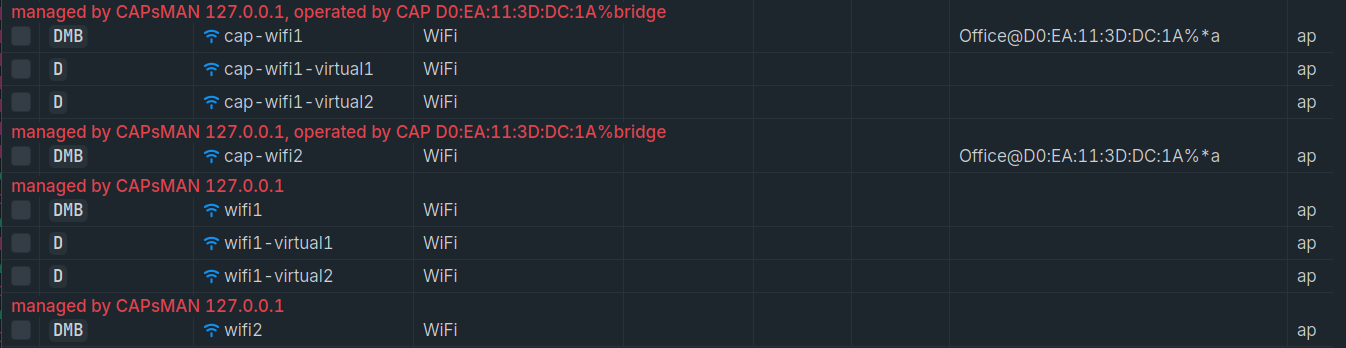
The issue: I’ve setup CAPsMAN and the CAPs, but they’re not casting any WiFi signals (my devices do not see any of those provisioned WiFis) even though they’re claiming that they’re connected to the CAPsMAN (see screenshot).

I have two hAP ax S. One of them (called “Office“) is connected to the other one (called “Main“). The “Main“ is used as the switch of the entire home network. Therefore, it makes sense to configure “Main“ as the CAPsMAN, but I want it to be a CAP as well. This is possible and a proposed solution from MikroTik.

I followed that guide and also this one on how to manually setup the “Office“ CAP.

I don’t see what I might’ve misconfigured, I followed the guides and both CAPs don’t offer any of the provisioned WiFis!


“Main“ configuration:

/interface bridge
add admin-mac=D0:EA:11:3D:E0:96 auto-mac=no comment=defconf fast-forward=no name=bridge
/interface list
add name=LAN
/interface wifi channel
add band=5ghz-ax disabled=no frequency=5150-5250,5250-5350,5470-5725 name=channel_5ghz skip-dfs-channels=10min-cac width=20/40mhz
add band=2ghz-ax disabled=no frequency=2412,2432,2472 name=channel_2ghz width=20mhz
/interface wifi security
add authentication-types=wpa2-psk,wpa3-psk disabled=no encryption=ccmp ft=yes ft-over-ds=yes ft-preserve-vlanid=yes management-encryption=cmac \
    management-protection=allowed name=sec_FAM wps=disable
add authentication-types=wpa2-psk,wpa3-psk comment="includes NTR and IOT" disabled=no encryption=ccmp ft=yes ft-over-ds=yes ft-preserve-vlanid=yes \
    management-encryption=cmac management-protection=allowed name=sec_not_FAM wps=push-button
/interface wifi steering
add disabled=no name=steering1 neighbor-group=dynamic-home.34_5-7e02348a rrm=yes wnm=yes
/interface wifi configuration
add channel=channel_5ghz country=Germany disabled=no installation=indoor manager=capsman mode=ap name=cfg_home.34_5 security=sec_FAM ssid=home.34_5 steering=\
    steering1
add channel=channel_2ghz country=Germany disabled=no installation=indoor manager=capsman mode=ap name=cfg_home.34_2 security=sec_FAM ssid=home.34_2 steering=\
    steering1
add channel=channel_2ghz country=Germany disabled=no installation=indoor manager=capsman mode=ap name=cfg_home.34_2_NTR security=sec_not_FAM ssid=home.34_2_NTR \
    steering=steering1
add channel=channel_2ghz country=Germany disabled=no installation=indoor manager=capsman mode=ap name=cfg_home.34_2_IOT security=sec_not_FAM ssid=home.34_2_IOT \
    steering=steering1
/disk settings
set auto-media-interface=bridge auto-media-sharing=yes auto-smb-sharing=yes
/interface bridge port
add bridge=bridge comment=defconf interface=ether2
add bridge=bridge comment=defconf interface=ether3
add bridge=bridge comment=defconf interface=ether4
add bridge=bridge comment=defconf interface=ether5
add bridge=bridge comment=defconf interface=sfp1
add bridge=bridge comment=defconf interface=*2
add bridge=bridge comment=defconf interface=*3
add bridge=bridge interface=ether1
/ipv6 settings
set disable-ipv6=yes
/interface list member
add comment=defconf interface=bridge list=LAN
/interface wifi cap
set caps-man-addresses=127.0.0.1 certificate=request discovery-interfaces=lo enabled=yes
/interface wifi capsman
set enabled=yes interfaces=bridge,lo upgrade-policy=suggest-same-version
/interface wifi provisioning
add action=create-dynamic-enabled disabled=no master-configuration=cfg_home.34_2 slave-configurations=cfg_home.34_2_NTR,cfg_home.34_2_IOT supported-bands=2ghz-ax
add action=create-dynamic-enabled disabled=no master-configuration=cfg_home.34_5 supported-bands=5ghz-ax
/ip address
add address=10.0.0.10/24 comment=defconf interface=bridge network=10.0.0.0
/ip dns
set allow-remote-requests=yes servers=10.0.0.1
/ip dns static
add address=10.0.0.10 comment=defconf name=router.lan type=A
/ip route
add disabled=no dst-address=0.0.0.0/0 gateway=10.0.0.1
/system clock
set time-zone-name=Europe/Berlin
/system identity
set name=Main

“Office“ configuration:

/interface bridge
add admin-mac=D0:EA:11:3D:DC:1A auto-mac=no comment=defconf name=bridge
/interface wifi
# managed by CAPsMAN D0:EA:11:3D:E0:96%bridge
set [ find default-name=wifi1 ] configuration.manager=capsman .mode=ap datapath.bridge=bridge disabled=no
# managed by CAPsMAN D0:EA:11:3D:E0:96%bridge
set [ find default-name=wifi2 ] configuration.manager=capsman .mode=ap datapath.bridge=bridge disabled=no
/interface list
add comment=defconf name=LAN
/disk settings
set auto-media-interface=bridge auto-media-sharing=yes auto-smb-sharing=yes
/interface bridge port
add bridge=bridge comment=defconf interface=ether2
add bridge=bridge comment=defconf interface=ether3
add bridge=bridge comment=defconf interface=ether4
add bridge=bridge comment=defconf interface=ether5
add bridge=bridge comment=defconf interface=sfp1
add bridge=bridge comment=defconf interface=*8
add bridge=bridge comment=defconf interface=*9
add bridge=bridge interface=ether1
/ipv6 settings
set disable-ipv6=yes
/interface list member
add comment=defconf interface=bridge list=LAN
/interface wifi cap
set caps-man-addresses=10.0.0.10 certificate=request discovery-interfaces=bridge enabled=yes
/ip address
add address=10.0.0.20/24 comment=defconf interface=bridge network=10.0.0.0
/ip dns
set allow-remote-requests=yes servers=10.0.0.1
/ip dns static
add address=10.0.0.20 comment=defconf name=router.lan type=A
/ip route
add disabled=no dst-address=0.0.0.0/0 gateway=10.0.0.1
/system clock
set time-zone-name=Europe/Berlin
/system identity
set name=Office
Check point #21:
GP & CSA (Good Practice and Common Sense Advice) for Mikrotik devices

They are likely to be (corrupted) placeholders for your wifi1 and wifi2 interfaces, that then are not part of the bridge.

Hey, it seems like when I did /interface wifi reset [...], those bridge ports were created and I didn’t notice. I removed them, thanks for the hint! It didn’t resolve the issue though. Do you see something else unusual? I still don’t understand why my APs are not casting any WiFi signals…

You need to re-add wifi1 and wifi2 to the bridge AFAICT.

/interface bridge port
add bridge=bridge comment=defconf interface=wifi1
add bridge=bridge comment=defconf interface=wifi2

Thanks for the quick reply. Good catch! I did add the bridge ports on both CAPs and even after reprovisioning and rebooting its still not working. Aside from that I get that I’d need wifi1 and wifi2 bridge ports on the “Office“ CAP since it is connected to the CAPsMAN through the bridge, but the “Main“ CAP isn’t… it is connected as localhost 127.0.0.1 so it seems to me that on the “Main“ CAP I don’t need them as bridge ports anyway, am I right?

On both APs the bridge ports of wifi1 and wifi2 are marked as inactive.

Well re-post your current configurations, maybe there is something else that some of the more experienced members can spot.

Current “Main“ configuration:

/interface bridge
add admin-mac=D0:EA:11:3D:E0:96 auto-mac=no comment=defconf fast-forward=no name=bridge
/interface list
add name=LAN
/interface wifi channel
add band=5ghz-ax disabled=no frequency=5150-5250,5250-5350,5470-5725 name=channel_5ghz skip-dfs-channels=10min-cac width=20/40mhz
add band=2ghz-ax disabled=no frequency=2412,2432,2472 name=channel_2ghz width=20mhz
/interface wifi security
add authentication-types=wpa2-psk,wpa3-psk disabled=no encryption=ccmp ft=yes ft-over-ds=yes ft-preserve-vlanid=yes management-encryption=cmac \
    management-protection=allowed name=sec_FAM wps=disable
add authentication-types=wpa2-psk,wpa3-psk comment="includes NTR and IOT" disabled=no encryption=ccmp ft=yes ft-over-ds=yes ft-preserve-vlanid=yes \
    management-encryption=cmac management-protection=allowed name=sec_not_FAM wps=push-button
/interface wifi steering
add disabled=no name=steering1 neighbor-group=dynamic-home.34_5-7e02348a rrm=yes wnm=yes
/interface wifi configuration
add channel=channel_5ghz country=Germany disabled=no installation=indoor manager=capsman mode=ap name=cfg_home.34_5 security=sec_FAM ssid=home.34_5 steering=\
    steering1
add channel=channel_2ghz country=Germany disabled=no installation=indoor manager=capsman mode=ap name=cfg_home.34_2 security=sec_FAM ssid=home.34_2 steering=\
    steering1
add channel=channel_2ghz country=Germany disabled=no installation=indoor manager=capsman mode=ap name=cfg_home.34_2_NTR security=sec_not_FAM ssid=home.34_2_NTR \
    steering=steering1
add channel=channel_2ghz country=Germany disabled=no installation=indoor manager=capsman mode=ap name=cfg_home.34_2_IOT security=sec_not_FAM ssid=home.34_2_IOT \
    steering=steering1
/disk settings
set auto-media-interface=bridge auto-media-sharing=yes auto-smb-sharing=yes
/interface bridge port
add bridge=bridge comment=defconf interface=ether2
add bridge=bridge comment=defconf interface=ether3
add bridge=bridge comment=defconf interface=ether4
add bridge=bridge comment=defconf interface=ether5
add bridge=bridge comment=defconf interface=sfp1
add bridge=bridge interface=ether1
add bridge=bridge comment=defconf interface=wifi1
add bridge=bridge comment=defconf interface=wifi2
/ipv6 settings
set disable-ipv6=yes
/interface list member
add comment=defconf interface=bridge list=LAN
/interface wifi cap
set caps-man-addresses=127.0.0.1 certificate=request discovery-interfaces=lo enabled=yes
/interface wifi capsman
set enabled=yes interfaces=bridge,lo upgrade-policy=suggest-same-version
/interface wifi provisioning
add action=create-dynamic-enabled disabled=no master-configuration=cfg_home.34_2 slave-configurations=cfg_home.34_2_NTR,cfg_home.34_2_IOT supported-bands=2ghz-ax
add action=create-dynamic-enabled disabled=no master-configuration=cfg_home.34_5 supported-bands=5ghz-ax
/ip address
add address=10.0.0.10/24 comment=defconf interface=bridge network=10.0.0.0
/ip dns
set allow-remote-requests=yes servers=10.0.0.1
/ip dns static
add address=10.0.0.10 comment=defconf name=router.lan type=A
/ip route
add disabled=no dst-address=0.0.0.0/0 gateway=10.0.0.1
/system clock
set time-zone-name=Europe/Berlin
/system identity
set name=Main

Current “Office“ configuration:

/interface wifi
# managed by CAPsMAN D0:EA:11:3D:E0:96%bridge
set [ find default-name=wifi1 ] configuration.manager=capsman .mode=ap datapath.bridge=bridge disabled=no
# managed by CAPsMAN D0:EA:11:3D:E0:96%bridge
set [ find default-name=wifi2 ] configuration.manager=capsman .mode=ap datapath.bridge=bridge disabled=no
/interface list
add comment=defconf name=LAN
/disk settings
set auto-media-interface=bridge auto-media-sharing=yes auto-smb-sharing=yes
/interface bridge port
add bridge=bridge comment=defconf interface=ether2
add bridge=bridge comment=defconf interface=ether3
add bridge=bridge comment=defconf interface=ether4
add bridge=bridge comment=defconf interface=ether5
add bridge=bridge comment=defconf interface=sfp1
add bridge=bridge interface=ether1
add bridge=bridge comment=defconf interface=wifi1
add bridge=bridge comment=defconf interface=wifi2
/ipv6 settings
set disable-ipv6=yes
/interface list member
add comment=defconf interface=bridge list=LAN
/interface wifi cap
set caps-man-addresses=10.0.0.10 certificate=request discovery-interfaces=bridge enabled=yes
/ip address
add address=10.0.0.20/24 comment=defconf interface=bridge network=10.0.0.0
/ip dns
set allow-remote-requests=yes servers=10.0.0.1
/ip dns static
add address=10.0.0.20 comment=defconf name=router.lan type=A
/ip route
add disabled=no dst-address=0.0.0.0/0 gateway=10.0.0.1
/system clock
set time-zone-name=Europe/Berlin
/system identity
set name=Office

First off, what version of RouterOS are you running? The hAP ax S has had some wifi troubles in various versions. Other threads go into great detail. Best to be on the latest version recommended on the big discussion thread.

Note sure if this is the cause, but the help says that manager=capsman on the CAPsMAN local wifi config is a no-no:

CAPsMAN cannot manage it's own wifi interfaces using configuration.manager=capsman, it is enough to just set the same configuration profile on local interfaces manually as you would with provisioning rules, and the end result will be the same as if they were CAPs.

I would remove that so that the local wifi config comes up without any dependency on CAPsMAN. There is no down-side to this that I’m aware of from a functionality perspective vs what you’re trying to do. And then it will help narrow down if the problem is the basic wifi config or with the CAPsMAN config and provisioning.

I would also remove other non-essential wifi settings on Main until the basics are functioning. For example, /interface wifi security.encryption and management-encryption and management-protection and wps, as well as all the ft settings. Also /interface wifi configuration.steering. None of that is essential for a basic config, so remove it.

Same for the Office side. It’s got /interface wifi cap.caps-man-addresses and certificate set. I would only implement that stuff once the basic CAPsMAN setup is working.

Any of these little details could break something. Likewise the dots in the config names (ex: cfg_home.34_5). Are they ok? I have no idea, but I would be looking at things like that.

If that doesn’t change the behavior, consider resetting the Office device to cAP mode. You won’t necessarily be able to manage Office directly (no DHCP client), but it should pull config from a properly functioning CAPsMAN and broadcast wifi.

First of: Thanks for your detailed reply!

I’m using the latest version 7.22.3 as of now on both APs.

Ok so I removed configuration.manager=capsman from the 4 wifi configurations that I use for provisioning. I don’t get part of your quote and whether I fulfilled that by removing configuration.manager=capsman from the 4 configs:

[…] it is enough to just set the same configuration profile on local interfaces manually as you would with provisioning rules, and the end result will be the same as if they were CAPs.

The wifi configuration profiles on the “Main“ AP now look like this:

/interface wifi configuration
add channel=channel_5ghz country=Germany disabled=no installation=indoor mode=ap name=cfg_home.34_5 security=sec_FAM ssid=home.34_5 steering=steering1
add channel=channel_2ghz country=Germany disabled=no installation=indoor mode=ap name=cfg_home.34_2 security=sec_FAM ssid=home.34_2 steering=steering1
add channel=channel_2ghz country=Germany disabled=no installation=indoor mode=ap name=cfg_home.34_2_NTR security=sec_not_FAM ssid=home.34_2_NTR steering=steering1
add channel=channel_2ghz country=Germany disabled=no installation=indoor mode=ap name=cfg_home.34_2_IOT security=sec_not_FAM ssid=home.34_2_IOT steering=steering1

My devices can now see the WiFis, but they can only join from the “Office“ CAP. Roaming to “Main“ CAP is not an issue when already inside the network, only joining from “Main“ doesn’t work. So the “original“ issue is now fixed, but this new one appeared. I’m assuming since on the “Office“ AP I manually override the bridge as a datapath and the manager as CAPsMAN (I did so by following this MikroTik Guide), it is working flawlessly (even on the slave interfaces IOT and NTR), but not on the “Main“ CAP.

# managed by CAPsMAN D0:EA:11:3D:E0:96%bridge, traffic processing on CAP
# mode: AP, SSID: home.34_2, channel: 2412/ax
set [ find default-name=wifi1 ] configuration.manager=capsman .mode=ap datapath.bridge=bridge disabled=no
# managed by CAPsMAN D0:EA:11:3D:E0:96%bridge, traffic processing on CAP
# mode: AP, SSID: home.34_5, channel: 5700/ax/Ce/D
set [ find default-name=wifi2 ] configuration.manager=capsman .mode=ap datapath.bridge=bridge disabled=no

I stripped away everything you asked me to and checked every time whether I could join from the “Main“ CAP, but no. It wouldn’t let me in. This is so weird I can join from Office and roam to Main, but not join from Main. I even changed the dots to an underscore… since no effect, I changed them back.

About CAPS mode: I had bad experience with that. It never wanted to connect via DHCP. I have a separate DHCP server running and I’m assuming because it doesn’t apply DNS / Gateway settings correctly, it always failed. On both APs I need to set those settings manually so that they can perform properly:

/ip address
add address=10.0.0.20/24 comment=defconf interface=bridge network=10.0.0.0
/ip dns
set allow-remote-requests=yes servers=10.0.0.1
/ip dns static
add address=10.0.0.20 comment=defconf name=router.lan type=A
/ip route
add disabled=no dst-address=0.0.0.0/0 gateway=10.0.0.1

Aside from that… the “Office“ AP is working with no issues so I really doubt that resetting “Office“ to CAPS mode will fix the issue clearly residing on the “Main“ CAP, which also hosts the CAPsMAN server.

Do you guys have other possible solutions?

Thanks @cpunk I really appreciate your contribution :grin: :+1:


Here is my latest “main“ configuration:

/interface bridge
add admin-mac=D0:EA:11:3D:E0:96 auto-mac=no comment=defconf fast-forward=no name=bridge
/interface list
add name=LAN
/interface wifi channel
add band=5ghz-ax disabled=no frequency=5150-5250,5250-5350,5470-5725 name=channel_5ghz skip-dfs-channels=10min-cac width=20/40mhz
add band=2ghz-ax disabled=no frequency=2412,2432,2472 name=channel_2ghz width=20mhz
/interface wifi configuration
add channel=channel_5ghz country=Germany disabled=no installation=indoor mode=ap name=cfg_home.34_5 ssid=home.34_5
add channel=channel_2ghz country=Germany disabled=no installation=indoor mode=ap name=cfg_home.34_2 ssid=home.34_2
add channel=channel_2ghz country=Germany disabled=no installation=indoor mode=ap name=cfg_home.34_2_NTR ssid=home.34_2_NTR
add channel=channel_2ghz country=Germany disabled=no installation=indoor mode=ap name=cfg_home.34_2_IOT ssid=home.34_2_IOT
/interface wifi security
add authentication-types=wpa2-psk,wpa3-psk disabled=no encryption=ccmp ft=yes ft-over-ds=yes ft-preserve-vlanid=yes management-encryption=cmac \
    management-protection=allowed name=sec_FAM wps=disable
add authentication-types=wpa2-psk,wpa3-psk comment="includes NTR and IOT" disabled=no encryption=ccmp ft=yes ft-over-ds=yes ft-preserve-vlanid=yes \
    management-encryption=cmac management-protection=allowed name=sec_not_FAM wps=push-button
/interface wifi steering
add disabled=no name=steering1 neighbor-group=dynamic-home.34_5-7e02348a rrm=yes wnm=yes
/interface wifi configuration
add channel=channel_2ghz channel.frequency=2412,2432,2472 country=Germany disabled=no installation=indoor mode=ap name=COPY_cfg_home.34_2 security=sec_FAM ssid=\
    home.34_2 steering=steering1 steering.neighbor-group=dynamic-home.34_5-7e02348a
add channel=channel_2ghz channel.frequency=2412,2432,2472 country=Germany disabled=no installation=indoor mode=ap name=COPY_cfg_home.34_2_IOT security=sec_not_FAM \
    ssid=home.34_2_IOT steering=steering1 steering.neighbor-group=dynamic-home.34_5-7e02348a
add channel=channel_2ghz channel.frequency=2412,2432,2472 country=Germany disabled=no installation=indoor mode=ap name=COPY_cfg_home.34_2_NTR security=sec_not_FAM \
    ssid=home.34_2_NTR steering=steering1 steering.neighbor-group=dynamic-home.34_5-7e02348a
add channel=channel_5ghz channel.frequency=5150-5250,5250-5350,5470-5725 country=Germany disabled=no installation=indoor mode=ap name=COPY_cfg_home.34_5 security=\
    sec_FAM ssid=home.34_5 steering=steering1 steering.neighbor-group=dynamic-home.34_5-7e02348a
/disk settings
set auto-media-interface=bridge auto-media-sharing=yes auto-smb-sharing=yes
/interface bridge port
add bridge=bridge comment=defconf interface=ether2
add bridge=bridge comment=defconf interface=ether3
add bridge=bridge comment=defconf interface=ether4
add bridge=bridge comment=defconf interface=ether5
add bridge=bridge comment=defconf interface=sfp1
add bridge=bridge interface=ether1
add bridge=bridge comment=defconf interface=wifi1
add bridge=bridge comment=defconf interface=wifi2
/ipv6 settings
set disable-ipv6=yes
/interface list member
add comment=defconf interface=bridge list=LAN
/interface wifi cap
set discovery-interfaces=lo enabled=yes
/interface wifi capsman
set enabled=yes interfaces=bridge,lo upgrade-policy=suggest-same-version
/interface wifi provisioning
add action=create-dynamic-enabled disabled=no master-configuration=cfg_home.34_2 slave-configurations=cfg_home.34_2_NTR,cfg_home.34_2_IOT supported-bands=2ghz-ax
add action=create-dynamic-enabled disabled=no master-configuration=cfg_home.34_5 supported-bands=5ghz-ax
/ip address
add address=10.0.0.10/24 comment=defconf interface=bridge network=10.0.0.0
/ip dns
set allow-remote-requests=yes servers=10.0.0.1
/ip dns static
add address=10.0.0.10 comment=defconf name=router.lan type=A
/ip route
add disabled=no dst-address=0.0.0.0/0 gateway=10.0.0.1
/system clock
set time-zone-name=Europe/Berlin
/system identity
set name=Main

Here is my current “Office“ configuration:

/interface bridge
add admin-mac=D0:EA:11:3D:DC:1A auto-mac=no comment=defconf name=bridge
/interface wifi
# managed by CAPsMAN D0:EA:11:3D:E0:96%bridge, traffic processing on CAP
# mode: AP, SSID: home.34_2, channel: 2432/ax
set [ find default-name=wifi1 ] configuration.manager=capsman .mode=ap datapath.bridge=bridge disabled=no
# managed by CAPsMAN D0:EA:11:3D:E0:96%bridge, traffic processing on CAP
# mode: AP, SSID: home.34_5, channel: 5700/ax/Ce/D
set [ find default-name=wifi2 ] configuration.manager=capsman .mode=ap datapath.bridge=bridge disabled=no
/interface list
add comment=defconf name=LAN
/disk settings
set auto-media-interface=bridge auto-media-sharing=yes auto-smb-sharing=yes
/interface bridge port
add bridge=bridge comment=defconf interface=ether2
add bridge=bridge comment=defconf interface=ether3
add bridge=bridge comment=defconf interface=ether4
add bridge=bridge comment=defconf interface=ether5
add bridge=bridge comment=defconf interface=sfp1
add bridge=bridge interface=ether1
add bridge=bridge comment=defconf interface=wifi1
add bridge=bridge comment=defconf interface=wifi2
/ipv6 settings
set disable-ipv6=yes
/interface list member
add comment=defconf interface=bridge list=LAN
/interface wifi cap
set discovery-interfaces=bridge enabled=yes
/ip address
add address=10.0.0.20/24 comment=defconf interface=bridge network=10.0.0.0
/ip dns
set allow-remote-requests=yes servers=10.0.0.1
/ip dns static
add address=10.0.0.20 comment=defconf name=router.lan type=A
/ip route
add disabled=no dst-address=0.0.0.0/0 gateway=10.0.0.1
/system clock
set time-zone-name=Europe/Berlin
/system identity
set name=Office

@bloodynetworker

You are providing the configuration. There are some mistakes - pointed out by @cpunk, fix them, then follow the next debugging steps.

Now is the time for the truth: provide logs and other info that help figure out the issue.

Configure the logging on both devices (!!!) for the caps and wireless.

system logging add topics=caps,debug action=memory
system logging add topics=wireless,debug action=memory

After that, you should have output (example)

[admin@hex_internet] > system logging print  
Flags: * - DEFAULT
Columns: TOPICS, ACTION
#   TOPICS    ACTION
0 * info      memory
1 * error     memory
2 * warning   memory
3 * critical  echo  
4   caps      memory
    debug           
5   wireless  memory
    debug           
[admin@hex_internet] >

Next, restart both devices one at a time, pausing for a while between each. First the "Main" and second the "Office", and execute command

log print detail without-paging show-ids

Also, run the commands on both devices.

interface wifi print detail
interface wifi radio print detail
interface wifi provisioning print detail
interface wifi cap print
interface wifi capsman print
interface bridge print detail
interface bridge port print detail

When you gather all outputs, provide them.

By that I mean stuff like ft. In the Mikrotik world you only get fast transition roaming within a single CAPsMAN management scope. Because Main in your case is the CAPsMAN, its local interfaces get ft even though they’re not provisioned via CAPsMAN, because they’re still “managed by” the CAPsMAN.

The config entries are missing security=.

But then there is also this, with a bunch of extra junk you don’t need:

/interface wifi configuration
add channel=channel_2ghz channel.frequency=2412,2432,2472 country=Germany disabled=no installation=indoor mode=ap name=COPY_cfg_home.34_2 security=sec_FAM ssid=\
    home.34_2 steering=steering1 steering.neighbor-group=dynamic-home.34_5-7e02348a
add channel=channel_2ghz channel.frequency=2412,2432,2472 country=Germany disabled=no installation=indoor mode=ap name=COPY_cfg_home.34_2_IOT security=sec_not_FAM \
    ssid=home.34_2_IOT steering=steering1 steering.neighbor-group=dynamic-home.34_5-7e02348a
add channel=channel_2ghz channel.frequency=2412,2432,2472 country=Germany disabled=no installation=indoor mode=ap name=COPY_cfg_home.34_2_NTR security=sec_not_FAM \
    ssid=home.34_2_NTR steering=steering1 steering.neighbor-group=dynamic-home.34_5-7e02348a
add channel=channel_5ghz channel.frequency=5150-5250,5250-5350,5470-5725 country=Germany disabled=no installation=indoor mode=ap name=COPY_cfg_home.34_5 security=\
    sec_FAM ssid=home.34_5 steering=steering1 steering.neighbor-group=dynamic-home.34_5-7e02348a

When I said “configure the local interfaces locally, I didn’t mean to have every parameter in each config entry separately in a copy. You only need the base config in /interface wifi channel, security, configuration and then manually assign a configuration entry or entries to each wifi radio. Just like in a single-router config.

So you can delete all those entries. They’ve got lots of things set that shouldn’t be there. For example, you already have frequencies set in /interface wifi channel so you shouldn’t ever set /interface wifi configuration channel.frequency. Generally you only want to configure an option once, and only where it’s most relevant. The Winbox UI lets you set things at multiple levels and this could lead to inconsistent results.

/interface wifi cap
set discovery-interfaces=lo enabled=yes

This should be disabled on Main. Make it:

/interface wifi cap
enabled=no

But with Main no longer looking for the CAPsMAN, you’ve got to configure the radios. I use this on a simple single-device router setup for my son’s router:

/interface wifi
set [ find default-name=wifi1 ] configuration=MAIN-5g-cfg datapath=MAIN-dp configuration.mode=ap disabled=no name=wifi1
set [ find default-name=wifi2 ] configuration=MAIN-2g-cfg datapath=MAIN-dp configuration.mode=ap disabled=no name=wifi2
add name=GUEST-5g master-interface=wifi1 configuration=GUEST-cfg disabled=no datapath=GUEST-dp
add name=GUEST-2g master-interface=wifi2 configuration=GUEST-cfg disabled=no datapath=GUEST-dp

First, I don’t know if the hAP ax S has the same order of radios (wifi1=5, wifi2=2.4), so I would check that against your other devices. Also, this example is with VLANs, so the datapath is set for the main and guest VLANs here.

At any rate, you need something like these /interface wifi entries to tie each radio to a named configuration= entry you want to use (in your case these are the “cfg_home.34_5”, etc configs (not the copies with the extra stuff set).

So basically the process is to:

  1. Set up the channel, sec, config in general (you’re good here once you delete the COPY duplicates).
  2. Point the local radios to those config entries (you need to create the /interface wifi entries for this).
  3. Point the CAPsMAN provisioning to the config entries (this part is already working for you).

Make sense?

Sorry for the misdirection on the dots. It’s difficult to know what might cause a problem and what might not.

you told me to basically remove all the security settings that I have, do you only want me to set the authentication settings? its the only relevant one I can think of that you haven’t pointed out as “not-essential for a basic security config“

Those wifi configuration profiles that you see are basically just a COPY of the old ones you told me to strip away most of its options. I didn’t want to loose my original configurations as I thought in the future they could probably still help me, so I copied them and modified cfg_home.34_x_abc to the bare minimum, just like you asked me to. As long as I don’t actually apply the old configs (“COPY”) to any wifi interface they shouldn’t be causing issues, right? I mean they’re not active on any wifi so :thinking: … Correct me if I’m wrong, otherwise I’ll just manually remove them from the uploaded config scripts so they’re more readable for you. Aside from that, thanks for pointing out that I have duplicate frequency settings! I find it very ease in WinBox to have duplicate settings and your not even noticing it. I think MicroTik should add a feature that points out duplicate settings to the user via the UI in a more noticeable manner. Those duplicate settings were part of the old COPY configuration that I didn’t apply to my wifi interfaces. Currently, I’m only applying the “basic“ config your recommending me.

I was just about to remove “Main“ as a CAP when I noticed that all of a sudden it lets me only join wifi1 and wifi2, but not the virtual ones (basically IOT and NTR slave interfaces). Interesting…

Anyways, lets keep that in mind, though I’m continuing to present the results of your proposal: wifi1 is 2.4 and wifi2 is 5, but I’ve seen it randomly changing sometimes its weird idk…

It’s working. I did it like you asked: Disabling CAP on “Main“ and running it locally. One can now join from “Main“ into wifi1 and wifi2, but this was only home.34_2 and home.34_5 so I created two more wifi interfaces with wifi1 as their master for NTR and IOT, finally I added them as bridge ports too and its all now working!

I’ll try applying some of my older configurations now and see whether that is working fine.
Thank you so much @cpunk after weeks this annoying issue is now finally resolved (and I hope for good :sweat_smile: :joy: )

Here is my configuration of “Main“:

/interface bridge
add admin-mac=D0:EA:11:3D:E0:96 auto-mac=no comment=defconf fast-forward=no name=bridge
/interface list
add name=LAN
/interface wifi channel
add band=5ghz-ax disabled=no frequency=5150-5250,5250-5350,5470-5725 name=channel_5ghz skip-dfs-channels=10min-cac width=20/40mhz
add band=2ghz-ax disabled=no frequency=2412,2432,2472 name=channel_2ghz width=20mhz
/interface wifi security
add authentication-types=wpa2-psk,wpa3-psk disabled=no encryption=ccmp ft=yes ft-over-ds=yes ft-preserve-vlanid=yes management-encryption=cmac \
    management-protection=allowed name=sec_FAM wps=disable
add authentication-types=wpa2-psk,wpa3-psk comment="includes NTR and IOT" disabled=no encryption=ccmp ft=yes ft-over-ds=yes ft-preserve-vlanid=yes \
    management-encryption=cmac management-protection=allowed name=sec_not_FAM wps=push-button
add authentication-types=wpa2-psk,wpa3-psk disabled=no name=basic_sec
/interface wifi configuration
add channel=channel_5ghz country=Germany disabled=no installation=indoor mode=ap name=cfg_home.34_5 security=basic_sec ssid=home.34_5
add channel=channel_2ghz country=Germany disabled=no installation=indoor mode=ap name=cfg_home.34_2 security=basic_sec ssid=home.34_2
add channel=channel_2ghz country=Germany disabled=no installation=indoor mode=ap name=cfg_home.34_2_NTR security=basic_sec ssid=home.34_2_NTR
add channel=channel_2ghz country=Germany disabled=no installation=indoor mode=ap name=cfg_home.34_2_IOT security=basic_sec ssid=home.34_2_IOT
/interface wifi
set [ find default-name=wifi1 ] comment=home.34_2 configuration=cfg_home.34_2 configuration.mode=ap disabled=no
set [ find default-name=wifi2 ] comment=home.34_5 configuration=cfg_home.34_5 configuration.mode=ap disabled=no
add comment=NTR configuration=cfg_home.34_2_NTR configuration.mode=ap disabled=no mac-address=D2:EA:11:3D:E0:9B master-interface=wifi1 name=wifi3
add comment=IOT configuration=cfg_home.34_2_IOT configuration.mode=ap disabled=no mac-address=D2:EA:11:3D:E0:9C master-interface=wifi1 name=wifi4
/interface wifi steering
add disabled=no name=steering1 neighbor-group=dynamic-home.34_5-7e02348a rrm=yes wnm=yes
/interface wifi configuration
add channel=channel_2ghz country=Germany disabled=no installation=indoor mode=ap name=COPY_cfg_home.34_2 security=sec_FAM ssid=home.34_2 steering=steering1 \
    steering.neighbor-group=dynamic-home.34_5-7e02348a
add channel=channel_2ghz country=Germany disabled=no installation=indoor mode=ap name=COPY_cfg_home.34_2_IOT security=sec_not_FAM ssid=home.34_2_IOT steering=\
    steering1 steering.neighbor-group=dynamic-home.34_5-7e02348a
add channel=channel_2ghz country=Germany disabled=no installation=indoor mode=ap name=COPY_cfg_home.34_2_NTR security=sec_not_FAM ssid=home.34_2_NTR steering=\
    steering1 steering.neighbor-group=dynamic-home.34_5-7e02348a
add channel=channel_5ghz country=Germany disabled=no installation=indoor mode=ap name=COPY_cfg_home.34_5 security=sec_FAM ssid=home.34_5 steering=steering1 \
    steering.neighbor-group=dynamic-home.34_5-7e02348a
/disk settings
set auto-media-interface=bridge auto-media-sharing=yes auto-smb-sharing=yes
/interface bridge port
add bridge=bridge comment=defconf interface=ether2
add bridge=bridge comment=defconf interface=ether3
add bridge=bridge comment=defconf interface=ether4
add bridge=bridge comment=defconf interface=ether5
add bridge=bridge comment=defconf interface=sfp1
add bridge=bridge interface=ether1
add bridge=bridge interface=wifi1
add bridge=bridge interface=wifi2
add bridge=bridge interface=wifi3
add bridge=bridge interface=wifi4
/ipv6 settings
set disable-ipv6=yes
/interface list member
add comment=defconf interface=bridge list=LAN
/interface wifi capsman
set enabled=yes interfaces=bridge upgrade-policy=suggest-same-version
/interface wifi provisioning
add action=create-dynamic-enabled disabled=no master-configuration=cfg_home.34_2 slave-configurations=cfg_home.34_2_NTR,cfg_home.34_2_IOT supported-bands=2ghz-ax
add action=create-dynamic-enabled disabled=no master-configuration=cfg_home.34_5 supported-bands=5ghz-ax
/ip address
add address=10.0.0.10/24 comment=defconf interface=bridge network=10.0.0.0
/ip dns
set allow-remote-requests=yes servers=10.0.0.1
/ip dns static
add address=10.0.0.10 comment=defconf name=router.lan type=A
/ip route
add disabled=no dst-address=0.0.0.0/0 gateway=10.0.0.1
/system clock
set time-zone-name=Europe/Berlin
/system identity
set name=Main

Thank you so much @cpunk after weeks this annoying issue is now finally resolved (and I hope for good :sweat_smile: :joy: )

Excellent! Glad to hear it's working.

Still, you have junk entries in your config. But more interesting is the password for the WIFI on the MAIN
and in the OFFICE

/interface wifi configuration
<cut> name=cfg_home.34_5 security=basic_sec
<cut> name=cfg_home.34_2 security=basic_sec
<cut> name=cfg_home.34_2_NTR security=basic_sec
<cut>name=cfg_home.34_2_IOT security=basic_sec

where:

/interface wifi security
add authentication-types=wpa2-psk,wpa3-psk disabled=no name=basic_sec

Am I wrong? So, why create multiple SSIDs if you are using the same password for all of them?
Or you are adding "password=" separately for "wifi configuration" and "wifi" (MAIN).