i made a backup after changing the machine
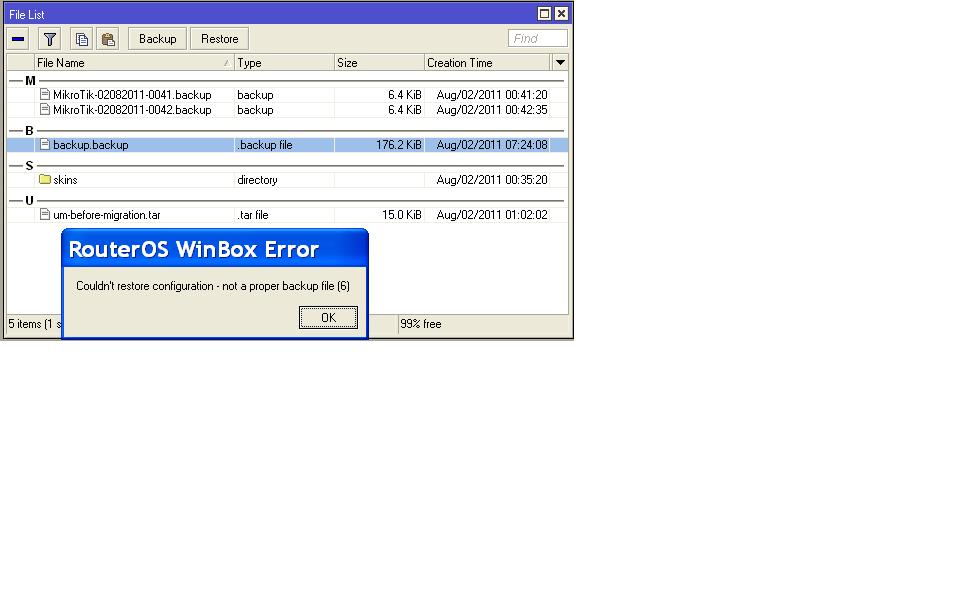
i cannot load my last backup because of the display in mikrotik . backup file under type tab
did you see this before thanks
http://wiki.mikrotik.com/wiki/Manual:Configuration_Management#Description
The restoration procedure assumes the cofiguration is restored on the same router, where the backup file was originally created, so it will create partially broken configuration if the hardware has been changed.
Restoring binary backups on devices other than the one the backup was created on is not officially supported.
http://wiki.mikrotik.com/wiki/Manual:Configuration_Management#Exporting_Configuration
Do a text export instead, edit the file as required to match the new hardware, then import that text configuration.
fewi, true, but that is not the reason for his error message. the file should still be restored, even on a different device.
the error probably means that the file is corrupted, for example the creation of the file was interrupted.
I get the same error, but only after the router sends the backup via automated script. I can drag/drop and restore just fine as well as manually send the email with a usable file, however when the script sends the file, the type is changed to “.backup file” rather than “backup” and becomes unusable. Currently running v5.22 on RB1200. I know this work on v4.17.
Thanks for any help
Do you have enough delay between file creation and email sending?
I had it set to delay of 10 seconds, increased to 20 seconds but still no luck. It seems that using the email tool changes the file type when attached. If I drag/drop and then attach to my email it works, but not when email with Mikrotik e-mail tool.