So my query is regarding the fail-over script over at http://wiki.mikrotik.com/wiki/Failover_Scripting. While I’m sure this isn’t the “official” script, it sure is entered into the Wiki, which does make it more official than a forum thread.
Anywhoo, The script seems awesome enough, but while on WAN2 (aka ISP2 in the script) - After WAN1 (aka ISP1) died, and the script failed over - when the script pings for the gateway of WAN1, the actual ping still goes out of WAN2, resulting in the script never reverting back to WAN1 once it’s back up again.
I cannot use ‘check gateway’ as I want to failover based on logical failures (WAN routing) instead of physical failures, as check gateway and arp would provide.
I’ve tried this several times now, each time with a clean RouterOS (RB750) install (both v5.23 and RC13), no firewall or mangle rules, but for two masquerade rules.
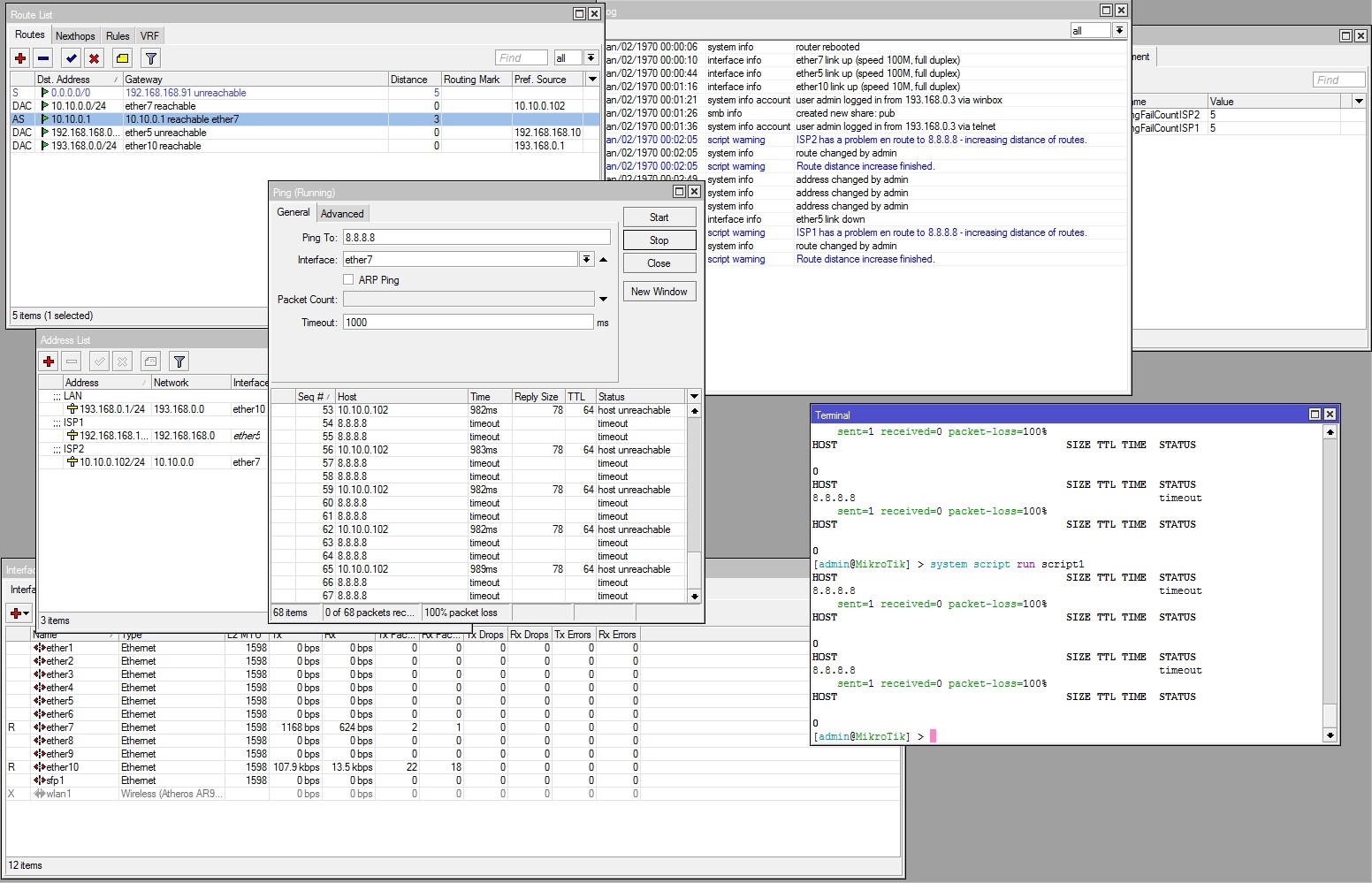
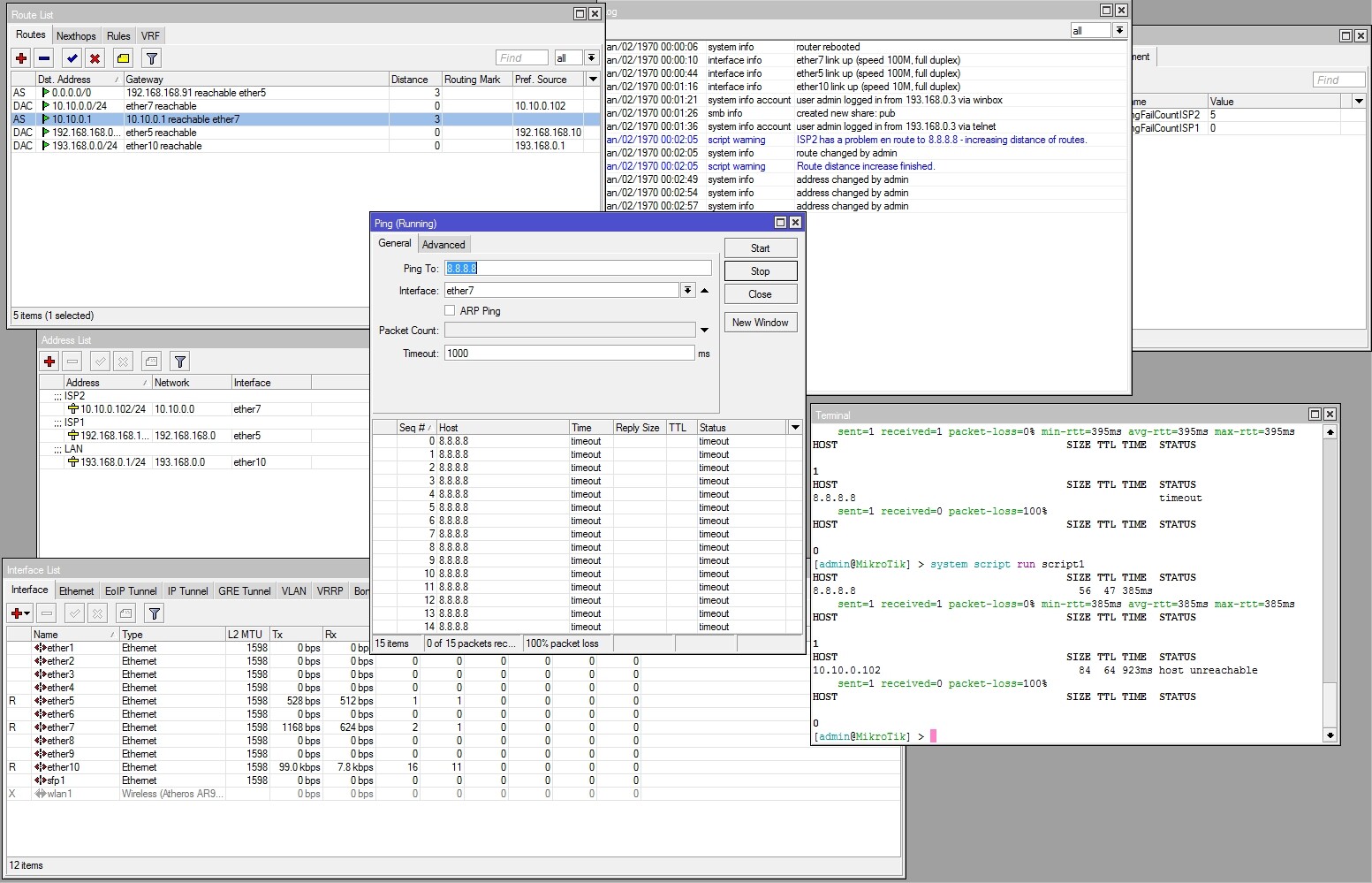
I executed the script in the terminal, and each time I can see the only ping response was from WAN 2, while the routing table shows WAN1 as unreachable, even though I plugged the cable back in. The only way I was able to force traffic over WAN1 again, was to change the distance to lower than WAN2, as expected.
After carefully watching the script in action for a couple minutes, I’ve found that it DOES work, BUT, it does not automatically revert back to ISP1 when it’s reachable again, instead it will stay on ISP2 until it goes down, then only revert back to ISP1.
I noticed that the script increases the route distance of the ISP that’s down, as it should, but in doing so, pinging ISP1 won’t work, unless it’s possible to “force” ping out of ISP1’s interface, regardless of distance.
Its not official. Its just included on the wiki under user submitted scripts.
As the script is mine, I should be able to help you. Are you sure its not a problem with your mangle / route setup?
Please post “/export compact” from your mangle and routes.
Also, yes, the script actually forces respective pings to go out respective interfaces.
I noticed, even before running the script, with GW1 and GW2 distanced set to 1 and 2 respectively, I cannot ping an IP over GW2 until I change the distances to 2 and 1 (making GW2 the priority) - why is this?
# apr/15/2013 09:35:25 by RouterOS 6.0rc13
#
/interface bridge
add l2mtu=1524 name=bridge-lan3-5
/interface ethernet
set 0 auto-negotiation=no l2mtu=1524 name=P1VOXSAT
set 1 auto-negotiation=no name=P2XPRESS
/ip hotspot user profile
set [ find default=yes ] idle-timeout=none keepalive-timeout=2m
/interface bridge port
add bridge=bridge-lan3-5 interface=ether3
add bridge=bridge-lan3-5 interface=ether4
add bridge=bridge-lan3-5 interface=ether5
/ip address
[b]add address=172.20.0.1/24 interface=bridge-lan3-5 network=172.20.0.0
add address=193.168.0.3/24 interface=P2XPRESS network=193.168.0.0
add address=10.10.0.2/24 interface=P1VOXSAT network=10.10.0.0[/b]
/ip dns
set allow-remote-requests=yes servers=8.8.8.8,8.8.4.4
/ip firewall nat
add action=masquerade chain=srcnat out-interface=P2XPRESS src-address-list=""
add action=masquerade chain=srcnat out-interface=P1VOXSAT src-address-list=""
/ip route
[b]add distance=1 gateway=10.10.0.1
add distance=2 gateway=193.168.0.1[/b]
/ip service
set www port=8765
/system clock
set time-zone-name=Africa/Johannesburg
/system ntp client
set enabled=yes mode=unicast primary-ntp=196.4.160.4 secondary-ntp=\
    64.90.182.55
/system scheduler
add name=failover-schedule on-event=failover-script policy=\
    ftp,reboot,read,write,policy,test,winbox,password,sniff,sensitive,api \
    start-date=apr/12/2013 start-time=09:26:56
/system script
add name=script1 policy=\
    ftp,reboot,read,write,policy,test,winbox,password,sniff,sensitive,api \
    source="\r\
    \n# Edit the variables below to suit your needs\r\
    \n\r\
    \n# Please fill the WAN interface names\r\
    \n:local InterfaceISP1 P1VOXSAT\r\
    \n:local InterfaceISP2 P2XPRESS\r\
    \n#P1VOXSAT=ETH1\r\
    \n#P2XPRESS=ETH2\r\
    \n\r\
    \n# Please fill the gateway IPs (or interface names in case of PPP)\r\
    \n:local GatewayISP1 192.168.0.254\r\
    \n:local GatewayISP2 193.168.0.1\r\
    \n\r\
    \n# Please fill the ping check host\r\
    \n:local PingTarget 8.8.8.8\r\
    \n\r\
    \n# Please fill how many ping failures are allowed before fail-over happen\
    ds\r\
    \n:local FailTreshold 3\r\
    \n\r\
    \n# Define the distance increase of a route when it fails\r\
    \n:local DistanceIncrease 2\r\
    \n\r\
    \n# Editing the script after this point may break it\r\
    \n\r\
    \n# Declare the global variables\r\
    \n:global PingFailCountISP1\r\
    \n:global PingFailCountISP2\r\
    \n\r\
    \n# This inicializes the PingFailCount variables, in case this is the 1st \
    time the script has ran\r\
    \n:if ([:typeof \$PingFailCountISP1] = \"nothing\") do={:set PingFailCount\
    ISP1 0}\r\
    \n:if ([:typeof \$PingFailCountISP2] = \"nothing\") do={:set PingFailCount\
    ISP2 0}\r\
    \n\r\
    \n# This variable will be used to keep results of individual ping attempts\
    \r\
    \n:local PingResult\r\
    \n\r\
    \n# Check ISP1\r\
    \n:set PingResult [ping \$PingTarget count=1 interface=\$InterfaceISP1]\r\
    \n:put \$PingResult\r\
    \n\r\
    \n:if (\$PingResult = 0) do={\r\
    \n\t:if (\$PingFailCountISP1 < (\$FailTreshold+2)) do={\r\
    \n\t\t:set PingFailCountISP1 (\$PingFailCountISP1 + 1)\r\
    \n\t\t\r\
    \n\t\t:if (\$PingFailCountISP1 = \$FailTreshold) do={\r\
    \n\t\t\t:log warning \"ISP1 has a problem en route to \$PingTarget - incre\
    asing distance of routes.\"\r\
    \n\t\t\t:foreach i in=[/ip route find gateway=\$GatewayISP1 && static] do=\
    \\\r\
    \n\t\t\t\t{/ip route set \$i distance=([/ip route get \$i distance] + \$Di\
    stanceIncrease)}\r\
    \n\t\t\t:log warning \"Route distance increase finished.\"\r\
    \n\t\t}\r\
    \n\t}\r\
    \n}\r\
    \n:if (\$PingResult = 1) do={\r\
    \n\t:if (\$PingFailCountISP1 > 0) do={\r\
    \n\t\t:set PingFailCountISP1 (\$PingFailCountISP1 - 1)\r\
    \n\t\t\r\
    \n\t\t:if (\$PingFailCountISP1 = (\$FailTreshold -1)) do={\r\
    \n\t\t\t:log warning \"ISP1 can reach \$PingTarget again - bringing back o\
    riginal distance of routes.\"\r\
    \n\t\t\t:foreach i in=[/ip route find gateway=\$GatewayISP1 && static] do=\
    \\\r\
    \n\t\t\t\t{/ip route set \$i distance=([/ip route get \$i distance] - \$Di\
    stanceIncrease)}\r\
    \n\t\t\t:log warning \"Route distance decrease finished.\"\r\
    \n\t\t}\r\
    \n\t}\r\
    \n}\r\
    \n\r\
    \n\r\
    \n\r\
    \n# Check ISP2\r\
    \n:set PingResult [ping \$PingTarget count=1 interface=\$InterfaceISP2]\r\
    \n:put \$PingResult\r\
    \n\r\
    \n:if (\$PingResult = 0) do={\r\
    \n\t:if (\$PingFailCountISP2 < (\$FailTreshold+2)) do={\r\
    \n\t\t:set PingFailCountISP2 (\$PingFailCountISP2 + 1)\r\
    \n\t\t\r\
    \n\t\t:if (\$PingFailCountISP2 = \$FailTreshold) do={\r\
    \n\t\t\t:log warning \"ISP2 has a problem en route to \$PingTarget - incre\
    asing distance of routes.\"\r\
    \n\t\t\t:foreach i in=[/ip route find gateway=\$GatewayISP2 && static] do=\
    \\\r\
    \n\t\t\t\t{/ip route set \$i distance=([/ip route get \$i distance] + \$Di\
    stanceIncrease)}\r\
    \n\t\t\t:log warning \"Route distance increase finished.\"\r\
    \n\t\t}\r\
    \n\t}\r\
    \n}\r\
    \n:if (\$PingResult = 1) do={\r\
    \n\t:if (\$PingFailCountISP2 > 0) do={\r\
    \n\t\t:set PingFailCountISP2 (\$PingFailCountISP2 - 1)\r\
    \n\t\t\r\
    \n\t\t:if (\$PingFailCountISP2 = (\$FailTreshold -1)) do={\r\
    \n\t\t\t:log warning \"ISP2 can reach \$PingTarget again - bringing back o\
    riginal distance of routes.\"\r\
    \n\t\t\t:foreach i in=[/ip route find gateway=\$GatewayISP2 && static] do=\
    \\\r\
    \n\t\t\t\t{/ip route set \$i distance=([/ip route get \$i distance] - \$Di\
    stanceIncrease)}\r\
    \n\t\t\t:log warning \"Route distance decrease finished.\"\r\
    \n\t\t}\r\
    \n\t}\r\
    \n}"
Thanks for the advise I had a look at your presentation pdf, and copied the console commands as close as possible, yet up until before page 38 - since I don’t want load balancing, only automated fail-over (and restore).
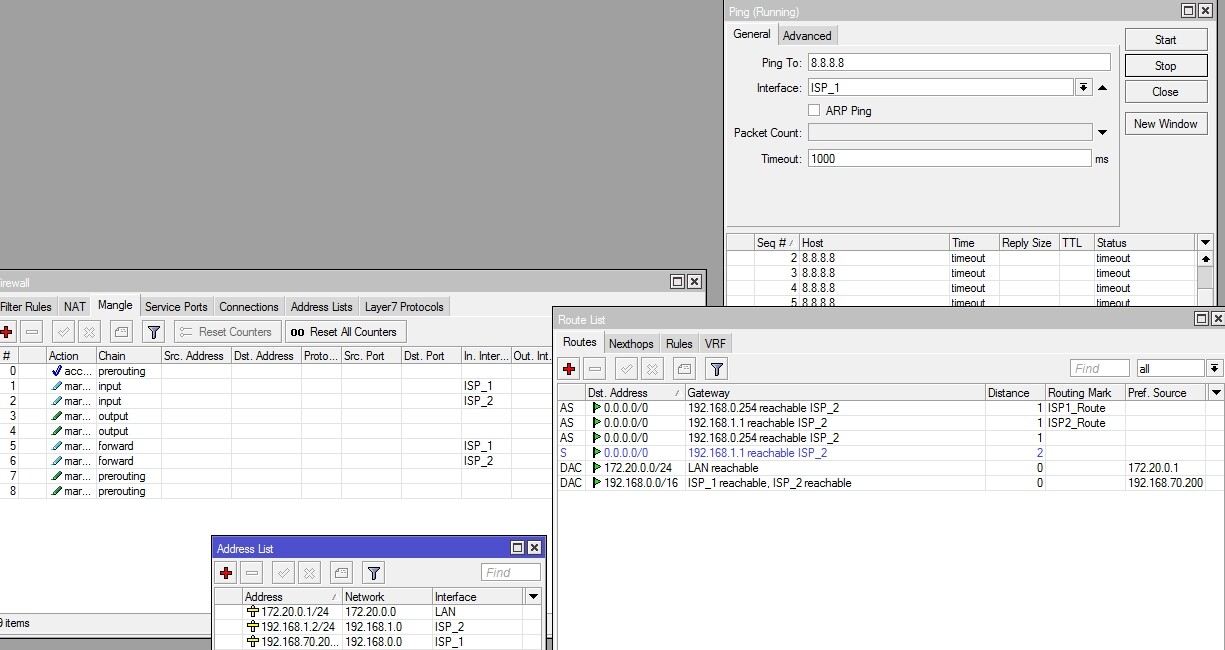
Yes, the same problem persists, when ISP1 is the primary connection, I cannot ping out of ISP2’s interface.
Your mangle is still not right. Since you arent doing the actual topology in my presentation, but a different thing, you need to modify the mangle, the presentation was just an example so you could see how the whole thing is supposed to work.
That will make your router and LAN (if you do some NATs) accessible from both ISPs. You dont need any more mangle, since your LAN → WAN connections will always stay in the “main” routing table.
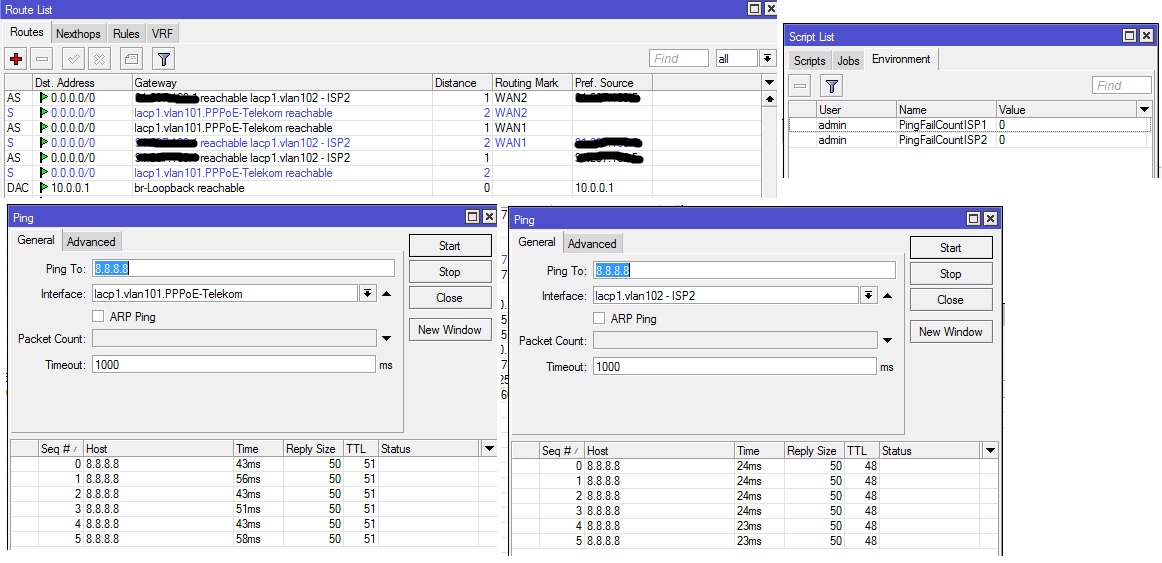
The rest of your setup is OK, so the script should now work fine. Example from one of our routers here. (I have more routes in each WAN routing table because of load-balancing)
I can ping both ISP’s now from RouterOS, thank you for helping out, but now my LAN cannot access the net, I can see packet flow through the NAT rules, but nothing beyond than, I also checked and double checked the distances, and my masquerade rules…
Also, watch the actual presentation, and try to read up on the subject to understand how it works, its better in the long run then copying things on/to forums.
I have the MTCNA training scheduled for next week, but my manager requires a working Failover script “TODAY” - to quote him.
So I’m left learning about mikrotik routing, mangles, and route marking - all in one go.
I noticed that even though I can ping through both ISP’s now, if I kill the ISP2 connection, and once the script makes the necessary distance changes, it I still cannot ping ISP2 once its plugged back in - I assume this is because my routes are mess?
Assuming you do no load-balancing, assuming all the connections go out 10.10.0.1 unless its down, and assuming instant fallback of all traffic when that ISP is back up.
You can simply create a route for target host, for example if you are monitoring 8.8.8.8 , then create a route for 8.8.8.8 that should always goes via WAN1. This way monitoring to 8.8.8.8 will always goes via WAN1. For example>
/ip route add comment="Static ROUTE for 8.8.8.8 so it should always go from WAN 1" disabled=no distance=1 dst-address=8.8.8.8/32 gateway=Primary_GW_IP scope=30 target-scope=1
My goal is to create a “fully functional” failover-ready routerboard, both for novice’s like myself, and other’s looking for a starting point in creating more elaborate fail-over scripts…
Since the tomaskir’s script is the first result returned when Googling, for example, I think it’s good to at least have the “official” script working as it should - I know I know, it’s not official, but’s like I said before, a entry in the Wiki is more ‘official’ than in the forum.
Why is this required:
add chain=srcnat out-interface=ISP_1
add chain=srcnat out-interface=ISP_2
When this will suffice?
add action=masquerade chain=srcnat out-interface=ISP_1 src-address-list=“”
add action=masquerade chain=srcnat out-interface=ISP_2 src-address-list=“”
These dont need to be there, you only need to have the masquerade rules.
I personally dont like recursive route lookup as a means for fail-over because:
it makes a mess of your routing table
you have to force one host to WAN1 only, and another host to WAN2 only. If you have more then 2 connections, you have to dedicate a single host for each WAN connection to always go out that WAN connection.