I’ve been troubleshooting this for a while now, and was able to pinpoint the issue, but can’t find what configuration could be wrong, or what knowledge I’m lacking to explain this phenomenon.
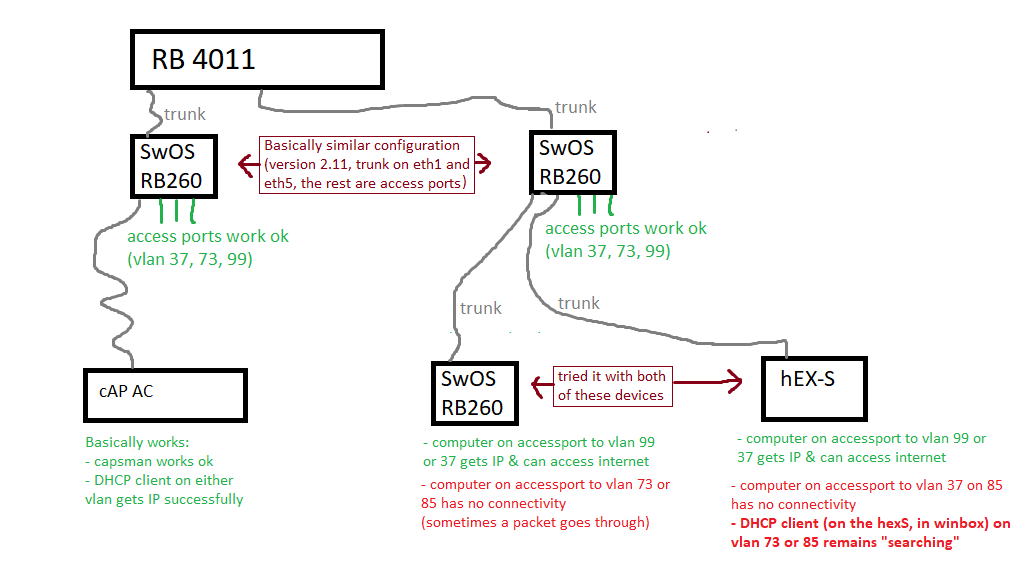
I have a main router RB4011, then two switches RB260 (plugged directly into the router), and multiple VLANs. All works ok, as expected.
Now as I’m expanding the network, I’ve added another RB260, but this one is plugged into one of the switches, not directly to the router. Some of the VLANs aren’t working.
I have a hEX-S handy, so i tried to use it as a switch (but with the RouterOS/winbox, it’s easier to configure and much more powerful). I seem to have run into the same issue.
For comparison, I looked into the cAP which has already been running for months, is already in the “2nd tier” (not directly connected to the router) and it seems to work ok.
I’ve put this picture together, to describe what works and what doesn’t work.
(btw, vlan99 = management)
Oh, and worth noting: when I was troubleshooting with the RB260, the computer was plugged into an accessport for vlan 73. For a long time, running “ipconfig” command gave me the auto-assigned 169.x.x.x IP, ipconfig/release/renew unsuccessful… then eventually it picked up the IP from the network (10.10.73.x). Opening websites basically didn’t work, but sometimes a website did partially load.
Running a ping command to either the router or an external IP, produced an interesting pattern:
Reply from 8.8.8.8: bytes=32 time=23ms TTL=116
Request timed out.
Request timed out.
Reply from 8.8.8.8: bytes=32 time=24ms TTL=116
Request timed out.
Request timed out.
Reply from 8.8.8.8: bytes=32 time=23ms TTL=116
Request timed out.
Request timed out.
Also worth noting - as of yesterday, not sure what I did, but clients connecting over WiFi to vlan 73, no longer obtain ip address. All that I remember changing, is going into the cAP via winbox, and adding DHCP client on each of the vlans (as i was making the sketch image, and examining where the DHCP is functional and where it’s not).
I found that this is likely because of the cAPsMan config “local forwarding = enabled” on the capsman-configuration (ssid) that is connected to vlan73. I then disabled local forwarding, and that made AP traffic go through the vlan99, so it successfully reached the router, and worked well. But when localforwarding is enabled, the clients connected via wifi on the AP, access the “raw” vlan73 which is broken for some reason. mainrouter.rsc (9.83 KB)
I cannot help with main router or caps for anything capsman related, dont use it, dont need, causes nothing but headaches for people. I like simple life.
For example you only need one bridge…
I would not use capsman at first and get the config cleanly setup without it.
If happy no need to add it. If you think you still need it then modify.
Use the link reference provided.
The only note to the linked article is that a Management VLAN is not totally necessary if you trust your HOME VLAN for the most part.
One still uses a BASE or MNGT interface listing to separate the trusted LAN from the rest of the VLANs on the LAN interface.
Further in input chain rules one can limit access to all smart devices including winbox and router to fixed admin IP addresses (desktop, laptop, smartphone, ipad etc).
I have re-configured the router to have just one bridge, and use the “bridge vlan table”, but it’s still the same issue.
Then i also tried setting the STP mode on the bridge to none, still the same.
The symptoms are the same, almost no connection, but after some time a site does get loaded. Trying to access the switch over the lan sometimes succeeds, but it’s a lottery whether the settings are saved if i click “apply”.
Maybe the switch (RB260) also need some special configuration?
EDIT: I disabled RSTP on all ports on the RB260 that is between the main router to the other RB260. Seems to work like a charm now.
The “why” still eludes me
Should RSTP be enabled only on certain ports of the switch, maybe the ones that lead to the main router?
Having sorted out the issues which can arise from multiple bridges there shouldn’t be any need to disable RSTP. Even without adjusting the priorities to ensure that the 4011 is the root bridge and setting edge ports to remove the delay before traffic is forwarded there is no obvious reason why it shouldn’t work for a simple topology.