Hi. My 3011 can’t establish 1000mbit connection through it’s gigabit ports with dlink dgs-1210 or with my dl380 g7 server. By the way if i connect them directly (dlink — dl380), gigabit link works. So i’m sure that i use true gigabit ports at another side of the wire. I used EIA/TIA-568B cat5e 1 and 3 meters patch-cords, and tried to make crossover for 1gbit as i found at wikipedia. I have even tried to switch off “Advertise auto-negotiation” check boxes for 10mbit and 100mbit at Ethernet tab in interface settings (it show me no link). I have tried ports from both of switch groups, no matter.
I am inclined to think that I have received defective router.
All ports have Master port settings set to None, and no one of tested ports aren’t in software bridge. But even if i’m testing 7th port, for example, no matter if it Slave and use another port as master (6th port for example) or not
Do you mean you aren’t getting a gigabit link, or do you mean you aren’t actually able to get a gigabit per second actual speed? Master port etc. should not have any bearing on link speed.
This does not make sense. If your link is coming up at gigabit, but you are getting slow speeds, using master port will fix actual performance so that you can get gigabit speeds on the switch. However, if the device is not auto negotiating 1000Mbit on the link there should be no way the master port setting would have any impact, unless something is really messed up.
I spoke about link, of course. auto negotiation process ends with setting 100mbit link, not 1gbit. that is the problem. And i agree with you, that thing, i guess, works on physical layer, other parameters such as master/slave port shouldn’t affect autonegotiation process
I would email MikroTik support, it might be a faulty unit. You can try a factory reset to see if that fixes it, but failing that, maybe there is something wrong. Perhaps a loose connector on the extra pins for gigabit.
Finally, CAT6 UTP solves the problem with 9 of 10 gigabit ports, but one of them, 5th port, peforms negotiation process for about 5-10 seconds and finishes with 100mbit link, don’t know how to diagnose what the problem with this port.
Well yeah, cr.ppy cables can do that
Are you sure there’s no interference? (AC cables near to the UTP cable can cause weird things - like working at only 100mbps with 30-40% packet loss for example).
Also you can do a bandwidth test if you have another tik, and you’ll see actual speed and packet loss.
RouterBOARD 952Ui-5ac2nD FW RouterBOARD 952Ui-5ac2nD
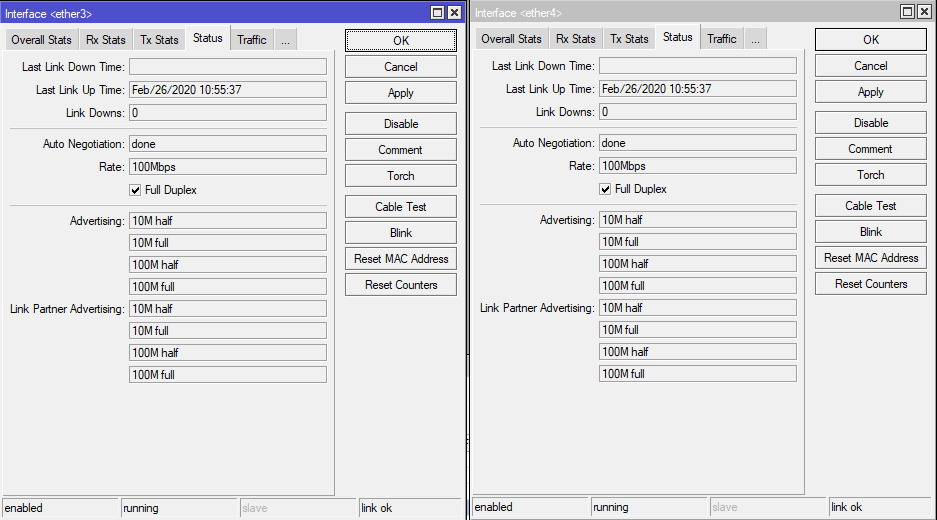
on the ether3 & ether4 two DGS-1210-28/ME (port 24)
on both links 100Mbit
And this problem is more than 200 points.
Quality of cable is very important. Make sure that you are using only well known brands of cable (Leviton, AMP, Belden, Siemon, Panduit, etc). As possible use cat.6 instead cat.5e and make sure with a cable tester that the 8 pins are making contact with the connectors. Also remember that both devices needs gigabit ports to stablish the gigabit link. Make sure that both Ethernet ports are gigabit.

 CCA types.