OSPF Design consideration

Hello
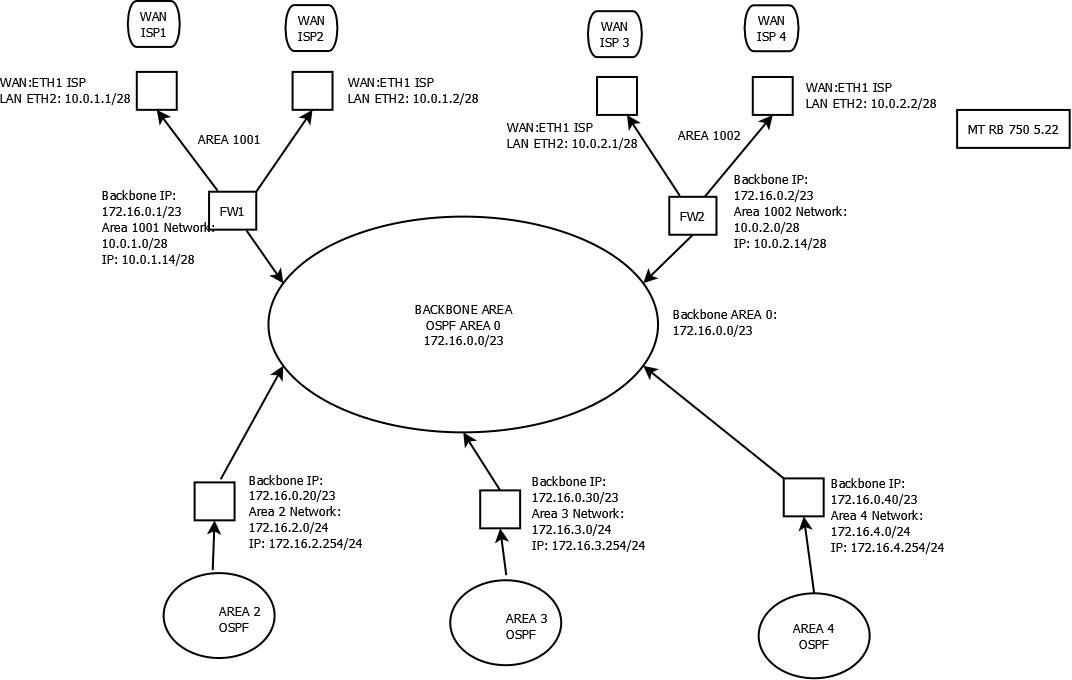
Attached is found a diagram of my network.

From each “Area” we have a network 172.16.x.0/24 (where area 2 has 2.0; area 3 has 3.0 etc)

All traffic, some from area 2 and some from area 3 will go out through FW (FW1 or FW2)
Actually everything works.
We have OSPF running between backbone and the towers.


The CORE AREA (area 1001 and 1002) has some problems.
From the tower I am not able to reach 10.0.1.1 or 10.0.2.1, the core routers, BTW.
All devices are MT with 5.22.

What do you think about this setup?

I will ask you some info about VRRP+OSPF that is giving me problems, but later!

I will attach some confs:

FW1:
/routing ospf area
add area-id=10.0.1.0 name=“Core RA”
/routing ospf instance
set [ find default=yes ] redistribute-connected=as-type-2 router-id=172.16.0.241
/routing ospf interface
add interface=“ether2 - Backbone Spadhausen” network-type=broadcast
add interface=“ether6 - Core RA” network-type=broadcast
/routing ospf network
add area=backbone network=172.16.0.0/23
add area=“Core RA” network=10.0.1.0/28


FW2:

/routing ospf area
add area-id=10.0.2.0 name=“Core Mezzano”
/routing ospf instance
set [ find default=yes ] redistribute-connected=as-type-2 router-id=
172.16.0.68
/routing ospf interface
add interface=“ether5 - Backbone Spadhausen” network-type=broadcast
add interface=“ether2 - Core Mezzano” network-type=broadcast
/routing ospf network
add area=backbone network=172.16.0.0/23
add area=“Core Mezzano” network=10.0.2.0/28
rete ospf.png

eheheh when some “complex” setup comes in, no one is going to post anything about it? :slight_smile:

Check if 10.0.1.0/28 route is distributed through the backbone to all areas.

How many routers do you have? Probably its not necessary to create too many areas.
You also need to tells us each area types. Its all default or there is some stub area?

if i remember correctly area 1001 and 1002 cannot be used to route traffic if they are non backbone
so try just using area 0 in place

don’t you wish to help him ?

Hello.

I have a router in each area because there I do routing, simple queue, firewall filter (no nat), just routing.
When I add a block of users in a specific geografic zone (I translated that in OSPF AREA #).
We are WISP and each tower is a OSPF area, and a specific subnet.

I think so. You are using an area for any network block. You could have all your network in a backbone area. Nowadays, you don’t have more than 20 routes in your table. Later, if your network grows, add more areas.

Tell us if you’ve stub areas.

Hello
all areas are now default type

I have 50+ routers. 1 area. OSPF carries 550+ routes. Works nicely.

Yeah, I would also use only one area for this small setup. Remove the complexity!!

500 routers in one area is no problem today … Use areas to separate devices with bad ospf implementations from the rest. E.g. loadbalancers or mainframes

Or for security reasons ( you want all traffic over some special routers/firewalls )