Hello folks.
I have a problem here - I use pptp links over dynamic IP addresses. Pptp server is on static.
To simplify my life instead of static routing I want to use OSPF.
So the problem is - how to prevent client-side Mikrotik to announce dynamically obtained IP address ?
Is it any way to do this without writing the script ?
If I understand correctly what you want to do, you can just set the interfaces as passive by default in OSPF, so this way the server will advertise the connected customers IPs but the links by themselves won’t participate in the OSPF process thus not learning IPs from there.
Is your router set to redistribute connected routes? If so, then that’s the problem. Active/passive won’t matter because the redistribution is just picking up every local route in your table, throwing them in a dump truck, and backing the truck up to your OSPF table and dumping them in a great big pile.
Almost certainly you can get the same results, but with the routes being interior to OSPF using default passive interfaces along with network statements covering your local interfaces.
Passive means that the interfaces won’t try to form adjacencies, so it’s okay to include customer-facing interfaces because they won’t send or receive hello packets (thus they cannot form adjacencies).
When using default passive, you’ll need to manually specify each interface where you DO want an adjacency to form so if you want to try this, be sure to plan accordingly with some backup static routes if you’re not located physically at the router when you make your changes.
It’s the redistribute connected which is injecting the route even when you don’t have a network statement that matches.
Your only other option is to filter the prefix in the OSPF-OUT filter on the process itself.
In a nutshell, here are the two methods:
Redistribute Connected Routes=as type 1
-vs-
redistribute connected=no
interfaces >
interface=all passive=yes
+interface=ether1 passive=no
+interface=ether2 passive=no
(etc - do this for every IP interface where you want to form adjacencies)
networks >
network=0.0.0.0/0 area=backbone
This second set of configurations does “the same thing” as simply injecting all connected routes, but the second method actually originates them properly into OSPF. They’ll get aggregated / filtered by ABRs according to the standard OSPF design methodology, where E1 and E2 routes do not.
Of course, network=0.0.0.0/0 is a shotgun approach - it literally adds all interfaces just as redistribute connected routes does. However, you don’t need to use network 0.0.0.0/0 - you can add exactly the network range(s) that you need and omit any that you don’t want going into OSPF.
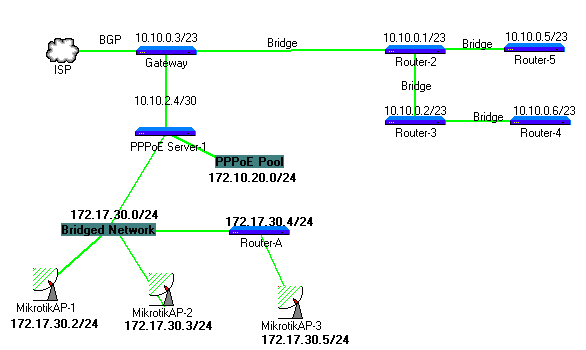
Okay Let me explain my reason why i redistribute connected with simple diagram and talk on it. I know Im asking too much question and I made headache sorry for this.
172.17.30.0/24 my subnetwork for antennas routers and its connected to pppoe_server-1 and 172.10.20.0/24 pppoe pool for customers.
I have limited puplic ip and nat local ip’s from Gateway router like;
on ppoe_servers if i make redistribute connected=no, gateway cant see the pppoe ip’s so nat not working. there are 10 pppoe server on network and all pppoe_client ip’s dump to route table and there is more then 3600 route on route table. this is not good i think.
Now I think make static routing On Gateway router to PPPoE Ip’s and minimize the routing table like;
but now there is a problem for other static local ip’s ( using customers for VPN etc) or puplic ip, these are assigned by radius. and the problem start in here. what should i do for minimize the routing table.
further more should i add 172.17.30.0/24 range to ospf network as area1 on PPPoE_Server ? but this ip range bridged network and not spoke with ospf. or make them static routing on gateway router ?
On PPPoE server, you would include a network statement for 172.17.30.0/24.
Basically, anything that you can inject into OSPF with a redistribute connected, you can also originate naturally into OSPF by defining a network prefix that covers the range.
As for 172.10.20.0/24 being PPPoE endpoints, you could do the following:
/ip route add dst=172.10.20.0/24 type=blackhole (note - you should do this anyway so that packets destined to unassigned IPs don’t ping-pong between PPPoE_Server and Gateway)
redsitribute static routes: type1 or type2 (whichever makes more sense in your network)
/routing filter
add chain=ospf-out prefix=172.10.20.0/24 prefix-length=25-32 action=discard
add chain=ospf-out action=accept
note - the appropriate chain might be ospf-in - I forget off the top of my head and don’t feel like labbing this up just to test. If one doesn’t work, try the other.
Basically, this filter will discard any sub-prefixes of your PPPoE pool (but only when redistributing into OSPF) but will allow the master prefix itself (/24) because the prefix-length is specified as 25-32.
If you have this filter rule, and you also have a network=172.10.20.0/something , and an interface of the router has an IP address in that range, then it’s going to originate within OSPF and won’t get filtered.
In cases where the pppoe client has a public IP address, then you pretty much MUST announce that. If your network is well-planned-out, then customers of PPPoE-Server1 will all get their public IP addresses from a contiguous block such as 192.0.2.64/27 - in this case, announce the /27 and filter the sub-prefixes of this public pool just as you did with 172.10.20.0/24
I’d have to play with this in the lab to confirm the actual behavior, but for the straggler roaming /32 addresses that aren’t in contiguous blocks, you’ll have to either redistribute connected (your filters for the pool prefixes should still keep the clients of those pools out of your routing table individually) or add some network prefix to your PPPoE server which will cover those interfaces as they appear on the server. (I’d prefer the latter)
In a nutshell - avoid redistribute connected except as a completely unavoidable last resort. (like chopping off your foot to escape a bear trap in the wilderness).
Redistribute static, create a static route for the master prefix and filter out the sub-prefixes so that only the master route for the pool exists in your routing table.
okay now I add 172.17.30.0/24 range to ospf network as Area1
add area=area1 network=172.17.30.0/24
for minimize the route table this is worked also so New Settings ;
/routing filter
add action=discard chain=ospf-out prefix=172.10.20.0/24 prefix-length=25-32
add action=accept chain=ospf-out
I still can not disable redistribute-connected cause some static Local and Public ip’s that assigned by radius may on diffrend pppoe_server’s.
i will start to do what you suggest to me to minimize route table. and before you explain this to me i test this as below;
I add routing filter
chain=ospf-out prefix=172.10.20.0/24 prefix-length=16-32 invert-match=no action=discard set-bgp-prepend-path=“”
and I route on Gateway Router
/ip route
add distance=1 dst-address=172.10.20.0/24 gateway=10.10.2.6
this is also worked. but i will choose your suggestion. thanks again.