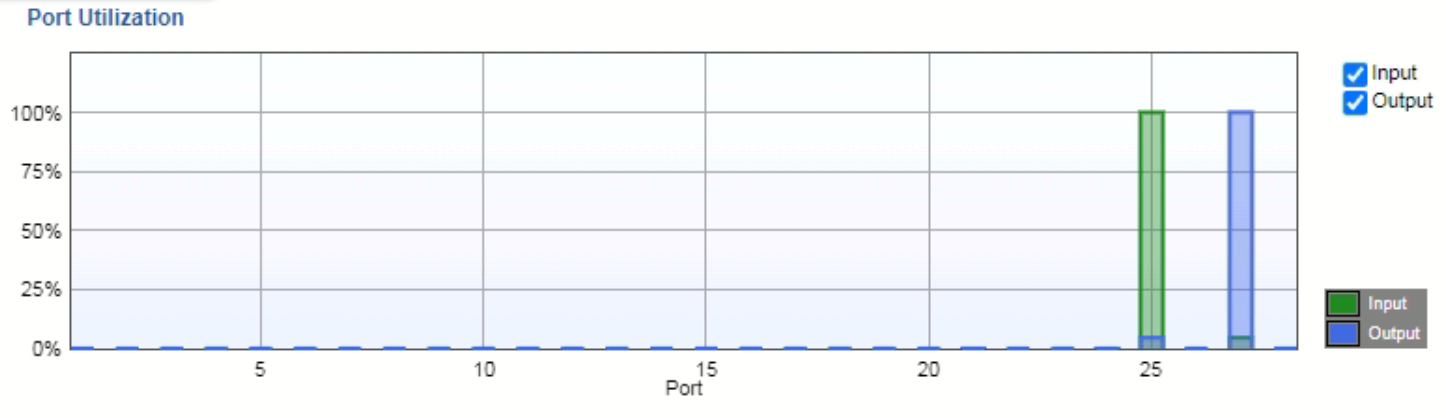
I have setup OSPF, MPLS between Huawei and Mikrotik. Everything works fine however the ports speed on my switch shows 100% for both ports connected to the Mikrotik.
I am also having speed issues which means the ports are definitely hitting 100%. When I torch i dont see any packets for 10Gbps.
I have done all latest upgrades to the latest versions still issue persists.
Hi, with that sparse info it’s going to be pretty hard to help out. For example, 100% of what, exactly? Link bandwidth, packet rate? Where are you seeing that figure?
You’ll need to give us a bit more to work with: a brief topology description, Huawei and MikroTik models, exact software versions and a config export with sensitive stuff removed. “Latest” doesn’t tell us which versions you’re running. Actual Mbps/pps figures and a screenshot of that 100% reading would help too.
Thank you for a reply. Below are the details I missed on.
Side A: HUAWEI NetEngine 8000 M1A - Version 8.220
Side B: Mikrotik 2116 - Ver: 7.24.2
The link bandwidth on the L2 switch shows 100% where Mikrotik sfp-sfpplus1 & sfp-sfpplus2 are connected. The Tx and Rx of Mikrotik show the right BW which is below 3Gbps.
Thanks, but that’s only part of what I asked for. And as BartoszP also asked, what exactly does “100%” mean on that device? And what do you mean by “speed issues” in general? What are you testing, between which devices, and what speeds do you expect versus what you actually get?
Besides the above, we still need a few more things to give you a proper answer:
The exact Edgecore switch models and software versions.
A screenshot or CLI output showing that 100% reading, including which ports it applies to and their actual link speeds.
Actual Tx/Rx figures in Mbps and pps from both ends of the affected links, taken at the same time while the problem is happening.
A RouterOS config export (i.e. run /export in the terminal), remove any sensitive stuff from the output and paste it in a code block.
Also explain how sfp-sfpplus1 and sfp-sfpplus2 fit into your topology. Your description shows just a single path, but you mentioned two connected ports, so which device (ports) are they connected to, and are they bonded, separate routed links, bridged or what?
Otherwise, we’re pretty much left guessing again, and what you provided is nowhere near enough to make an educated guess. I’m happy to help, but without those details, this is as far as I can go.
so 100% is the bandwidth use of the ports on the L2 SW. (Uploaded the MK config as well)
SW1 edge core: ECS5520-18X (Huawei End)
SW2 & SW3 edge core: ECS4120-28Fv2
Attached is a screenshot of the edgcore at the mikrotik end SW3. Port 25 is the input port from Huawei and Port 27 is connected to Mikrotik SFP-2. These 2 ports the input for Huawei end is at 100% and the port connected to Mikrotik (port 27) are at 100%.
When I say speed issues the bandwidth is choking and wont get full upload speeds for users.
Actual Tx/Rx:
Mikrotik SFP-2 (connected to edgecore P27) - Tx: 400Mbps Rx:4.6Gbps
Mikrotik SFP-1 (connected to BNG) - Tx: 4.6Gbps Rx; 400Mbps
Thanks, now we’ve got something to work with. I wouldn’t take that Edgecore graph at face value, though. It shows port numbers and percentages, but no actual bitrates, link speeds or sampling interval.
Edgecore has a well known port utilization reporting bug ("Port utilization info is incorrect on 10G ports" or similar) so that pic doesn’t prove you’re hitting a wall. Btw, which firmware is SW3 actually running?
Assuming uploads go from the BNG towards Huawei, we need to follow SFP1 Rx → SFP2 Tx. The tall bars in your screenshot show the opposite direction, so they don’t establish that your upload path is saturated.
Anyways, the next step is to gather info from both sides. Start by connecting to the MT box with Winbox and recording a few minutes of Rx/Tx graphs in Mbps/Gbps for SFP1 and SFP2 while running an upload test, alongside SW3’s actual port 25/27 traffic figures over the same period.
Also explain exactly how you’re testing: which tool, where it’s running, the test endpoints, TCP or UDP, and how many parallel streams. Include expected versus actual upload speed so we can rule out the test setup itself as the bottleneck.
While you’re at it, post the switch ports’ current link speeds and the output of:
/interface ethernet monitor sfp-sfpplus1 once
/interface ethernet monitor sfp-sfpplus2 once
Grab error/drop counters on both sides before and after the test too.
Assuming the edgecore is having a BUG. The SW port do not show 100% if I run a basic L2 P2P. The 100% port utilisation is only when I run OSPF,MPLS.
Edgecore Firmware: 1.0.2.32
When I run UDP or TCP traffic test I dont see any issues as I believe this forcefully transmits data. The Tx/Rx never for over 7Gbps the mikrotik Tx/Rx behaviour is normal don't see any faults in there.
I feel a bug in mikrotik OSPF, MPLS. On the same HW I am running OSPF between 2 more sites, here I am using HW at both ends and the SW1 is Edgcore (port utilisation is not 100%).
Therefore I could 99.9% confirm its a Mikrotik BUG for OSPF,MPLS or may be HW and MK protocol issues.
Hope this info helps. I am looking to see if anyone has been running OSPF,MPLS between:
A: 2 mikrotik successfully
B: HW and Mikrotik
Whoa, not so fast tiger! I wouldn't bet on that 99.9% MikroTik bug just yet.
Your SW3 firmware 1.0.2.32 is from 2017 and Edgecore didn't fix the "Port utilization info is incorrect on 10G port" msg until 2019 (in v1.2.2.25). And your own screenshot points the same way. The small bars sit around 4 to 5%, which matches your 400 Mbps on a 10G link, so 4.6 Gbps should show up around 46%, not 100%. Compare SW3's raw byte counters with the MikroTik's over the same interval before you blame OSPF/MPLS. If you've got a spare switch or a lab setup, you can try it there.
Anyways, forgot to mention last time that a couple of things in your export look off too. Your static LDP neighbor points at the router's own loopback (transport=172.35.207.2). It should point to the Huawei's address, or just get rid of it. VPLS also adds labels plus an inner Ethernet header, so a full 1500 byte packet ends up around 1536 to 1540 bytes on the wire, and more if the switches tag VLAN 1070 between them. If any of your three Edgecores is still at the standard 1518 frame size, big packets get dropped while small ones pass. That hits TCP uploads really hard, and it would also explain why plain L2 works fine. Check the max frame size/jumbo setting on all three.
Btw, don't run Torch while testing. It turns off FastPath and can sk(r)ew your numbers. Run an upload test and post the output of these while it's running:
Sounds good. Since the backup path shows 100% too, could you post the MikroTik's Tx/Rx on SFP4 while the switch shows 100%, and which switch models and firmware sit on that path?