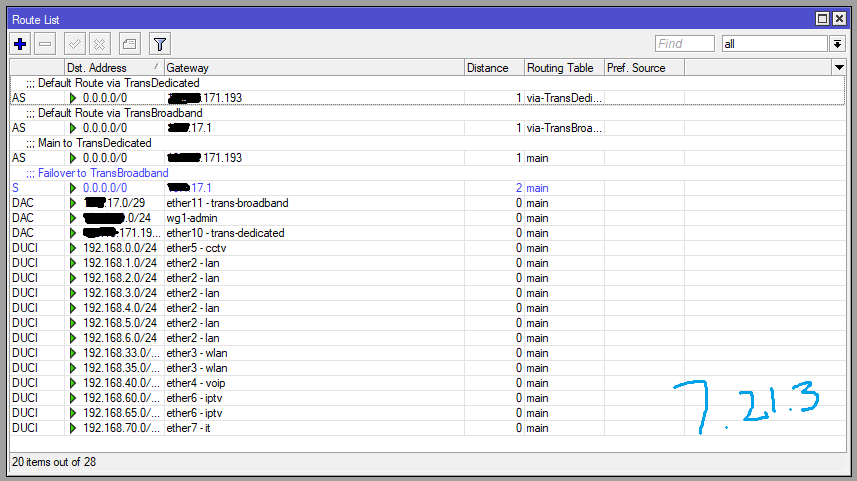
I still haven't been able to get the PBR Routing Rule configuration to work in ROS v7.22. When I ping 8.8.8.8 with a source address of 192.168.33.254, it should be routed to IP address xxx.xxx.17.1, but in ROS v7.22, for some reason, it always gets routed to the main route xxx.xxx.171.193. Previously, in ROS v7.21.3, there were no issues at all. I’m still confused about the chain parameter in the routing rule; for some reason, even after changing the chain to main, user, or mangle, and the action to lookup, lookup only..., or drop, the result remains the same.
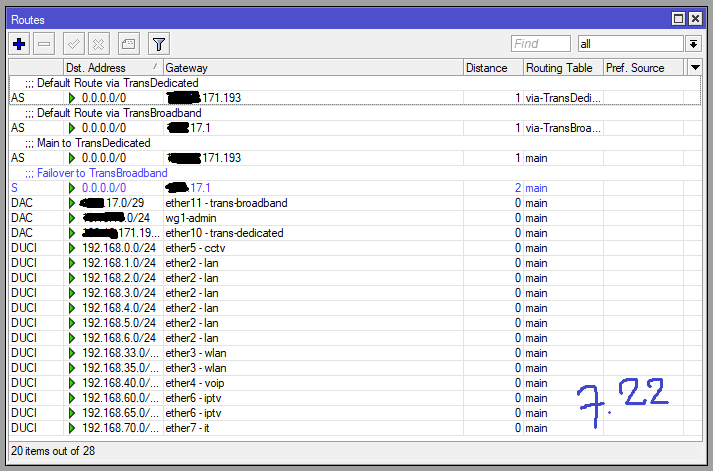
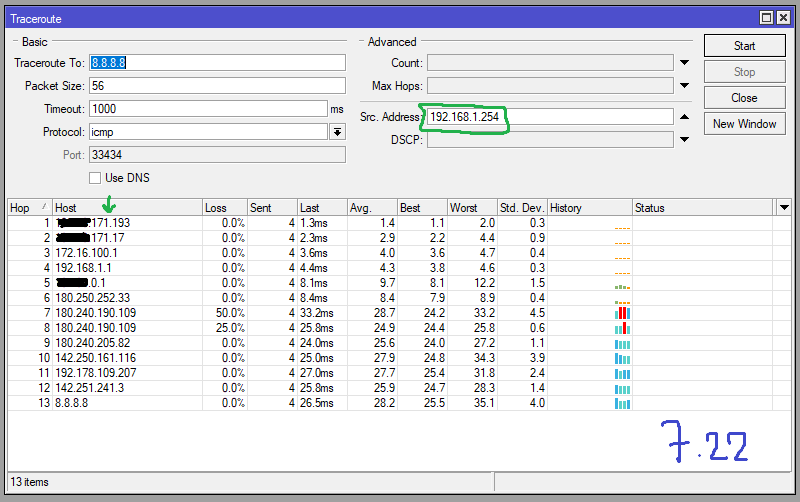
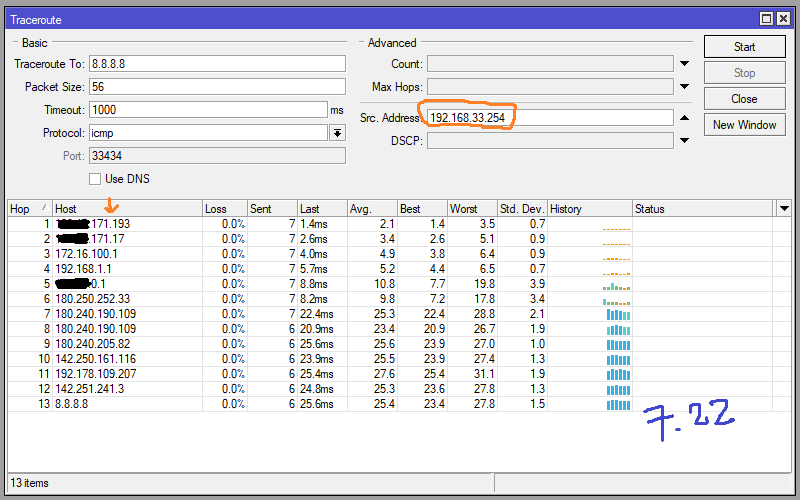
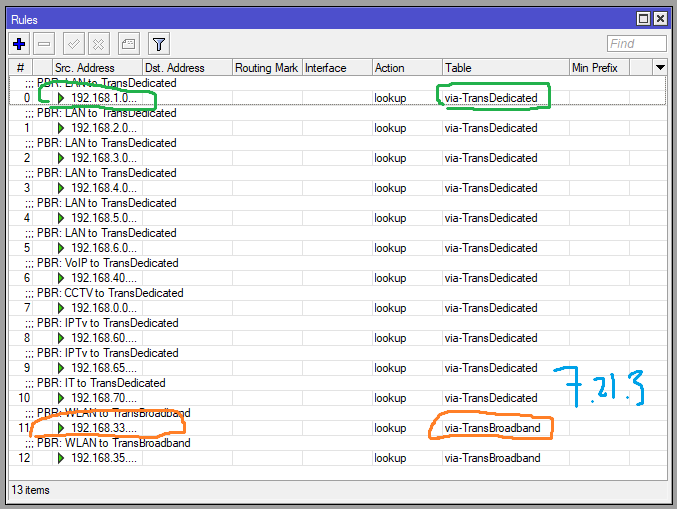
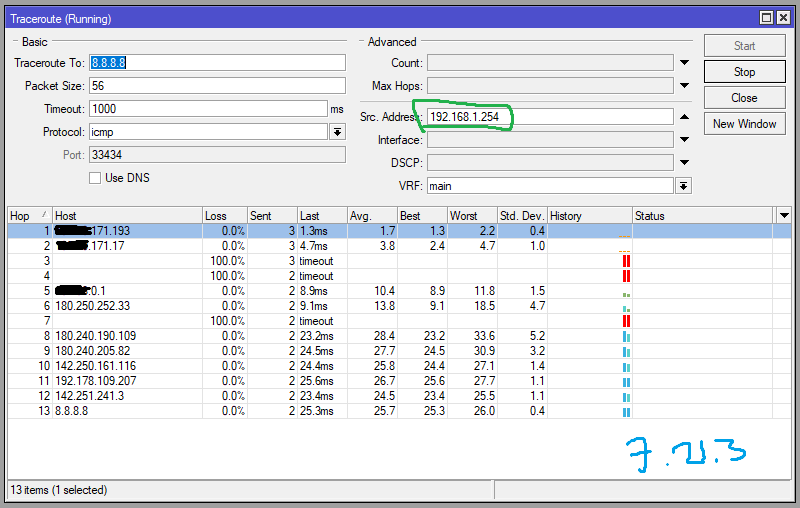
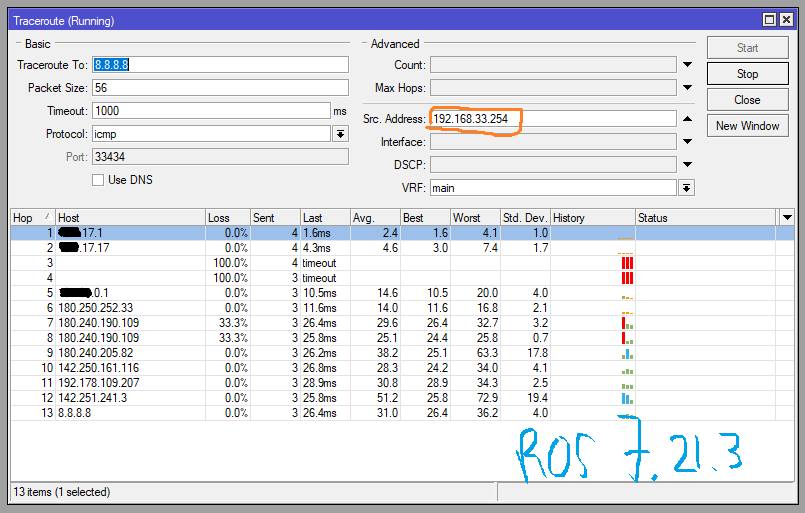
You are specifying the wrong value for chain in all your routing rules. To keep the behavior of versions <= 7.21 the chain should be set to user. Run this command as a quick fix:
/routing rule set [find chain=main] chain=user
Documentation:
and relevant quote:
- process implicit policy routing rules (any user defined rules by default is added in "user" chain)
and:
relevant parameter:
chain ( string ) Name of the chain where rules in the routing decision will be located. by default "user" is used, if chain is not specified. If chain name is set the same as one of the built in routing decision names, then user created rules are added right after that routing decision. For example, if chain="mangle", then any user created rule n this chain will be located right after the "mangle" decision.
When you add your rule to the main chain, they stay below the "catch all" rule and have no effects, all lookups are then done with the table main.
Config please
/export file=anynameyouwish (minus router serial number, any public WANIP information, keys, dhcp lease lists )
I’ve already set chain=user, but when I trace the route, it always points to the main route instead of the default route. I’ll try setting chain=user again. However, I’ve only tested this on CHR version 7.22 in GNS3—are there any differences between a real network and GNS3?; I haven’t tried it on a real router yet because I’m afraid of disrupting the hospital network.
There will be no difference between 7.21 and 7.22 with regards to the routing rules, if you make sure the followings are true in the 7.22 installation:
-
Verify with
/routing settings printthat the value ofpolicy-rulesis still with the default order, which is: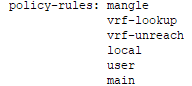
If not, reset it to default with:
/routing settings set policy-rules=mangle,vrf-lookup,vrf-unreach,local,user,main -
All routing rules displayed with
/routing rule exporteither show no
chainparameter, or havechain=user. If they showchain=""orchain=something_else, then you should correct them by setting Chain touser(if you edit with WinBox), or if using the CLI, you can choose to either set touseror to clear the valuechainfor all rules with either of these commands:/routing rule set [find] chain=useror
/routing rule set [find] !chain
To recap: the default value (that keeps the behavior of previous versions) is that chain is not set (when you use export you don't see chain included in the output). That default value is also equivalent to having chain=user set.
The current issue is that due to a bug, you are unable to create or edit routing rules in WinBox without having the chain set to something. Which means if you create or edit a rule in WinBox, when you try to clear the Chain field, it will cause the value to be stored as chain="" which is not the same as chain unset and won't work like the expected behavior of chain=user.
That's why currently, if you do any edit of the routing rules with WinBox and want the behavior of 7.21 and older, you should make sure Chain is set to user before you save the entry.
Your routing rules will not work as expected if you have them like in this screenshot
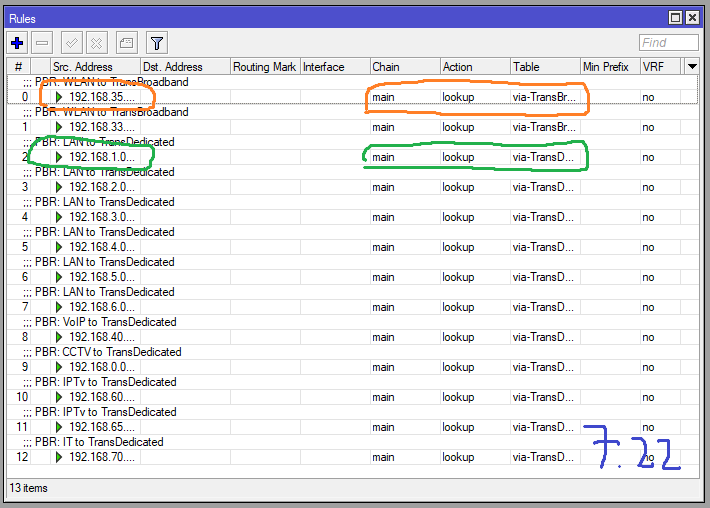
Where the whole Chain column shows main.
Here for full configuration
/interface ethernet
set [ find default-name=ether2 ] name="ether2 - lan"
set [ find default-name=ether3 ] name="ether3 - wlan"
set [ find default-name=ether4 ] name="ether4 - voip"
set [ find default-name=ether5 ] name="ether5 - cctv"
set [ find default-name=ether6 ] name="ether6 - iptv"
set [ find default-name=ether7 ] name="ether7 - it"
set [ find default-name=ether10 ] name="ether10 - trans-dedicated"
set [ find default-name=ether11 ] name="ether11 - trans-broadband"
/interface wireguard
add comment="WireGuard Remote Admin" listen-port=13231 mtu=1420 name=
wg1-admin
/interface list
add comment="Mangle untuk WAN" name=WAN
add comment="PBR untuk antar-LAN" name=LAN-ALL
add comment="PBR untuk LAN ke Dedicated" name=LAN-Dedicated
add comment="PBR untuk LAN ke Broadband" name=LAN-Broadband
add comment="QoS untuk Broadband" name=QoS-Broadband
add comment="QoS untuk Dedicated" name=QoS-Dedicated
/ip pool
add name=dhcp_pool1_wlan ranges=
192.168.33.10-192.168.33.253,192.168.35.10-192.168.35.250
add name=dhcp_pool2_iptv ranges=
192.168.60.10-192.168.60.253,192.168.65.10-192.168.65.253
/ip dhcp-server
add add-arp=yes address-pool=dhcp_pool1_wlan authoritative=after-2sec-delay
interface="ether3 - wlan" lease-time=1h name=dhcp-wlan
add add-arp=yes address-pool=dhcp_pool2_iptv interface="ether6 - iptv" name=
dhcp-iptv
/queue type
add kind=pcq name=pcq-upload pcq-classifier=src-address
add kind=pcq name=pcq-download pcq-classifier=dst-address
/queue simple
add comment="SIMRS Prioritas 1" limit-at=10M/10M max-limit=50M/50M name=
sq-simrs priority=1/1 queue=pcq-upload/pcq-download target=192.168.5.3/32
add comment="InternalServer Prioritas 1" limit-at=10M/10M max-limit=50M/50M
name=sq-internal-server priority=1/1 queue=pcq-upload/pcq-download
target="192.168.70.100/32,192.168.70.101/32,192.168.70.102/32,192.168.70.1
03/32,192.168.70.104/32,192.168.70.105/32,192.168.70.106/32,192.168.70.107
/32,192.168.70.108/32,192.168.70.109/32,192.168.70.110/32,192.168.70.120/3
2,192.168.70.123/32,192.168.5.8/32,192.168.6.111/32,192.168.6.112/32"
add comment="VoIP Prioritas 2" limit-at=5M/5M max-limit=10M/10M name=sq-voip
priority=2/2 queue=pcq-upload/pcq-download target=192.168.40.0/24
add comment="CCTV Prioritas 3" max-limit=20M/5M name=sq-cctv priority=3/3
queue=default/default target=192.168.0.0/24
/queue tree
add comment="PARENT: Broadband UPLOAD" max-limit=15M name=BB-UP parent=global
queue=default
add comment="PARENT: Broadband DOWNLOAD" max-limit=50M name=BB-DL parent=
global queue=default
add limit-at=3M max-limit=15M name=BB-UP-portal packet-mark=pkt-bb-portal-up
parent=BB-UP priority=1 queue=pcq-upload
add limit-at=5M max-limit=50M name=BB-DL-portal packet-mark=pkt-bb-portal-dl
parent=BB-DL priority=1 queue=pcq-download
add limit-at=3M max-limit=15M name=BB-UP-meeting packet-mark=
pkt-bb-meeting-up parent=BB-UP priority=3 queue=pcq-upload
add limit-at=5M max-limit=50M name=BB-DL-meeting packet-mark=
pkt-bb-meeting-dl parent=BB-DL priority=3 queue=pcq-download
add max-limit=5M name=BB-UP-streaming packet-mark=pkt-bb-streaming-up parent=
BB-UP priority=5 queue=pcq-upload
add max-limit=10M name=BB-DL-streaming packet-mark=pkt-bb-streaming-dl
parent=BB-DL priority=5 queue=pcq-download
add max-limit=15M name=BB-UP-browsing packet-mark=pkt-bb-browsing-up parent=
BB-UP priority=6 queue=pcq-upload
add max-limit=50M name=BB-DL-browsing packet-mark=pkt-bb-browsing-dl parent=
BB-DL priority=6 queue=pcq-download
add comment="PARENT: Dedicated UPLOAD" max-limit=50M name=DD-UP parent=global
queue=default
add comment="PARENT: Dedicated DOWNLOAD" max-limit=50M name=DD-DL parent=
global queue=default
add limit-at=10M max-limit=50M name=DD-UP-portal packet-mark=pkt-dd-portal-up
parent=DD-UP priority=1 queue=pcq-upload
add limit-at=10M max-limit=50M name=DD-DL-portal packet-mark=pkt-dd-portal-dl
parent=DD-DL priority=1 queue=pcq-download
add limit-at=6M max-limit=50M name=DD-UP-meeting packet-mark=
pkt-dd-meeting-up parent=DD-UP priority=3 queue=pcq-upload
add limit-at=6M max-limit=50M name=DD-DL-meeting packet-mark=
pkt-dd-meeting-dl parent=DD-DL priority=3 queue=pcq-download
add max-limit=10M name=DD-UP-streaming packet-mark=pkt-dd-streaming-up
parent=DD-UP priority=5 queue=pcq-upload
add max-limit=10M name=DD-DL-streaming packet-mark=pkt-dd-streaming-dl
parent=DD-DL priority=5 queue=pcq-download
add max-limit=50M name=DD-UP-browsing packet-mark=pkt-dd-browsing-up parent=
DD-UP priority=6 queue=pcq-upload
add max-limit=50M name=DD-DL-browsing packet-mark=pkt-dd-browsing-dl parent=
DD-DL priority=6 queue=pcq-download
/routing table
add comment="Route via TransDedicated" fib name=via-TransDedicated
add comment="Route via TransBroadband" fib name=via-TransBroadband
/interface list member
add comment="Member WAN" interface="ether10 - trans-dedicated" list=WAN
add interface="ether11 - trans-broadband" list=WAN
add comment="Member LAN-ALL" interface="ether2 - lan" list=LAN-ALL
add interface="ether3 - wlan" list=LAN-ALL
add interface="ether4 - voip" list=LAN-ALL
add interface="ether5 - cctv" list=LAN-ALL
add interface="ether6 - iptv" list=LAN-ALL
add interface="ether7 - it" list=LAN-ALL
add interface="ether7 - it" list=LAN-ALL
add comment="Member LAN-Dedicated" interface="ether2 - lan" list=
LAN-Dedicated
add interface="ether4 - voip" list=LAN-Dedicated
add interface="ether5 - cctv" list=LAN-Dedicated
add interface="ether6 - iptv" list=LAN-Dedicated
add interface="ether7 - it" list=LAN-Dedicated
add comment="Member LAN-Broadband" interface="ether3 - wlan" list=
LAN-Broadband
add comment="Member QoS-Dedicated" interface="ether2 - lan" list=
QoS-Dedicated
add interface="ether6 - iptv" list=QoS-Dedicated
add interface="ether7 - it" list=QoS-Dedicated
add comment="Member QoS-Broadband" interface="ether3 - wlan" list=
QoS-Broadband
/interface wireguard peers
add allowed-address=xxx.xxx.xxx.2/32 client-allowed-address=::/0 interface=
wg1-admin name=pc-xxxx public-key=
"wwxFL+04gN65NXuraJHYxxxxxxxxxxxxxxxxxxxxxxxxxxxxxxxxx"
add allowed-address=xxx.xxx.xxx.3/32 client-allowed-address=::/0 interface=
wg1-admin name=lpt-xxxx public-key=
"/3RCm6K/Kow1mFOBy96Xxxxxxxxxxxxxxxxxxxxxxxxxxxxxxxxxx"
/ip address
add address=192.168.1.254/24 comment=LAN interface="ether2 - lan" network=
192.168.1.0
add address=192.168.2.254/24 interface="ether2 - lan" network=192.168.2.0
add address=192.168.3.254/24 interface="ether2 - lan" network=192.168.3.0
add address=192.168.4.254/24 interface="ether2 - lan" network=192.168.4.0
add address=192.168.5.1/24 interface="ether2 - lan" network=192.168.5.0
add address=192.168.6.1/24 interface="ether2 - lan" network=192.168.6.0
add address=192.168.33.254/24 comment=WLAN interface="ether3 - wlan" network=
192.168.33.0
add address=192.168.35.254/24 interface="ether3 - wlan" network=192.168.35.0
add address=192.168.40.254/24 comment=VoIP interface="ether4 - voip" network=
192.168.40.0
add address=192.168.0.254/24 comment=CCTV interface="ether5 - cctv" network=
192.168.0.0
add address=192.168.60.254/24 comment=IPTV interface="ether6 - iptv" network=
192.168.60.0
add address=192.168.65.254/24 interface="ether6 - iptv" network=192.168.65.0
add address=192.168.70.254/24 comment="IT Management" interface="ether7 - it"
network=192.168.70.0
add address=xxx.xxx.xxx.194/29 comment="WAN Dedicated" interface=
"ether10 - trans-dedicated" network=xxx.xxx.xxx.192
add address=xxx.xxx.xxx.2/29 comment="WAN Broadband" interface=
"ether11 - trans-broadband" network=xxx.xxx.xxx.0
add address=xxx.xxx.xxx.1/24 comment="WireGuard Admin" interface=wg1-admin
network=xxx.xxx.xxx.0
/ip dhcp-server network
add address=192.168.33.0/24 dns-server=192.168.33.254 gateway=192.168.33.254
add address=192.168.35.0/24 dns-server=192.168.35.254 gateway=192.168.35.254
add address=192.168.60.0/24 dns-server=192.168.60.254 gateway=192.168.60.254
add address=192.168.65.0/24 dns-server=192.168.65.254 gateway=192.168.65.254
/ip dns
set allow-remote-requests=yes servers=
xxx.xxx.xxx.10,xxx.xxx.xxx.3,xxx.xxx.xxx.4,8.8.8.8
/ip firewall address-list
add address=192.168.33.0/24 list=boleh-streaming
add address=192.168.35.0/24 list=boleh-streaming
add address=192.168.60.0/24 list=boleh-streaming
add address=192.168.65.0/24 list=boleh-streaming
add address=192.168.5.3 list=simrs-server
add address=192.168.5.5 list=simrs-server
add address=192.168.5.8 list=internal-server
add address=192.168.60.2 list=internal-server
add address=192.168.60.33 list=internal-server
add address=192.168.60.44 list=internal-server
add address=192.168.60.101 list=internal-server
add address=192.168.60.102 list=internal-server
add address=192.168.60.211 list=internal-server
add address=192.168.6.111 list=internal-server
add address=192.168.70.0/24 list=internal-server
add address=xxx.xxx.xxx.10 comment="Server aplikasi tera" list=internet
add address=192.168.0.192 comment="printer CT2" list=internet
add address=192.168.0.250 comment="CCTV 250" disabled=yes list=internet
add address=192.168.1.21 comment=Radiologi list=internet
add address=192.168.1.22 comment="Server PACS Lobby" list=internet
add address=192.168.1.100 comment="PC Radiologi R. 707" list=internet
add address=192.168.1.101 comment=Admission list=internet
add address=192.168.1.102 comment=Farmasi list=internet
add address=192.168.1.102 list=boleh-update
add address=192.168.1.103 comment="Bank Anda" list=internet
add address=192.168.70.125 comment=slot-ip list=internet
add address=192.168.70.192 list=boleh-streaming
add address=192.168.70.192 list=internet
add address=192.168.60.0/24 list=internet
add address=192.168.65.0/24 list=internet
/ip firewall filter
add action=accept chain=input comment="IN: Accept loopback" in-interface=lo
add action=accept chain=input comment="IN: Accept broadcast" dst-address=
255.255.255.255 in-interface-list=LAN-ALL
add action=accept chain=input comment="IN: Accept directed broadcast"
dst-address-type=broadcast in-interface-list=LAN-ALL
add action=accept chain=input comment="IN: Accept ICMP from Dedicated"
in-interface-list=WAN protocol=icmp
add action=log chain=input comment="IN: Log invalid LAN" connection-state=
invalid in-interface-list=LAN-ALL log-prefix="DROP-INPUT-INVALID: "
add action=drop chain=input comment="IN: Drop invalid LAN" connection-state=
invalid in-interface-list=LAN-ALL
add action=accept chain=input comment="IN: Accept established/related"
connection-state=established,related
add action=add-src-to-address-list address-list=nakal address-list-timeout=1h
chain=input comment="IN: Log nakal" in-interface-list=LAN-ALL
src-address-list=!internet
add action=drop chain=input comment="IN: Drop non-internet LAN"
in-interface-list=LAN-ALL src-address-list=!internet
add action=accept chain=input comment="IN: Accept ICMP LAN rate-limited"
in-interface-list=LAN-ALL limit=10,5:packet protocol=icmp
add action=accept chain=input comment="IN: Accept WireGuard" dst-port=13231
in-interface-list=WAN protocol=udp
add action=accept chain=input comment="IN: Accept Winbox/SSH via WireGuard"
dst-port=8291,2022 in-interface=wg1-admin protocol=tcp
add action=drop chain=input comment="IN: Drop Winbox/SSH dari WAN" dst-port=
8291,2022 in-interface-list=WAN protocol=tcp
add action=accept chain=input comment="IN: Accept Winbox/SSH dari LAN"
dst-port=8291,2022 in-interface-list=LAN-ALL protocol=tcp
add action=accept chain=input comment="IN: Accept DNS TCP" dst-port=53
in-interface-list=LAN-ALL protocol=tcp
add action=accept chain=input comment="IN: Accept DNS UDP" dst-port=53
in-interface-list=LAN-ALL protocol=udp
add action=accept chain=input comment="IN: Accept DHCP" dst-port=67
in-interface-list=LAN-ALL protocol=udp
add action=accept chain=input comment="IN: Accept NTP" dst-port=123
in-interface-list=LAN-ALL protocol=udp
add action=log chain=input comment="IN: Log DROP ALL input" log-prefix=
"DROP-INPUT-ALL: "
add action=drop chain=input comment="IN: DROP ALL input"
add action=log chain=forward comment="FWD: Log invalid forward"
connection-state=invalid log-prefix="DROP-FORWARD-INVALID: "
add action=drop chain=forward comment="FWD: Drop invalid forward"
connection-state=invalid
add action=accept chain=forward comment="FWD: Accept established/related"
connection-state=established,related
add action=accept chain=forward comment="FWD: Accept new LAN-LAN"
connection-state=new in-interface-list=LAN-ALL out-interface-list=LAN-ALL
add action=accept chain=forward comment="FWD: Accept new LAN-WAN"
connection-state=new in-interface-list=LAN-ALL out-interface-list=WAN
add action=accept chain=forward comment="FWD: Accept dstnat"
connection-nat-state=dstnat connection-state=new in-interface-list=WAN
out-interface-list=LAN-ALL
add action=log chain=forward comment="FWD: Log drop WAN-LAN"
connection-state=new in-interface-list=WAN log-prefix=
"DROP-FORWARD-WAN: " out-interface-list=LAN-ALL
add action=drop chain=forward comment="FWD: Drop new WAN-LAN"
connection-state=new in-interface-list=WAN out-interface-list=LAN-ALL
add action=log chain=forward comment="FWD: Log DROP ALL forward" log-prefix=
"DROP-FORWARD-ALL: "
add action=drop chain=forward comment="FWD: DROP ALL forward"
/ip firewall mangle
add action=mark-connection chain=forward comment="PASS1 BB: Portal"
connection-mark=no-mark connection-state=new dst-address-list=addr-portal
in-interface-list=QoS-Broadband new-connection-mark=conn-bb-portal
out-interface-list=WAN
add action=mark-connection chain=forward comment="PASS1 BB: Meeting"
connection-mark=no-mark connection-state=new dst-address-list=
addr-meeting in-interface-list=QoS-Broadband new-connection-mark=
conn-bb-meeting out-interface-list=WAN
add action=mark-connection chain=forward comment="PASS1 BB: Streaming"
connection-mark=no-mark connection-state=new dst-address-list=
addr-streaming in-interface-list=QoS-Broadband new-connection-mark=
conn-bb-streaming out-interface-list=WAN
add action=mark-connection chain=forward comment=
"PASS1 BB: Browsing (sisa packet)" connection-mark=no-mark
connection-state=new in-interface-list=QoS-Broadband new-connection-mark=
conn-bb-browsing out-interface-list=WAN
add action=mark-connection chain=forward comment="PASS1 DD: Portal"
connection-mark=no-mark connection-state=new dst-address-list=addr-portal
in-interface-list=QoS-Dedicated new-connection-mark=conn-dd-portal
out-interface-list=WAN
add action=mark-connection chain=forward comment="PASS1 DD: Meeting"
connection-mark=no-mark connection-state=new dst-address-list=
addr-meeting in-interface-list=QoS-Dedicated new-connection-mark=
conn-dd-meeting out-interface-list=WAN
add action=mark-connection chain=forward comment="PASS1 DD: Streaming"
connection-mark=no-mark connection-state=new dst-address-list=
addr-streaming in-interface-list=QoS-Dedicated new-connection-mark=
conn-dd-streaming out-interface-list=WAN
add action=mark-connection chain=forward comment="PASS1 DD: Browsing (sisa)"
connection-mark=no-mark connection-state=new in-interface-list=
QoS-Dedicated new-connection-mark=conn-dd-browsing out-interface-list=WAN
add action=mark-packet chain=forward comment="PASS2 BB: Portal UPLOAD"
connection-mark=conn-bb-portal new-packet-mark=pkt-bb-portal-up
passthrough=no src-address-list=internet
add action=mark-packet chain=forward comment="PASS2 BB: Portal DOWNLOAD"
connection-mark=conn-bb-portal dst-address-list=internet new-packet-mark=
pkt-bb-portal-dl passthrough=no
add action=mark-packet chain=forward comment="PASS2 BB: Meeting UPLOAD"
connection-mark=conn-bb-meeting new-packet-mark=pkt-bb-meeting-up
passthrough=no src-address-list=internet
add action=mark-packet chain=forward comment="PASS2 BB: Meeting DOWNLOAD"
connection-mark=conn-bb-meeting dst-address-list=internet
new-packet-mark=pkt-bb-meeting-dl passthrough=no
add action=mark-packet chain=forward comment="PASS2 BB: Streaming UPLOAD"
connection-mark=conn-bb-streaming new-packet-mark=pkt-bb-streaming-up
passthrough=no src-address-list=internet
add action=mark-packet chain=forward comment="PASS2 BB: Streaming DOWNLOAD"
connection-mark=conn-bb-streaming dst-address-list=internet
new-packet-mark=pkt-bb-streaming-dl passthrough=no
add action=mark-packet chain=forward comment="PASS2 BB: Browsing UPLOAD"
connection-mark=conn-bb-browsing new-packet-mark=pkt-bb-browsing-up
passthrough=no src-address-list=internet
add action=mark-packet chain=forward comment="PASS2 BB: Browsing DOWNLOAD"
connection-mark=conn-bb-browsing dst-address-list=internet
new-packet-mark=pkt-bb-browsing-dl passthrough=no
add action=mark-packet chain=forward comment="PASS2 DD: Portal UPLOAD"
connection-mark=conn-dd-portal new-packet-mark=pkt-dd-portal-up
passthrough=no src-address-list=internet
add action=mark-packet chain=forward comment="PASS2 DD: Portal DOWNLOAD"
connection-mark=conn-dd-portal dst-address-list=internet new-packet-mark=
pkt-dd-portal-dl passthrough=no
add action=mark-packet chain=forward comment="PASS2 DD: Meeting UPLOAD"
connection-mark=conn-dd-meeting new-packet-mark=pkt-dd-meeting-up
passthrough=no src-address-list=internet
add action=mark-packet chain=forward comment="PASS2 DD: Meeting DOWNLOAD"
connection-mark=conn-dd-meeting dst-address-list=internet
new-packet-mark=pkt-dd-meeting-dl passthrough=no
add action=mark-packet chain=forward comment="PASS2 DD: Streaming UPLOAD"
connection-mark=conn-dd-streaming new-packet-mark=pkt-dd-streaming-up
passthrough=no src-address-list=internet
add action=mark-packet chain=forward comment="PASS2 DD: Streaming DOWNLOAD"
connection-mark=conn-dd-streaming dst-address-list=internet
new-packet-mark=pkt-dd-streaming-dl passthrough=no
add action=mark-packet chain=forward comment="PASS2 DD: Browsing UPLOAD"
connection-mark=conn-dd-browsing new-packet-mark=pkt-dd-browsing-up
passthrough=no src-address-list=internet
add action=mark-packet chain=forward comment="PASS2 DD: Browsing DOWNLOAD"
connection-mark=conn-dd-browsing dst-address-list=internet
new-packet-mark=pkt-dd-browsing-dl passthrough=no
add action=change-mss chain=forward comment="MSS clamp" disabled=yes new-mss=
clamp-to-pmtu protocol=tcp tcp-flags=syn
/ip firewall nat
add action=masquerade chain=srcnat comment="SRCNAT via WAN Dedicated"
out-interface="ether10 - trans-dedicated"
add action=masquerade chain=srcnat comment="SRCNAT via WAN Broadband"
out-interface="ether11 - trans-broadband"
/ip firewall raw
add action=drop chain=prerouting comment=
"Block streaming non-boleh-streaming" dst-address-list=addr-streaming
in-interface-list=LAN-ALL src-address-list=!boleh-streaming
add action=accept chain=prerouting comment="Accept TransBroadband subnet"
in-interface="ether11 - trans-broadband" src-address=xxx.xxx.xxx.0/29
add action=drop chain=prerouting comment="Drop bogon 0.0.0.0/8"
in-interface-list=WAN src-address=0.0.0.0/8
add action=drop chain=prerouting comment="Drop loopback" in-interface-list=
WAN src-address=127.0.0.0/8
add action=drop chain=prerouting comment="Drop link-local" in-interface-list=
WAN src-address=169.254.0.0/16
add action=drop chain=prerouting comment="Drop RFC1918 192.168.x"
in-interface-list=WAN src-address=192.168.0.0/16
add action=drop chain=prerouting comment="Drop RFC1918 172.16.x"
in-interface-list=WAN src-address=172.16.0.0/12
add action=drop chain=prerouting comment="Drop RFC1918 10.x"
in-interface-list=WAN src-address=10.0.0.0/8
add action=drop chain=prerouting comment="Drop TCP FIN+SYN" protocol=tcp
tcp-flags=fin,syn
add action=drop chain=prerouting comment="Drop TCP FIN+RST" protocol=tcp
tcp-flags=fin,rst
add action=drop chain=prerouting comment="Drop TCP SYN+RST" protocol=tcp
tcp-flags=syn,rst
add action=drop chain=prerouting comment="Drop TCP NULL" protocol=tcp
tcp-flags=!fin,!syn,!rst,!psh,!ack,!urg
add action=drop chain=prerouting comment="Block WinUpdate" content=
windowsupdate.microsoft.com src-address-list=!boleh-update
add action=drop chain=prerouting comment="Block WinUpdate" content=
*.windowsupdate.microsoft.com src-address-list=!boleh-update
add action=drop chain=prerouting comment="Block WinUpdate" content=
*.update.microsoft.com src-address-list=!boleh-update
add action=drop chain=prerouting comment="Block WinUpdate" content=
*.windowsupdate.com src-address-list=!boleh-update
add action=drop chain=prerouting comment="Block WinUpdate" content=
download.windowsupdate.com src-address-list=!boleh-update
add action=drop chain=prerouting comment="Block WinUpdate" content=
download.microsoft.com src-address-list=!boleh-update
add action=drop chain=prerouting comment="Block WinUpdate" content=
*.download.windowsupdate.com src-address-list=!boleh-update
add action=drop chain=prerouting comment="Block WinUpdate" content=
wustat.windows.com src-address-list=!boleh-update
add action=drop chain=prerouting comment="Block WinUpdate" content=
ntservicepack.microsoft.com src-address-list=!boleh-update
add action=drop chain=prerouting comment="Block WinUpdate" content=
go.microsoft.com src-address-list=!boleh-update
add action=drop chain=prerouting comment="Block WinUpdate" content=
dl.delivery.mp.microsoft.com src-address-list=!boleh-update
add action=drop chain=prerouting comment="Block WinUpdate" content=
*.delivery.mp.microsoft.com src-address-list=!boleh-update
/ip route
add check-gateway=ping comment="Default via TransDedicated" disabled=no
distance=1 dst-address=0.0.0.0/0 gateway=xxx.xxx.xxx.193 routing-table=
via-TransDedicated scope=30 target-scope=10
add comment="Default via TransBroadband" disabled=no distance=1 dst-address=
0.0.0.0/0 gateway=xxx.xxx.xxx.1 routing-table=via-TransBroadband scope=30
target-scope=10
add check-gateway=ping comment="Main primary via TransDedicated" disabled=no
distance=1 dst-address=0.0.0.0/0 gateway=xxx.xxx.xxx.193 routing-table=
main scope=30 target-scope=10
add comment="Main failover via TransBroadband" disabled=no distance=2
dst-address=0.0.0.0/0 gateway=xxx.xxx.xxx.1 routing-table=main scope=30
target-scope=10
/routing rule
add action=lookup chain=user comment="PBR: Router WAN Dedicated reply"
disabled=no src-address=xxx.xxx.xxx.194/32 table=via-TransDedicated
add action=lookup chain=user comment="PBR: Router WAN Broadband reply"
disabled=no src-address=xxx.xxx.xxx.2/32 table=via-TransBroadband
add action=lookup chain=user comment="PBR: LAN to LAN" disabled=no
dst-address=192.168.0.0/16 src-address=192.168.0.0/16 table=main
add action=lookup chain=user comment="PBR: LAN Dedicated" disabled=no
src-address=192.168.1.0/24 table=via-TransDedicated
add action=lookup chain=user disabled=no src-address=192.168.2.0/24 table=
via-TransDedicated
add action=lookup chain=user disabled=no src-address=192.168.3.0/24 table=
via-TransDedicated
add action=lookup chain=user disabled=no src-address=192.168.4.0/24 table=
via-TransDedicated
add action=lookup chain=user disabled=no src-address=192.168.5.0/24 table=
via-TransDedicated
add action=lookup chain=user disabled=no src-address=192.168.6.0/24 table=
via-TransDedicated
add action=lookup chain=user comment="PBR: VoIP Dedicated" disabled=no
src-address=192.168.40.0/24 table=via-TransDedicated
add action=lookup chain=user comment="PBR: CCTV Dedicated" disabled=no
src-address=192.168.0.0/24 table=via-TransDedicated
add action=lookup chain=user comment="PBR: IPTV Dedicated" disabled=no
src-address=192.168.60.0/24 table=via-TransDedicated
add action=lookup chain=user disabled=no src-address=192.168.65.0/24 table=
via-TransDedicated
add action=lookup chain=user comment="PBR: IT Dedicated" disabled=no
src-address=192.168.70.0/24 table=via-TransDedicated
add action=lookup chain=user comment="PBR: WLAN Broadband" disabled=no
src-address=192.168.33.0/24 table=via-TransBroadband
add action=lookup chain=user disabled=no src-address=192.168.35.0/24 table=
via-TransBroadband
Okay, thank you. This issue has been resolved by changing chain=user, but I’ve encountered another issue, as I mentioned to @anav
I’ve already fixed the first issue by changing `chain=user`, but I’ve encountered another problem. For the most part, hosts cannot connect to other subnets, though a few can. Example:
Ping from host 192.168.6.111
C:\Users\Asus>ping 192.168.1.155

Pinging 192.168.1.155 with 32 bytes of data:
Reply from 192.168.1.155: bytes=32 time=4ms TTL=127
Reply from 192.168.1.155: bytes=32 time=1ms TTL=127
Reply from 192.168.1.155: bytes=32 time=2ms TTL=127
Reply from 192.168.1.155: bytes=32 time=1ms TTL=127

Ping statistics for 192.168.1.155:
Packets: Sent = 4, Received = 4, Lost = 0 (0% loss),
Approximate round trip times in milli-seconds:
Minimum = 1ms, Maximum = 4ms, Average = 2ms

C:\Users\Asus>ping 192.168.1.106

Pinging 192.168.1.106 with 32 bytes of data:
Request timed out.
Request timed out.
Request timed out.
Request timed out.

Ping statistics for 192.168.1.106:
    Packets: Sent = 4, Received = 0, Lost = 4 (100% loss),
And this from host 192.168.70.123
C:\Users\RF01>ping 192.168.6.155

Pinging 192.168.6.155 with 32 bytes of data:
Reply from 192.168.70.254: Destination host unreachable.
Reply from 192.168.70.254: Destination host unreachable.
Reply from 192.168.70.254: Destination host unreachable.
Reply from 192.168.70.254: Destination host unreachable.

Ping statistics for 192.168.6.155:
Packets: Sent = 4, Received = 4, Lost = 0 (0% loss),

C:\Users\RF01>ping 192.168.1.106

Pinging 192.168.1.106 with 32 bytes of data:
Request timed out.
Request timed out.
Request timed out.
Request timed out.

Ping statistics for 192.168.1.106:
    Packets: Sent = 4, Received = 0, Lost = 4 (100% loss),
And here’s the strangest part: I can connect 192.168.5.8 via TCP on port 8090 from 192.168.70.123, but when I try to ping, I get an RTO.
C:\Users\RF01>ping 192.168.5.8

Pinging 192.168.5.8 with 32 bytes of data:
Request timed out.
Request timed out.
Request timed out.
Request timed out.

Ping statistics for 192.168.5.8:
Packets: Sent = 4, Received = 0, Lost = 4 (100% loss),

PS C:\Windows\system32> Test-NetConnection -ComputerName 192.168.5.8 -Port 8090

ComputerName     : 192.168.5.8
RemoteAddress    : 192.168.5.8
RemotePort       : 8090
InterfaceAlias   : Ethernet
SourceAddress    : 192.168.70.123
TcpTestSucceeded : True
And I think for Internal Server with OS Linux there’s no problem, about HTTP/S or ICMP. Example:
C:\Users\RF01>ping 192.168.5.3

Pinging 192.168.5.3 with 32 bytes of data:
Reply from 192.168.5.3: bytes=32 time=3ms TTL=63
Reply from 192.168.5.3: bytes=32 time<1ms TTL=63
Reply from 192.168.5.3: bytes=32 time=5ms TTL=63
Reply from 192.168.5.3: bytes=32 time=1ms TTL=63

Ping statistics for 192.168.5.3:
Packets: Sent = 4, Received = 4, Lost = 0 (0% loss),
Approximate round trip times in milli-seconds:
Minimum = 0ms, Maximum = 5ms, Average = 2ms

PS C:\Windows\system32> Test-NetConnection -ComputerName 192.168.5.3 -Port 80

ComputerName     : 192.168.5.3
RemoteAddress    : 192.168.5.3
RemotePort       : 80
InterfaceAlias   : Ethernet
SourceAddress    : 192.168.70.123
TcpTestSucceeded : True
I’ve tried temporarily disabling all Routing Rules, Firewall Filters, Mangle, and RAW configurations, but the result is still the same. I can't upload files because I'm a new user, I hope the configuration below isn’t too long
In 7.22.1 the bug with WinBox forcing chain="" has been fixed.
What are running on the hosts that you are unable to ping, but are able to access hosted services? The default firewall of Windows for example by default blocks ICMP echo request from different subnets if your devices are not in the domain zone, which means you cannot ping them from other subnets.
You'll need to edit the highlighted firewall rules:
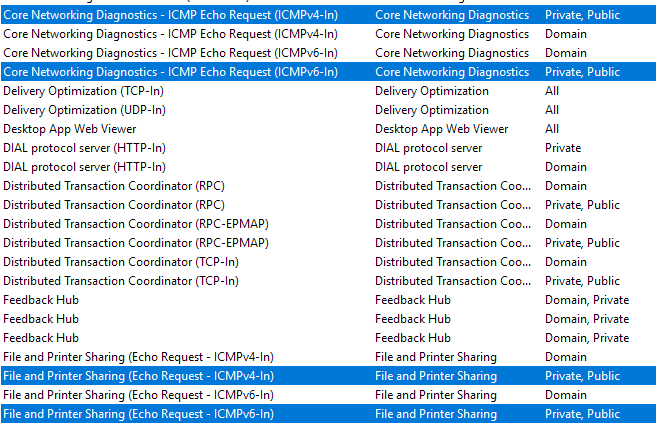
And change the Scope:
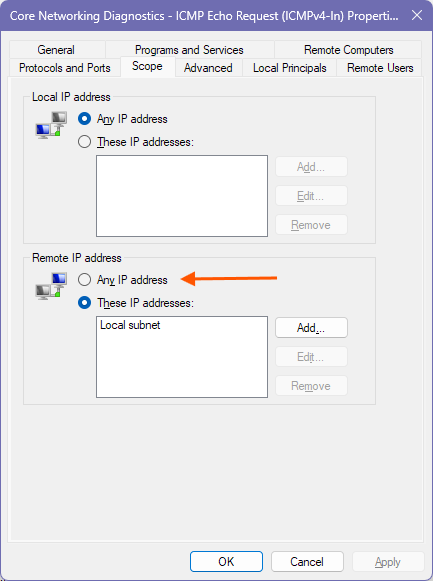
Unrelated to the problem you currently have: Normally you can place this rule at the top of the routing rule table:
/routing rule
add action=lookup min-prefix=0 table=main
then you wouldn't need special exception such as this rule anymore:
@CGGXANNX Do you know what action=mangle does in /routing rule? (It's a new feature added in 7.23 beta2).
Thanks sir, already fix yesterday, I trap with my old config in router RB1100 with small configuration, in short, with my old config no issue with SMB but in CCR2004 with optimize the configuration especially in pbr and qos, the issue appear. But with this script, I solved
Set-NetConnectionProfile -InterfaceAlias "Ethernet" -NetworkCategory Private
Get-NetFirewallRule -DisplayGroup "File and Printer Sharing" | Set-NetFirewallRule -Enabled True
New-NetFirewallRule -DisplayName "Allow SMB from LAN" -Protocol TCP -LocalPort 445,139 -Direction Inbound -Action Allow -Profile Any -RemoteAddress 192.168.0.0/16
New-NetFirewallRule -DisplayName "Allow ICMP from LAN" -Protocol ICMPv4 -IcmpType 8 -Direction Inbound -Action Allow -Profile Any -RemoteAddress 192.168.0.0/16
It has been added since 7.22, not 7.23  .
.
To know what those new actions under /routing rule are, you can first read the current documentation on routing table lookup:
                 policy-rules: mangle
                               vrf-lookup
                               vrf-unreach
                               local
                               user
                               main
- process policy routing rules (lookup routing-marks set by ip/firewall/mangle, If lookup fails move to the next rule).
- check that the packet has to be resolved in a VRF other than "main", and try to resolve it, return "network unreachable" if cannot be resolved here
- check that the packet has to be locally delivered, the destination address is the address of the router from the "main" VRF
- process implicit policy routing rules (any user defined rules by default is added in "user" chain)
- process implicit catch-all rule that looks up the destination in the ''main'' routing table
- the returned result is "network unreachable"
The default order for routing lookup described there is not new, and has been like that since early 7.x versions. For example, when you had mangle mark-routing rules, then those normally overrides the rules you added under /routing rule. Or when you have a packet modified by mangle mark-routing, then if that packet has one of the router's IP addresses as destination, then the router will not be able to receive that packet on the input chain anymore (because local lookup by default is placed lower than mangle).
That was the default behavior, and until 7.22 you could not change that, for example you could not give firewall mangle rules lower priority than the rules under /routing rule.
With 7.22 MikroTik wanted to change that and allow the user to modify the lookup order. This was however their first implementation (I am linking at an older version of the documentation):
IP Routing - RouterOS - MikroTik Documentation
In those beta versions of 7.22, the way the router exposes the lookup order, as well as allowing you to move the order around, was implemented by having built-in rules under /routing rule:
[admin@CCR2004_2S+_107] /routing/rule> print
Flags: X - DISABLED, I - INACTIVE; * - DEFAULT
 0  * action=mangle

 1  * action=lookup vrf

 2  * action=unreachable vrf

 3  * action=lookup table=local

 4  * action=lookup table=main
- process policy routing rules (lookup routing-marks set by ip/firewall/mangle, If lookup fails move to the next rule).
- check that the packet has to be resolved in a VRF other than "main", and try to resolve it, return "network unreachable" if cannot be resloved here (rules 1,2)
- check that the packet has to be locally delivered, the destination address is the address of the router from the "main" VRF (rule 3)
- process implicit policy routing rules (any user defined rules typically should be added between rule 3 and rule 4 )
- process implicit catch-all rule that looks up the destination in the ''main'' routing table (rule 4)
- the returned result is "network unreachable"
Thus, new action was defined. As you can see the rule with action=mangle is the one responsible for checking the routing mark on the packet, and if present and valid, the routing lookup will be performed on the referenced routing table, and the other routing rules below are skipped.
Similarly, the vrf flag was added, so that the 2nd and 3rd default step of the routing lookup can be represented. The new local table is also added, that contains only routes with the router's IP addresses as destination.
It was then intended, that any custom routing rules that the user previously wanted to add to /routing rule, should be inserted between the rule #3 and #4 to keep the same behavior of previous version <= 7.21.
But soon it could be seen that the approach was causing quite a few problems, with export & import, as well as with the normal workflow of adding new routing rules (the user must be aware that their rules have to be inserted at specific location between built-in rules). That's why in the later RC version (rc3) the approach was abandoned, and the new property /routing rule policy-rules is introduced, that specifies a list of "chains", and the item under /routing rule can now also specify the chain they belong to.
The built-in routing rules from the beta are now hidden. But you can imagine that there is now an invisible rule with action=mangle chain=mangle, an invisible rule with action=lookup vrf chain=vrf-lookup, one with action=unreachable vrf chain=vrf-unreach, one with action=lookup table=local chain=local, and finally one with action=lookup table=main chain=main.
Combined with the fact that routing rules added by user without specifying the chain are automatically put in the user chain, the default routing lookup behavior that has been there all the time in RouterOS 7 is maintained, with policy-rules=mangle,vrf-lookup,vrf-unreach,local,user,main by default.
But now, since 7.22 the user has the ability to move that default order around (by moving the chain in policy-rules), as well as to add new custom named chains, and insert routing rules at any location between the built-in rules, or even disable those built-in rules (by removing the chain from policy-rules).
And of course, because the new action and flag and local table are still there, you can also duplicate the built-in rule actions if you want, while giving them more matching conditions (like dst-address, src-address, interface).
I didn't see any description of action=mangle in the current documentation, so I assumed it was a new feature in 7.23 beta2 that hasn't been documented yet.
Thank you very much for such a detailed explanation. Essentially, it still allows users to change the lookup order. For example, I can move chain=mangle to be after chain=user. But if I have rules in the user chain that need to check for routing-marks defined in /ip/firewall/mangle earlier, I can define a rule in the user chain with chain=user, action=mangle, right?
Yes. You can even do something like:
- Clear the whole
policy-rules, set it only topolicy-rules=my-rules. - Then manually replicate the built-in rules (or not, for example ignore VRF ones if you have no use for VRF) under
/routing rulesin any order and combination that you want, giving each rulechain=my-rules.
Understood, thanks a lot for the explanation. I think MikroTik should really add this explanation to their documentation—it would be super helpful for understanding.
But be careful when you edit policy-rules. For example if you accidentally remove local before having some kind of replacements (a rule under /routing rule with a chain that's still in policy-rules with action=lookup table=local) then you'll be disconnected from the router if you use IP address to manage it (with WinBox or WebFig). Because no packet will be able to reach the input chain of the firewall anymore!
The only way to be able to manage the router then would be to use WinBox with MAC address!
I see, it's like how adjusting firewall rules can accidentally lock you out.
The reason I was curious about action=mangle is that I originally thought it meant looking up specific mangle rules in /ip/firewall/mangle (for example, creating a custom chain in firewall mangle and referencing it here).
This would allow us to specify routing rules with more complex conditions and also enable PBR to support FastTrack. (Of course, I'm referring to the fact that once FastTrack is enabled, subsequent packets don't get a chance to set the routing-mark, which means the mangle chain in /routing/rule effectively has no matching rules and just continues to the next step.)
Hopefully, this feature will be implemented one day.
I encountered another issue related to the connection to the Windows PACS Server at 192.168.5.3, so here are the results of my tests from both clients: Host A at 192.168.1.153 and Host B at 192.168.70.192. Host A and the Windows PACS Server are on the same interface, as shown in the Mikrotik configuration (ether2 - lan).
In the packet capture results between 192.168.1.153 and 192.168.5.8 on port 8090, there are a large number of TCP retransmissions and TCP duplicate ACKs, which is in contrast to the connection between 192.168.70.192 and 192.168.5.8, which appears much cleaner. Have you ever experienced this with the PBR approach on ROS7?
Btw, I still can't upload attachment and for Windows PACS Server I can’t access because it's a vendor-specific system
perhaps time for another full config export for viewing??