Hello,
I received two PC engines (apu2 & apu4) and would be glad to use them with RouterOS.
I have seen successful attempt with apu1 (different cpu) so i tried on the newer versions to no avail.
Has anyone tried and was successful?
Cheers
Hello,
I received two PC engines (apu2 & apu4) and would be glad to use them with RouterOS.
I have seen successful attempt with apu1 (different cpu) so i tried on the newer versions to no avail.
Has anyone tried and was successful?
Cheers
If we are talking about physical hardware, RouterOS can work only on x86 devices and on MikroTik devices.
Hello @normis, thank you for your answer.
PC Engine APU2/APU4 are running: AMD Embedded G series GX-412TC, 1 GHz quad Jaguar core with 64 bit and AES-NI support, 32K data + 32K instruction cache per core, shared 2MB L2 cache.
Unfortunately I’m not getting much out of the console port.
Thank you
So it is a x86, compatible in theory.
And it should be able to run most linuxes, just fine:
https://teklager.se/en/knowledge-base/supported-operating-systems/
From that to actually boot RouterOS on it, there might be a looong way, having not a “direct” visual output (but only the console/serial) doesn’t really help.
I would first try installing to it an OS that is documented to work on it, like:
https://wiki.archlinux.org/title/PC_Engines
or:
https://teklager.se/en/knowledge-base/installing-pfsense-apu-boards-over-serial/
to get familiar with the procedure.
Anyway it has been done:
What has to be seen is whether the RouterOS has the drivers for the network cards, it depends on the specific cards/boards.
yup that was done already, Debian is working just fine.
I wanted to give RouterOS a try as it might have been a very cool device in some use-cases I have.
I’ll check the linked thread and probably call it a day as I tried for quite some time already to no avail.
Thank you!
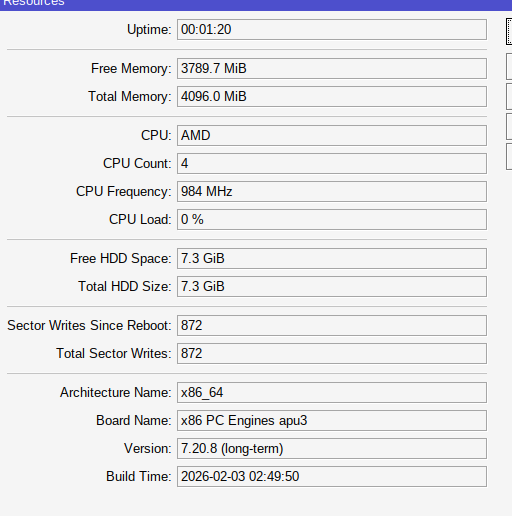
Just for info: I installed router os on a pcengines board.
By default you get no login, but the beeps.
You have to connect with winbox and set serial baudrate + enable serial console, then you can use it as expected!
Try this (winbox terminal)
[admin@MikroTik] > /system/console/disable 0
[admin@MikroTik] > /port/set baud-rate=115200 serial0
[admin@MikroTik] > /system/console/enable 0
coming here sort of late, but anyways - does ethernet work?
older posts from Y2020 says it does not, but is there any positive change now?
thanks,
shpokas
Hey, they all work on mine.
Just confirming that I got APU2 working with ROS 7.21.4, no issues with ethernet or my wifi card.