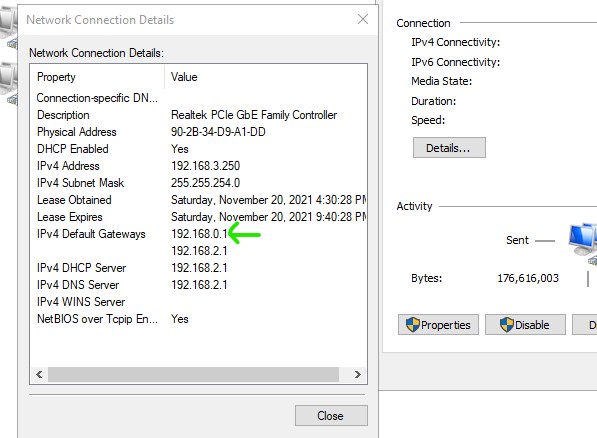
i have 2 WAN network, and 1 out LAN
where am i setting wrong or any missing? TQ
/interface bridge
add admin-mac=2C:C8:1B:23:2E:69 auto-mac=no fast-forward=no name=bridge
/interface ethernet
set [ find default-name=ether1 ] arp=local-proxy-arp comment=\
    "Backup Netinstall" name=1Master
set [ find default-name=ether2 ] arp=local-proxy-arp comment="WAN port" name=\
    2WAN
set [ find default-name=ether3 ] arp=local-proxy-arp name=3WAN
set [ find default-name=ether4 ] name=4LAN
set [ find default-name=ether5 ] name=5LAN
/interface list
add name=LAN
add name=WAN
/ip pool
add name=pool_DHCP ranges=192.168.3.1-192.168.3.250
/ip dhcp-server
add address-pool=pool_DHCP disabled=no interface=bridge lease-time=5h10m name=\
    server1
/interface bridge port
add bridge=bridge interface=4LAN
add bridge=bridge interface=5LAN
/interface bridge settings
set use-ip-firewall=yes
/ip neighbor discovery-settings
set discover-interface-list=LAN
/ip settings
set tcp-syncookies=yes
/interface list member
add interface=bridge list=LAN
add interface=2WAN list=WAN
add interface=3WAN list=WAN
add interface=4LAN list=LAN
add interface=5LAN list=LAN
add interface=1Master list=LAN
/ip address
add address=192.168.2.1/23 interface=bridge network=192.168.2.0
/ip dhcp-client
add add-default-route=no disabled=no interface=2WAN use-peer-dns=no
add add-default-route=no disabled=no interface=3WAN use-peer-dns=no
/ip dhcp-server network
add address=192.168.2.0/23 dns-server=192.168.2.1 gateway=192.168.2.1
/ip dns
set allow-remote-requests=yes servers=208.67.222.123,208.67.220.123
/ip firewall address-list
add address=www.facebook.com list=Blacklist
add address=shopee.com.my list=Blacklist
add address=lazada.com.my list=Blacklist
add address=taobao.com list=Blacklist
add address=www.lazada.com.my list=Blacklist
add address=192.168.2.0/23 list=Local_network
/ip firewall filter
add action=drop chain=forward port=80,443 protocol=tcp src-address-list=\
    Blacklist
add action=drop chain=input connection-state=invalid
/ip firewall mangle
add action=accept chain=prerouting dst-address=192.168.0.0/24 in-interface=\
    bridge
add action=accept chain=prerouting dst-address=192.168.100.0/24 in-interface=\
    bridge
add action=mark-connection chain=prerouting connection-mark=no-mark \
    dst-address-type=!local in-interface=bridge new-connection-mark=WAN1_conn \
    passthrough=yes per-connection-classifier=both-addresses-and-ports:2/0
add action=mark-connection chain=prerouting connection-mark=no-mark \
    dst-address-type=!local in-interface=bridge new-connection-mark=WAN2_conn \
    passthrough=yes per-connection-classifier=both-addresses-and-ports:2/1
add action=mark-routing chain=prerouting connection-mark=WAN1_conn \
    in-interface=bridge new-routing-mark=to_WAN1
add action=mark-routing chain=prerouting connection-mark=WAN2_conn \
    in-interface=bridge new-routing-mark=to_WAN2
add action=mark-routing chain=output connection-mark=WAN1_conn \
    new-routing-mark=to_WAN1
add action=mark-routing chain=output connection-mark=WAN2_conn \
    new-routing-mark=to_WAN2
/ip firewall nat
add action=masquerade chain=srcnat out-interface=2WAN
add action=masquerade chain=srcnat out-interface=3WAN
/ip firewall service-port
set sip disabled=yes
/ip route
add check-gateway=ping distance=1 gateway=192.168.0.1 routing-mark=to_WAN1
add check-gateway=ping distance=1 gateway=192.168.100.1 routing-mark=to_WAN2
add check-gateway=ping distance=1 gateway=192.168.0.1
add check-gateway=ping distance=2 gateway=192.168.100.1
/ip service
set telnet disabled=yes
set ftp disabled=yes
set www disabled=yes
set ssh disabled=yes
/tool mac-server
set allowed-interface-list=LAN
/tool mac-server mac-winbox
set allowed-interface-list=LAN
/tool mac-server ping
set enabled=n0
anav
November 20, 2021, 2:09pm
2
Observations.
MISSING firewall rules to protect your router and LAN network.
(2) remove this setting (select NO) and use the normal
(3) Your mangle rules… add the modifications and the missing lines. add action=mark-connection chain=prerouting connection-mark=no-mark disabled=no
It looks like you have fixed private IPs as your internet connections, thus why do you not have an IP address setting for both WANs??
Observations.
MISSING firewall rules to protect your router and LAN network.
(2) remove this setting (select NO) and use the normal
(3) Your mangle rules… add the modifications and the missing lines. add action=mark-connection chain=prerouting connection-mark=no-mark disabled=no
It looks like you have fixed private IPs as your internet connections, thus why do you not have an IP address setting for both WANs??
It looks like you have fixed private IPs as your internet connections, thus why do you not have an IP address setting for both WANs??
#whoever is feeding you that connection may prefer dynamic
Sob
November 20, 2021, 5:46pm
4
I don’t see any way how router could cause this. Don’t you just have 192.168.0.1 as another manual gateway in Windows config?
Adapter properties → IPv4 → Advanced → Default gateways
i just Auto obtain IP address, not manual input ip
Sob
November 20, 2021, 7:09pm
6
I understand, but even with dhcp enabled, it’s still possible to have another forgotten manually configured gateway in advanced setting, from some past experiments perhaps. Did you check that it’s really not there?