Hello people.
I have setup a PCC load balancer + Hotspot on a Mikrotik 750G.
The PCC configuration is as shown in the wiki article http://wiki.mikrotik.com/wiki/Manual:PCC
Since I run a hotspot, I have added the --hotspot: auth option in the PCC rules
My problem is, with this configuration all traffic prefers going through 1 line. If I disable that WAN interface, it does use the other one.
If I remove the --hotspot: auth option, load balancing works well but users don’t automatically get redirected to the hotspot page.
I load balance 2 lines from the same ISP, sometimes giving me the same gateway. To overcome potential problems, I have the 2 modems NATing on IPs 192.168.9.1/24 and 192.168.8.1/24. The Mikrotik runs on 192.168.10.1/24 just as the LAN clients behind it.
Here’s a diagram:
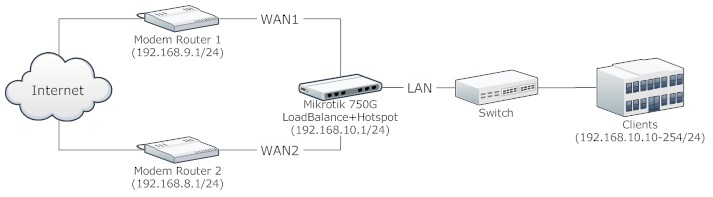
And here are exports from my configuration:
/ip address
add address=192.168.10.1/24 disabled=no interface=LAN network=192.168.10.0
add address=192.168.8.2/24 disabled=no interface=WAN2 network=192.168.8.0
add address=192.168.9.2/24 disabled=no interface=WAN1 network=192.168.9.0
/ip dhcp-server network
add address=192.168.10.0/24 dns-server=192.168.10.1 gateway=192.168.10.1
/ip dhcp-server
add add-arp=yes address-pool=static-only authoritative=after-2sec-delay bootp-support=static disabled=no interface=LAN lease-time=3d name=dhcp1
/ip dhcp-server config
set store-leases-disk=5m
/ip firewall mangle
add action=accept chain=prerouting disabled=no dst-address=192.168.9.0/24 in-interface=LAN
add action=accept chain=prerouting disabled=no dst-address=192.168.8.0/24 in-interface=LAN
add action=mark-connection chain=prerouting disabled=no in-interface=WAN1 new-connection-mark=WAN1_conn passthrough=yes
add action=mark-connection chain=prerouting disabled=no in-interface=WAN2 new-connection-mark=WAN2_conn passthrough=yes
add action=mark-connection chain=prerouting disabled=no dst-address-type=!local hotspot=auth in-interface=LAN new-connection-mark=WAN1_conn passthrough=yes per-connection-classifier=both-addresses-and-ports:2/0
add action=mark-connection chain=prerouting disabled=no dst-address-type=!local hotspot=auth in-interface=LAN new-connection-mark=WAN2_conn passthrough=yes per-connection-classifier=both-addresses-and-ports:2/1
add action=mark-routing chain=output connection-mark=WAN1_conn disabled=no new-routing-mark=to_WAN1 passthrough=yes
add action=mark-routing chain=output connection-mark=WAN2_conn disabled=no new-routing-mark=to_WAN2 passthrough=yes
add action=mark-routing chain=prerouting connection-mark=WAN1_conn disabled=no in-interface=LAN new-routing-mark=to_WAN1 passthrough=yes
add action=mark-routing chain=prerouting connection-mark=WAN2_conn disabled=no in-interface=LAN new-routing-mark=to_WAN2 passthrough=yes
/ip firewall nat
add action=masquerade chain=srcnat disabled=no out-interface=WAN1
add action=masquerade chain=srcnat disabled=no out-interface=WAN2
/ip route
add check-gateway=ping disabled=no distance=1 dst-address=0.0.0.0/0 gateway=192.168.9.1 routing-mark=to_WAN1 scope=30 target-scope=10
add check-gateway=ping disabled=no distance=1 dst-address=0.0.0.0/0 gateway=192.168.8.1 routing-mark=to_WAN2 scope=30 target-scope=10
add check-gateway=ping disabled=no distance=1 dst-address=0.0.0.0/0 gateway=192.168.8.1 scope=30 target-scope=10
add check-gateway=ping disabled=no distance=1 dst-address=0.0.0.0/0 gateway=192.168.9.1 scope=30 target-scope=10
/ip hotspot profile
set default dns-name=“” hotspot-address=0.0.0.0 html-directory=hotspot http-cookie-lifetime=3d http-proxy=0.0.0.0:0 login-by=cookie,http-chap name=default rate-limit=“” smtp-server=0.0.0.0 split-user-domain=no use-radius=no
add dns-name=interlandns.com hotspot-address=0.0.0.0 html-directory=hotspot http-cookie-lifetime=3d http-proxy=0.0.0.0:0 login-by=cookie,http-chap name=hsprof2 rate-limit=“” smtp-server=0.0.0.0 split-user-domain=no use-radius=no
/ip hotspot
add address-pool=default-dhcp addresses-per-mac=2 disabled=no idle-timeout=5m interface=LAN keepalive-timeout=none name=hotspot1 profile=hsprof2
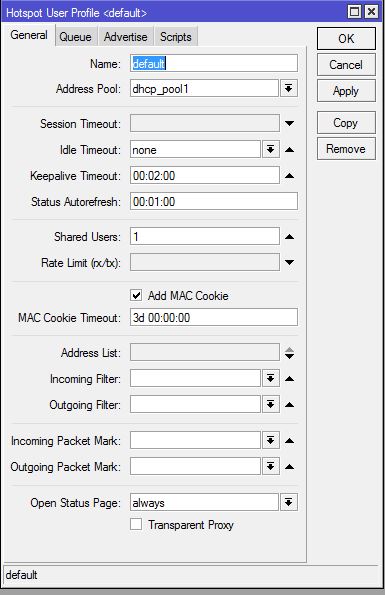
/ip hotspot user profile
set default idle-timeout=none keepalive-timeout=2m name=default shared-users=1 status-autorefresh=1m transparent-proxy=no