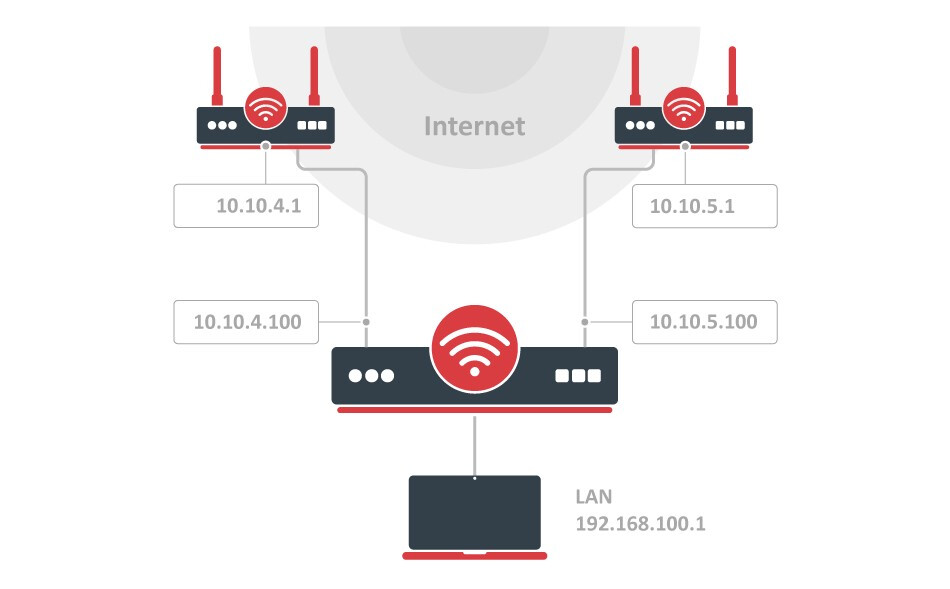
Based on this rules inbound traffic destination of public ( internet ) subnets, but inbound interface is LAN ??
To me this traffic never will match. Is this should be public Internet inbound interface ?
then 10.10.4.1 and 10.10.5.1 with their antennas are not "the internet", but two (WiFi) routers, probably like the ones provided by the ISPs. The MikroTik router is effectively inside their LAN networks (hence the 10.x.x.x subnets). The two routers act as gateways but they are devices that you may want to manage too (access the management webpage at https://10.10.4.1/ and https://10.10.5.1/ for example).
The two mangle rules you quoted allow you to manage those two devices (and also access their LAN networks in case other devices are plugged into those two routers too). Without these two rules (that have the purpose of skipping the PCC rules below them) traffic towards 10.10.5.100/24 might be redirected to 10.10.4.1 which is not what you want.
No, it's the interface where the packets are comming from (note the in of in-interface). When your laptop at 192.168.100.20 opens https://10.10.5.1/, then the SYN packet that starts the connection comes from the ether_LAN interface (the interface that has the subnet 192.168.100.0/24). That packet now needs to be routed to 10.10.5.1 (the dst-address). This mangle rule:
will exactly catch this packet and will make sure that the other PCC-related rules below will not see it. The action=accept here effectively direct the packet to use the main routing table.
In the main routing table there is the connected route dst-address=10.10.5.0/24 gateway=ether_ISP2 that assures that this packet go out of the correct interface (ether_ISP2) and can correctly reach the 10.10.5.1 WiFi router.
OK I understood concept of reply. Than you for explanation.
In real production in my case, both providers upstream DHCP reservation, I specified for every provider routing table and ping as gateway availability ping under DHCP Client settings, but ECMP is not working + only reports status DAd which I can reach them not problem. Only if traffic is allowed with ACCEPT from public interfaces, seems like traffic flowing with PCC, but ECMP state not available.
In one sentence: The two mangle rules demonstrate the way to prevent any traffic, so desired, that should not be trapped by the PCC mangling, is not captured and sent to PCC routes etc (as stated stick with main for routing). It could be a local subnet, a single Device etc.
As to your config not working, no crystal balls here.
Post your config
/export file=anynameyouwant ( minus router serial number, any public WANIP information, keys, dhcp lease lists )