Per-packet load balancing, supported by ISP

Hello there,

I’ve got an offer from my ISP to get a second DSL line. The ISP supports bonding, meaning that they have a Cisco router on their side where they can switch on “Load Balancing per Packet” for incoming packets:
http://www.cisco.com/en/US/docs/ios/12_0s/feature/guide/pplb.html

The ISP suggested that I also buy a Cisco, but it is too expensive for me.

I saw the hint on
http://wiki.mikrotik.com/wiki/Manual:IP/Route
(grey box on the right side):
“See interface bonding if you need to achieve per-packet load balancing.”

Anybody got that up and running? Would be nice to hear how stable that is, before I go and order the router and the DSL line.

Thanks a lot

No experience with that. Maybe someone else can chime in.

Just in case it’s useful, you could also use bonding, which works just fine. Very stable, mature, standardized technology.

Cisco supports two different protocols, PAgP and LACP. PAgP is Cisco proprietary, LACP is a standard (802.3ad). You will have to use LACP. LACP can run different algorithms to calculate which link in a bundle to put a packet on. It is NOT going to utilize both links the same by alternating links per packet, it is going to use either layer 2 mode and use the result of a XOR on the source and destination MAC address, or layer 3 mode and also include the IP address. If you have a /30 between you and the ISP the MACs will always be the same so that is a bad fit, and you should use layer 3.
Still, if you have a connection between 1.1.1.1 and 2.2.2.2 running at 1Mbps that the algorithm puts on link 1, and a connection between 1.1.1.1 and 3.3.3.3 running at 2Mbps that the algorithm puts on link 2, then link 1 is going to see 1Mbps of utilization, and link 2 is going to see 2Mbps of utilization. Each connection only runs across one link. It is per packet load balancing in that the router looks at each packet to decide which link to put it on, but it’s always going to put packets in the same connection on the same link. As long as you have a mix of traffic over a lot of connections this tends to balance things fairly nicely.

Again, not quite what you asked for, but a possible solution.
http://wiki.mikrotik.com/wiki/Manual:Interface/Bonding#Bonding_modes

Thanks for your answer fewi.

Question is, if PPPoE interfaces support bonding. Somebody told me that they don’t.

Bonding would be indeed the solution since it can be done by using “balance-rr” in RouterOS. That is the same (and very simple) method used by Cisco in “Load Balancing per Packet” mode (see the link to the Cisco website in my first post). My ISP doesn’t support any other methods or protocols.

Can you confirm that PPPoE interfaces support bonding in the RouterOS?

Thanks

I’m afraid I don’t know. I don’t have any RouterOS routers with PPP interfaces. Should be easy to determine for you in a lab tho.

If both PPPoE accounts are with the same ISP have you considered MLPPP?

I’m new to RouterOS, so I thought that some experts might give me some hints if that works or not, before I do some tests on my own.

Mangling the packets with nth and routing them accordingly seems to be another solution.

My ISP does not offer MLPPP, because it seems to produce some unwanted overhead. They normally use the Load Balancing per packet method when they bundle two or three SDSL lines. But then they provide the client-side Cisco, too, and take a lot more money.

So I’m more or less in a “take what you get” situation.

Thanks for your input!

Perhaps it is easier than I thought by using nth?

/ip firewall mangle add chain=prerouting action=mark-routing new-routing-mark=gw1 nth=1,1,0
/ip firewall mangle add chain=prerouting action=mark-routing new-routing-mark=gw2 nth=1,1,1

/ip route add gateway=xx.xx.xx.xx routing-mark=gw1
/ip route add gateway=yy.yy.yy.yy routing-mark=gw2

xx.xx.xx.xx and yy.yy.yy.yy would be the external routing IPs of the WAN connections. We have an own Ripe-subnet with 8 external ip numbers routed to both WAN connections.

Would that work?

Thanks

That should work. Though you’d want to add two more routes via each gateway with a higher AD that packets can fall through to if the route for their mark dies due to circuit failure.

That is why it’s nicer to use a protocol - you get the failover as added bonus and don’t have to rely on other ways (for example if you have DSL modems in bridged mode you’d need ping tests to determine failure as the interface to the modem would stay up even if the DSL line upstream goes down).

Good point, thanks a lot fewi.

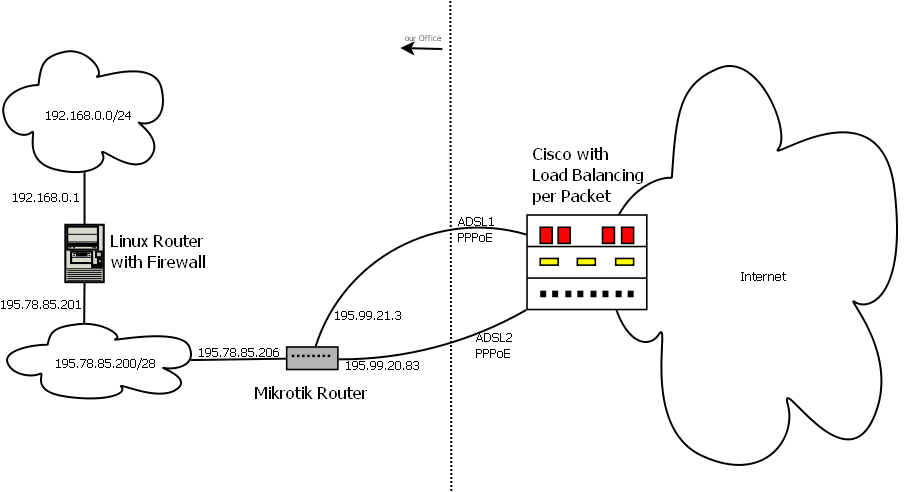
First of all I made a small diagram showing the network with two DSL-Lines (IP numbers changed):
network.png
This is just to be sure that there is no misunderstanding or something similar. To implement the failover I would use:

/ip firewall mangle add chain=prerouting action=mark-routing new-routing-mark=gw1 nth=1,1,0
/ip firewall mangle add chain=prerouting action=mark-routing new-routing-mark=gw2 nth=1,1,1

/ip route add distance=1 gateway=195.99.21.3 routing-mark=gw1
/ip route add distance=2 gateway=195.99.20.83 routing-mark=gw1
/ip route add distance=1 gateway=195.99.20.83 routing-mark=gw2
/ip route add distance=2 gateway=195.99.21.3 routing-mark=gw2

Would that be ok? To implement the line check I would follow this article:
http://wiki.mikrotik.com/wiki/Advanced_Routing_Failover_without_Scripting

And one last question:
A “RB450 Indoor” with RouterOS Version 5.x Level 4 would be able to do the job, right? Or do I need something special?

Thanks a lot!

Hello,

after ordering the second DSL line and the Mikrotik router we finally got the load balancing up and running. There is only a small problem left, but I should provide some insights first.

The firewall mangle rules:
chain=prerouting action=mark-packet new-packet-mark=odd passthrough=yes src-address=195.78.85.200/29 nth=2,1
chain=prerouting action=mark-routing new-routing-mark=gw1 passthrough=yes src-address=195.78.85.200/29 packet-mark=odd
chain=prerouting action=mark-packet new-packet-mark=even passthrough=yes src-address=195.78.85.200/29 nth=2,2
chain=prerouting action=mark-routing new-routing-mark=gw2 passthrough=yes src-address=195.78.85.200/29 packet-mark=even

As you can see mangling has to be done in two steps: First the packets get a packet mark (odd or even), then a routing mark is set accordingly (gw1 or gw2). And: The nth format has changed - it contains only two parameters in newer RouterOS versions, not three.

The routing table:
0 A S 0.0.0.0/0 pppoe-out1 gw1 1
1 S 0.0.0.0/0 pppoe-out2 gw1 2
2 A S 0.0.0.0/0 pppoe-out2 gw2 1
3 S 0.0.0.0/0 pppoe-out1 gw2 2
4 ADC 195.78.85.200/29 195.78.85.206 bridge1 0
5 ADC 195.232.191.2/32 195.99.21.3 pppoe-out2 0
pppoe-out1

The last two routes are added automatically. This concept is working and gives a very good performance! There is more or less no loss, both lines together give the double bandwidth of one line - in both directions.

So far so good, there is only one small problem: The Cisco router on the other side sometimes routes all traffic only to one of the two DSL lines. It seems to “think” that the other line is down, The problem starts directly after connecting the second line (which might be pppoe-out1 or pppoe-out2, no difference), all incoming packets go only to one line. This situation can be solved by disconnecting and reconnecting the “working” line, but giving a 50% chance to get into a similar situation again. If both lines start receiving correctly everything is fine, until one of the lines gets reconnected.

The provider says that the problem occurs because the two pppoe interfaces of our router (195.99.21.3 and 195.99.20.83) are not ping-able from the external network. That is indeed true, the routing marks are only set for routed packets and not for outgoing packets. So the router does not have a default gateway for it’s own packets.

This is a bit annoying because there is an automatic disconnect every 24h - after that we have a 50% chance that only one line is receiving incoming packets.

Any hints?

Thanks

Unless you’re using the packet marks for something else you can skip using packet marks completely and just apply routing marks:

chain=prerouting action=mark-packet new-packet-mark=odd passthrough=yes src-address=195.78.85.200/29 nth=2,1
chain=prerouting action=mark-routing new-routing-mark=gw1 passthrough=yes src-address=195.78.85.200/29 packet-mark=odd
chain=prerouting action=mark-packet new-packet-mark=even passthrough=yes src-address=195.78.85.200/29 nth=2,2
chain=prerouting action=mark-routing new-routing-mark=gw2 passthrough=yes src-address=195.78.85.200/29 packet-mark=even

becomes

chain=prerouting action=mark-routing new-routing-mark=gw1 passthrough=yes src-address=195.78.85.200/29 nth=2,1
chain=prerouting action=mark-routing new-routing-mark=gw2 passthrough=yes src-address=195.78.85.200/29 nth=2,2

As far as the pinging of the PPPoE interfaces goes: who is pinging what exactly? And with the answer to that question can you provide the output of “/ip address print detail” and “/ip route print detail”, wrapped in

 tags?

Ok, confirmed. My fault, I thought that I needed “mark-packet” to do per packet load balancing. It works with “mark-routing” and nth directly, too. Thanks.

It should be the Cisco router itself (195.232.191.2) which does the line checking. Here comes the output of the commands:

[admin@MikroTik] > /ip address print detail
Flags: X - disabled, I - invalid, D - dynamic 
 0   address=195.78.85.206/29 network=195.78.85.200 interface=bridge1 
     actual-interface=bridge1 

 1 D address=195.99.20.83/32 network=195.232.191.2 interface=pppoe-out2 
     actual-interface=pppoe-out2 

 2 D address=195.99.21.3/32 network=195.232.191.2 interface=pppoe-out1 
     actual-interface=pppoe-out1


[admin@MikroTik] > /ip route print detail
Flags: X - disabled, A - active, D - dynamic, 
C - connect, S - static, r - rip, b - bgp, o - ospf, m - mme, 
B - blackhole, U - unreachable, P - prohibit 
 0 A S  dst-address=0.0.0.0/0 gateway=pppoe-out1 gateway-status=pppoe-out1 reachable 
        distance=1 scope=30 target-scope=10 routing-mark=gw1 

 1   S  dst-address=0.0.0.0/0 gateway=pppoe-out2 gateway-status=pppoe-out2 reachable 
        distance=2 scope=30 target-scope=10 routing-mark=gw1 

 2 A S  dst-address=0.0.0.0/0 gateway=pppoe-out2 gateway-status=pppoe-out2 reachable 
        distance=1 scope=30 target-scope=10 routing-mark=gw2 

 3   S  dst-address=0.0.0.0/0 gateway=pppoe-out1 gateway-status=pppoe-out1 reachable 
        distance=2 scope=30 target-scope=10 routing-mark=gw2 

 4 ADC  dst-address=195.78.85.200/29 pref-src=195.78.85.206 gateway=bridge1 
        gateway-status=bridge1 reachable distance=0 scope=10 

 5 ADC  dst-address=195.232.191.2/32 pref-src=195.99.20.83 gateway=pppoe-out2,pppoe-out1 
        gateway-status=pppoe-out2 reachable,pppoe-out1 reachable distance=0 scope=10

(all addresses slightly changed)

Route #5 might be the problem - its sets the source ip to the ip of one of the pppoe interfaces (pppoe-out2 in this example).

if I ping from my side to the Cisco I get:

[admin@MikroTik] > ping 195.232.191.2 interface=pppoe-out1     
HOST                                     SIZE TTL TIME  STATUS                           
195.232.191.2                                           timeout                          
    sent=2 received=0 packet-loss=100% 

[admin@MikroTik] > ping 195.232.191.2 interface=pppoe-out2
HOST                                     SIZE TTL TIME  STATUS                           
195.232.191.2                              56 255 13ms 
    sent=3 received=3 packet-loss=0% min-rtt=13ms avg-rtt=13ms max-rtt=13ms

So this could be the problem.

Thanks a lot
Any good ideas how to make both PPPoE interfaces pingable from outside?

Thanks

Try exempting the IPs in the WAN link subnets from any policy routing:

/ip firewall address-list
add list=wan-links address=195.99.21.0/30
add list=wan-links address=195.99.20.80/30
/ip firewall mangle
add chain=prerouting src-address=wan-links action=accept
add chain=prerouting dst-address=wan-links action=accept

That’s assuming you don’t NAT against your WAN link IPs, which I don’t think you are given that you have public IP space routed through them.

No NAT at all.

Why do you use /30 here? How can we know that the wan link network consists of 4 IPs?
I tried both 195.99.21.0/30 and 195.99.21.1 and it seems that using the IP instead of the network improves the situation a bit. It seems to be a bit easier to build up both connections correctly. I don’t need so many retries, at least that is my feeling. So we are on the right track, but the problem is definitly still there.

I’m still thinking about the automatically generated route #5:

5 ADC  dst-address=195.232.191.2/32 pref-src=195.99.20.83 gateway=pppoe-out2,pppoe-out1
        gateway-status=pppoe-out2 reachable,pppoe-out1 reachable distance=0 scope=10

“pref-src=195.99.20.83” should be a problem when a packet comes in on the other pppoe-interface, right? Can I remove the prefered source IP somehow?

Thanks a lot!

Sorry, I was doing too many things at once typing that post. Of course you’re using PPPoE, so there’s no /30 links, so that makes little sense.

Basically you would want to try and figure out what source IP address the Cisco router on the other end is going to be using to ping your sides of the links, the ISP can hopefully also help with that. Then add that (or those) source IPs to an address list together with the IPs on your end, and use the policy routing exemption rules I posted in combination with that updated list. You’re basically trying to say “any traffic between the two routers shouldn’t be subjected to nth”. The easiest way to do that is to have mangle rules above the policy routing nth rules that just accept the traffic you don’t want subjected to nth.

You can’t remove the preferred source because the entry is dynamic. The issue is probably simply that the Cisco router on the other end is handing you the same /32 on their side on both PPPoE links despite your ends getting different IPs. Maybe the provider can hand you a different /32 to hit as a default gateway on the second link, and then you just use ECMP with two default routes? Usually there’s an issue with that if you NAT against the link IPs, but you’re not, so ECMP should be working just fine.

Now both wan addresses are pingable from 0.0.0.0. I achieved this by adding a new, separate default route for non-tagged packets:

 4 A S  dst-address=0.0.0.0/0 gateway=pppoe-out1,pppoe-out2 
        gateway-status=pppoe-out1 reachable,pppoe-out2 reachable distance=1 scope=30 
        target-scope=10

And, of course your firewall settings excluding the wan addresses from tagging were necessary, too. Unfortunately this route somehow gets inactive if one of the interfaces goes down. This is not shown in WinBox (route still shown in black), but the wan addresses simply aren’t pingable any more. So I have to restart that route by hand. Is there a way to do this automatically?

Unfortunately the problem still exists. I never gave some details, here they come:

  • Line 1 and Line 2 receiving
    Restarting Line 1 gives a 50% chance that Line 1 does not receive afterwards. The other 50% leads to both lines receiving correctly.
    Restarting Line 2 gives a 50% chance that Line 2 does not receive afterwards. The other 50% leads to both lines receiving correctly.

  • Only Line 1 receiving, Line 2 does not receive
    Restarting Line 2 gives a 95% chance that Line 2 still does not receive afterwards. The other 5% leads to both lines receiving correctly.
    Restarting Line 1 forces a switch-over to Line 2 and gives a 50% chance that Line 1 does not receive afterwards. The other 50% leads to both lines receiving correctly.

  • Only Line 2 receiving, Line 1 does not receive
    Restarting Line 1 gives a 95% chance that Line 1 still does not receive afterwards. The other 5% leads to both lines receiving correctly.
    Restarting Line 2 forces a switch-over to Line 1 and gives a 50% chance that Line 2 does not receive afterwards. The other 50% leads to both lines receiving correctly.

So the best way to get both lines receiving again is to restart the working line, probably forcing the ISP router to switch over to the other line.

But I will talk to my ISP first, perhaps they can give me some further hints about what might be wrong or missing.

Thanks

Unfortunately this route somehow gets inactive if one of the interfaces goes down. This is not shown in WinBox (route still shown in black), but the wan addresses simply aren’t pingable any more. So I have to restart that route by hand. Is there a way to do this automatically?

What first looked like only a small problem might be the main problem: Because the new default route #4 becomes inoperable directly after one of the interfaces went down and up, both interfaces are not pingable. And that seems to be exactly the time when the ISP router tries to ping them.

The route is not really down. I did some packet sniffing, and it turned out that, in such a situation, if a icmp packet comes in on pppoe-out1 it goes out on pppoe-out2 and vice versa, so the route somehow seems to be mixed up. Is that perhaps a bug in RouterOS? Restarting the route solves that problem, icmp packets coming in on pppoe-out1 go then out on pppoe-out1 again and vice versa.

So my question is now:

  • How do I refresh a static route after a PPPoE interface comes up again?
  • Or can I perhaps write a script which refreshes the route after a PPPoE interface comes up again? (on a Linux machine you could write an ip-up.d script)

Here comes the routing table again:

[admin@MikroTik] > ip route print detail 
Flags: X - disabled, A - active, D - dynamic, 
C - connect, S - static, r - rip, b - bgp, o - ospf, m - mme, 
B - blackhole, U - unreachable, P - prohibit 
 0 A S  dst-address=0.0.0.0/0 gateway=pppoe-out1 gateway-status=pppoe-out1
        distance=1 scope=30 target-scope=10 routing-mark=gw1 

 1   S  dst-address=0.0.0.0/0 gateway=pppoe-out2 gateway-status=pppoe-out2
        distance=2 scope=30 target-scope=10 routing-mark=gw1 

 2 A S  dst-address=0.0.0.0/0 gateway=pppoe-out2 gateway-status=pppoe-out2
        distance=1 scope=30 target-scope=10 routing-mark=gw2 

 3   S  dst-address=0.0.0.0/0 gateway=pppoe-out1 gateway-status=pppoe-out1
        distance=2 scope=30 target-scope=10 routing-mark=gw2 

 4 A S  dst-address=0.0.0.0/0 gateway=pppoe-out1,pppoe-out2 
        gateway-status=pppoe-out1 reachable,pppoe-out2 reachable distance=
        target-scope=10 

 5 ADC  dst-address=195.78.85.200/29 pref-src=195.78.85.206 gateway=bridge
        gateway-status=bridge1 reachable distance=0 scope=10 

 6 ADC  dst-address=195.232.191.2/32 pref-src=195.99.20.93 gateway=pppoe-
        gateway-status=pppoe-out2 reachable,pppoe-out1 reachable distance=

Route #4 gets inoperable after one of the interfaces gets restarted.

Thanks

Ok, I figured that out on my own:

 4   chain=output action=mark-routing new-routing-mark=gw1 passthrough=yes src-address=195.99.21.3 

 5   chain=output action=mark-routing new-routing-mark=gw2 passthrough=yes src-address=195.99.20.83

By adding these two mangle rules outgoing packets from the wan interfaces get tagged, too, according to the source address. And so they always take the correct interface.

Unfortunately this does not solve the main problem (as I hoped before). Will get in contact with my ISP again.

Thx

Ok talked to my ISP. They say that the problem might be that our Mikrotik router tries to do MLPPP. And that could be true - I read somewhere that RouterOS tries to do MLPPP if there are two or more PPPoE interfaces.

The reason is, that they have three Cisco routers as end points, not only one, as shown in my graphic. And nobody can predict which one will get the first and which one will get the second line. Cisco supports MLPPP in general, but it will not work in such a scenario. And might mix up the routes if both lines go to different Ciscos.

So how do I force the RouterOS not to try MLPPP even if it sees two PPPoE interfaces? Is there a way?

Thx