Greetings
I have 1 RouterBOARD 962UiGS-5HacT2HnT with Firmware 6.45.1
With Default Settings, i have 1 public ip address assigned on my PPPOE Session, i want to be able to connect via WINBOX to it.
Its enabled on Services port 8291, but im not able to connect with my laptop using Mobile ATT ,
In default configuration access from wan is blocked! Just go to IP > Firewall > Filter Rules and disable input drop rule ate the end of list
Of better recommend is to create a new rule chain input, protocol tcp, Dst. Port 8291, action accept and put this rule on top of all other rules!
Of course both of these solutions are not recommended!
There have been several problems with Winbox security in the recent past, and people that have done what was described here have found that their routers were hacked.
MikroTik thinks that the current version is no longer vulnerable to such attacks, but so they did for previous versions and there were some very big holes in them.
So please manage your devices only from the inside, and when you really need to access it from outside then try to find a range of IP addresses that you can allow access, and still block the majority of the internet.
I agree with pe1chl, of course.
Permitting only a range of IPs that you anticipate your mobile or other internet would have when you want access, is the way to go.
Still, this is kinda ridiculous to always be scared to allow access from the internet, because of such large-scale exploits that can happen. I have bunch of internal services (IRC, FTP, Web etc. etc.) on internal computers available to the internet and never had any problem with what. Yet mikrotiks had so many holes in this basic administration service!
The protocol should be strong and well established - receive requests for connection, and if incorrect credentials, just refuse and done. Very frustrating and this causes many annoyances.
Trust is easily lost.
I do agree that MT should not have had these problems. Since with MT you can do nearly everything with it, setup proxy or socks server, its much more interesting to get inn to an MikroTik Router
Why you should not open your router form outside has been discussed here many times before.
If you need access from outside to you router, you should use VPN.
Router could call home and you can access it. VPN can use DNS, so if you have a dynamic IP, that should be no problem.
If you need to open Winbox/SSH or web access to MT and can not use VPN, you should.
I agree that a VPN or more clever firewall is a better solution for this problem, but it is not so useful to suggest that to a beginner who does not yet know how the firewall works.
That is why I suggested more simple solutions for now.
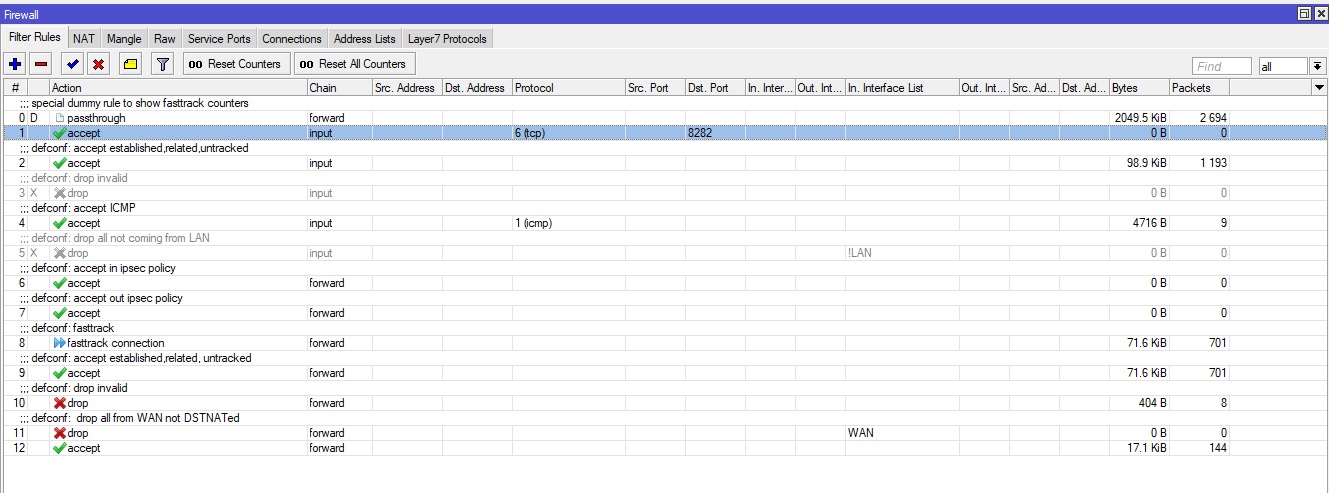
I gave up, on the winbox, but i needed also to permit port 8282 to access DVR, i created the forward and also DST NAT from public to private ip
and still shows it as filtered and not open if i scan via a online scan port website…
Don’t post screenshots, they don’t show everything, post config export instead. In this case “/ip firewall export” could be enough.
Firewall rule #1 is useless, input chain is for services on router itself, not for forwarded ports.
By disabling firewall rule #5, you opened every service on router to whole world. So on the upside, even access to WinBox from internet should now work. But it’s probably not the best idea (see previous posts).
You don’t need rule #12, implicit invisible accept rule at the end already exists.
Assuming your dstnat rule is correct, and since you (as it seems) didn’t change much in default firewall, it should work. You already have some incoming connections matched by the rule. So also check if the target device is configured correctly.
You still have all access to router open (see point 3 in previous post). But other than that, there’s nothing wrong. So try to watch packets more closely. You use either Tools->Torch, or some logging rules, e.g.:
The first rule should log some packets (if dstnat rule logs something, it should be here too). The second rule will only log something if DVR responds. If it doesn’t, you need to check what’s wrong there.