I’ve been experiencing an issue with my Mikrotik ax 2 router that I’m hoping someone might be able to help me with. The problem is quite peculiar and I haven’t been able to find a solution yet.
My network consists entirely of devices that connect via Wi-Fi, and they are all intermittently losing their connection several times a day. What’s especially strange is that even when the devices are disconnected, the SSID remains visible in the network lists. When any device attempts to reconnect, it’s denied access with an error message stating the Wi-Fi password is incorrect. This is obviously puzzling since the password hasn’t been changed.
The wired connection, however, remains unaffected and operates without any hitches, which seems to isolate the issue to the Wi-Fi component of the router. The router is currently running on RouterOS v7.9.2, and I’ve also tried updating to 7.10rc6, but the problem persists on both versions.
Interestingly enough, a system reboot temporarily resolves the issue and everything works smoothly again, but it’s just a matter of time before the devices start losing connection. This makes me believe that it’s not a hardware issue but something related to the software or settings.
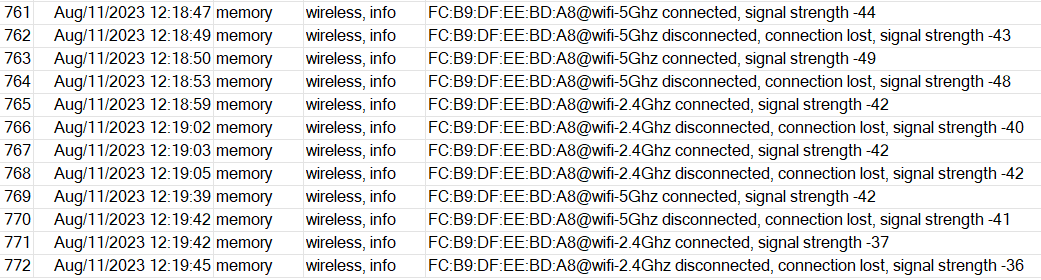
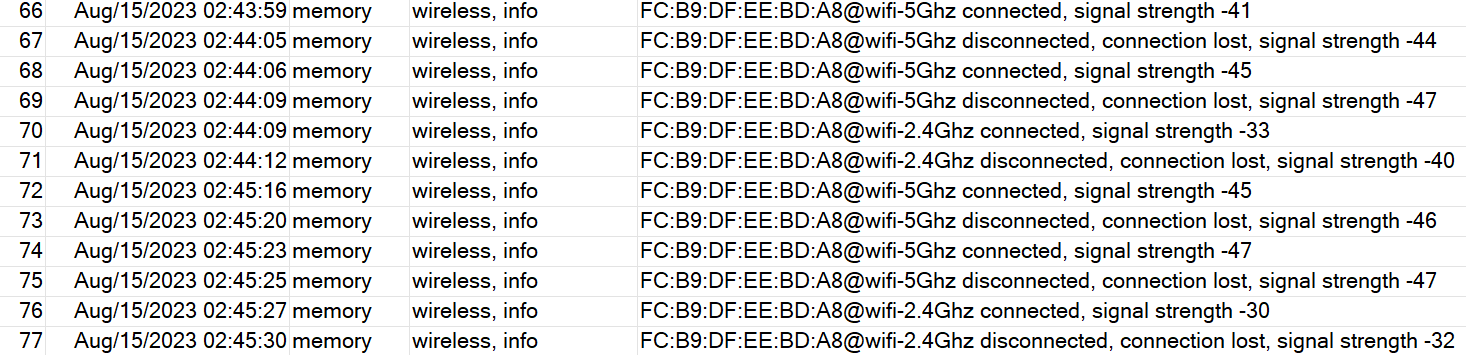
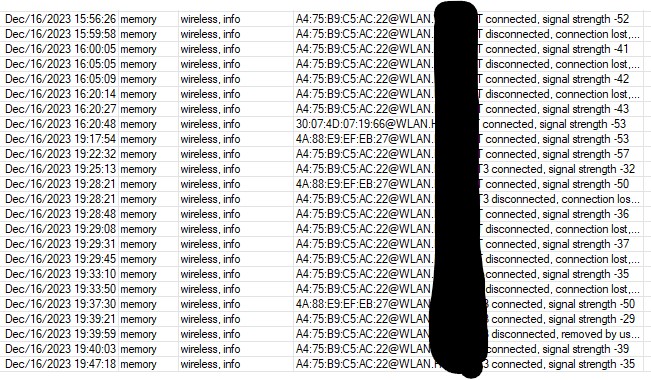
While troubleshooting, I noticed some recurring lines in the router’s log when the disconnections occur. The logs show “wifi2 disconnected, key handshake timeout, signal strength -80”, which I’m assuming has some relevance to my issue but I’m not exactly sure what it means.
I’m hoping someone with a bit more technical knowledge could shed some light on this. Any thoughts or suggestions would be greatly appreciated!
Here are some troubleshooting steps you can try to resolve the problem:
Restart your router: Sometimes, a simple router reboot can fix temporary connectivity issues. Unplug the power adapter from the router, wait for a few seconds, and then plug it back in.
Check your Wi-Fi signal strength: Make sure that your device is within a reasonable range of the router and not experiencing significant interference. Walls, appliances, and other electronic devices can weaken the Wi-Fi signal. Try moving closer to the router to see if the disconnection issue persists.
Update router firmware: Ensure that your Mikrotik ax2 router is running the latest firmware version. Router manufacturers often release firmware updates that address known issues and improve overall performance and stability. Visit the Mikrotik website or use the RouterOS interface to check for any available updates.
Thought I had a dud until I started reading
I have a HAP AX2 as well with same problem, WIFI access points can no longer be connected to, and all devices are kicked off.
Bit surprised/bewildered Mikrotik are not taking this more seriously (looks like this has been going on for some time?), the device not really “fit for purpose” in it’s current state.
Lets hope this is a software issue, and not some sort of erratic hardware problem!
Few details, though looks like everyone else has already laid it out anyway…
With 7.9.1 firmware, wifi “crashing” seemed to be about every 2-2.5 days.
With 7.10.rc4 the “crashing” has increased to < 24 hours, sometimes half a day.
Very simple setup, nothing fancy!
1/Default router reset config.
2/Disable WPA3 (some devices seem to have trouble connecting otherwise)
3/Simple queue (cake)
4/Remove “fast track” from the firewall
Thats it… thanks for the tip on 7.8 firmware, I’ll try that,
Honestly, this is the worst piece of hardware I’ve ever had the misfortune of encountering. I’ve spent 20 years working in IT, and this device takes the cake for having the most convoluted control interface I’ve ever seen for a home or small business device.
The interface itself looks like it was ripped straight from the late 90s, and the configuration process is as counterintuitive as it gets. And the icing on the cake of this dreadful experience? It doesn’t even work with the default configuration.
Before this, I was using multiple Apple Airport Extremes, and after years of uptime, I’ve practically forgotten where they’re located in my apartment. This new AX2, however, has proven to be utterly useless. It’s brought no tangible benefits over a device that’s six years its senior. The speed’s roughly the same, hovering around 600-700 Mbps same room/ 300-400 Mbps over a wall, despite all the hype about WiFi 6, Wave 2, and other marketing gimmicks.
Exactly same experience here. I had no issues whatsoever with my old Apple Airport Extreme while my brand new Mikrotik hAP ax3 has to be restarted everyday due to its wifi issues.
I opened a support ticket and here is their answer:
Hello,
Thank you for contacting MikroTik Support.
We are working on fixes for this issue. Unfortunately, at this time, there are no logs or packet captures that can be done from the customer side that would provide us with more information. We are evaluating possible fixes now.
Imagine if you had to use it as part of your War effort… ((
Price points are great, but only if one has a reliable, stable product, speed is the least of my concerns of the three…
My ax3 is dormant/comatose until a firmware release worthy of consideration is released.
In the same boat.
But is seems with any ax product.
Very good signal, yet constant disconnects
With a cAPGi-5HaxD2HaxD
later edit: only a reboot will fix the issue. Disabling/enabling the WIFI interfaces does not fix it.
So far so good for me, except small problem with AC getting sa querry timeouts every 2-3 minutes for few days. Right now i think is good but i will continue to monitor situation.
When I was on 7.11beta5 I had no problems whatsoever, when I updated to 7.11rc1 my downstairs air conditioner started having a problem with connecting to WiFi, every 2-3 minutes i got disconnected, SA query timeout.
AP is on shelf, AC on the wall, 3 meters apart. Sent supout to the support. Right now I can see that amount of errors reduced.
Updated to 7.11rc4
Same problems after a while.
Right after reboot everything seems fine.
Removed the new AX AP and installed back the old CAP AC XL = absolutely no issues.
This AX stuff is a letter behind beta and should have not been released.
I have cAP ax. Issue is almost similar. One Android has absolutely no issues (Samsung S20+), while another Samsung S23+ Ultra works, but when leaving home and back it says “Incorrect password” on home WiFi. But tap on that network and poof, it’s connected again. I use only WPA2, as on WPA3 I was not able to connect at all. Could it be something like short password? I have 9 characters, should be enough. On the other hand, all home appliances like fridge, wash machine or other 2,4GHz things or Thermomix work perfectly. Just that one phone… I use wifiwave2 and 7.12rc now. The main unit is RB5009.
Any news regarding this issue? Fired up my cAPax after ROS 7.13 came up, works for a random time really good.
Than the game with “connected” / “disconnected” every few seconds came up. Only whit my Samsung S22, a old Samsung S8 works fine…
After a reboot it works again. Should I schedule a “/system reboot” every night or so…
Really annoying, I know why I dont deploy MT WLAN sh…t in my work enviroment.


 ((
((