I’m setting up an scenario with PPPoE customers which connect to a PPPoE concentrator. I’m going to enforce bandwidth limits on each customer. In the past I had static IP assigned to the customers and the bandwidth was enforced at the CPE side (traffic shapping). Now the traffic shapping is to be done at the pppoe concentrator (mikrotik rb1100) based on radius attribute.
In the past, when the CPE did the traffic shapping and QOS, voip packets were never dropped (they are correctly marked with the DSCP field). Now with PPPoE I need to perform such QoS at the routerboard.
Now routerboard creates a dynamic queue for each pppoe customer with him bandwidth settings based on the radius configuration. I’m stucked because I don’t know how enforce QoS for voip (for example) with such pppoe dynamic queues… Is this (using dynamic queues for pppoe customers) the correct way? I saw in the forum that I can create addresses lists and queues by addresses list, etc..
Can anybody assist on this or point to the right way?
Those dynamic queues are simple queues, which means you get bandwidth control only - there’s no assigning priority to different types of packets.
The most scalable approach would be to use RADIUS for authentication, and to dynamically assign customers to address lists on login. Search Google for “MUM QoS” and you’ll find a presentation that shows both how to strictly rate limit per user, and give priority by protocol - you can adjust that to use the dynamically adjusted address lists for the packet marking.
Thank you very much for your response. It is greatly apreciated!!
I saw that MUM presentation but I don’t fully understand how queue tree works. Are they"per user" view and then they are “automagicaly” instantiated by customer? or instead this is an aggregated view of all customers and their traffic?
The PCQ portion can be per user. PCQ essentially is a queue type that automagically creates internal subqueues with a CIR per subqueue based on some classifier you specify.
The available classifiers include just the destination IP address of an IP header (for traffic to the user that would be one subqueue per user) and the source IP address of an IP header (for traffic from the user that would be one subqueue per user).
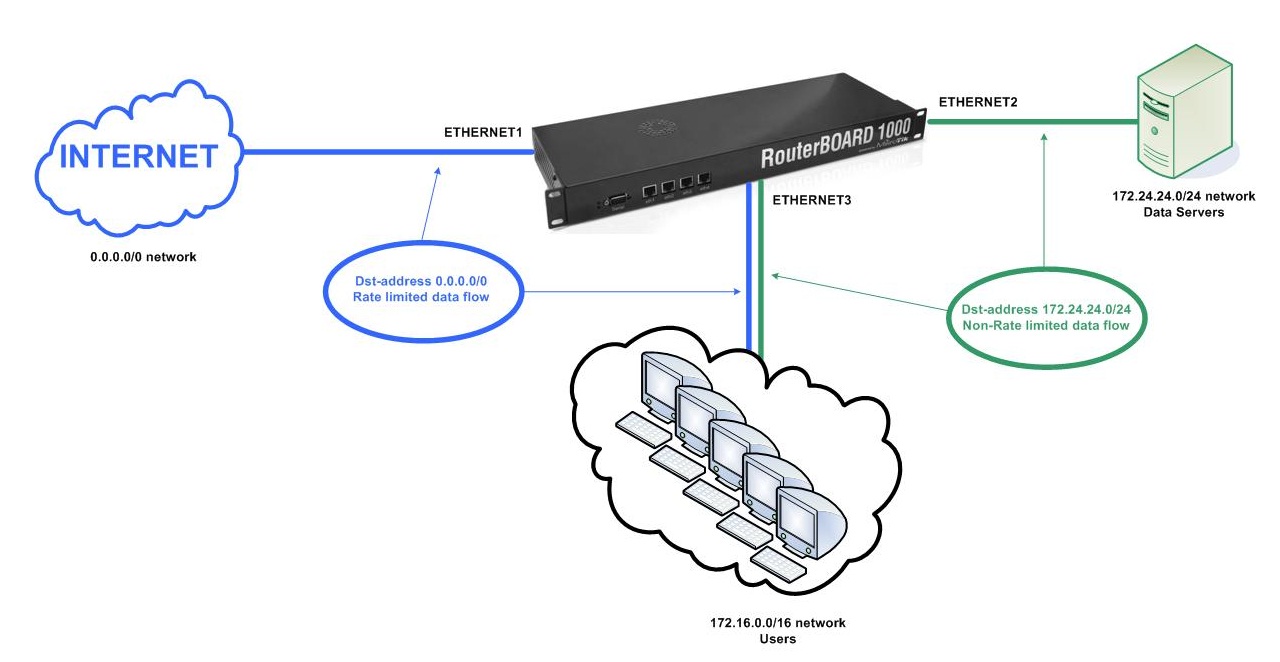
I`m using hotspot service with FreeRadius and it creates dynamic simple queue. Now dynamic queues rate traffic to all network. But I want, that clients access to network 172.24.24.0/24 with unlimited speed. The network 172.24.24.0/24 is my game, data and stream servers. Here is my interfaces:
Interface1 = Internet
Interface2 = Servers (data, game and stream)
Interface3 = To clients
Interface4 = Radius server
Therefor I think,
If I change interface of dynamic queue to interface1, it doesn`t rate traffic from interface3 to interface2.
Now I don`t know how to do this and solve my problem.
There are several possible solutions. Here’s the one I would prefer:
Queue trees attached to global-in and global-out fife before simple queues do, and the simple queues don’t get evaluated for packets that match them. Packets that don’t match fall through to the simple queues. That makes it possible to mark packets and pass them through a queue with a very large rate limit, such as 1Gbps and effectively exempt them from being rate limited.
In your scenario you would want to mark all packets that match traffic between the users and the data servers. This has to be done in specific chains so that the packets are marked before global-in and global-out queues fire, refer to the packet flow wiki page for details.
Ohh thank you so much fewi. It works.
But strange, that upload traffic is rated by simple dynamic queue. Do you have any other advice for me about upload flow?
Fewi, also when I start to uploading data, download speed goes down.
Do you have other idea to set src&dst based queue unconcern to dynamic simple queue.
The IP addressing in that export is different from your topology drawing, so make sure it’s appropriate for the prerouting and postrouting chains in those mangle rules. Refer to the packet flow diagram to ensure you’re aware of where you are in NAT and whether IPs have been translated or not. It looks OK, but I cannot be sure. More importantly, queues don’t take if you leave all their settings at default, which you seem to have done - set max-limit to 1000000000 on those queue trees like I initially posted. That export shows it at 0.
I have solved my problem. Your post was right. I removed all configuration and reconfigured again careful step by step. Now it`s working very very nice. Thank you very much fewi…