Muscle memory can be relearned if you move buttons or menus around...
But if, instead of just moving things,
you also make the tasks harder to perform,
then it becomes a matter of efficiency.
Where there used to be literally a single button to press,
you now have to, at the very least, open a tools menu just to make the option appear.
It’s completely stupid and illogical.
One single button =>become=> Button for open the Menù with the old One single button.
A number of head changes have legitimate reasons:
- Harder to strip
- Easier for automated assembly
- Etc.
But then again, others are purely grift/greed based (cough BMW cough):
- Use goofy/proprietary hardware so that owners are forced to use $pendy dealer maintenance.
Torx, for instance, has been wonderful compared to Phillips, and Phillips was a huge leap up from simple slotted.
I know, that you know, that I know, that .... that we both (or even more that we) know where the real problem is.
No changes is impossible and keeping old Windows only WinBox3 live has no sense as MS constantly removes old APIs and sooner or later the new Windows will not run it despite our prayers.
MultiOS version 4 has it's own pros and cons we have to live with and we should push "parents" to bring it up faster 
Let's go back to the clutch example, standard (de facto) are:
- it is the leftmost pedal
- when you press it the clutch disengages
- the above remains the same no matter if the pedal is connected to the clutch via a cable/wire, an hydraulic circuit or something else.
(technology used does not change usability or ergonomics)
Winbox 4 besides the removal of the wire in favour of a more modern hydraulic circuit has moved the pedal from the left to the center and now you have to raise it to disengage the clutch.
Of course it can be learned.
Equivalent example:
The obsolete control levers on the steering wheel are now gone.
They were unsightly, relics from the era of the "Model A".
To signal a turn, press the "lights" button on the new, ultra-ergonomic and super-cool touchscreen,
then select either the right or left turn signal from the opposite sides of the 30" touchscreen.
If you need to use the windshield wipers to clear a sudden splash of mud, go to the "Tools" menu, then select "Front Windshield," then "Wipers," then "Single Wipe," and finally choose the option "with" or "without" a spray of water.
If you have the "Voice Assistant" option, activate it by saying "Hey Car."
After the prompt "Hello, how can I help you right now?",
say "Clean the front windshield."
The assistant will then ask, "How many wipes?",
to which you should respond with a number, for example, "One".
WARNING: There is a risk of colliding with the vehicle in front of you,
as time continues to pass and the car keeps moving forward while this operation is being performed.
FYI, it's not just a minimum version problem. I have removed this limitation in my patched WinBox 3 app, but it was not enough.
Below are some issues in WinBox 3, caused by the changes in new RouterOS 7.25, and they were leading to the app crash:
- There was an unhandled conversion of null strings received from RouterOS
- There was a new unhandled data type
- There is a routine that doesn't handle new zero values received from RouterOS
I solved the issues above, but new issues appear one by one and it's unknown, how many of them to expect.
Seems, there are some changes in data structures, received from the router, and the last issue I stucked with is that the app doesn't handle data structures, that don't include some kind of "id" parameter. The main problem is that I can't yet find the same code block in WB4, that processes these data structures to find out how it's handled.
So, as you see, it's not so easy to fix.
Is inside the downloaded content?
Please clarify, what downloaded content are you talking about?
The libraries that are downloaded from the router.
That is my hypothesis.
In this case it's just an internal data structure, received from the router, that contains left-side menu items. It consists of title, id and some other data. So, from what I see, previous RouterOS always contains id in this structure, and WinBox 3 handles this without problems. New RouterOS doesn't contain id in some cases, and this causes a crash.
Yes...
{name:'Wireless Protocol',type:'enm',id:'u265',compact:1,def:4294967295,radio:1,values:{type:'static',map:['','','802.11','nstreme','nv2']}}
So, just alter the file changing the name?
roteros-57fef61b6e4007d5.jg (SHA1 57fef61b6e4007d54b430d5881fcb8c843f74d0c)
> adding missing ids >
roteros-57fef61b6e4007d5.jg new SHA1 = 4b430d5881fcb8c843f74d0c57fef61b6e4007d5
> renaming file >
roteros-4b430d5881fcb8c8.jg
> done, accepted?
What is that?
The "gui files" that WinBox 4 downloads from the router. You can find them (as .gz compressed) under %LOCALAPPDATA%\MikroTik\WinBox\cache\guifiles. Decompressed and they contains some JSON-like tree.
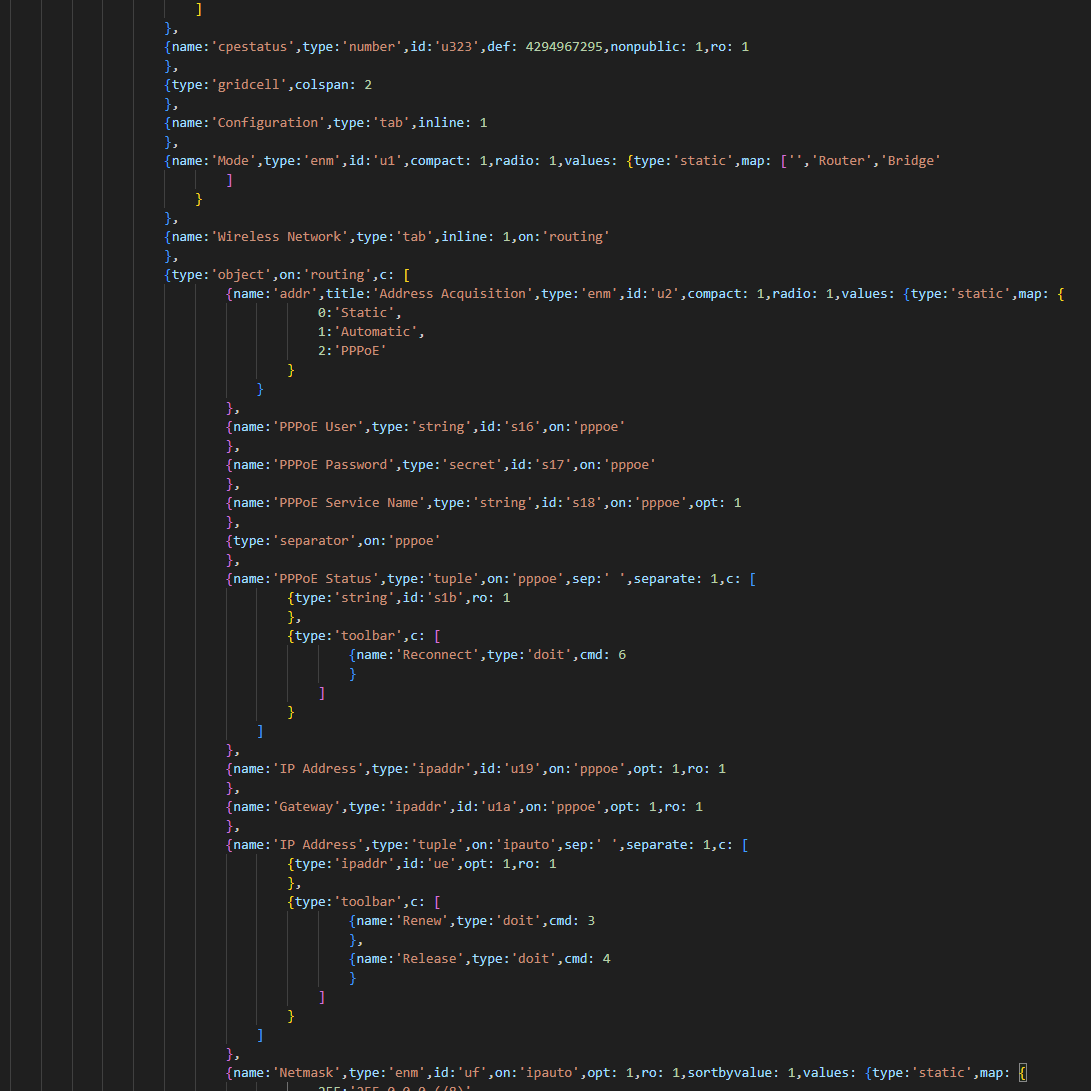
Their names have part of the SHA1 hashcode as @rextended has shown above.
The file used on WB4 that are downloaded from RouterOS
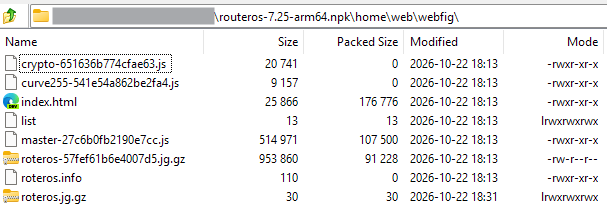
on 7.25 is first downloaded /home/web/webfig/roteros.info
that containing
{ crc: 393324143, size: 953860, name: "roteros.jg", unique: "roteros-57fef61b6e4007d5.jg", version: "7.25" },
then is downloaded the file indicated on the .info
/home/web/webfig/roteros-57fef61b6e4007d5.jg.gz
and un"gz"ipped
WHAT?
ROTER???
R-O-T-E-R???
Ah...
Then I wonder why the programmer who works on WebFig or WinBox4 has such trouble getting things right...
Thanks, didn't know about these files. Will take a look, may be there is something useful...
Obsolescence of Winbix 3 is a primary reason I do not upgrade RouterOS to 7.25.
Mikrorik, it is never to late to admit Winbox 4 was a mistake.
They think, you will start to like it by just changing font settings 