spam 
spam x2
enuro12… I would double check your settings.
This was with the transmit power set to 0 on both devices, 8ft apart and 50ft apart.
I used 3 of my MP IP cameras to test the bandwidth for a real world test.
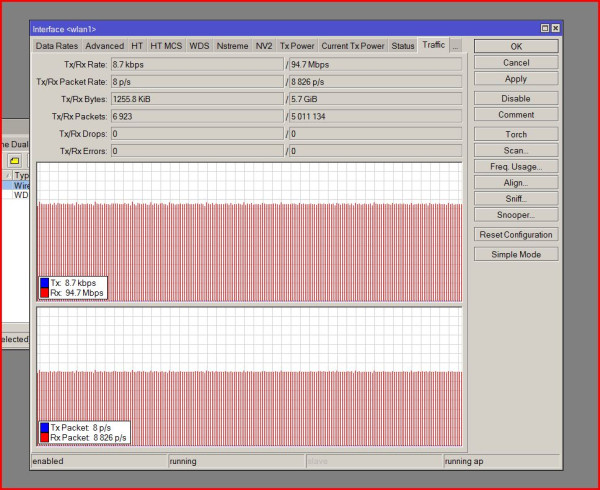
What sort of signals do you get with that?
When i dropped my TX to 0, i lost connection to the client radio.
lol thats just awesome! I’ll reset everything tomorrow and try again.
So before i broke everything down and brought it to the office, i dropped the TX power on both devices to 0. I still got my 220Mbps between the radios.
At the office my max is 200Mbps and hangs around 180. I suspect the extra distance in the open was a benefit.
In any case i’m not getting over 15Mbps TCP ever. I’m putting together all the data and a few videos so you can see exactly what i’ve done.
YouTube link to me setting up the SXT’s. I’ve followed the tutorial exactly as it was written.
I’ll make a video of my bandwidth tests tonight.
signal jumps between -20 and -40 which is much too strong. don’t use tx-power 0, use for example 3
get them further apart, your signal is much too strong, this affects speed directly. like the article says, get the signal to be -60!
the bridge setup is not a good idea in general, but that won’t affect the speed so much.
What is the correct way to set them up?
The article says 40 - 60. For the first 3 days i was very confused by that. I’ve sent a message to JTech to change that to -60, because a noob like myself didn’t realize i was after negative numbers.
I’ll get them moved then try again
very approximate signal guide:
-40 is too strong
-60 is good signal
-80 is too weak
I have had the same issue with a similar setup, bandwidth test in RouterOS show 50 Mbit/s in every direction. I then decided to do a real world test, I transferred large files back and fourth over my wireless bridge. The result were quite impressive with over 90 Mbit/s in every direction.
Thanks for all the responses. This is my first time with a device that was not point and shoot.
I got the tower side (AP) side mounted today, tomorrow i hope to get the station up and see what i get. It was my first tower free climb as well. Shew!
I tried to find a way to PM you but couldn’t - I’m JTech over at WISPForum.net…I didn’t receive the message your referring to…how did you send it to me? - I’m concerned I’m not getting messages.
Also…Thank you for pointing that out - I’ve made the suggested change!
And please consider not climbing a tower unless you’re wearing some sort of fall arrest - You might consider borrowing some gear if you can’t afford to purchase it…the surface of the earth isn’t very kind to falling humans.
Hey!
Honestly i dont remember. I spent a bit of time trying to find a way to contact you. It looked like you were no longer active here so i found your forum at your site. I’ll look threw my sent items and see where i sent it.
I wore some borrowed climb gear. It was a free climb up and then i clipped off at the top. Wish i had some experience with it tho, because i had to work with 1 hand the entire time. I’m pretty sure the gear would have held me, however i wasn’t comfortable with taking the risk.
Also nobody has ever given me any more to go on. I’ve got clear LOS and maxing at 40mb. Seems pretty low for the 1800ft i’m shooting.