Port forward to a target device from VPS Wireguard (over VPN tunnel)

Hello, friends,

struggling 1 day to fix my issue, can’t figure out without your help.

I Have VPS server that runs Wireguard server. port 85 is opened there and I am forwarding port 85 to 10.1.1.3 (mikrotik’s wireguard ip). For simplicity, I am forwarding port 85 to mikrotik’s port 80 so when I enter MY_VPS_ADDRESS:85 Mikrotik login page should appear.

I can ping 10.1.1.1 (wireguard server ip) from mikrotik and I can also ping mikrotik from vps on 10.1.1.3.

Hanshake is successful, everything is up, I see packets on port 85 in mikrotik but page is not opening. I think mikrotik sends response to incorrect route. Logged request and here is msg: “dstnat: in:wireguard out:(unknown 0), proto TCP (SYN), IP_OF_CLIENT:7041->10.1.1.3:85, len 60”

Here is my config (I have reset my router and accepted default config for everyone to be as simple as possible):

/interface bridge
add admin-mac=CA:2A:E2:B1:24:B1 auto-mac=no comment=defconf name=bridge
/interface wireguard
add listen-port=13231 mtu=1420 name=wireguard
/disk
set sd1 disabled=no
set sd1-part1 disabled=no name=disk3
/interface list
add comment=defconf name=WAN
add comment=defconf name=LAN
/interface wireless security-profiles
set [ find default=yes ] supplicant-identity=MikroTik
/ip pool
add name=dhcp ranges=192.168.3.15-192.168.3.250
/ip dhcp-server
add address-pool=dhcp interface=bridge name=defconf
/port
set 0 name=serial0
/interface bridge port
add bridge=bridge comment=defconf interface=ether2
add bridge=bridge comment=defconf interface=ether3
add bridge=bridge comment=defconf interface=ether4
add bridge=bridge comment=defconf interface=ether5
/ip neighbor discovery-settings
set discover-interface-list=LAN
/interface list member
add comment=defconf interface=bridge list=LAN
add comment=defconf interface=ether1 list=WAN
/interface wireguard peers
add allowed-address=0.0.0.0/0,::/0 endpoint-address=VPS_HOST_PORT endpoint-port=51820 interface=wireguard persistent-keepalive=5s public-key="PUBLIC_KEY_OF_HOST="
/ip address
add address=192.168.3.1/24 comment=defconf interface=bridge network=192.168.3.0
add address=10.1.1.3/24 interface=wireguard network=10.1.1.0
/ip dhcp-client
add comment=defconf interface=ether1
/ip dhcp-server network
add address=192.168.3.0/24 comment=defconf dns-server=1.1.1.1,1.0.0.1 gateway=192.168.3.1 netmask=24
/ip dns
set allow-remote-requests=yes servers=1.1.1.1,1.0.0.1
/ip dns static
add address=192.168.3.1 comment=defconf name=router.lan
/ip firewall filter
add action=accept chain=input comment="defconf: accept established,related,untracked" connection-state=established,related,untracked
add action=drop chain=input comment="defconf: drop invalid" connection-state=invalid
add action=accept chain=input comment="defconf: accept ICMP" protocol=icmp
add action=accept chain=input comment="defconf: accept to local loopback (for CAPsMAN)" dst-address=127.0.0.1
add action=drop chain=input comment="defconf: drop all not coming from LAN" in-interface-list=!LAN
add action=accept chain=forward comment="defconf: accept in ipsec policy" ipsec-policy=in,ipsec
add action=accept chain=forward comment="defconf: accept out ipsec policy" ipsec-policy=out,ipsec
add action=fasttrack-connection chain=forward comment="defconf: fasttrack" connection-state=established,related hw-offload=yes
add action=accept chain=forward comment="defconf: accept established,related, untracked" connection-state=established,related,untracked
add action=drop chain=forward comment="defconf: drop invalid" connection-state=invalid
add action=drop chain=forward comment="defconf: drop all from WAN not DSTNATed" connection-nat-state=!dstnat connection-state=new in-interface-list=WAN
/ip firewall nat
add action=masquerade chain=srcnat comment="defconf: masquerade" ipsec-policy=out,none out-interface-list=WAN
add action=dst-nat chain=dstnat dst-address=10.1.1.3 dst-port=85 log=yes protocol=tcp to-addresses=192.168.3.1 to-ports=80
/ip firewall service-port
set ftp disabled=yes
set tftp disabled=yes
set irc disabled=yes
set h323 disabled=yes
set sip disabled=yes
set pptp disabled=yes
/ip service
set ftp disabled=yes
set api disabled=yes
set api-ssl disabled=yes
/ipv6 firewall address-list
add address=::/128 comment="defconf: unspecified address" list=bad_ipv6
add address=::1/128 comment="defconf: lo" list=bad_ipv6
add address=fec0::/10 comment="defconf: site-local" list=bad_ipv6
add address=::ffff:0.0.0.0/96 comment="defconf: ipv4-mapped" list=bad_ipv6
add address=::/96 comment="defconf: ipv4 compat" list=bad_ipv6
add address=100::/64 comment="defconf: discard only " list=bad_ipv6
add address=2001:db8::/32 comment="defconf: documentation" list=bad_ipv6
add address=2001:10::/28 comment="defconf: ORCHID" list=bad_ipv6
add address=3ffe::/16 comment="defconf: 6bone" list=bad_ipv6
/ipv6 firewall filter
add action=accept chain=input comment="defconf: accept established,related,untracked" connection-state=established,related,untracked
add action=drop chain=input comment="defconf: drop invalid" connection-state=invalid
add action=accept chain=input comment="defconf: accept ICMPv6" protocol=icmpv6
add action=accept chain=input comment="defconf: accept UDP traceroute" port=33434-33534 protocol=udp
add action=accept chain=input comment="defconf: accept DHCPv6-Client prefix delegation." dst-port=546 protocol=udp src-address=fe80::/10
add action=accept chain=input comment="defconf: accept IKE" dst-port=500,4500 protocol=udp
add action=accept chain=input comment="defconf: accept ipsec AH" protocol=ipsec-ah
add action=accept chain=input comment="defconf: accept ipsec ESP" protocol=ipsec-esp
add action=accept chain=input comment="defconf: accept all that matches ipsec policy" ipsec-policy=in,ipsec
add action=drop chain=input comment="defconf: drop everything else not coming from LAN" in-interface-list=!LAN
add action=accept chain=forward comment="defconf: accept established,related,untracked" connection-state=established,related,untracked
add action=drop chain=forward comment="defconf: drop invalid" connection-state=invalid
add action=drop chain=forward comment="defconf: drop packets with bad src ipv6" src-address-list=bad_ipv6
add action=drop chain=forward comment="defconf: drop packets with bad dst ipv6" dst-address-list=bad_ipv6
add action=drop chain=forward comment="defconf: rfc4890 drop hop-limit=1" hop-limit=equal:1 protocol=icmpv6
add action=accept chain=forward comment="defconf: accept ICMPv6" protocol=icmpv6
add action=accept chain=forward comment="defconf: accept HIP" protocol=139
add action=accept chain=forward comment="defconf: accept IKE" dst-port=500,4500 protocol=udp
add action=accept chain=forward comment="defconf: accept ipsec AH" protocol=ipsec-ah
add action=accept chain=forward comment="defconf: accept ipsec ESP" protocol=ipsec-esp
add action=accept chain=forward comment="defconf: accept all that matches ipsec policy" ipsec-policy=in,ipsec
add action=drop chain=forward comment="defconf: drop everything else not coming from LAN" in-interface-list=!LAN
/system clock
set time-zone-name=Asia/Tbilisi
/tool mac-server
set allowed-interface-list=LAN
/tool mac-server mac-winbox
set allowed-interface-list=LAN

I think I have similar problem of: viewtopic.php?t=183010 but tried everything, srcnat is not even doing anything, just dead silence…

Good day.
Does this capture the network.
You have a VPS (virtual private server) somewhere on the internet.
You want to use Wireguard at home to send user out via the internet connected to the VPS at some server farm

If so this makes no sense to me and without a diagram I have no clue of what is going on.
I Have VPS server that runs Wireguard server. —> Makes sense to what I said above! :slight_smile:
and I am forwarding port 85 to 10.1.1.3 (mikrotik’s wireguard ip). —> Say what?? Where is your MT device located??

The only port forwarding required in wireguard is from the HOST ROUTER to a mikrotik device behind the host router (as the MT isnt a public facing device).
That way the remote end can connect to the listening port on the MT device (which for the initial connection is acting as a Server).

Thus I dont understand what is going on here if your MT is your home router, no need to port forward. If at home you have an ISP router before the MT device then I can see possibly port forwarding the ISP router port to the MT device. BUT BUT, I thought the idea of a VPS was that it had a public IP and was running wireguard as a server for the initial connection.

Further you talk about forwarding ports but none of them is the wireguard port. Hence, you really need to do a better job of communicating your network setup and expectations wrt to wireguard.
Port forwarding to servers, is a completely different topic.

Sorry for not providing more details. I have solved the issue.

For anyone in future - if you can’t open port somewhere (cellular internet or any other reason), and you have Virtual Private Server that runs Wireguard (or any other server), you can open ports using that VPS (you will connect to VPS and it will forward traffic to mikrotik through VPN)

Let’s assume that Wireguard uses 10.1.1.0/24 subnet. VPS Wireguard server has 10.1.1.1 and Mikrotik has 10.1.1.2. After Wireguard Interface and Peer configuration, all you need is this config:

/ip address
add address=10.1.1.2/24 interface=wireguard network=10.1.1.0

/routing table
add name=wg-table fib

/ip firewall mangle
add action=mark-connection chain=input in-interface=wireguard new-connection-mark=VPN-conn passthrough=yes
add action=mark-routing chain=output connection-mark=VPN-conn new-routing-mark=wg-table passthrough=no
add action=mark-connection chain=forward in-interface=wireguard new-connection-mark=VPN-conn-f passthrough=no
add action=mark-routing chain=prerouting connection-mark=VPN-conn-f in-interface=bridge new-routing-mark=wg-table

/ip route
add distance=1 gateway=10.1.1.1 routing-table=wg-table

/ip firewall filter
add action=accept chain=input comment="ACCEPT WIREGUARD" in-interface=wireguard protocol=tcp place-before=1

Lost almost 2 days and happy problem is fixed.
Thanks

Im totally lost and have no idea what you are doing, can you provide a network diagram. I see VPS being used a lot with MT so I would like to add this to a user article for wireguard but I have to understand what you are doing which means a network that makes sense…

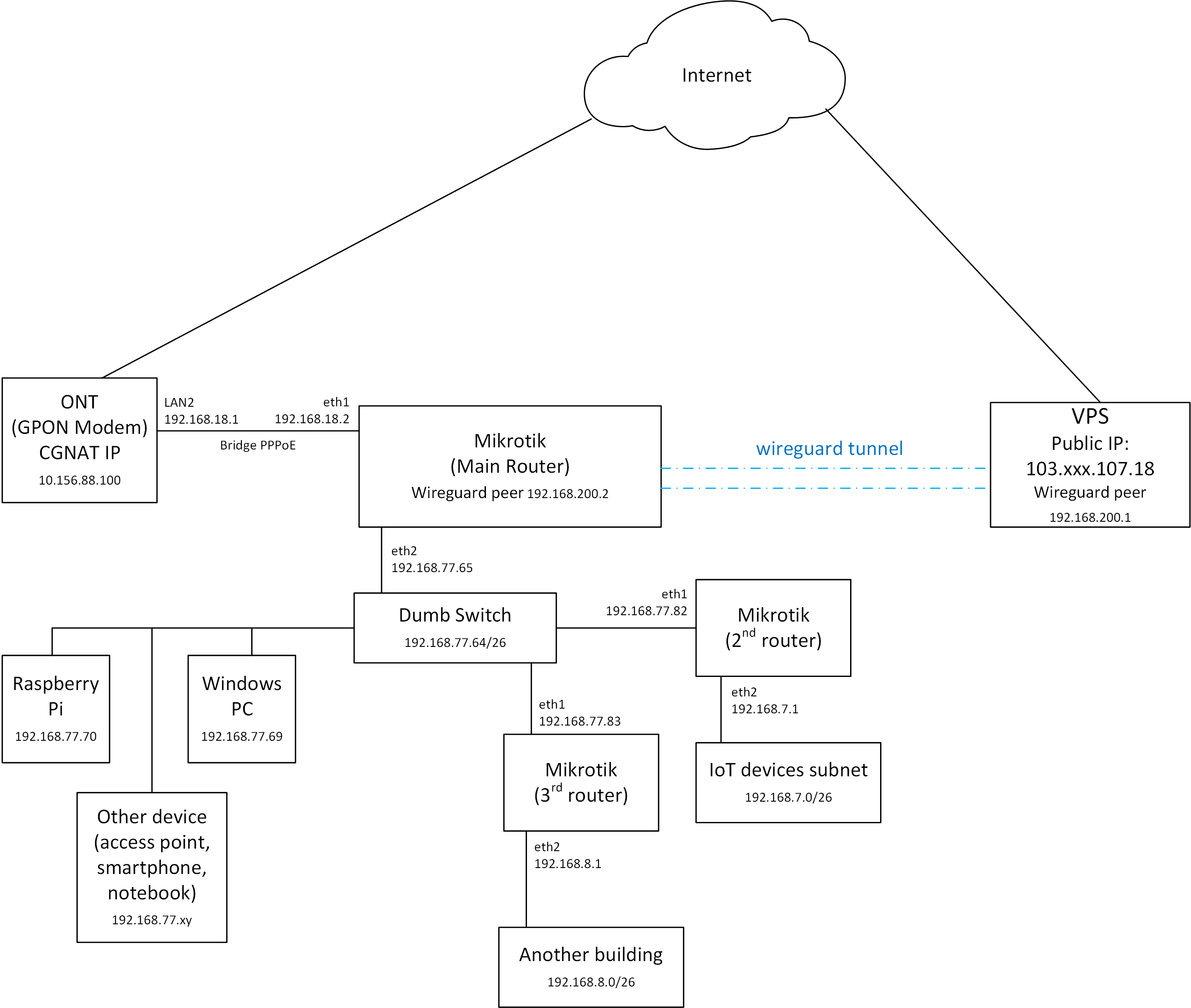
Here is diagram:

So as Mikrotik is behind CGNAT, I can’t manage to port forward to IP camera. So, I Have VPN bridge and want to access 33.129.202.22 and forward port to 192.168.88.5.

Ahh okay, so basically, the requirement is to be able to remotely connect to your camera.
Most setups these days are with companies that have a cloud app already and connecting is already available remotely.

Have you considered you can wireguard the whole way?
known facts VPS Server Endpoint fixed at 33.129.202.22 Endpoint port is abcde, camera IP = 192.168.88.5/32

(1) Setup Wireguard Interface Coordinated Subnet

VPS Server IP address=192.168.01/24 interface=wg0
MT Client (Camera) IP address=192.168.0.10/24 interface=wg-MT
Mobile Client Address=192.168.0.20/32 - Address found in wireguard settings.

(2) Wireguard Peer Settings

Mobile Client settings (aka laptop or ipad etc.) sitting anywhere looking to reach server
Allowed IPs
peer-VPS SERver

  • 192.168.0.0/24 { allows mobile client to ping both VPS Server and MT Client }
  • 192.168.88.5/32 { allows mobile client destination address to be matched/selected by wg protocol on the way outbound }

VPS Server
Allowed IPs
peer1 - Mobile Device - 192.168.0.20/32 { incoming source IP traffic (regardless of destination) }
peer2 - MT Client - 192.168.0.10/32 { for pinging etc }, 192.168.88.5/32***

*** This is included because once the traffic reaches the VPS Server from the mobile client then traffic heading will be heading to the MT client and in this case will be considered destination traffic and thus needs an allowed IP for matching and selection for ‘now local traffic’ heading outbound to MT client.

MT Client (Camera)
Allowed IPs
peer-VPS Server - 192.168.0.0/24 { allows pinging of VPS server and mobile client } and incoming source IP traffic from mobile client

+++++++++++++++++++++++++++++++++

(3) IP Routes
Mobile Client - not applicable

VPS Server -
The IP address for the Wireguard interface creates a dynamic routing for pinging to and fro the MT client and for pings from mobile Client.
(dac) 192.168.0.0/24 gwy=wg0

The above dynamically create route also handles any return traffic from the mobile client
(be it from VPS internet, from VPS subnet or from from the MT Client Device after reaching the VPS Server) such that ANY of this traffic with source address of mobile client gets back to the mobile client through the tunnel.

What is left? How is the traffic destined for 192.168.88.5/32 going to be routed from VPS Server, after arriving from the mobile client, to the MT Client (camera). A route needs to be manually added
dst-address=192.168.8.5/32 gwy=wg0

MT Client (Camera) -
The IP address for the Wireguard interface creates a dynamic routing for pinging to and fro the MT client and for pings from mobile Client.
(dac) 192.168.0.0/24 gwy=wg0

In addition, this route will also inform the Router that any Return Traffic from the mobile client that hit the 192.168.88.5/32 server and is now being returned, will be directed back to the wg-MT interface.
+++++++++++++++++++++++++++++++++++++++++++++++++++++++++++
(4) Firewall Rules

Mobile CLient - not applicable

VPS Server UNKNOWN not a linux guy
But my guess is something like this but in MT speak
add action=accept chain=forward in-interface=wg0 out-interface=wg0 src-address=192.168.0.20/32

Note that this firewall rule will work in both directions! Traffic returning from the Camera will hit the VPS Server and then be considered local traffic. The firewall rule will allow that traffic to continue back into the tunnel towards the mobile client, and based on the IP routing dynamically created as discussed earlier.

MT Client
One needs a rule to allow traffic from the mobile client to reach the server
add action=accept chain=forward in-interface=wg-MT src-address=192.168.0.20/32 dst-address=192.168.88.5/32

++++++++++++++++++++++++++++++++++++++++
not added at least on the MT device was the additional rule required to allow ICMP ping.
add action=accept chain=input in-interface=wg-MT protocol=ICMP

As per above, is how I would approach the issue for an end to end Wireguard solution.
A different approach makes little sense to me.

However you want to be able to reach SOMEHOW not disclosed, the VPS Server, from the mobile client.
and then port forward that traffic from VPS server to the MT Client device which has the camera.

Well the VPS part is not my concern, its not MT. So getting that traffic to the wireguard interface is your problem.
But the the MT settings from my previous post remain valid for receiving any traffic heading for the camera (to the MT client) over the WG tunnel.

a. allowed IPs is source address of mobile client let say 192.168.0.20/32
b. IP route required that ensures return traffic for 192.168.0.20/32 is sent back through the WG tunnel
c. a firewall rule is created that allows traffic from the wg interface with source IP 192.168.0.20/32 to reach destination IP 192.168.88.5/32

+++++++++++++++++++++++++++++++++++++++++++++++++++++

If ever the local IP address 192.168.88.5 is a computer, will that computer be able to use the public IP address of the VPS as its own public IP address?

Not with this configuration. You will need to route all traffic, that’s another rule but I Have not tested it.


I also have the same problem. Mikrotik is behind CGNAT and can’t port forward Windows PC. So I installed wireguard on the VPS to forwarding port from Windows PC over wireguard tunnel.
I can ping or traceroute to target device behind mikrotik from VPS (over wireguard tunnel), but still unable to forwarding port (RDP and Nginx Web Server) to VPS public IP.
The network diagram is exactly the same as the one you posted, only the ip address is different.

VPS IP: 103.xxx.107.18
Wireguard IP on VPS: 192.168.200.1
Wireguard IP on mikrotik: 192.168.200.2
Mikrotik IP: 192.168.77.65
Target Device IP: 192.168.77.69

Traceroute from VPS to target device over wireguard tunnel:

root@jxxx:#  traceroute -I 192.168.77.69
traceroute to 192.168.77.69 (192.168.77.69), 64 hops max
  1   192.168.200.2  3.187ms  2.991ms  3.032ms
  2   192.168.77.69  3.438ms  3.143ms  3.223ms


Ping from VPS to target device over wireguard tunnel:

root@jxxx:# ping -c 4 192.168.77.69
PING 192.168.77.69 (192.168.77.69) 56(84) bytes of data.
64 bytes from 192.168.77.69: icmp_seq=1 ttl=127 time=3.99 ms
64 bytes from 192.168.77.69: icmp_seq=2 ttl=127 time=4.59 ms
64 bytes from 192.168.77.69: icmp_seq=3 ttl=127 time=3.75 ms
64 bytes from 192.168.77.69: icmp_seq=4 ttl=127 time=3.98 ms

--- 192.168.77.69 ping statistics ---
4 packets transmitted, 4 received, 0% packet loss, time 3004ms
rtt min/avg/max/mdev = 3.750/4.078/4.590/0.310 ms


Port scan from VPS to target device over wireguard tunnel:

root@jxxx:#  nmap -sT 192.168.77.69
Starting Nmap 7.80 ( https://nmap.org ) at 2022-08-31 14:38 WIB
Nmap scan report for 192.168.77.69
Host is up (0.0058s latency).
Not shown: 995 filtered ports
PORT     STATE SERVICE
139/tcp  open  netbios-ssn
445/tcp  open  microsoft-ds
3389/tcp open  ms-wbt-server
8089/tcp open  unknown
9000/tcp open  cslistener

Port 8089 is used for Nginx webserver on Windows PC.

I tried adding a rule similiar in post #3, but it still doesn’t work.

Let me try again, I think I had some errors in my config advice. :frowning:
To be clear there is no port forwarding required!
Besides matching better the wireguard interface ip convention I made some changes on VPS device to firewall rules…

(1) Setup Wireguard Interface —> Coordinated Subnet

VPS Server IP address=10.1.1.1/24 interface=wg0
MT Device ( with server camera) IP address=10.1.1.2/24 interface=wg-MT
Mobile/Road Warrior Client (could be windows laptop, could be iphone) Address=10.1.1.3/32 - Address found in wireguard settings.

(2) Wireguard Peer Settings

Mobile Client settings (aka laptop or ipad etc.) sitting anywhere looking to reach camera server through the VPS.
Allowed IPs
peer-VPS SERver

  • 10.1.1.0/24 { allows mobile client to ping both VPS Server and MT Client }
  • 192.168.88.5/32 { allows mobile client destination address to be matched/selected by wg protocol on the mobile device on the way outbound }

VPS Server
Allowed IPs
peer1 - Mobile Device - 10.1.1.3/32 { incoming source IP traffic (and pinging) - allows mobile user to exit the tunnel (filtered) at VPS }
peer2 - MT Client - 10.1.1.2/32 { for pinging etc }, 192.168.88.5/32***

*** This is included because once the traffic reaches the VPS Server from the mobile client then traffic which will have exited the tunnel, will have to re-enter the tunnel heading to the MT Device and ithus the destination IP(or subnet at the remote site) needs to be captured in allowed IPs - to be allowed to enter the tunnel. Stated differently, need to include this IP as an allowed IP for matching and selection for ‘now local traffic’ heading outbound to MT Device.

MT Device (with server camera)
Allowed IPs
peer-VPS Server - 10.1.1.0/24 { allows pinging of VPS server and mobile client } and incoming source IP traffic from mobile client so it can exit the tunnel (filtered) and then reach the server

+++++++++++++++++++++++++++++++++

(3) IP Routes
Mobile Client - not applicable

VPS Server -
The IP address for the Wireguard interface creates a dynamic routing for pinging to and fro the MT client and for pings from mobile Client.
(dac) 192.168.0.0/24 gwy=wg0 table=main

The above dynamically create route also handles any return traffic from the mobile client
(be it from VPS internet (not in this case), from VPS subnet (not in this case) AND (applicable in this case) coming from from the MT Device to the VPS:
after exiting the tunnel, the VPS needs to know where to send the traffic with destination of mobile client, the default route covers that and will send this traffic back through the tunnel to the mobile client.

What is left? How is the traffic destined for 192.168.88.5/32 going to be routed from VPS Server, after arriving from the mobile client, to reach the MT Device ( with server camera). A route needs to be manually added:
add dst-address=192.168.8.5/32 gwy=wg0

In this regard mobile client traffic after first exiting the wireguard tunnel at the VPS, needs to be handled. Since there is no 192.168.5/32 address or interface on the VPS we need to tell the VPS where to send this now “local traffic” sitting on the VPS.

MT Device (with server camera) -
The IP address for the Wireguard interface creates a dynamic routing for pinging to and fro the MT client and for pings from mobile Client.
(dac) 192.168.0.0/24 gwy=wg0 table=main

In addition, this route will also inform the Router that any Return Traffic from the mobile client that hits the 192.168.88.5/32 server and is now being returned, will be directed back to the wg-MT interface and back towards the VPS.
+++++++++++++++++++++++++++++++++++++++++++++++++++++++++++
(4) Firewall Rules

Mobile Client - not applicable

VPS Server UNKNOWN not a linux guy
But my guess is something like this but in MT speak
add action=accept chain=forward in-interface=wg0 src-address=10.1.1.3/32 {allow traffic from mobile client into VPS}
add action=accept chain=forward src-address=10.1.1.3/32 dst-address=192.168.88.5/32 out-interface=wg0 {allow traffic sitting in VPS from mobile client, to enter the tunnel towards the MT Device and its server at .5}

MT Device
One needs a firewall rule to allow traffic from the mobile client to reach the server
add action=accept chain=forward in-interface=wg-MT src-address=10.1.1.3/32 dst-address=192.168.88.5/32

++++++++++++++++++++++++++++++++++++++++

Would need to see full congif of MT device and for VPS
a. wireguard rules
b. routing rules
c. firewall rules

Mikrotik

/ip address
add address=192.168.77.65/26 interface=ether2 network=192.168.77.64
add address=192.168.18.2/28 interface=ether1 network=192.168.18.0
add address=192.168.200.2/28 interface=wireguard network=192.168.200.0

/ip firewall filter
add action=accept chain=input comment="default configuration" \
    connection-state=established,related
add action=accept chain=input in-interface-list=LAN src-address-list=\
    allowed_to_router
add action=accept chain=input comment="Accept incoming ICMP (ping)" log=yes \
    log-prefix="Accept ICMP__" protocol=icmp
add action=accept chain=input comment="Accept incoming connection from Wiregua\
    rd interface to mikrotik web admin" dst-address=192.168.200.2 \
    in-interface=wireguard log=yes log-prefix="Accept incoming__" protocol=\
    tcp
add action=accept chain=input comment=\
    "Accept incoming connection from Wireguard interface to mikrotik ssh" \
    dst-port=2200 in-interface=wireguard log=yes log-prefix=\
    "Accept incoming__" protocol=tcp
add action=accept chain=input comment="Accept incoming Mikrotik SSH services f\
    from Wireguard JKT1 (Local: 192.168.200.1 Public 103.***.107.18)" \
    dst-address=192.168.200.2 dst-port=2200 log=yes log-prefix=\
    "Mikrotik SSH Access_" protocol=tcp src-address=192.168.200.1
add action=accept chain=input comment="Accept incoming Mikrotik Web services  \
    from Wireguard JKT1 (Local: 192.168.200.1 Public 103.***.107.18)" \
    dst-address=192.168.200.2 dst-port=9080 log=yes log-prefix=\
    "Mikrotik Web Access_" protocol=tcp src-address=192.168.200.1
add action=accept chain=input comment="Accept incoming Mikrotik Web services  \
    from Wireguard JKT1 (Local: 192.168.200.2 Public 103.***.107.18)" \
    dst-address=192.168.77.65 dst-port=9080 log=yes log-prefix=\
    "Mikrotik Web Access_" protocol=tcp src-address=192.168.200.2
add action=accept chain=input dst-port=8089 log=yes log-prefix=\
    "ACCEPT from WG" protocol=tcp
add action=drop chain=input log-prefix=Dropped_incoming_
add action=fasttrack-connection chain=forward connection-state=\
    established,related disabled=yes hw-offload=yes
add action=accept chain=forward comment="Established, Related" \
    connection-state=established,related
add action=accept chain=forward comment=\
    "Allow fordward from wireguard to bridge1" in-interface=wireguard log=yes \
    log-prefix="wireguard forward__" out-interface=bridge1
add action=accept chain=forward comment=\
    "Allow fordward from bridge1 to wireguard" in-interface=bridge1 \
    out-interface=wireguard
add action=accept chain=forward in-interface=wireguard out-interface=\
    wireguard
add action=accept chain=forward dst-address=192.168.200.0/28 log=yes \
    log-prefix="Forward to WG__" src-address=192.168.77.64/26
add action=accept chain=forward comment="Allow client LAN traffic out WAN" \
    log-prefix=forwarded_from_LAN_subnet_ out-interface=pppoe-out1 \
    src-address-list=all_local_subnet
add action=accept chain=forward comment="Allow forward traffic to ONT Subnet" \
    dst-address=192.168.18.0/24 in-interface=bridge1 out-interface=ether1 \
    src-address=192.168.77.64/27
add action=accept chain=forward comment=\
    "Allow Forward traffic to IoT & NodeMCU Subnet" dst-address=\
    192.168.7.0/26 in-interface=bridge1 log-prefix=\
    "Allow Forward to Subnet NodeMCU__" out-interface=bridge1 src-address=\
    192.168.77.64/26
add action=accept chain=forward comment=\
    "Allow Forward traffic to Kost Pojok 44 LAN Segment" dst-address=\
    192.168.7.64/26 in-interface=bridge1 log-prefix=\
    "Allow Forward to Subnet KostPojok__" out-interface=bridge1 src-address=\
    192.168.77.64/26
add action=drop chain=forward comment=\
    "Drop incoming from internet which is not public IP" in-interface=ether1 \
    log=yes log-prefix="Drop Fwd not public ip__" src-address-list=\
    not_in_internet
add action=drop chain=forward comment=\
    "Drop packets from LAN that do not have LAN IP" in-interface=bridge1 log=\
    yes log-prefix=LAN_!LAN src-address-list=!all_local_subnet
add action=drop chain=forward comment=\
    "Drop tries to reach not public addresses from LAN" dst-address-list=\
    not_in_internet in-interface=bridge1 log=yes log-prefix=!public_from_LAN \
    out-interface=!bridge1
add action=drop chain=forward comment=\
    "Drop incoming packets that are not NATted" connection-nat-state=!dstnat \
    connection-state=new in-interface=ether1 log=yes log-prefix=!NAT
add action=drop chain=forward comment="Drop invalid" connection-state=invalid \
    log=yes log-prefix=invalid
/ip firewall mangle
add action=accept chain=prerouting dst-address-list="ONT Subnet"
add action=accept chain=postrouting disabled=yes dst-address-list=\
    allowed_to_router
add action=mark-connection chain=prerouting comment=" ICMP" connection-state=\
    new new-connection-mark=ICMP passthrough=yes protocol=icmp
add action=mark-packet chain=prerouting connection-mark=ICMP new-packet-mark=\
    ICMP passthrough=no
add action=mark-connection chain=postrouting connection-state=new \
    new-connection-mark=ICMP passthrough=yes protocol=icmp
add action=mark-packet chain=postrouting connection-mark=ICMP \
    new-packet-mark=ICMP passthrough=no
add action=mark-packet chain=postrouting comment=ACK new-packet-mark=ACK \
    packet-size=0-123 passthrough=no protocol=tcp tcp-flags=ack
add action=mark-packet chain=prerouting new-packet-mark=ACK packet-size=0-123 \
    passthrough=no protocol=tcp tcp-flags=ack
add action=mark-connection chain=prerouting comment=HTTP connection-mark=\
    no-mark connection-state=new new-connection-mark=HTTP passthrough=yes \
    port=80,443 protocol=tcp
add action=mark-connection chain=prerouting connection-bytes=500000-0 \
    connection-mark=HTTP connection-rate=200k-100M new-connection-mark=\
    HTTP_BIG passthrough=yes port=80,443 protocol=tcp
add action=mark-packet chain=prerouting connection-mark=HTTP_BIG \
    new-packet-mark=HTTP_BIG passthrough=no
add action=mark-packet chain=prerouting connection-mark=HTTP new-packet-mark=\
    HTTP passthrough=no
add action=mark-connection chain=prerouting comment=OTHER connection-mark=\
    no-mark new-connection-mark=OTHER passthrough=yes protocol=!icmp
add action=mark-packet chain=prerouting connection-mark=OTHER \
    new-packet-mark=OTHER passthrough=no protocol=!icmp

/ip firewall nat
add action=dst-nat chain=dstnat comment="Bittorrent Port Forwarding TCP" \
    dst-port=34567 in-interface=pppoe-out1 protocol=tcp to-addresses=\
    192.168.77.69 to-ports=34567
add action=dst-nat chain=dstnat comment="Bittorrent Port Forwarding TCP" \
    dst-port=25354 in-interface=pppoe-out1 protocol=tcp to-addresses=\
    192.168.77.69 to-ports=25354
add action=dst-nat chain=dstnat comment="Bittorrent Port Forwarding UDP" \
    dst-port=34567 in-interface=pppoe-out1 protocol=udp to-addresses=\
    192.168.77.69 to-ports=34567
add action=dst-nat chain=dstnat comment="Bittorrent Port Forwarding UDP" \
    dst-port=25354 in-interface=pppoe-out1 protocol=udp to-addresses=\
    192.168.77.69 to-ports=25354
add action=masquerade chain=srcnat comment="WAN Access (PPPoE)" \
    out-interface-list=WAN

/ip route
add comment="LAN Segment on hEX" disabled=yes distance=1 dst-address=\
    192.168.76.32/27 gateway=192.168.76.1 pref-src="" routing-table=main \
    scope=30 suppress-hw-offload=no target-scope=10
add disabled=no distance=1 dst-address=0.0.0.0/0 gateway=wireguard pref-src=\
    0.0.0.0 routing-table=via-wireguard scope=30 suppress-hw-offload=no \
    target-scope=10
add comment=";;;;; IoT / NodeMCU LAN Segment on Mikrotik 951Ui-2HnD" \
    disabled=no distance=1 dst-address=192.168.7.0/26 gateway=192.168.77.82 \
    pref-src=0.0.0.0 routing-table=main scope=30 suppress-hw-offload=no \
    target-scope=10
add comment=";;;;; Kost Pojok LAN Segment  on Mikrotik 951Ui-2HnD" disabled=\
    no distance=1 dst-address=192.168.7.64/26 gateway=192.168.77.82 pref-src=\
    0.0.0.0 routing-table=main scope=30 suppress-hw-offload=no target-scope=\
    10
add comment=";;;;; Kost Pojok LAN Segment  on Mikrotik hEX (RB750Gr3)" \
    disabled=no distance=1 dst-address=192.168.8.0/26 gateway=192.168.77.83 \
    pref-src=0.0.0.0 routing-table=main scope=30 suppress-hw-offload=no \
    target-scope=10
add disabled=no dst-address=192.168.9.0/26 gateway=192.168.77.83 \
    routing-table=main suppress-hw-offload=no


VPS

IPTables
⠀
# Generated by iptables-save v1.8.4 on Sun Apr 24 10:14:44 2022
*filter
:INPUT DROP [0:0]
:FORWARD DROP [0:0]
:OUTPUT ACCEPT [0:0]
-A INPUT -m conntrack --ctstate RELATED,ESTABLISHED -j ACCEPT
-A INPUT -i lo -j ACCEPT
-A INPUT -m conntrack --ctstate INVALID -j DROP
-A INPUT -i wg0 -m state --state RELATED,ESTABLISHED -j ACCEPT
.... snip ....
-A FORWARD -m conntrack --ctstate ESTABLISHED,RELATED -j ACCEPT
-A FORWARD -m conntrack --ctstate INVALID -j DROP
-A FORWARD -i wg0 -o wg0 -j ACCEPT
-A FORWARD -i wg0 -o ens3 -j ACCEPT
-A FORWARD -i ens3 -o wg0 -p tcp -m tcp --dport 2200 --tcp-flags FIN,SYN,RST,ACK SYN -m conntrack --ctstate NEW -j ACCEPT -m comment --comment "Port Forwarding: SSH Mikrotik"
-A FORWARD -i ens3 -o wg0 -p tcp -m tcp --dport 3389 --tcp-flags FIN,SYN,RST,ACK SYN -m conntrack --ctstate NEW -j ACCEPT -m comment --comment "Port Forwarding: Windows RDP (TCP)"
-A FORWARD -i ens3 -o wg0 -p udp -m udp --dport 3389 -m conntrack --ctstate NEW -j ACCEPT -m comment --comment "Port Forwarding: Windows RDP (UDP)"
-A FORWARD -i ens3 -o wg0 -p tcp -m tcp --dport 8089 --tcp-flags FIN,SYN,RST,ACK SYN -m conntrack --ctstate NEW -j ACCEPT -m comment --comment "Port Forwarding: Nginx on Windows"
-A OUTPUT -o lo -j ACCEPT
-A OUTPUT -m conntrack --ctstate ESTABLISHED -j ACCEPT
COMMIT
# Completed on Sun Apr 24 10:14:44 2022
# Generated by iptables-save v1.8.4 on Sun Apr 24 10:14:44 2022
*nat
:PREROUTING ACCEPT [0:0]
:INPUT ACCEPT [0:0]
:OUTPUT ACCEPT [0:0]
:POSTROUTING ACCEPT [0:0]
-A PREROUTING -i ens3 -p tcp --dport 2200 -j DNAT --to-destination 192.168.200.2 -m comment --comment "Port Forwarding: SSH Mikrotik"
-A PREROUTING -i ens3 -p tcp --dport 3389 -j DNAT --to-destination 192.168.200.3 -m comment --comment "Port Forwarding: Microsoft RDP (TCP)"
-A PREROUTING -i ens3 -p udp --dport 3389 -j DNAT --to-destination 192.168.200.3 -m comment --comment "Port Forwarding: Microsoft RDP (UDP)"
-A PREROUTING -i ens3 -p tcp --dport 8089 -j DNAT --to-destination 192.168.200.2 -m comment --comment "Port Forwarding: Nginx on Windows"
-A POSTROUTING -s 192.168.200.0/28 -o ens3 -j MASQUERADE
-A POSTROUTING -s 192.168.201.0/28 -o ens3 -j MASQUERADE
-A POSTROUTING -s 192.168.202.0/30 -o ens3 -j MASQUERADE
#
COMMIT
# Completed on Sun Apr 24 10:14:44 2022
# Generated by iptables-save v1.8.4 on Sun Apr 24 10:14:44 2022
*mangle
:PREROUTING ACCEPT [0:0]
:INPUT ACCEPT [0:0]
:FORWARD ACCEPT [0:0]
:OUTPUT ACCEPT [0:0]
:POSTROUTING ACCEPT [0:0]
COMMIT
# Completed on Sun Apr 24 10:14:44 2022
# Generated by iptables-save v1.8.4 on Sun Apr 24 10:14:44 2022
*raw
:PREROUTING ACCEPT [0:0]
:OUTPUT ACCEPT [0:0]
COMMIT
# Completed on Sun Apr 24 10:14:44 2022
⠀
Route List
⠀
root@jxxx:# ip route list
default via 103.***.107.161 dev ens3 proto dhcp src 103.***.107.18 metric 100
103.***.107.160/27 dev ens3 proto kernel scope link src 103.***.107.18
103.***.107.161 dev ens3 proto dhcp scope link src 103.***.107.18 metric 100
192.168.7.0/26 dev wg0 scope link
192.168.77.64/26 dev wg0 scope link
192.168.200.0/28 dev wg0 proto kernel scope link src 192.168.200.1
⠀
Wireguard
⠀
root@jxxx:# wg show

interface: wg0
  public key: OSYkX4****************
  private key: (hidden)
  listening port: 12345

peer: fiZ5zH****************
  endpoint: 182.***.***.111:17419
  allowed ips: 192.168.200.2/32, 192.168.77.64/26, 192.168.7.0/26
  latest handshake: 59 seconds ago
  transfer: 20.51 MiB received, 8.84 MiB sent
  persistent keepalive: every 25 seconds

@Lebaran —> You didnt provide the full config for MIKROTIK which is disappointing, as I cannot fully answer the issues…

MIKROTIK
(1) This rule appears to be wrong. What you want to do is give admin coming in on wireguard access to web admin.
I use winbox so normally its port 8291 (not that I use any defaul for real) and protocol tcp.

so your rule. doesnt make sense as you have the destination as the wireguard interface, not the router itself???
add action=accept chain=input comment=“Accept incoming connection from Wiregua
rd interface to mikrotik web admin” dst-address=192.168.200.2
in-interface=wireguard log=yes log-prefix="Accept incoming
_" protocol=
tcp_

For example my rule is
add action=accept chain=input dst-port=8192 protocol=tcp in-interface=wireguard

So basically replace dst-port protocol with whatever identifies your access to web config
YOU did it correctly for SSH for example!

You may have this done already for winbox ??? If not winbox then not sure what this is about.
add action=accept chain=input dst-port=8089 log=yes log-prefix=
“ACCEPT from WG” protocol=tcp

(2) All the other input rules for SSH are not required… and are probably wrongly formatted as dst address being the wireguard interface is incorrect.

(3) This rule seems to be nonsensical or at least not very clear, what were you trying to accomplish??
add action=accept chain=forward in-interface=wireguard out-interface=
wireguard

(4) I suspect that the second rule is not needed as you have already allowed the bridge to access wireguard and is not .77 the lan subnet part of your bridge.

(5) I see sending all LAN out wireguard tunnel for internet.

(6) Dont understand this routing at all??

add action=accept chain=forward comment=
"Allow fordward from bridge1 to wireguard" in-interface=bridge1 out-interface=wireguard

add action=accept chain=forward dst-address=192.168.200.0/28 " src-address=192.168.77.64/26 ??? Possibly redundant

(5) What is the purpose of this RULE?? An ONT is a modem and thus an ISP device not accessible to the user???
add action=accept chain=forward comment=“Allow forward traffic to ONT Subnet”
dst-address=192.168.18.0/24 in-interface=bridge1 out-interface=ether1
src-address=192.168.77.64/27

(6) These two are also weird as no 192.168.7.0/subnet is identified in the config.
add action=accept chain=forward comment=
“Allow Forward traffic to IoT & NodeMCU Subnet” dst-address=
192.168.7.0/26 in-interface=bridge1 log-prefix=
"Allow Forward to Subnet NodeMCU
_" out-interface=bridge1 src-address=
192.168.77.64/26
add action=accept chain=forward comment=
“Allow Forward traffic to Kost Pojok 44 LAN Segment” dst-address=
192.168.7.64/26 in-interface=bridge1 log-prefix=
“Allow Forward to Subnet KostPojok__” out-interface=bridge1 src-address=
192.168.77.64/26_

(7) Dont understand the mangling going on, but thats neither here nor there…

(8) Routing to an unknown destination, where is 192.168.76.x utilized???
add comment=“LAN Segment on hEX” disabled=yes distance=1 dst-address=
192.168.76.32/27 gateway=192.168.76.1 pref-src=“” routing-table=main
scope=30 suppress-hw-offload=no target-scope=10

++++++++++++++++++++++++++++++++++++++++++++++++++++++++++

IN summary your config is too complex for me to understand and you failed to provide even the wireguard parameters, let alone the rest of the MT config.
If you want support start a new thread with a network diagram and full config…

@anav

Currently ssh port forwarding on mikrotik works if i add SNAT rules on the VPS.

-A POSTROUTING -o wg0 -p tcp --dport 2200 -d 192.168.200.2 -j SNAT --to-source 192.168.200.1


Incoming packets hit input rules on mikrotik

add action=accept chain=input comment="Accept incoming connection from Wiregua\
    rd interface to mikrotik web admin" dst-address=192.168.200.2 \
    in-interface=wireguard log=yes log-prefix="Accept incoming__" protocol=\
    tcp


However, ip address in mikrotik log recorded as wireguard ip. instead of origin ip address (public ip from my cellulare provider).

Accept incoming__input: in:wireguard out:(unknown 0), proto TCP (SYN), 192.168.200.1:3948->192.168.200.2:2200, len 52

If I install wireguard directly on the target device, I don’t need to add SNAT rules to the VPS.

(5) What is the purpose of this RULE?? An ONT is a modem and thus an ISP device not accessible to the user???
add action=accept chain=forward comment=“Allow forward traffic to ONT Subnet”
dst-address=192.168.18.0/24 in-interface=bridge1 out-interface=ether1
src-address=192.168.77.64/27


Yes ,ONT is GPON modem from ISP configured as bridge WAN. I added that rule, so that I can still access the admin page to see optical Rx/TX stats..

(6) These two are also weird as no 192.168.7.0/subnet is identified in the config.
add action=accept chain=forward comment=
“Allow Forward traffic to IoT & NodeMCU Subnet” dst-address=
192.168.7.0/26 in-interface=bridge1 log-prefix=
“Allow Forward to Subnet NodeMCU__” out-interface=bridge1 src-address=
192.168.77.64/26
add action=accept chain=forward comment=
“Allow Forward traffic to Kost Pojok 44 LAN Segment” dst-address=
192.168.7.64/26 in-interface=bridge1 log-prefix=
“Allow Forward to Subnet KostPojok__” out-interface=bridge1 src-address=
192.168.77.64/26


This is another mikrotik device (mAP lite) as secondary router for IoT device. Full network diagram:
full-network-diagram.png