Port Forwarding Not working

Hi,

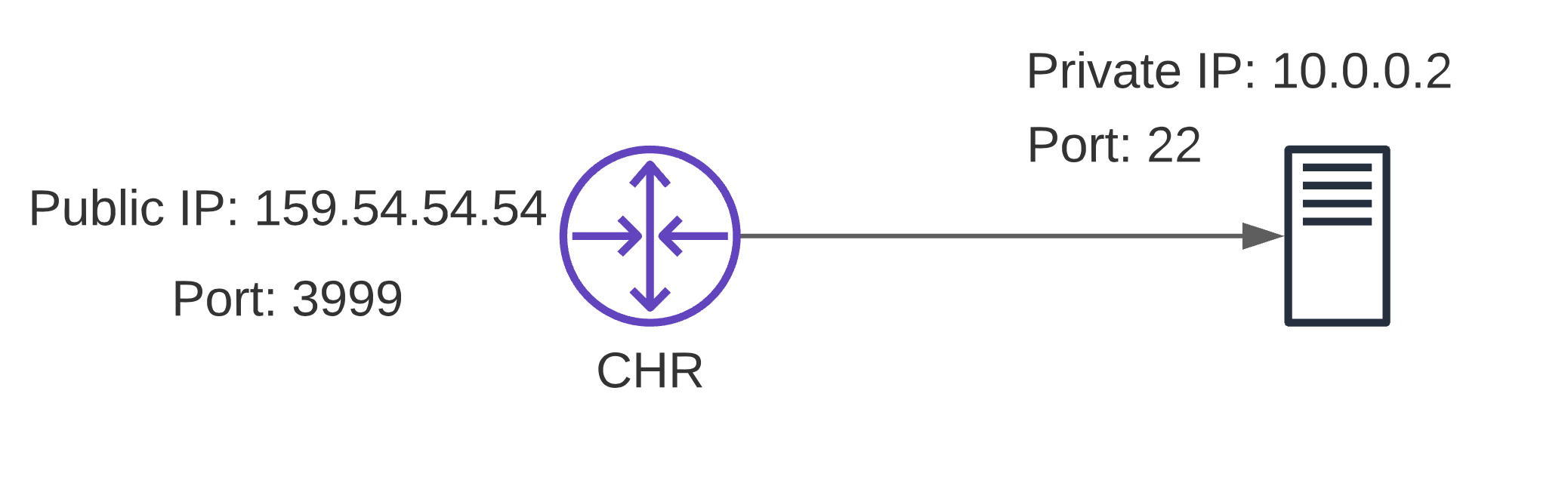
I just installed the CHR and trying to do a port forward from the WAN IP to a Private IP on port 22. Here’s a diagram that explains the setup. Also, I want only a specific IP to be able to establish that connection using that external port. To my understanding, I need to create: a) a NAT rule b) a Firewall rule to allow that particular external IP to connect.

So far what I’ve tried, even without the firewall rule as to just to get the port forward to work, the port appears to be closed in the port checker tool. I will appreciate all the help.
If I need to post my Log, then please let me know the commands to get it as I’ve just used the webfig to do the configuration. Thank You.
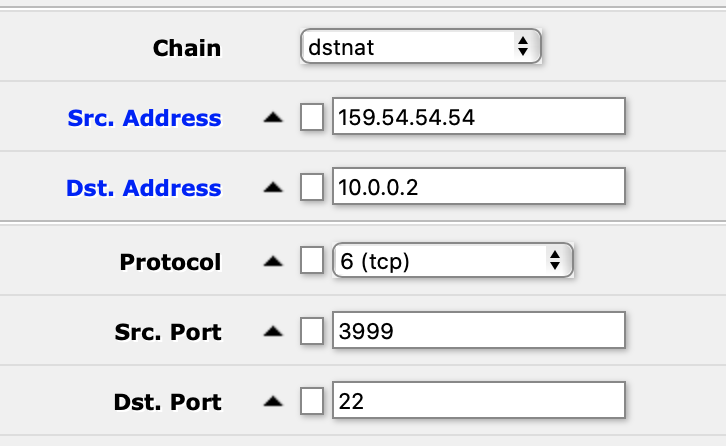
Screen Shot 2021-06-25 at 3.18.23 AM.png
Screen Shot 2021-06-25 at 3.26.05 AM.png

You should be using the Action tab for selecting the destination:

add action=dst-nat chain=dstnat comment="SSH server" dst-address=159.54.54.54 dst-port=3999 protocol=tcp src-address=[fill in the allowed IP address] to-addresses=10.0.0.2 to-ports=22

Thank you. Now I’m getting a connection timeout error when trying to SSH using the Public IP and Port. However, the source IP and the destination IP:3999 does show up in the “Connections” momentarily and then disappears.
I’m able to Ping the destination private IP using the Router CLI. The port checker still shows 159.54.54.54 port 3999 as being closed.

nox@macbook ~ % ssh -p 3999 root@159.54.54.54
ssh: connect to host 159.54.54.54 port 3999: Operation timed out


[admin@MikroTik] > ping 10.0.0.2
  SEQ 		HOST                                     	SIZE TTL TIME  STATUS           
    0 		10.0.0.2	                                 56   64   0ms  
    1 		10.0.0.2	                                 56   64   0ms  
    2 		10.0.0.2	                                 56   64   0ms  
    3 		10.0.0.2	                                 56   64   0ms  
    sent=4 received=4 packet-loss=0% min-rtt=0ms avg-rtt=0ms max-rtt=0ms

Do you see the packet counter of this rule increasing?
Sure there is a SSH server listening on 10.0.0.2?

Could you export your firewall (/ip firewall export)?

Yes, the count increases with every attempt.
Just for testing, I assigned a public IP to the server I’m trying to reach via the Router, the SSH works fine. It uses my Public Key so it connects right away.
To rule out any firewall issue on the private IP, I attempted SSH from another computer, local to that server, and it gave the “Permission Denied (public key)” error which indicates the SSH is open on the private IP as well. But I noticed the presence of our relevant IPs:Ports in the last code segment here.

user@randomPC:~# ssh root@10.0.0.2
Permission denied (publickey).


[admin@MikroTik] > /ip firewall export 
# jun/25/2021 05:21:04 by RouterOS 6.48.3
# software id = 
#
#
#
/ip firewall nat
add action=dst-nat chain=dstnat comment="SSH server" dst-address=\
    159.54.54.54 dst-port=3999 log=yes protocol=tcp src-address=\
    104.230.44.200 to-addresses=10.0.0.2 to-ports=22
[admin@MikroTik] >


root@server:~# ps aux | grep sshd
root         692  0.0  0.3  12176  7508 ?        Ss   Jun24   0:00 sshd: /usr/sbin/sshd -D [listener] 0 of 10-100 startups
root       14182  0.0  0.4  13808  9008 ?        Ss   09:11   0:00 sshd: root@pts/0
root       14330  0.0  0.0   8160   736 pts/0    S+   09:32   0:00 grep --color=auto sshd


root@server:~# netstat -plant | grep :22
tcp        0      0 0.0.0.0:22              0.0.0.0:*               LISTEN      692/sshd: /usr/sbin 
tcp        0     36 159.54.54.54:22        104.230.44.200:49651     ESTABLISHED 14182/sshd: root@pt 
tcp6       0      0 :::22                   :::*                    LISTEN      692/sshd: /usr/sbin

on the graph is missing what IP have the CHR on server side
supposing CHR can ping 10.0.0.2 (test!)
and have IP 10.0.0.1 (/24?) on server side

paste this on terminal and retry:

/ip firewall nat
remove [find where comment="SSH server"] 
add action=dst-nat chain=dstnat comment="NAT SSH" dst-address=159.54.54.54 dst-port=3999 protocol=tcp to-addresses=10.0.0.2 to-ports=22
add action=src-nat chain=srcnat comment="reverse path SSH" dst-address=10.0.0.2 to-addresses=10.0.0.1

WARNING: You do not have any rule to protect the CHR from Internet.

Bingo! It worked.

Thank you so much both of you for your incredible help :slight_smile:
The CHR is protected by the Firewall rules on the VM Container it is hosted on, so it only accepts SSH connections from my IP.

Now that we got the connection working, what else should be added to make it accept this particular NAT connection only from my IP 104.230.44.200 (or a particular IP of my choice)

Paste this on terminal:

/ip firewall address-list
add address=159.54.54.54 list=allowed_ssh_access
/ip firewall raw
add action=drop chain=prerouting dst-address=159.54.54.54 dst-port=3999 protocol=tcp src-address-list=!allowed_ssh_access

every address you put on allowed_ssh_access address-list are enabled to access, the other not.

Thank you, this was very helpful and taught me a lot as I’m just starting out with Mikrotik.

This is a good starting point, and I’m wondering if there’s a one shot way to achieve the same effect without creating a forward and a reverse NAT separately.

Yes, use CHR as gateway, your SSH server use the gateway to reply on SSH connection…

Thank you. By Gateway, do you mean a Default Gateway or a Static Route?

One thing I noticed that the data rates are very very slow, at most 1 Mbps. For eg. for testing, I port forwarded to a Samba Share on the same IP and a 10MB file takes about 3 minutes to transfer to a Client PC.

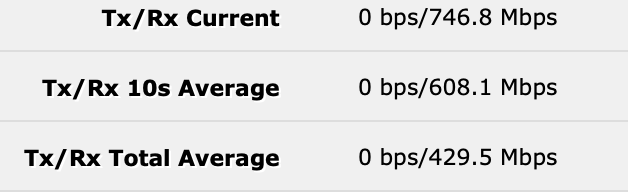
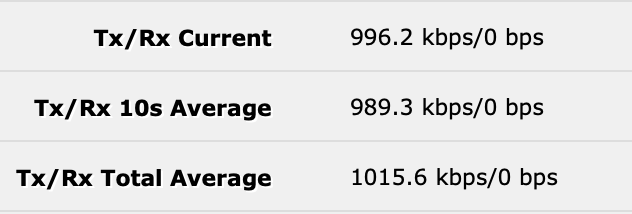
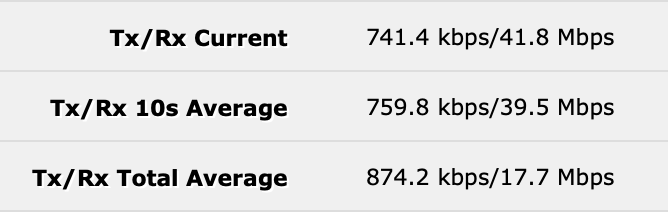
The Samba Server has a 20Mbps upload speed. Mikrotik Router Bandwidth Test on IP 23.162.144.120 yielded some interesting results. I did two tests, one only receive, and the other using “both” option (send and receive), both tests TCP. Here’re the findings. What should I be testing? I thought maybe there was a reverse NAT issue causing the slowdown but from the tests looks like it is the transmit speed? Is there anything within CHR that could be causing this? CHR is running on a dedicated server, and there’s nothing else running as this is a test setup.

Receive Only Test:
Screen Shot 2021-06-27 at 8.14.33 PM.png
Send Only Test:
Screen Shot 2021-06-27 at 9.57.24 PM.png
Send/Receive Test:
Screen Shot 2021-06-27 at 8.15.58 PM.png

I fixed the bandwidth tool speed by upgrading to a CHR P1 license, totally forgot about the 1Mbps limit and now the bandwidth test tool speeds are as they should be- Fast. However, accessing the port forwarded services still has latency and then it picks up eventually once it’s connected. Could it be due to NAT/Reverse NAT?

And Gateway, you mean default gateway or a static route on the SSH Server?

Perfect answer. The second reverse path is what I was missing in my configuration. Thanks for the post!

1 - firewall rule to allow port forwarding required

add chain=forward action=accept connection-nat-state=dstnat

2 - destination nat rule, for static Public IP, to permit access to the IP and port in question AND TO narrow down access.

add chain=dstnat action=dst-nat dst-address=159.54.54.54 dst-port=3999 protocol=tcp
to-addresses=10.0.0.2 to-ports=22 src-address=104.230.44.200

Note1: To-ports NOT required if same as dst-ports, in this case you are using port translation.
Note2: If you want to have a number of allowed IPs access the server then use src-address-list=Authorized

where Authorized is a firewall address list.
add address=104.230.44.200 list=Authorized
add address=fixexIPuser2 list=Authorized
"
add address=fixedIPuser100 list=Authorized
add address=Dyndns name userA list=Authorized
"
add address=Dyndns name userZZZ list=Authorized

The router will resolve DYDNS names to IP for you.

++++++++++++++++++++++++++++++++++++++++++++++++++

IN summary screw the initial advice for raw filtering it was way overcooked, and I thought Italians knew how to cook their meat!
Besides, when you have a destination nat rule in place on the config, the associated port shows on a scan and is shown as closed.
If you add source addresses in the mix, the port does NOT even show up on a scan and thus is always recommended by myself.

The logic of letting parcels enter the office, and then later seeing if they are dangerous, even if there is a bomb inside,
is certainly worse than not allowing parcels to enter at all unless requested.

Or to make it simpler, it is better to immediately block the packet in RAW instead of processing it 8 times unnecessarily in all the passages to reach Firewall Filter.

Or better, how the packet is processed?
https://help.mikrotik.com/docs/display/ROS/Packet+Flow+in+RouterOS#PacketFlowinRouterOS-FlowofRoutedPacket
First pass on RAW, then Connection-Tracking, then Prerouting-Mangle, then DST-NAT, then on Routing, then TTL management, then Forward-Mangle, and finally Forward-Filter, etc.
When you block the packet on RAW, it doesn’t go through any of the next 7 steps.
When you block the packet on Filter, the packet is already passed on RAW, Connection-Tracking, Mangle, DST-NAT, Routing, TTL management, again Mangle, and finally Firewall Filter.
There is no logic to block the unwanted connections at the end of this 8-pass chain, instead to block it immediately.

Yes, delete everything in the end is still valid, of course,
but if for sure some traffic is unwanted,
it is better to block it instead of unnecessarily use power, resources and time to process it.

In fact, by analyzing the blocked traffic, it is possible to deduce how to create rules in RAW that completely block unnecessary traffic, even before it is managed by the system.

An example above all, blacklists must be blocked in RAW, not in filter, otherwise the packages are processed 8 times before they arrive at the Firewall Filter (input or forward makes no difference).
Raw is not required, unless you have something to blow up and then the router will not save you as they will come to your house and put one in your car…
Advising raw firewall rules for a simple port forwarding setup is a tad overkill IMHO. Not saying that you are wrong, but If I need an shirt, your suggesting a kevlar vest.

From security point of view your logic is flawless. From performance point of view not so much. Yes, security should be paramount, but if things can be optimized for performance without sacrificing security, it's wise to do it.

One can compare RAW filter to security checks done on every single packet. And firewall filter can be compared to security checks done only on packets that are not trusted at stage where security check is done.

Now imagine: you have inflow of milions of packets to your post office. If security is done on entry gates, the poor security guy has to check every single packet and one can imagine the bulk of work he's got to do even if the security check is really quick. Since security guy normally only removes very small number of packets, other post office processes don't benefit from removing packets, but he'll work his arse off.
If, OTOH, packets first enter the sorting machine (connection tracking) and most packets are let to go without security checks (because ... somehow ... they are trustworthy) - accept established,related,untracked - and security checks are only performed on remaining few packets, that security guy will have to do very little work. Now the parallel ends, in firewall it's actually the same guy (or very few guys ... CPU cores) that does every single operation. So if that same guy doesn't need to do some basic security checks on every single packet arriving but rather on those not trustworthy, he can spend more time on sorting and the rest of handling thus overall number of packets handled can be higher than in the other case. Surely there are cases (e.g. DDoS) where removing dangerous packets at the entrance is benefitial (due to sheer number of packets being removed by security guy), but not in normal operations.

What he said… the short version is “overkill” both in added complexity and overhead for ???
The important point is that with source address on the dst nat rule, the port is not visible on scans plus of course only that IP will be allowed access.
Simplicity like a good Italian wine, I think rextended drank vinegar by mistake. :wink:

The answer was triggered by someone who is always criticizing RAW.

:laughing:

RAW =
sledgehammer.jpg

SRC-ADDRESS =
nail.jpg

+++++++++++++++++++++++++++++++++++++++++++++++++++++++++

RAW =
saw.jpg
SRC-ADDRESS =
scalp.jpg