I need some more help
I think previously I didn’t have things set right but it just worked for some reason.
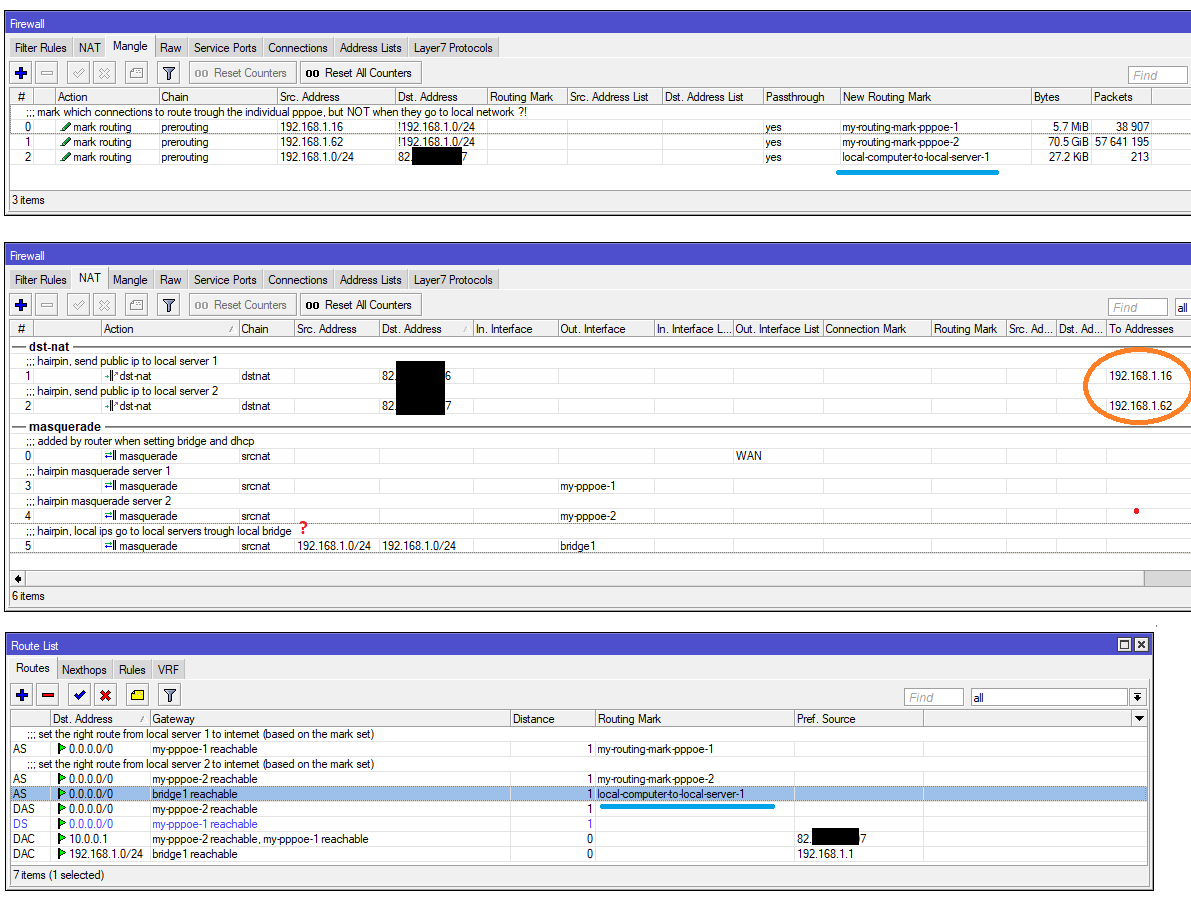
With current setup, the local computer 192.168.1.16 cannot reach public IP 82.x.x.7 UNLESS I add that blue mangle routing rule and the blue route, allow to reach that public IP by local bridge (?!).
Is that a must ?
Is there a simpler way ? (e.g just by one rule in NAT ?)
Don’t other NAT rules there already do that ? allow 192.168.1.16 to reach 82.x.x.7 locally ?
Problem is that prerouting mangle (where you mark routing) occurs before dstnat. So you have packet going to public address which matches dst-address=!192.168.1.0/24 in rules #0-1 and it gets marked. Then dstnat changes destination to 192.168.1.x, but routing is already marked, so destination is looked up only in my-routing-mark-pppoe-x table and it doesn’t contain route to 192.168.1.0/24, so packet goes out to internet.
Options are:
a) What you did
b) Add dst-address-type=!local to mangle rules #0-1, to also exclude all addresses on router
c) The routing rule I posted (it tells the router to always look up 192.168.1.0/24 only in main routing table)
OK, I left that as it was since you said it is one way to do it, and I have a hard time understanding all the rules.
I am very close to smashing it right now, I think what I need is very simple (e.g 3 pppoe accounts each going to/from different computer) I can’t understand why I need tons of rules for it, each of them overwrites each other and cause conflicts, etc. It’s a nightmare, it is over 16 days already, every day I “work” on this thing, it’s ridiculous.
Now … I cannot reach it by internet in order to manage it, in ip > services, I set www port to 380, I understand the 192.168.1.1 is the one replying on the web port, no ?!
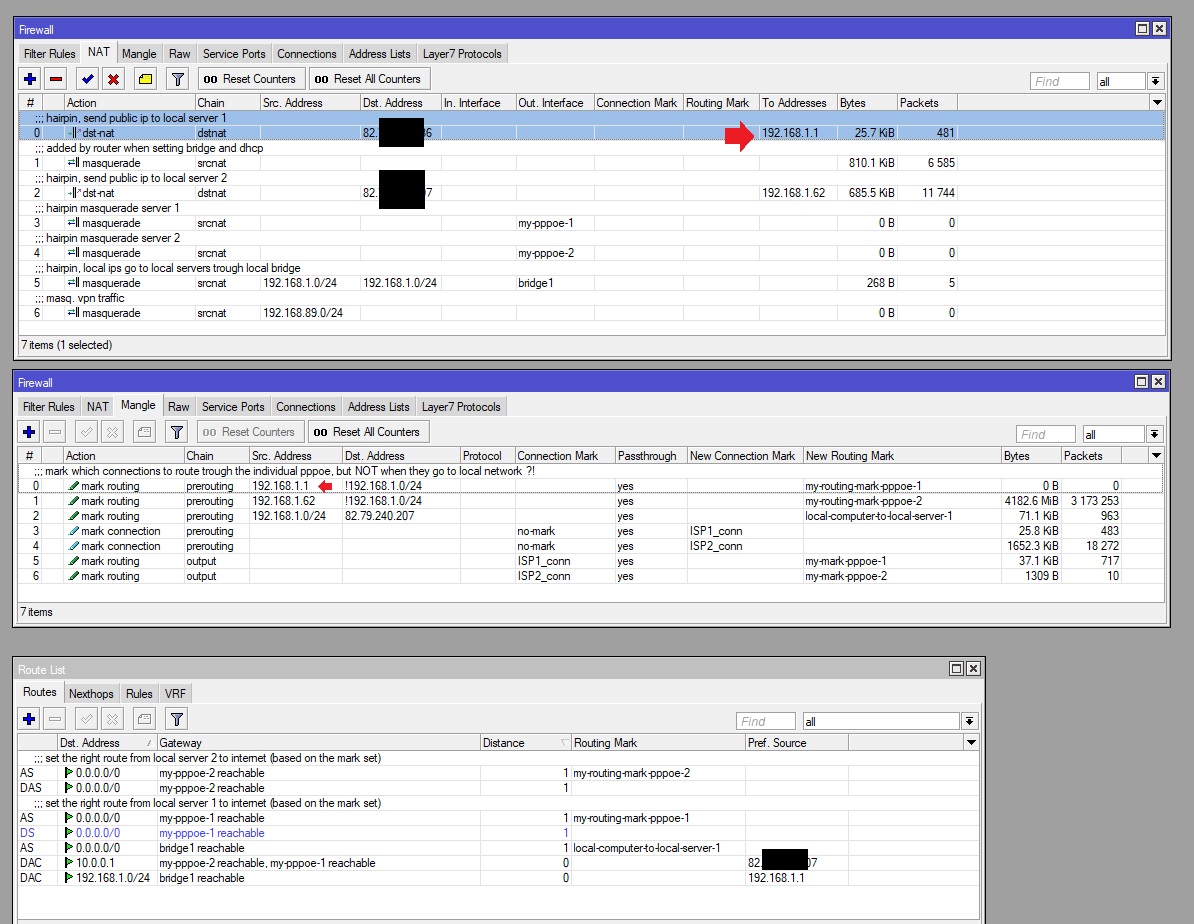
So for testing, I changed that first NAT (dst-nat) to forward all traffic of that public 82.x.x.6 IP to 192.168.1.1 instead of the 192.168.1.16 as it was in the images.
And nothing, doesn’t reply on port :380, only from local network.
What am I doing wrong ?
Help
The 82.x.x.6 is also the internet connection I see under “quick set”, I have no idea why another “internet connection” shows there when I already have tons of rules in order to connect to the internet.
Strategy to take down a country - drop hex routers, like leaflets, on the population and watch them self destruct and go stark raving mad. No bullets need be fired, no animals hurt in the process.
I was thinking it does that, but I wasn’t sure, and I applied “quick” settings there in order for it to make the local bridge, enable DHCP and VPN. I cannot find another location for VPN settings eider.
Take a deep breath and don’t panic, everything is ok, but you need some more rules.
With multi-WAN config, router doesn’t automatically send replies via the same WAN from where the request came in. So the basic idea is to mark incoming connections based on incoming interface:
And this would be for replies from internal servers (you may not need it for your current config, if each server is accessible only from one WAN interface and always uses the same interface for outgoing traffic):
For the 2 connections I have now, I added the rules you mentioned, except the last group which you said might not be needed, this is what I have now.
Problem is … I still cannot reach it on port 380 when accessing from outside, but from local computers I can see the web interface at 192.168.1.1:380
I was expecting it to be a simple port forward from public to 192.168.1.1 since I can access it locally.
I am not sure the NAT and mangle to/from 192.168.1.1 is correct or needed (red arrows), I edited that trying to get a connection to router port 380.
In plain English,
(1) All external requests (originating) are connection marked by the router, depending upon which WAN interface they come in on.
(2) When traffic is exiting the router and has these marks, assign the applicable routing marks to match the same interface.
This does nothing by itself but is something that the admin directs the router to follow so that when the admin is making the IP route rules, the router will be able to physically route the traffic appropriately
(3) When server traffic replies to the requests, and we know they have the original marks the router put on them, we assign router marks as we did in 2. @sob (4) What is missing is the IP Route rules that tie everything together…
@sob My question is why do we bother with 2?
In part 1. we connection mark the incoming traffic per WAN.
In part 3. we track the replies by their connection marks and route mark the responses.
In part 4. we apply IP route rules to ensure the connection marked traffic goes out the applicable WAN by the route mark
(where does 2 come in to play)
Hi Adrian, that is why I am trying to put advice in language that is digestible. The MT geeks here speak config as though its our mother tongue LOL.
I have taken it upon myself, through humour, to attempt to bring them down to earth. I could have put on my signa, I would rather herd rats than big MT egos
Seriously, stick with it! Between Sob’s expert advice and my amateurish fumbling, we will get there. Heck its not about the end result its about the journey and the people we meet along the way.
No argument from me mkx. At least you admitted RoS was alien LOL. I do have to admit though there is nothing sexier than a person of the opposite (hmmmm lets say gender that attracts you) speaking your language with a foreign accent. In my case even those purporting to speak english (UK, Aussies etc), so hot! Hmm, mkx’s plan was to distract me from the thread at hand so I didn’t provide any further incorrect, confusing or damaging advice… it worked!!
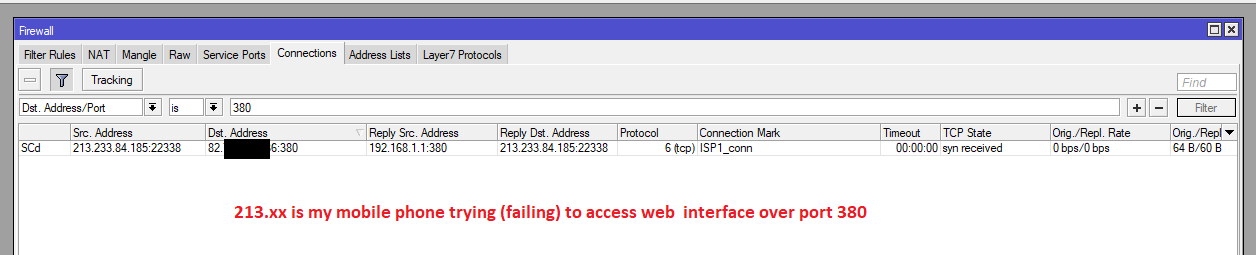
Does this show any tips on why it would not open the web interface over port 380 ?
This is an attempt over internet (failing), but it loads from local network if I access both 192.0.0.1 or public IP too.
OK, I added another route “ip routes” to use pppoe-1 interface for that ISP1_conn connection mark (seen in the image) and it seems to work.
Now I need to try to understand them all and find other things that don’t work
Port 380 is quite uncommon and it wouldn’t surprise me if some your ISP was blocking it. Try to forward some more standard port (e.g. port 80) to verify that your port forwarding rule actually works. You might want to enable logging on port forwarding rule to see if it actually gets triggered when accessed from internet …