// I have a separate topic but I get new issues and questions along the way and it gets confusing and unproductive, I think is best to ask / solve one by one
With the attached setup, what I am trying to do is have 3 pppoe connections from my ISP, both .. sorry all three are made trough their same ethernet cable insert in port 1.
Each of the different pppoe connections need to be used by a different computer on the network, in both directions (they need to also be servers that respond on that dedicated IP www, ftp, etc).
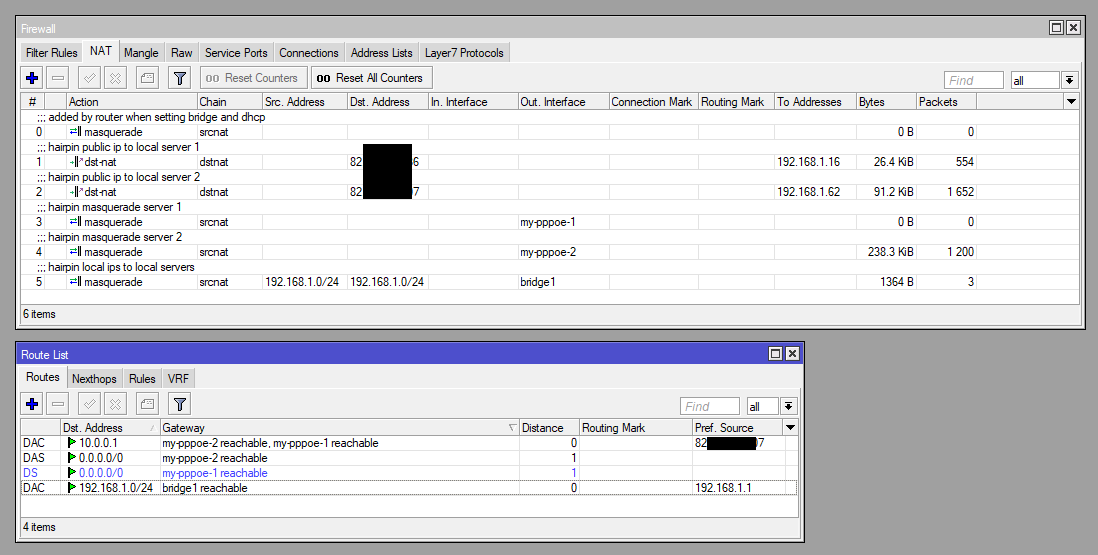
It seems to be 90% done, the problem is that … services work from the internet when I access them using domain name or public IP of these ppoe connections, but when I try to access the services (www, ftp, etc) from a local computer in same network normally (using domain or public ip), I seem to reach the router, unless I access them using local ip (e.g 192.168.1.62) but that is not great, I need to access them like from the internet (using public IP or domain name).
# mar/21/2019 12:52:27 by RouterOS 6.44.1
# software id = S70D-L6ES
#
# model = RouterBOARD 3011UiAS
# serial number = 8EEXXXXX
/interface bridge
add name=bridge1
/interface pppoe-client
add add-default-route=yes disabled=no interface=ether1 name=my-pppoe-1 user=\
    CRPTM256XXXXX
add add-default-route=yes disabled=no interface=ether1 name=my-pppoe-2 user=\
    CRPTM2559XXXXX
add add-default-route=yes disabled=no interface=ether1 name=my-pppoe-3 user=\
    TM509XXXXX
/interface list
add name=WAN
add name=LAN
/interface wireless security-profiles
set [ find default=yes ] supplicant-identity=MikroTik
/ip pool
add name=vpn ranges=192.168.89.2-192.168.89.255
add name=dhcp_pool1 ranges=192.168.1.10-192.168.1.254
/ppp profile
set *FFFFFFFE local-address=192.168.89.1 remote-address=vpn
/interface bridge port
add bridge=bridge1 interface=ether2
add bridge=bridge1 interface=ether3
add bridge=bridge1 interface=ether4
add bridge=bridge1 interface=ether5
add bridge=bridge1 interface=ether6
add bridge=bridge1 interface=ether7
add bridge=bridge1 interface=ether8
add bridge=bridge1 interface=ether9
add bridge=bridge1 interface=ether10
/interface detect-internet
set detect-interface-list=all internet-interface-list=all lan-interface-list=\
    all wan-interface-list=all
/interface l2tp-server server
set enabled=yes use-ipsec=yes
/interface list member
add interface=ether1 list=WAN
add interface=bridge1 list=LAN
add interface=my-pppoe-1 list=WAN
add interface=my-pppoe-2 list=WAN
add interface=my-pppoe-3 list=WAN
/interface pptp-server server
set enabled=yes
/interface sstp-server server
set default-profile=default-encryption enabled=yes
/ip address
add address=192.168.1.1/24 interface=ether2 network=192.168.1.0
/ip cloud
set ddns-enabled=yes
/ip dhcp-client
add dhcp-options=hostname,clientid disabled=no interface=ether1
/ip dhcp-server network
add address=192.168.1.0/24 gateway=192.168.1.1
/ip dns
set servers=8.8.8.8,8.8.4.4
/ip firewall mangle
add action=mark-routing chain=prerouting dst-address=!192.168.1.0/24 \
    new-routing-mark=my-mark-pppoe-1 passthrough=yes src-address=192.168.1.16
add action=mark-routing chain=prerouting dst-address=!192.168.1.0/24 \
    new-routing-mark=my-mark-pppoe-2 passthrough=yes src-address=192.168.1.62
/ip firewall nat
add action=masquerade chain=srcnat comment=\
    "local computers access to public internet" out-interface=my-pppoe-1
add action=masquerade chain=srcnat out-interface=my-pppoe-2
add action=masquerade chain=srcnat out-interface=my-pppoe-3
add action=dst-nat chain=dstnat comment="public internet to local computer" \
    in-interface=my-pppoe-1 to-addresses=192.168.1.16
add action=dst-nat chain=dstnat in-interface=my-pppoe-2 to-addresses=\
    192.168.1.62
add action=masquerade chain=srcnat comment="masq. vpn traffic" src-address=\
    192.168.89.0/24
/ip route
add distance=1 gateway=my-pppoe-1 routing-mark=my-mark-pppoe-1
add distance=1 gateway=my-pppoe-2 routing-mark=my-mark-pppoe-2
add distance=1 gateway=my-pppoe-1
/ip service
set telnet port=523
set ftp port=521
set www port=580
set ssh port=522
set www-ssl disabled=no port=5443
set api port=58728
set winbox port=58291
set api-ssl port=58729
/ppp secret
add name=vpn
/system clock
set time-zone-name=Europe/Bucharest
/tool graphing interface
add
/tool sniffer
set filter-interface=my-pppoe-2
I couldnt get past the basic math. No coffee yet this morning.
… @sob
…
“Amazing deduction, Sob". …"What did you expect dear Watson!”
My question is since there seems to be three different (I think) wan Ips, does this mean there needs to be three hairpin nat sets of rules??
I am trying to set this up for the last 10 days, so that’s my excuse. And I keep experimenting with one of the interfaces, sometimes I have 2 sometimes I have 3 online.
Do I need to manually add the public IP ? If so, to which rule(s) ? And I have no ideea if they should be added as “source”, “destination”, etc, it gets very confusing, I started using Mikrotik just days ago.
First, sorry, I was too quick and didn’t study your config in detail.
The right solution depends on what you have. If you have static public addresses, simply replace in-interface=my-pppoe-x with dst-address= in dstnat rules and add hairpin rule:
And also the above srcnat rule. These new dstnat rules could in theory replace your current ones, but since there’s a delay before the address list is updated when hostname changes, and it could cause service interruptions, it’s better to keep both. Old rules will work for connections from internet a these new ones for connections from LAN.
So now I am thinking to start with this from zero and make the same for all interfaces.
Does it look OK ? Besides the above, do I still need some rules for the other direction (e.g to tell each local server what route to use to reach the internet) ?
Great, then it’s the simple case (“replace in-interface=my-pppoe-x with dst-address= in dstnat rules”). Do the same with other dstnat rules, broaden dst-address in srcnat hairpin rule (dst-address=192.168.1.0/24), so that the rule will work for all, and you’re done.
For routes, you already mark routing in your config.
When I think I am almost done, something goes wrong
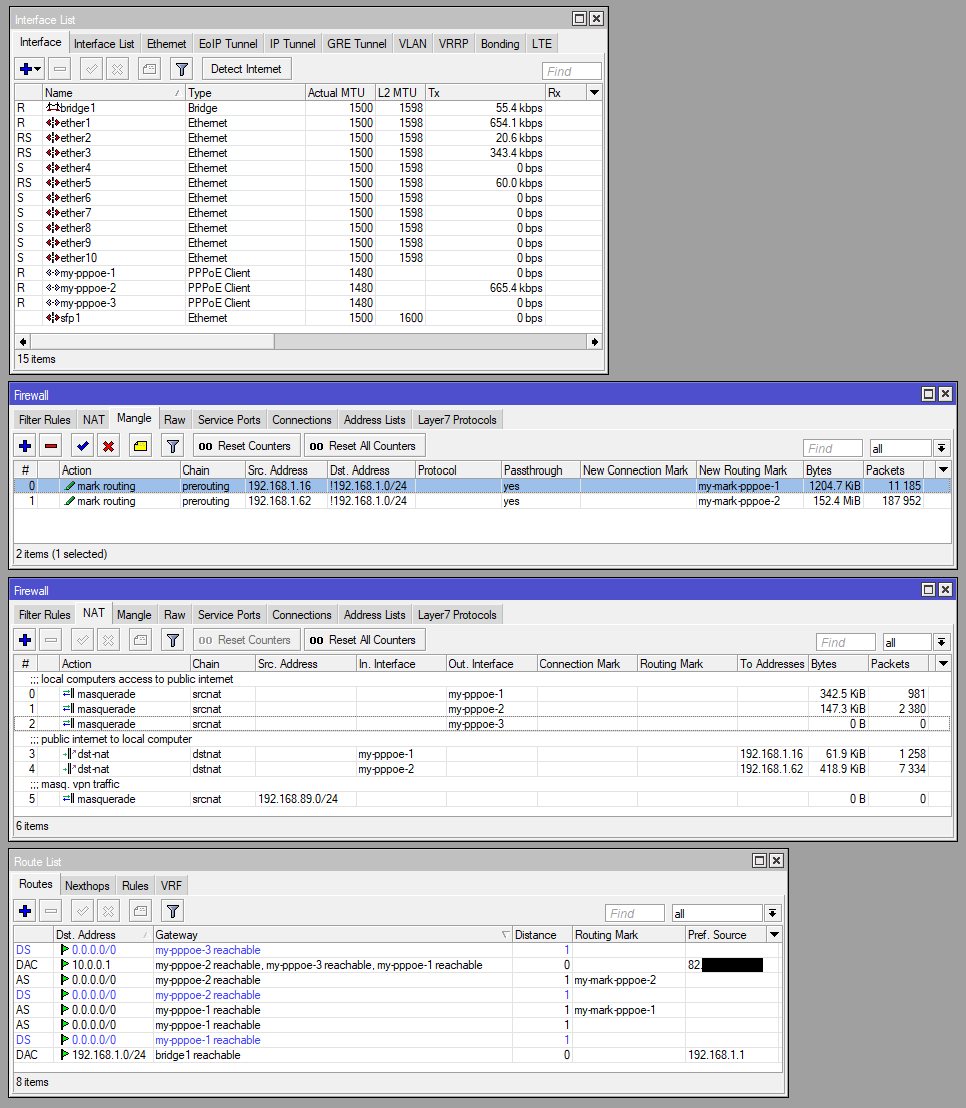
Right now, the ports open on 192.168.1.16 cannot be reached from the internet. But I can connect from other local computers to it, even if I use the public IP of that target.
This is what I have now (attached).
Say what? This is a technical forum? I came hear to meet people and make friends so that I would have a place to stay when I travel!!
Speaking of which, how many spare beds do you have at your place. You are in Spain right.
Seriously, glad the OPs issues have been resolved!!
@anav: I’m tempted to believe your explanation. Although I’m not sure if everyone will welcome you with open arms, it seems to me that sometimes you’re a little bit too intense. But hey, I have big heart, I’m willing to lend you a place for tent and maybe access to wifi.
Too intense LOL. I disagree and perhaps we should have a mud wrestling contest to settle this.
I suppose you are one of those folks that stifles a sneeze and hates orgasms too.
You missed the “little bit” part. And call me picky, but I have certain ideas who I’d like to mud wrestle with, and I’m not sure if you’d fit. Anyway, there’s one advantage of strictly technical forums, in there you can have great relation even with people who you’d want to strangle in real life, because you skip million of uninportant things to argue about, and all you focus on is common enemy in form of stray packet or something.


 I am trying to set this up for the last 10 days, so that’s my excuse. And I keep experimenting with one of the interfaces, sometimes I have 2 sometimes I have 3 online.