Possible to map networks per WiFi client? If so, how?

You have six identical Nat rules.

You need to add something to distinguish them depending on the interface that Is used?

For dstnat you can add an in-interface selector, but I am not sure to understand what you actually want to do and if this would help.

Loosely the requirement Is "ping devices that have the same IP distinguishing them by the ports they are connected to"?

Exactly. But not only pinging, Usually I'd access their web UI or use SSH to log into them.
Otherwise I'd have to switch to the WiFi of the corresponding device which is annoying. I was hoping to be able to set it in a way that I can work with multiple devices at once...

Check this:

The reason you are able to ping the 192.168.32.1-192.168.72.1 addresses and they all land on the 192.168.2.1 test router currently plugged into ether2 is because the other ports are currently not in the running state (no R next to the ether3-ether7 interfaces in the interface list).

As a result, all the routes that you've added to out-ether3-out-ether7 with:

are currently invalid and unreachable (the have the USI flag if you look at them in WinBox under IP -> Routes, and have the I flag when you use /ip route print to view them). Which means those tables out-ether3-out-ether7 have no active routes anymore (no route with A flag).

When a routing table has no active flag, and packet is directed by mangle mark-routing to use that table, the routing lookup falls back to the main table as backup. And because this DHCP client instance is currently running and bound:

there is currently an active route added by this DHCP client in main with dst-address=192.168.2.0/24 gateway=ether2.

So all the packets that have routing mark out-ether3-out-ether7 can still fallback to main and find a valid active route, and will all use ether2 as egress interface.

If you don't like that, and want that when nothing is plugged to one of the ether2-ether7 interface, accessing 192.168.22.0/24-192.168.72.0/24 respectively should not be possible (not falling back to the route in main) then the fix is very easy, just add these additional blackhole routes in those custom routing tables:

/ip route
add blackhole dst-address=0.0.0.0/0 routing-table=out-ether2
add blackhole dst-address=0.0.0.0/0 routing-table=out-ether3
add blackhole dst-address=0.0.0.0/0 routing-table=out-ether4
add blackhole dst-address=0.0.0.0/0 routing-table=out-ether5
add blackhole dst-address=0.0.0.0/0 routing-table=out-ether6
add blackhole dst-address=0.0.0.0/0 routing-table=out-ether7

Now when you look at the routing table in WinBox (don't forget to make the Blackhole column visible first), or use /ip route print, you'll see that even when those ether2-ether7 interfaces are down (unplugged), the respective routing tables that are tied to them still all have at least one active route with dst-address=0.0.0.0/0 that can satisfy every IPv4 addresses. This will make sure that there is no more falling back to main.

These default active routes are blackhole routes, so the packets will be dropped if they are used. And they have the prefix length /0 which means they have lower priority than the other /24 route in the same table. If that /24 route is active (not USI) it will always have precedence.

Now if ether3 is unplugged and you try to reach 192.168.32.x you'll get the unreachable/timeout result as expected, this one:

With all due respect :slightly_smiling_face:, I believe that - as seen in the linked thread - same routes as blackholes but with distance 2 would be more readable.

/ip route
add blackhole distance=2 dst-address=192.168.2.0/24 routing-table=out-ether2
add blackhole distance=2 dst-address=192.168.2.0/24 routing-table=out-ether3
add blackhole distance=2 dst-address=192.168.2.0/24 routing-table=out-ether4
add blackhole distance=2 dst-address=192.168.2.0/24 routing-table=out-ether5
add blackhole distance=2 dst-address=192.168.2.0/24 routing-table=out-ether6
add blackhole distance=2 dst-address=192.168.2.0/24 routing-table=out-ether7

but it is just a matter of preference.

Always amazing to see how some people seemingly effortless do things which look like magic to me.

Many, many thanks! Having done my first FW update on a test by the way of this setup without needing to dial in into its wifi. Really cool! :folded_hands::folded_hands::folded_hands:

The accent is on the seemingly, cannot speak for CGGXANNX, but rest assured that for me learning the very little bits and pieces of RouterOS I now know has been a process that took and is taking (and willl take) a lot of effort.

Anyway, good that you are up and running. :slightly_smiling_face:

Maybe one fly in the ointment, the connections to the test routers seems to be somehow slower than expected.

I tested pinging `192.168.2.1` via `192.168.42.1`, this works, is fast but looks unexpected

64 bytes from 192.168.42.1: icmp_seq=6 ttl=63 time=5.910 ms
92 bytes from router.lan (10.0.0.1): Redirect Host(New addr: 10.0.0.8)
Vr HL TOS  Len   ID Flg  off TTL Pro  cks      Src      Dst
 4  5  00 0054 aaab   0 0000  3f  01 f157 10.0.234.252  192.168.42.1 

64 bytes from 192.168.42.1: icmp_seq=7 ttl=63 time=8.739 ms
92 bytes from router.lan (10.0.0.1): Redirect Host(New addr: 10.0.0.8)
Vr HL TOS  Len   ID Flg  off TTL Pro  cks      Src      Dst
 4  5  00 0054 a1fe   0 0000  3f  01 fa04 10.0.234.252  192.168.42.1 

64 bytes from 192.168.42.1: icmp_seq=8 ttl=63 time=5.246 ms
64 bytes from 192.168.42.1: icmp_seq=9 ttl=63 time=5.328 ms
64 bytes from 192.168.42.1: icmp_seq=10 ttl=63 time=7.353 ms

Don't think I've ever seen this part before
92 bytes from router.lan (10.0.0.1): Redirect Host(New addr: 10.0.0.8)
Vr HL TOS Len ID Flg off TTL Pro cks Src Dst
4 5 00 0054 a1fe 0 0000 3f 01 fa04 10.0.234.252 192.168.42.1

DNS lookup using 192.168.42.1 also works.

I saw requests in the web UI to take ~5.4s of waiting time before transfering the file within 15-30ms to fetch a JavaScript file.
The first time around I didn't notice the time since I did the update in the background, but I retried an FW-update on a router and the update file of around 80mb took about 15min of transfer time... all locally.

I tried to capture logs (not of the update but just a very simple GET / ping) to see what happens but cant make much out of it.

Fast ping:

2026-10-22 21:01:47 firewall,info ether4 prerouting: in:bridge out:(unknown 0), connection-state:new src-mac 78:9A:18:FB:68:1C, proto ICMP (type 8, code 0), 10.0.234.252->192.168.42.1, len 84
2026-10-22 21:01:47 firewall,info ether4 prerouting: in:bridge out:(unknown 0), connection-mark:use-ether4 connection-state:new src-mac 78:9A:18:FB:68:1C, proto ICMP (type 8, code 0), 10.0.234.252->192.168.42.1, len 84
2026-10-22 21:01:47 firewall,info ether4 dstnat: in:bridge out:(unknown 0), connection-mark:use-ether4 connection-state:new src-mac 78:9A:18:FB:68:1C, proto ICMP (type 8, code 0), 10.0.234.252->192.168.42.1, len 84
2026-10-22 21:01:47 firewall,info ether4 srcnat: in:bridge out:ether4, connection-mark:use-ether4 connection-state:new,dnat src-mac 78:9A:18:FB:68:1C, proto ICMP (type 8, code 0), 10.0.234.252->192.168.2.1, NAT 10.0.234.252->(192.168.42.1->192.168.2.1), len 84

Logs for HTTP call showing the 5 seconds gap / waiting time:

2026-10-22 21:02:04 firewall,info ether4 prerouting: in:bridge out:(unknown 0), connection-state:new src-mac 78:9A:18:FB:68:1C, proto TCP (SYN), 10.0.234.252:52578->192.168.42.1:80, len 64
2026-10-22 21:02:04 firewall,info ether4 prerouting: in:bridge out:(unknown 0), connection-mark:use-ether4 connection-state:new src-mac 78:9A:18:FB:68:1C, proto TCP (SYN), 10.0.234.252:52578->192.168.42.1:80, len 64
2026-10-22 21:02:04 firewall,info ether4 dstnat: in:bridge out:(unknown 0), connection-mark:use-ether4 connection-state:new src-mac 78:9A:18:FB:68:1C, proto TCP (SYN), 10.0.234.252:52578->192.168.42.1:80, len 64
2026-10-22 21:02:04 firewall,info ether4 srcnat: in:bridge out:ether4, connection-mark:use-ether4 connection-state:new,dnat src-mac 78:9A:18:FB:68:1C, proto TCP (SYN), 10.0.234.252:52578->192.168.2.1:80, NAT 10.0.234.252:52578->(192.168.42.1:80->192.168.2.1:80), len 64
-- Gap start
2026-10-22 21:02:06 bridge,stp,debug ether1 rx bpdu protoId: 0x0 protoVer: 0x2 type: 0x2 flags: 0x3c { LEARN FWD DSGN } cistRootId: 0x8000:285261b1aaec cistEpc: 20000 cistRegionalRootId: 0x8000:789a18fb681c portId: 0x8003 messageAge: 256(1) maxAge: 5120(20) helloTime: 512(2) forwardDelay: 3840(15) version1Length: 0
2026-10-22 21:02:06 bridge,stp,debug ether1:0  rcv info SuperiorDesignated
2026-10-22 21:02:08 bridge,stp,debug ether1 rx bpdu protoId: 0x0 protoVer: 0x2 type: 0x2 flags: 0x3c { LEARN FWD DSGN } cistRootId: 0x8000:285261b1aaec cistEpc: 20000 cistRegionalRootId: 0x8000:789a18fb681c portId: 0x8003 messageAge: 256(1) maxAge: 5120(20) helloTime: 512(2) forwardDelay: 3840(15) version1Length: 0
2026-10-22 21:02:08 bridge,stp,debug ether1:0  rcv info SuperiorDesignated
-- Gap end
2026-10-22 21:02:09 firewall,info ether4 prerouting: in:bridge out:(unknown 0), connection-state:new src-mac 78:9A:18:FB:68:1C, proto TCP (ACK,PSH), 10.0.234.252:52578->192.168.42.1:80, len 523
2026-10-22 21:02:09 firewall,info ether4 prerouting: in:bridge out:(unknown 0), connection-mark:use-ether4 connection-state:new src-mac 78:9A:18:FB:68:1C, proto TCP (ACK,PSH), 10.0.234.252:52578->192.168.42.1:80, len 523
2026-10-22 21:02:09 firewall,info ether4 dstnat: in:bridge out:(unknown 0), connection-mark:use-ether4 connection-state:new src-mac 78:9A:18:FB:68:1C, proto TCP (ACK,PSH), 10.0.234.252:52578->192.168.42.1:80, len 523
2026-10-22 21:02:09 firewall,info ether4 srcnat: in:bridge out:ether4, connection-mark:use-ether4 connection-state:new,dnat src-mac 78:9A:18:FB:68:1C, proto TCP (ACK,PSH), 10.0.234.252:52578->192.168.2.1:80, NAT 10.0.234.252:52578->(192.168.42.1:80->192.168.2.1:80), len 523
2026-10-22 21:02:09 firewall,info ether4 prerouting: in:bridge out:(unknown 0), connection-mark:use-ether4 connection-state:established,snat,dnat src-mac 78:9A:18:FB:68:1C, proto TCP (ACK), 10.0.234.252:52578->192.168.42.1:80, NAT (10.0.234.252:52578->192.168.2.31:52578)->(192.168.42.1:80->192.168.2.1:80), len 52
2026-10-22 21:02:09 firewall,info ether4 prerouting: in:bridge out:(unknown 0), connection-mark:use-ether4 connection-state:established,snat,dnat src-mac 78:9A:18:FB:68:1C, proto TCP (ACK,FIN), 10.0.234.252:52578->192.168.42.1:80, NAT (10.0.234.252:52578->192.168.2.31:52578)->(192.168.42.1:80->192.168.2.1:80), len 52

I'm still reading through the other threads to see how it worked out for other people (already found out that in some threads ROS 6 was used... after being surpised about that there is no `route-mark` in my commands.)

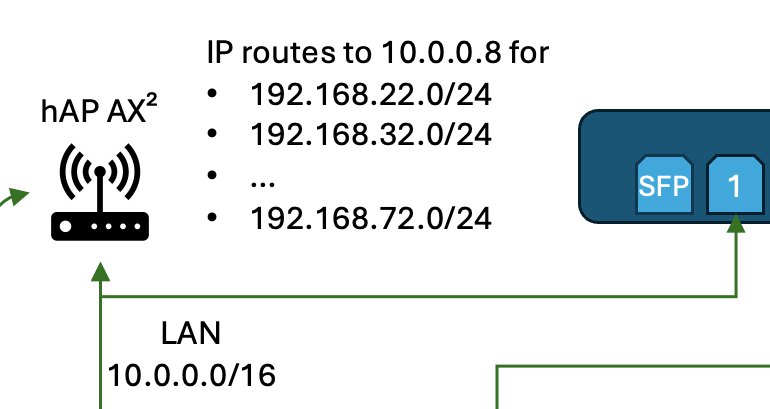
The issues are most probably caused by this part of your diagram and needs to be resolved on the hAP ax²:

We can be more certain if you also have an export of the configuration hAP ax². But it's probably like this:

  • On your hAP ax² you have the routes under /ip route for the 192.168.x.y address ranges with gateway=10.0.0.8, with 10.0.0.8 being the IP address manually assigned to the L009 on its bridge interface.

    BTW, you should correct this default route on the L009:

    The gateway should be set to the IP address of the upstream hAP ax² router, which I assume is 10.0.0.1. If you set to bridge every internet destination address will result in an ARP lookup, and normally you need proxy-arp enabled on the hAP ax² for that to work. It's much better to have

    /ip route
    add dst-address=0.0.0.0/0 gateway=10.0.0.1 routing-table=main
    

    instead on the L009.

  • The hAP ax² is set as default gateway for the notebook (10.0.234.252) client, probably via DHCP.

  • Notebook and L009 are on the same broadcast domain (same bridge / VLAN) and can normally directly talk to each other (this is evident as you've probably specified the 10.0.0.0/16 subnet for both devices).

So now what happens when your notebook at 10.0.234.252 sends packets to 192.168.42.1?

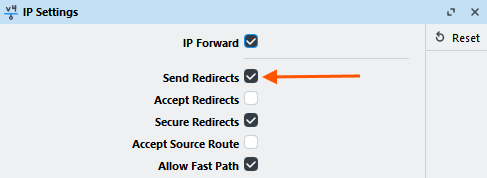
Because the destination is not in the same 10.0.0.0/16 subnet, the notebook will have to send it via the gateway (the hAP ax² at 10.0.0.1). The hAP ax² will receive the packet, look in the routing table and find the suitable next hop 10.0.0.8, which is the L009. This packet will be forwarded to the L009. But because it sees that the next hop 10.0.0.8 is on the same 10.0.0.0/16 subnet as the source 10.0.234.252, and because by default this setting is enabled:

It will send back an ICMP redirect packet to 10.0.234.252, telling the notebook to better use the gateway 10.0.0.8 the next time it needs to contact 192.168.42.1. This is what you saw here:

If a client accepts and honores ICMP redirect messages, it will normally install a new route in its table, remembering that next time it needs to contact 192.168.42.1 it should use 10.0.0.8 as gateway instead of the default 10.0.0.1. This is of course more efficient than having to go through the extra hop 10.0.0.1.

However, nowadays most modern operating system by default no longer trust those ICMP redirect packets anymore. As you can also see in the screenshot above, even RouterOS itself by default will ignore the ICMP redirects that it receives (Accept Redirects is off). This is for security reasons, because otherwise it's very easy for attackers on the same subnet to manipulate the routing table of other hosts.

So, in this case the 10.0.234.252 notebook most probably ignores the ICMP redirect packets and continues to send packets destined for 192.168.42.1 via hAP ax²!

But let's look at what will happens with the response packets coming from L009: The packets have destinations 10.0.234.252, the L009 sees that the address is on the same layer 2 (same 10.0.0.0/16 subnet) and has bridge as gateway (not 10.0.0.1). It will use ARP to find out the MAC address of 10.0.234.252 and then send the response packets directly on layer 2, completely bypassing the 10.0.0.1 router. This is one case of asymmetric routing.

What that means: The hAP ax² sees and tracks incoming connections with source 10.0.234.252 and destination 192.168.42.1, but it never sees any packet in the 192.168.42.1 -> 10.0.234.252 direction. If it's a TCP connection, the conntrack entry in the hAP ax² connection tracking table also tracks the current TCP state. It does see the SYN packet that initiates the connection (from 10.0.234.252 -> 192.168.42.1), but it's never able to see any SYN+ACK or other ACK packets from the other direction. It's not able to transition the state of the TCP connection to established at all.

After some amount of timeout the conntrack entry will be removed from the table. The 10.0.234.252 doesn't know this, and continues to send other packets of the same TCP connection. The hAP ax² sees new incoming TCP packets that have no corresponding conntrack entry, and is not SYN / SYN+ACK / ACK, it will classify the connection state of the packet as invalid, and the packet will be dropped by the usual "drop invaid" firewall rule.

This means those packets are lost and will never arrive at the remote 192.168.2.1 router attached to ether4 of the L009. With TCP connections, packet losses mean retransmissions and shrinking of the TCP window, that's probably the source of the performance issues that you could see. And this:

is probably related to some TCP timeout setting on the client that is 5 minutes, before the connection is recreated (maybe TCP Max Retransmit Timeout).


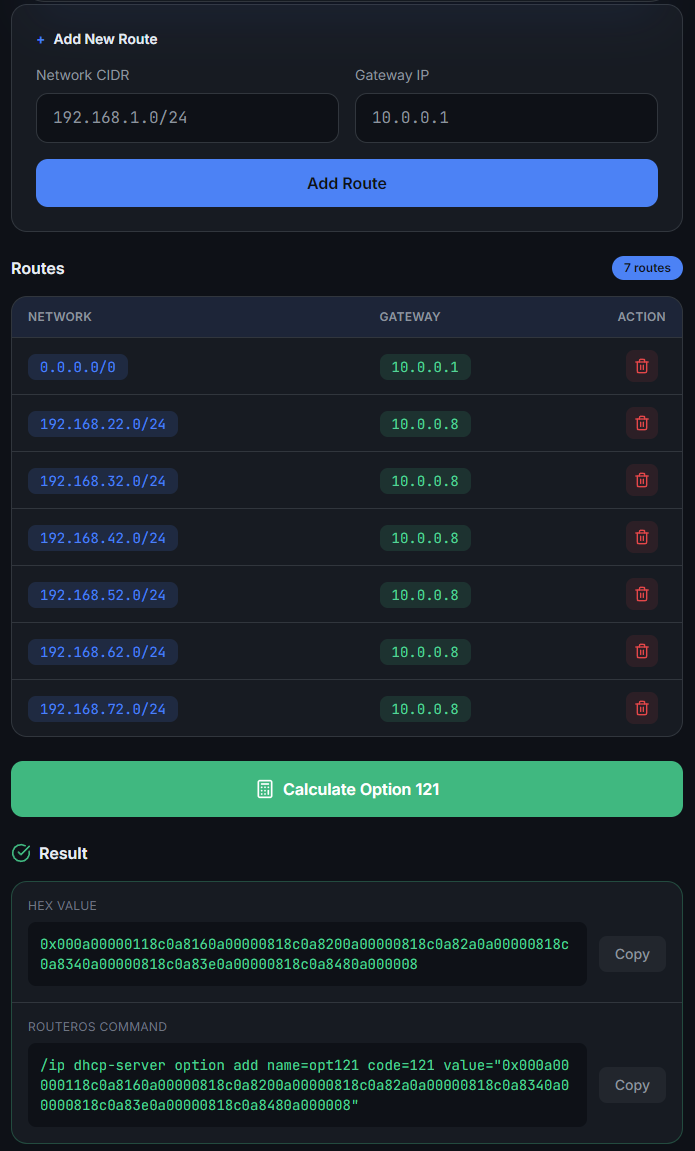
So you'll have to fix this asymmetric routing situation. The best way is to tell the notebook that 10.0.0.8 should be used as gateway when contacting 192.168.22.0/24-192.168.72.0/24. But not via ICMP redirect (because apparently the notebook rejects that). The better method is to use DHCP Option 121 (classless static routes) to announce those routes via DHCP. The manual has an example for that:

DHCP Server | RouterOS Manual

Here is a page that can help you generate the suitable option code for RouterOS: DHCP Option 121 Calculator | mtik.pl

/ip dhcp-server option 
add name=opt121 code=121 value="0x000a00000118c0a8160a00000818c0a8200a00000818c0a82a0a00000818c0a8340a00000818c0a83e0a00000818c0a8480a000008"

You can now add this opt121 option to the /ip dhcp-server network entry on the hAP ax² (see the manual) then let the notebook renew the DHCP lease, and verify that those special routes with 10.0.0.8 as gateway are correctly installed on the notebook (ip route if using Linux, route print if using Windows).

As a precaution, for the case where DHCP Option 121 is not supported by the clients, you should also deploy a SRCNAT rule similar to what is normally done for Hairpin-NAT on the hAP ax2. We'll create an address list and a masquerade rule:

/ip firewall address-list
add address=192.168.22.0/24 list=TEST_ROUTERS
add address=192.168.32.0/24 list=TEST_ROUTERS
add address=192.168.42.0/24 list=TEST_ROUTERS
add address=192.168.52.0/24 list=TEST_ROUTERS
add address=192.168.62.0/24 list=TEST_ROUTERS
add address=192.168.72.0/24 list=TEST_ROUTERS

/ip firewall nat
add action=masquerade chain=srcnat dst-address-list=TEST_ROUTERS

This ensures that in case DHCP Option 121 is not working, and the hAP ax² needs to jump in as gateway, it will change the source address of the packets from 10.0.234.252 to 10.0.0.1 before forwarding them to the L009. As a result, when the L009 forwards back the response packets, the packets will have 10.0.0.1 as destination and will be sent to the hAP ax² instead of directly to 10.0.234.252.

The performance issues will normally not occur if only one router is involved, the case where L009 is also the main gateway of your notebook.


EDIT: Another possible workaround when asymmetric routing is involved like in this case is to disable connection tracking on the hAP ax² for those destinations in the TEST_ROUTERS list above. You'll need to add a raw rule (in addition to the /ip firewall address-list entries)

/ip firewall raw 
add chain=prerouting action=notrack dst-address-list=TEST_ROUTERS

Then you won't need Option 121 or the masquerade rule. But it will affect performance, because the RAW rule will be consulted for every packets.

Using Option 121 is the best and preferred solution!

Wow! It just works. I can't really express how much better it is to work with this setup.
It solves all the issues I had. BTW I went with the DHCP option route. Thanks for computing the value needed for DHCP, DHCP option values can be quite a hassle (I remember to have set up option 119 once...) and I wouldn't have known where to start.

As said before, always amazing to see knowledge putting all these pieces together to make one working solution.

Many, many thanks. :folded_hands: @CGGXANNX