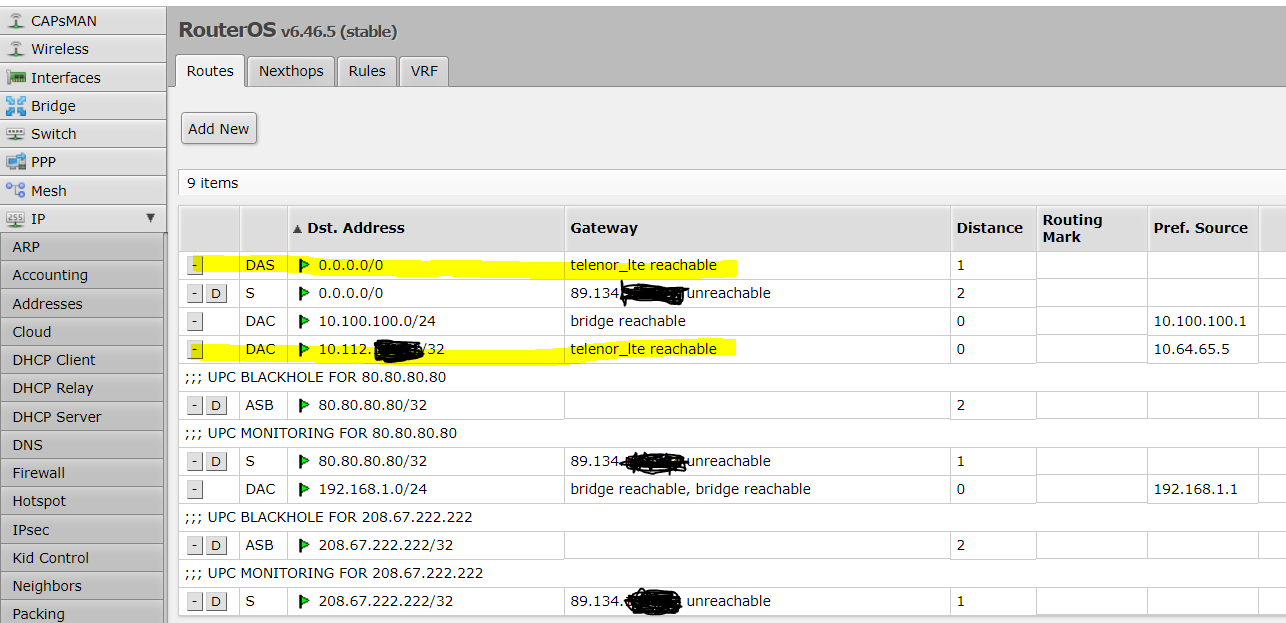
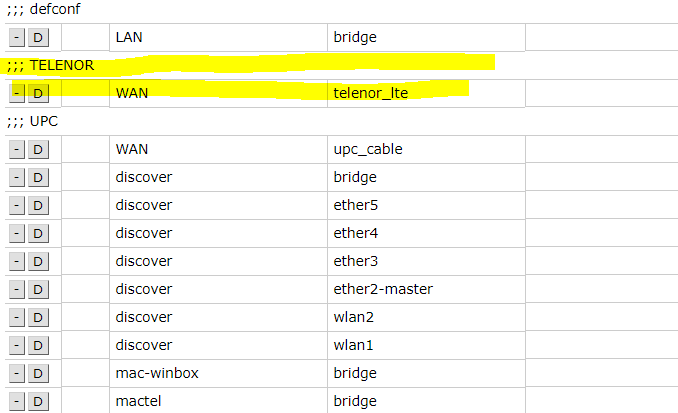
I see the following screenshot in another browser window after I enable the ppp-out1 interface (called telenor_lte here)
the yellow lines unluckily disappear after 1 second, or even faster, so it was difficult to catch this very moment
If i have no default route on my ppp-out interface i cannot use my telenor_lte 3g usb stick as a failover WAN for my UPC modem
Please help a not so techy networking person, mikrotik is very difficult for me, sorry
i seen some days that default route and ppp are not friends
Is my guess correct that the configuration of the machine has been done by UPC? If so, there is a chance that there are some scripts which actively clean it up.
So press the [terminal] button at the top right of the web interface window, write /export hide-sensitive file=my_config_export in the text window that opens, and press . Once the command finishes, press [webfig] button next to the [terminal] one, press [Files] in the left hand menu, download the file named my_config_export.rsc, follow the instruction regarding the IP address anonymisation given in my automatic signature below, and post the result here, between [code] and [/code] tags.
I did the configuration, i think UPC could not do something like this
why do you want me to post my whole config, i am not nuts to share it in a public forum ?
i checked your command and it contains all my open ports wow how great is that, and my external IP
actually i have removed the ppp interface several times and added, MIKROTIK is buggy in this case very much with my Huawei modem
then
i removed the ppp
rebooted
added ppp
and now when i check Add Default Route, its really added and stays there, wow i am happy
But, there is still an issue
I have Distance 1 on the LTE when LTE is enabled I can ping 8.8.8.8 from the Mikrotik
But i cannot browse the internet from a DHCP client (laptop) behind the router
I have Distance 2 on the UPC and everything works there when LTE is disabled
Is that because of the Distance 0 below? or what is that Distance 0 if PPP is enabled i dont understand that line
The instruction in my automatic signature, to which I referred in my previous post, explicitly says you should substitute the public IP addresses by something that makes it impossible to misuse them, yet maintains the visibility of the relationship between various IP addresses and prefixes in the configuration.
And the “because” answer is “because the typical case on this forum is that the issue is caused by some part of the configuration which the OP doesn’t give a thought - if he knew that the problem was there, he’d fix it himself, right”?
So hide-sensitive is only the first step (there used to be times when it was removing normal passwords but leaving IPsec secrets in place, very funny indeed), and then you have to do the fine cleaning.
Good. Yes, 'Tik is still not perfect - just like any other manufacturer.
That’s two unrelated things.
Distance 0 is set on all routes to “connected subnets”, i.e. to all subnets which are accessible directly, without any gateway. But the dst-address of these routes is always just the connected subnet, i.e. its mask is always longer than a /0.
As for impossibility to access internet from LAN via LTE - there may be a missing masquerade rule for the LTE interface, or there may be something else in your configuration - see the “because” above.
Thanks, after reading line by line in order to remove the sensitive information, i am still editing that file and will upload it to this thread, no worries, just i need time for that I added the (YELLOW) line so that my dhcp client laptop that is behind the mikrotik can see the external internet too now
I added also this (YELLOW) line because my domain did not ping from outside of the Internet, okay, it did not help, still does not ping
My dynamic dns client reacted after 10 minutes
changed the IP in public DNS and now my web server does not ping
and all other ports that are monitored by uptime robot are down
still does not ping
how can I find out if my SIM card is NATed or not?
I bought this contract just for the reason that its not NATed… so i am curious if that might be the issue…
Given that my fast shot regarding missing NAT rule turned out to hit the bull’s eye, there’s no need to publish the config right now.
To check whether your SIM’s account gets a public IP which doesn’t get NATed (it’s hard to believe but some operators assign public IPs to mobile clients but NAT them to other public IPs as they get to the internet), use e.g. https://www.whatismyip.com/ while running on the LTE - if it shows the same IP which you can see in your IP->address table attached to the LTE interface, you are not NATed.
But that still doesn’t mean you are not firewalled, so add a rule /ip firewall mangle add chain=prerouting in-interface=the-lte-interface-name protocol=tcp dst-port=443 action=log and try, from your mobile not connected to a WiFi provided by your router, to open a web page https://your.lte.ip.address . It should not open (unless you’ve permitted the https management of your router and allowed access to it via the LTE), but the added mangle rule should count packets.
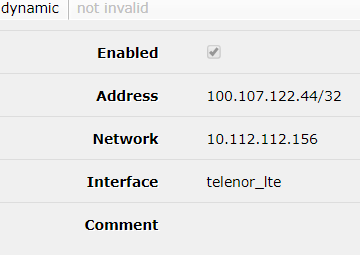
I do do not really understand how can the IP Address 100.107.122.44 be inside the network 10.112.112.156
according to my knowledge that is some strange information that might be the ppp-client that i do not understand
the public IP seems a normal IP
About firewalling, I disabled all rules temporarily that are deny rules in the firewall, did not help
I made this mangle rule with logging and it stays at 0 packets and bytes, even if i try to reach my webserver from outside the internet and i am connected via the lte interface
The address assigned internally to the SIM is from the “shared” range (RFC6598), 100.64.0.0/10, so it is not a public one.
It is, however, possible that there is a 1:1 NAT provided by the ISP, i.e. that whatever comes from the internet to the 176.77… one will be forwarded to your machine. But if you’ve tried the 176.77 in the browser and got nothing, it is not the case.
I’ve given you the mangle rule specially so that you wouldn’t need to disable any of the filter ones and still could see the result (mangle comes before filter for incoming traffic so it handles even packets which the filter will drop later).
The IP address of the local end of the PPP tunnel is not in the same subnet like the IP address of the remote end, but it doesn’t need to be because PPP means Point to Point Protocol, so there is no need to find the MAC address of the gateway by knowing its IP address and first finding the local interface by matching the address to all local subnets, then sending an ARP request out that interface and waiting for an ARP response. Here, the IP address is directly attached to the interface as the only possible remote end. You can also see that the mask of the local address is /32, so there is no subnet around it, no subnet address, no broadcast address etc. This is the same with all kinds of L3 point-to-point tunnels, and under circumstances this can be done over plain Ethernet as well.
Regarding the address itself being not a public one, there are two things to mention:
some mobile modems emulate a serial line, so the interface is a ppp-like one as in your case; others emulate an Ethernet card so the Mikrotik attaches a DHCP client to them. The address assignment may differ depending on the mode used, although the assignment from the shared range suggests that it is not the case. Nevertheless, it is worth giving it a try - you can choose the mode by a RouterOS command if the card supports both, so check whether :put [/port firmware get ignore-directip-modem] doesn’t return true. If it returns false, your modem doesn’t support the Ethernet card emulation mode.
some operators providing public addresses on their SIMs require that a dedicated APN name is used in the LTE configuration in order to get the public IP; if you use the standard APN name, you get the standard treatment.
As for the route that disappears i can only guess that you are disconnected soon after then connection inititated… So the routes are removed…
Make sure you run the latest ROS version etc…
I have Distance 1 on the LTE when LTE is enabled I can ping 8.8.8.8 from the Mikrotik
But i cannot browse the internet from a DHCP client (laptop) behind the router
I have Distance 2 on the UPC and everything works there when LTE is disabled
You have to set some Policy Routing Rules or Mangle Rules so that you choose the Routing Table to be used…
When you have distance 1 on the LTE and 2 to UPC, if you just let it like that, only LTE will be used… Unless it fails…
But with my previous suggestion you can fix that…
[admin@antmikrotik] > :put [/port firmware get ignore-directip-modem]
false
Is Ethernet card emulation mode the same as lte interface in Mikrotik Syntax?
They were explaining me when I bought the SIM card that I could use the other APN
This provider according to forums has real public IPs on the other APN, that i unluckily cannot use atm
I will open a support request at the provider and ask them why I was misleeded at buying the SIM card.
Thanks for confirming I have no NAT
EDIT: Funny Facts: I wrote this email during I had a power outage on my laptop and my UPS was serving my Modem and Router and my Laptop was running on Battery
I don’t understand what you ask. Ethernet card emulation is one of possible modes of the LTE modem (no matter whether an USB one or a mini-PCI one), and not every LTE modem can emulate the ethernet card (or, as Mikrotik calls it, use directip mode) while so far all of them I’ve seen did support the serial port emulation. So you can disable the Ethernet emulation, which is otherwise preferred, by the above setting (ignore-directip-modem=true), but you cannot activate it by any setting if the card doesn’t support it.
or you refer to something third thing that is another kind thatn these 2 above
what did you want to say by this?
So you can disable the Ethernet emulation, which is otherwise preferred, by the above setting (ignore-directip-modem=true), but you cannot activate it by any setting if the card doesn’t support it.
shall I issue some commands? if yes, which ones? i copied / pasted the command line, maybe you can do the same, it helps a lot for users remotely
or is that something I cannot do because it writes false in the result?
Ah, now I’ve got you. It didn’t come to my mind that you could be using /interface ppp-client rather than /interface lte, I’m not really good in retrieveing information from colorized screenshots
Now I can see that you’ve referred to ppp in text in some of the newer posts but I’ve still missed that it might mean you are really using /interface ppp-client to control the LTE card.
As far as I know, /interface ppp-client cannot use the Ethernet card emulation mode even if the LTE card supports it, whereas /interface lte chooses the Ethernet card emulation mode if available and not explicitly prohibited using ignore-directip-mode=true, otherwise it reverts to ppp mode over serial line.
I should have written something like “one can” (it is in general possible) rather than “you can”, which may be read as a suggestion to actually do that. I was only trying to explain the fact that the /interface lte checks the features of the LTE card, and chooses the Ethernet emulation mode if the card can do it and if it is not prohibited by RouterOS confguration, but that the mere fact that it is not prohibited does not mean that it can be actually used, because not all cards support it In your case, ignore-directip-mode is set to false, so if the LTE card supports the Ethernet card emulation mode, /interface lte will find out and use it.
[admin@antmikrotik] /interface lte> print
Flags: X - disabled, R - running
(ps the ppp-client is named telenor_lte and is disabled in general, it will be enabled only if the hosts checked via the UPC interface, that is running in a script every 15 seconds, are unreachable
/port firmware set ignore-directip-modem= has no meaning if you control the modem using /interface ppp-client. It only affects the behaviour if you use /interface lte instead. The default value is false, which means that the /interface lte prefers the Ethernet card emulation mode if it finds that the card supports it. So if you haven’t touched the value,
And don’t ask me why you must use yes or no (and cannot use true or false) when setting logical values, but get returns true or false for them.
Other than that, the advantage of using the Ethernet card emulation mode could be a lower load of Mikrotik’s CPU if I understand it right; whether there is any impact on bandwidth is unknown to me. In any case, use of /interface lte currently makes it impossible to use the on-up and on-down scripts in /ppp profile, as well as the script parameter of /ip dhcp-client because it adds the client dynamically if the Ethernet card emulation mode is used. So what you will use finally depends on your own analysis of the possible advantages of the Ethernet card emulation mode and your needs to implement some policy routing strategies where both WANs would be active simultaneously.
i dont use on up or on down i have a custom script that checks hosts and enables a interface or disables it and the lte interface (ppp in my case) case distance 1 and upc cable has distance 2
i still dont understand how to enable this /interface lte, i was hoping you could tell me
which is the analysis you would run, which are the commands?
Do this while the /interface ppp-client is disabled of course.
I don’t have even a single LTE card available at home, so I cannot answer a question what happens if you install two of them as I can see no way to link the apn object to a particular LTE modem.
what does this tell you? it seems to ignore my wish to add on apn
in the graphical /interface lte menu there is an interface dropdown menu, and that menu is empty, so i cannot chose an interface, i would think i could chose usb2 there, but its not there
there are some people writing crazy things about changing firmware of USB sticks that offer LTE, and then there is a way to change the mode with AT commands, but i tried yesterday to plug the USB modem to my PC and installed the software (driver) and then i could connect with putty to COM5 and issued some command i found somewhere which included GETPORTNAME and SETPORT but i just always got an answer like COMMAND NOT FOUND