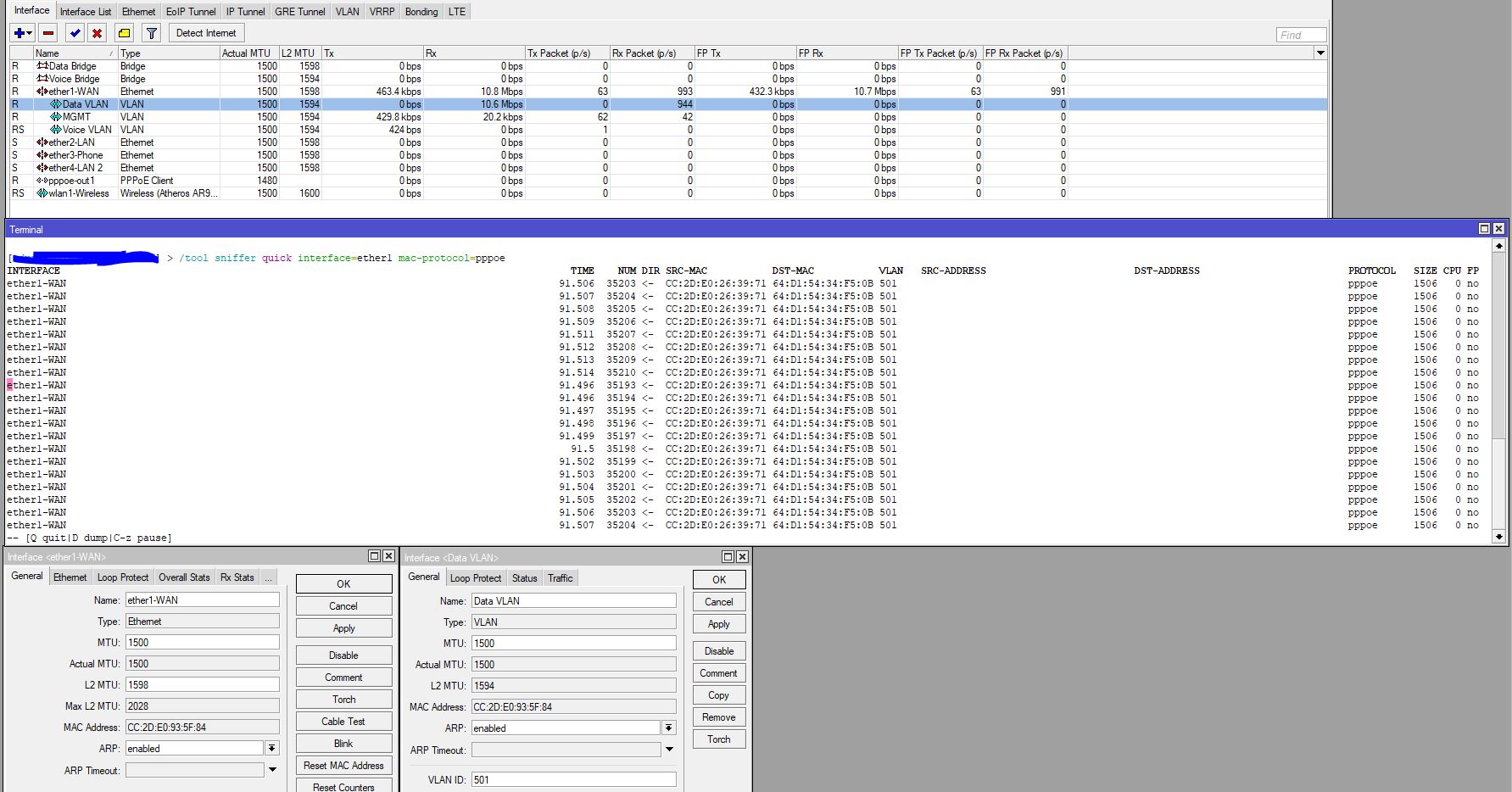
I had a situation today and want to understand why this will happen (Dont have much experience with PPPoE, etc)
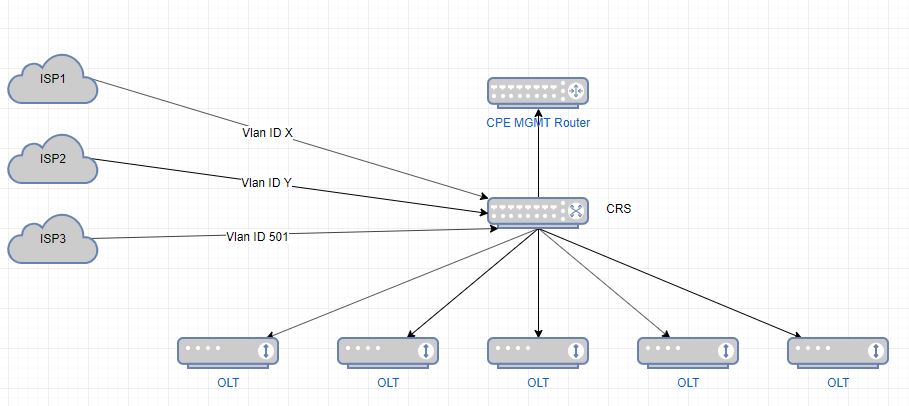
The environment is FTTh where customers connect to relevant ISP across Vlan & PPPoE, OLTs connects to CRS on Isolated Trunk (Vlan) Ports, then branches out to the relevant ISPs based on Vlan.ID. From CRS there is another Trunk (Vlan) going to the CPE Management Device.
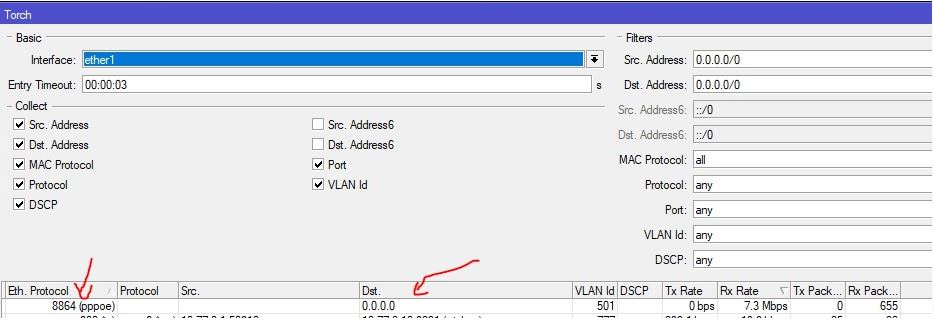
I noticed on the CPE Management device, that it is receiving PPPoE Session packets on ether1 for one of the ISP vlans 501. did some packet capturing and noticed these all belong to downloads of a certain customer of that ISP in the FTTh network. As per torch screen, it seems these PPPioE Session packets were sent to 0.0.0.0 which seems to be broadcasting this persons downloads out on this vlan.
Reported this to ISP and seems to be resolved now, but did not get any communication back from them on what the issue was and would like to understand what will cause something like this, can anyone please explain to me what / how this is caused?
PPP frames inside ethernet providing unique layer 2 tunnel based on unicast frames on session level. Why torch should show you destination IP, when PPP tunnel operates only with mac address?
Thx, no, maybe my explanation / description was not clear. The problem is I am seeing the 8864 session packets on a device totally unrelated to the client device, so instead of these packets going to specific MAC address, it seems to be broadcasted on the specific VLAN and I can see these packets on multiple devices, if that makes more sense now?
Thx, no, maybe my explanation / description was not clear. The problem is I am seeing the 8864 session packets on a device totally unrelated to the client device, so instead of these packets going to specific IP / MAC address, it seems to be broadcasted on the specific VLAN and I can see these packets on multiple devices, if that makes more sense now?
Now I think I get it. I think the only way it’s possible in ISP network is mac address learning of legit client on your ether1 port. Somehow.
or
it’s a bug in ROS that allows you to see PADI frames with 8863 ethernet protocol numbers like 8864. Few months ago I saw a bug that prevent to watch data with torch in PPPoE interface. Try to report that possible bug, maybe Tiks will answer something.
Even it is a bug, then that ISP managed his network wrong, because clients port must be isolated from each others on layer 2 without any vlans. Just isolated by software of a switch.
the target PPPoE client device doesn’t send anything in its uplink direction so the ISP gear starts to broadcast frames for it after the record for that MAC in its forwarding table expires (this normally takes minutes after it has seen the last frame with client’s MAC as source), whereas the PPPoE payload is a stream which doesn’t require any backward confirmations so it doesn’t stop in the absence of an uplink traffic,
the forwarding table size is so limited at some of the ISP boxes that it starts broadcasting because newer records squeeze out older ones; once any of the boxes between that resource-limited one and you receives such a frame, it has no choice but to broadcast it as it can never see a frame in the opposite direction,
isolation of client-facing ports on the ISP gear from one another cannot help as it’s not that you’d be getting an upload traffic of a foreign client, you get its download traffic, so it doesn’t ingress through one client-facing port and egress through another one,
I cannot imagine 7.3 Mbps of PPPoE-discovery traffic towards a MAC address of a single client (unless the client would be frenetically sending PADI at similar pace)
if the ISP gear was receiving frames with source MAC address of the client from your gear, you would be stealing part of the stream (and the ISP gear should report MAC flapping if this was happening)
As you are seeing misdirected unicast from a port on your CRS the issue likely lies with the switch forwarding database therein.
I had the same issue with some old Mikrotiks based on AR7240 switch chips where some client MAC addresses on different ports appeared to be hashed to the same value so only one could exist in the FDB causing unicast traffic to flood out of all ports, hopefully the switches in CRS don’t suffer from a similar problem.
When the problem arises check if the client MAC address exists in the FDB. Sniffing switch traffic to see if the client traffic is unidirectional (thus causing the FDB entry to age out) would require traffic to be mirrored to the CPU which may affect the switch chip behaviour.
Can you sniff the PPPoE communication of a client which legitimately passes through your gear? My point 1 (stream from PPPoE server being sent although no responses come from the client) is only possible if the server doesn’t send any keepalives to check the connection state, or if it does but ignores the absence of keepalive responses (like someone else complains here).
It will help alot, especially if both clients in the same broadcast domain. They could interact with one another directly. It’s not about direction of traffic. It’s about misconfiguration of topic starter and abusing the “network hole” by someone in same vlan.
I can generate whatever traffic you want with any ether type number.
While mac flapping happening, you can receive that bursted 7 mb/s sometimes.
I dont think that ISP switch is broken, because common access switch can keep 8k macs. Even with hash collision up to 3k.(bad switch, but enough)
I bet that ISP misconfigured port mirroring from some client to their chosen one with another vlan, and picked a port of topic starter. After he called them, they configured mirroring correctly. In this scenario you could see that traffic on a legit port.
I’m not sure we talk about the same? @CZFan (the topic starter) cannot affect by his own configuration what the upstream ISP is sending to him, except if he was actively sending frames with the affected customer’s MAC address as source and thus stealing the traffic by making the ISP switch learn that MAC on @CZFan’s port. I would expect the ISP’s switch to have client-facing ports isolated from each other (i.e. no forwarding from one client-facing port to another), but that doesn’t prevent frames sent by the PPPoE server from being broadcast via all client-facing ports as long as the dst-mac is unknown.
If you start thinking about spoofed traffic, then of course isolation of client-facing ports can prevent frames spoofed by one client from being forwarded to other client-facing ports at the ISP.
No doubt about this As stated above, this is what port isolation can help against.
Sure, but to happen, this requires that the legit recipient doesn’t send anything during that burst and that something between @CZFan’s uplink port and @CZFan’s clients (including both extremities) sends frames with legit recipient’s MAC as source.
This is the most straightforward explanation, but as it happened twice for different clients, the ISP’s staff must suffer from dysgraphia to make the same typo twice for two different clients to be monitored.
Can affect by his own hands (Why you think that it’s a session of a legit ISP client?(mac spoffing)) Also, all clients could know all macs in their service if there is no l2 isolation.
Yeah. Better be
7 mb/s is not a big deal for tcp “window” expanding between flapping as a udp stream.
aaaaand not realy. We all do mistakes cause of human factor
@CZFan, @Anumrak’s point of view made me review the whole thread and I’ve noticed I may be misunderstanding some points all the time.
So
are the two clients whose traffic you could see to arrive to the “CPE management router” connected via your own OLTs or their MAC addresses are unrelated to your part of the network at all? I.e. can we be sure that the “misforwarding” happens already at the ISP or can it happen as late as at your CRS (because the CRS gets it legitimately)?
what exactly did you have in mind when saying “almost like vlan 501 leaking over to native vlan from their side”? The torch shows that those frames do come to the “CPE management router” tagged with VID 501.
@tdw’s suggestion regarding collision of hashes of MAC addresses cannot be excluded (neither at your CRS nor at the ISP gear), it is just a bit complex to prove that - to do so, you’d need to store the complete list of MAC addresses known to the switch while the issue happens, and then try to spoof frames with each of these MAC addresses as source, one by one, to another CRS and see which one of them purges (actually, shadows) the MAC address of that “unrelated client” from the FDB.
I am still experiencing the problem, and seeing these packets on ALL devices inside the FTTh network.
Below screenshot from another customer device, seeing all these packets not meant for this device.
I had something strange happen today, an not sure if I can replicate it again, but was trying to MAC Telnet to a MAC address, struggled to get in as it kept saying incorrect password, bet then all of a sudden it accepted it and logged in, but it was not the device I was trying to log into, the device that I managed to log into, had an “Admin MAC” on the bridge interface same as what I was trying to MAC telnet to. Seems MTs are leaking bridge MACs onto WAN ports, etc
 As stated above, this is what port isolation can help against.