Hello, I have a problem configuring the internet on a mikrotik 4011 router. Im using WinBox, as gui is more easy to me then typing in terminal. So if there is any advice I would ask in advance that it be for WinBox and not for the terminal (if that’s not a problem, of course).
I am following First Time Guide. My ISP provides me with internet via ont and I have a router connected to it. I have PPPOE and an external IP address (it doesn’t take it from the public pool).
Doing everything from the mentioned instructions, I am able to ping 192.168.88.1, but not 8.8.8.8.8.
I’m sure I left something out or didn’t add something. I was trying to find a way to add my static IP (perhaps my thinking is wrong). I came across this topic, however it did not solve my problem.
Ultimately I want to have six computers connected by cable, but for now I would like at least one to have access to the Internet 
I’ll have to disappoint you, but you’ll need the use one command on the terminal to export the configuration and post it here for review:
/export file=anynameyouwish
This command will generate a file in the routers’ files which you’ll copy over to your computer, open with Notepad, remove any serial numbers, passwords, etc., and paste it here
What does a duck do on the router? Nat nat nat nat.
fixed it for ya
My config:
# 2025-04-10 14:31:20 by RouterOS 7.15.2
# software id = 9LCG-S59P
#
# model = RB4011iGS+
/interface bridge
add name=bridge1
/interface pppoe-client
add add-default-route=yes disabled=no interface=ether1 name=pppoe-out1 \
    use-peer-dns=yes user={login}
/ip pool
add name=dhcp_pool0 ranges=192.168.88.2-192.168.88.254
/ip dhcp-server
add address-pool=dhcp_pool0 interface=bridge1 name=dhcp1
/port
set 0 name=serial0
set 1 name=serial1
/interface bridge port
add bridge=bridge1 interface=ether2
/ip address
add address=192.168.88.1/24 interface=bridge1 network=192.168.88.0
add address=91.220.222.78/24 interface=ether1 network=91.220.222.0
/ip cloud
set update-time=no
/ip dhcp-server network
add address=192.168.88.0/24 dns-server=1.1.1.1 gateway=192.168.88.1
/ip dns
set servers=1.1.1.1
/ip firewall filter
add action=accept chain=input connection-state=established,related,untracked
/ip firewall nat
add action=masquerade chain=srcnat out-interface=ether1
/ip route
add gateway=255.255.255.0
/ip service
set telnet disabled=yes
set ftp disabled=yes
set www disabled=yes
set ssh port=2200
set api disabled=yes
/ip ssh
set strong-crypto=yes
/system note
set show-at-login=no
/system routerboard settings
set enter-setup-on=delete-key
/tool bandwidth-server
set enabled=no
Here is one problem…
The termination of the ISP connection is done through pppoe, so the ip address entry for ether1 is incorrect, should be removed.
/ip address
add address=192.168.88.1/24 interface=bridge1 network=192.168.88.0
add address=cc.220.222.dd/24 interface=ether1 network=91.220.222.0
You need to update your srcnat masquerade rule to use pppoe-out1 as out-interface. Or alternatively do like the defconf firewall, add pppoe-out1 (and ether1 if you plan to access the management of the modem/converter device) to an interface list WAN and change the masquerade rule to use out-interface-list=WAN.
@ anav - done, nothing change.
@CGGXANNX - would you be so kind as to describe a little more exactly how to do it?
-
You go to IP → Firewall → NAT tab. Look for the rule that says Action: masquerade Chain: srcnat. Double click to open it. Find the dropdown box with the caption Out. Interface and change the value from ether1 to pppoe-out1. That should fix your problem.
-
Alternatively, if you want to do it with interface list: Go to Interfaces → interface List tab. Click on the Lists button and add a new list with the name WAN. Go back to the Interfaces → interface List table and add two new entries: one with Interface pppoe-out1 List WAN, and one with Interface ether1 List WAN.
Then go to IP → Firewall → NAT tab edit the srcnat masquerade rule that I mentioned above, but this time, you clear the value of Out. Interface by clicking on the triangle next to in. Then set the value of Out. Interface List to WAN.
CGX nailed it…
/ip firewall nat
add action=masquerade chain=srcnat out-interface=ether1 should be pppoe-out1
WINBOX
IP menu firewall -->NAT
Sorry dont know the CLI commands to change.
Also, may I inquire what the purpose of the 255.255.255.0 route is?
And update your fiewall to the default one, as your router is insecure at the moment
@CGGXANNX - Thank you for describe. When I do that I get error “pppoe-out1 not ready” in red.
For the second option, I’m able to create list WAN, but can’t select it in “out. Interface”.
@TheCat12 - that entry has been deleted.
And just btw - shouldn’t I be able to connect by selecting, quick start, PPPoE, fill login and password? Because I’m wondering if maybe I’m sure I have the correct password given by the ISP. Or something else is set wrong?
-
If it shows pppoe-out1 as not ready, then it means that your PPPoE setup currently cannot be dialed successfully. You can open the Log and will probably see a lot of pppoe dialing attempts that fail. One of the reasons might be that your username or password is not correct. You’ll get more details from the log.
-
If you look at my previous post, where I mentioned using the masquerade rule with the WAN interface list, I specifically put some text in bold, look at them again
 . Please note that there are two different parameters!
However, you should still resolve the issue with PPPoE dialing first!
- If you want to use QuickSet and just select PPPoE and fill in the login as you wrote, then your router must in the original defconf configuration. DO NOT attempt to use QuickSet with the current configuration that you’ve built yourself from the example tutorial! Before using QuickSet, you must reset the RB4011 back to the default configuration, by going to System → Reset Configuration with all checkboxes unchecked (or maybe you can enable Keep Users to reuse the current login). After the reboot, the router will in the defconf configuration (many settings and items will have comments with “defconf” in them) and QuickSet will pop up allowing you to select PPPoE as method for WAN. Please also note that you should only use QuickSet once at this moment only. Do to use QuickSet to later make change to the configuration. Only use it after having reset the configuration first.
Thank you all very much for your help. It turned out that the problem was in the IPS box, where the signal is distributed throughout the estate.
@TheCat12 - I deleted all things from firewall, so it should be default.
Last thing. If I want to create a new connection, for example on port 4 (and use them at the same time), do I repeat the above steps by renaming the connections to, for example, 4?
What I meant under default firewall is to implement additional rules which are present in the default configuration becuase now your connection to the internet is even more insecure! I don’t have them at hand but they have been posted multiple times and can be found almost everywhere
@TheCat12 - I used the settings from this thread.
I noticed that something doesn’t quite work, because every now and then the connection is broken:
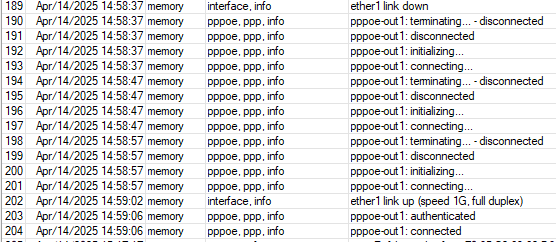
Configuration:
# 2025-04-14 15:29:03 by RouterOS 7.18.2
# software id = 9LCG-S59P
#
# model = RB4011iGS+

/interface bridge
add name=bridge1
/interface pppoe-client
add add-default-route=yes disabled=no interface=ether1 name=pppoe-out1 \
    use-peer-dns=yes user={USER}
/interface list
add name=WAN
/ip pool
add name=dhcp_pool0 ranges=192.168.88.2-192.168.88.254
/ip dhcp-server
add address-pool=dhcp_pool0 interface=bridge1 name=dhcp1
/port
set 0 name=serial0
set 1 name=serial1
/interface bridge port
add bridge=bridge1 interface=ether2
/interface list member
add disabled=yes interface=pppoe-out1 list=WAN
add disabled=yes interface=ether1 list=WAN
/interface ovpn-server server
add mac-address={MAC} name=ovpn-server1
/ip address
add address=192.168.88.1/24 interface=bridge1 network=192.168.88.0
add address=91.220.222.78/24 interface=ether1 network=91.220.222.0
/ip cloud
set update-time=no
/ip dhcp-server network
add address=192.168.88.0/24 dns-server=1.1.1.1 gateway=192.168.88.1
/ip dns
set servers=1.1.1.1
/ip firewall filter
add action=accept chain=input comment=\
    "defconf: accept established,related,untracked" connection-state=\
    established,related,untracked
add action=drop chain=input comment="defconf: drop invalid" connection-state=\
    invalid
add action=accept chain=input comment="defconf: accept ICMP" protocol=icmp
add action=accept chain=input comment=\
    "defconf: accept to local loopback (for CAPsMAN)" dst-address=127.0.0.1
add action=accept chain=forward comment="defconf: accept in ipsec policy" \
    ipsec-policy=in,ipsec
add action=accept chain=forward comment="defconf: accept out ipsec policy" \
    ipsec-policy=out,ipsec
add action=fasttrack-connection chain=forward comment="defconf: fasttrack" \
    connection-state=established,related hw-offload=yes
add action=accept chain=forward comment=\
    "defconf: accept established,related, untracked" connection-state=\
    established,related,untracked
add action=drop chain=forward comment="defconf: drop invalid" \
    connection-state=invalid
add action=drop chain=forward comment=\
    "defconf: drop all from WAN not DSTNATed" connection-nat-state=!dstnat \
    connection-state=new in-interface-list=WAN
/ip firewall nat
add action=masquerade chain=srcnat
/ip ipsec profile
set [ find default=yes ] dpd-interval=2m dpd-maximum-failures=5
/ip route
add disabled=no distance=1 dst-address=0.0.0.0/32 gateway=91.220.222.78 \
    routing-table=main scope=30 suppress-hw-offload=no target-scope=10
/ip service
set telnet disabled=yes
set ftp disabled=yes
set www disabled=yes
set ssh port=2200
set api disabled=yes
/ip ssh
set strong-crypto=yes
/system clock
set time-zone-name=Europe/Warsaw
/system note
set show-at-login=no
/system ntp client
set enabled=yes
/system ntp client servers
add address=pool.ntp.org
/system routerboard settings
set enter-setup-on=delete-key
/tool bandwidth-server
set enabled=no
-
FROM
/interface list
add name=WAN
TO
/interface list
add name=WAN
add name=LAN -
FROM
/interface list member
add disabled=yes interface=pppoe-out1 list=WAN
add disabled=yes interface=ether1 list=WAN
TO
/interface list member
add disabled=NO interface=pppoe-out1 list=WAN
add disabled=NO interface=ether1 list=WAN
add interface=bridge list=LAN -
Not sure why are you not paying attention ???
Why do you still have an address entered for ether1 REMOVE
/ip address
add address=192.168.88.1/24 interface=bridge1 network=192.168.88.0
add address=91.220.222.78/24 interface=ether1 network=91.220.222.0 -
WHY DO YOU LEAVE your router vulnerable to attack… In fact I recommend you unplug from the internet and netinstall as there are no guarantees your router has not been hacked.
Need to add…
/ip firewall filter
add action=accept chain=input comment=
“defconf: accept established,related,untracked” connection-state=
established,related,untracked
add action=drop chain=input comment=“defconf: drop invalid” connection-state=
invalid
add action=accept chain=input comment=“defconf: accept ICMP” protocol=icmp
add action=accept chain=input comment=
“defconf: accept to local loopback (for CAPsMAN)” dst-address=127.0.0.1
add action=accept chain=input comment=“user and admin access” in-interface-list=LAN
add action=drop chain=input comment=“drop all else”
Ok, so I started from the beginning, applying your advice. Well, and everything works on ethernet 2, but as I wrote, I have a problem with disconnection of the connection every half hour.
I looked for what could be the cause and so far (based on other topics): changing the lease time didn’t do anything. Disabling RSTP didn’t help either.
Attaching configuration:
# 2025-04-15 03:32:28 by RouterOS 7.18.2
# software id = 9LCG-S59P
#
# model = RB4011iGS+

/interface bridge
add name=bridge1
/interface pppoe-client
add add-default-route=yes disabled=no interface=ether1 name=pppoe-out1 user=\
    {user}
/ip pool
add name=dhcp_pool0 ranges=192.168.88.2-192.168.88.254
/ip dhcp-server
add address-pool=dhcp_pool0 interface=bridge1 lease-time=1d name=dhcp1
/port
set 0 name=serial0
set 1 name=serial1
/interface bridge port
add bridge=bridge1 interface=ether2
/ip address
add address=192.168.88.1/24 interface=bridge1 network=192.168.88.0
add address=91.220.222.78/24 interface=pppoe-out1 network=91.220.222.0
/ip dhcp-server network
add address=192.168.88.0/24 dns-server=1.1.1.1 gateway=192.168.88.1
/ip dns
set servers=1.1.1.1,1.0.0.1
/ip firewall filter
add action=accept chain=input comment=\
    "defconf: accept established,related,untracked" connection-state=\
    established,related,untracked
add action=drop chain=input comment="defconf: drop invalid" connection-state=\
    invalid
add action=accept chain=input comment="defconf: accept ICMP" protocol=icmp
add action=accept chain=input comment=\
    "defconf: accept to local loopback (for CAPsMAN)" dst-address=127.0.0.1
add action=accept chain=forward comment="defconf: accept in ipsec policy" \
    ipsec-policy=in,ipsec
add action=accept chain=forward comment="defconf: accept out ipsec policy" \
    ipsec-policy=out,ipsec
add action=fasttrack-connection chain=forward comment="defconf: fasttrack" \
    connection-state=established,related hw-offload=yes
add action=accept chain=forward comment=\
    "defconf: accept established,related, untracked" connection-state=\
    established,related,untracked
add action=drop chain=forward comment="defconf: drop invalid" \
    connection-state=invalid
add action=accept chain=input comment=\
    "defconf: accept established,related,untracked" connection-state=\
    established,related,untracked
add action=drop chain=input comment="defconf: drop invalid" connection-state=\
    invalid
add action=accept chain=input comment="defconf: accept ICMP" protocol=icmp
add action=accept chain=input comment=\
    "defconf: accept to local loopback (for CAPsMAN)" dst-address=127.0.0.1
add action=fasttrack-connection chain=forward comment=\
    "fast-track for established,related" connection-state=established,related \
    hw-offload=yes
add action=accept chain=forward comment="accept established,related" \
    connection-state=established,related
add action=drop chain=forward connection-state=invalid
add action=drop chain=forward comment=\
    "drop access to clients behind NAT from WAN" connection-nat-state=!dstnat \
    connection-state=new in-interface=ether1
/ip firewall nat
add action=masquerade chain=srcnat out-interface=pppoe-out1
/ip service
set telnet disabled=yes
set ftp disabled=yes
set www disabled=yes
set ssh port=2200
set api disabled=yes
/ip ssh
set strong-crypto=yes
/system clock
set time-zone-name=Europe
/system note
set show-at-login=no
/system ntp client
set enabled=yes
/system ntp client servers
add address=1.pool.ntp.org
/system routerboard settings
set enter-setup-on=delete-key
@anav - When I make the following change, interface=ether1 from interface=pppoe-out1, I am unable to ping 8.8.8.8.
add address=91.220.222.78/24 interface=ether1 network=91.220.222.0
The disconnection problem is probably on ISP’s side.
The last firewall rule “Drop all from WAN not DST-NATed” should apply to out-interface=pppoe-out1 and not ether1.
You’re also missing a rule for dropping all input not from LAN, so again you’re vulnerable.
The default firewall should be present 1:1 (without any removed rules) before you fully understand how it works because the aforementioned rule protects the access to your router from outside. If you need such, a VPN should be set up
A couple of thoughts.
- Usually if you are given a static ip address by your ISP, you don’t put it in manually.
(You case may be different, but unlikely)
Your pppoe connection should just keep getting the static IP address from the ISP (while you pay them)
You could check your assigned ip addresses in winbox, ip address
Is there a dynamic one on the pppoe-out1 (has a d flag)? Does it match your 91.xxx address?
If it does, just disable the static 91.xxx address you have put in.
Note: The above doesn’t apply if you have been given a second ip address, or group of addresses.
Though I am doubtful you ordered a full /24 range indicated by the 91.xxx/24,
Commonly ISP’s will give you (for money) additional /29 (with 4 IP’s) and /28 (with 8 IP’s) address ranges.
- As per @TheCat12 The default firewall rules and configuration is usually a good start.
If you have a safe place you can setup your mikrotik (eg. Perhaps even just with internet cable disconnected)
Use winbox, perhaps connecting via mac address.
Use files in winbox, and make a backup of your current config.
Then reset to factory defaults (keeping users)
Then when it has reset to factory defaults, use quickset (once only is wise) to change connection type to pppoe (ideally on ether1),
(and adjust ip and dhcp server settings if required)
disable all unwanted ip services
probably disable ip firewall Services sip helper
If you now check interfaces / interface lists, you should have the pppoe-out connection being WAN.
Also ether1 being WAN,
(if you put the pppoe-out on a different port to ether1, I would recommend making that different port a WAN port,
also check that the port is no longer attached to the bridge)
Also check ether1’s ip dhcp-client is now disabled.
Note: I have ONCE had an issue where reset to factory defaults on a HapAC2 gave no firewall rules, I tried to reset it multiple times.
Not sure why this happened.
There was a log entry I finally noticed complaining about broken script.
I upgraded to a newer routerOS, and the problem went away.
Things like this are very rare, but you might be lucky 