Hello My friends..!
so i have a script run on my mikrotik router, and the problem with it is that i dont want from it to return to scratch after my router reboot, so i want it to resume as it end after reboot.
so how can i do that..?
in a nutshell : i don’t need this script to be affected by the reboot, but i want from it to keep normaly .
in this screenshot what all this check box mean..?
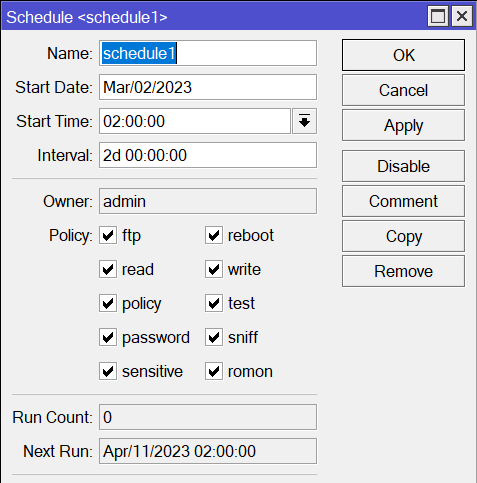
If I understand your question correctly: reboot doesn’t preserve router’s state in general and state of a running script is no exception. (IMO that’s one of crucial points of rebooting the device in the first place). So ROS, after reboot, has no idea if script was running when rebooted, it has no idea which command inside script was running and if it was sleep ROS has no idea when command was supposed to terminate. So the best newly booted ROS can do is to stick to schedule and start script next time it’s scheduled to do so.
If you really want to run the script in such long time intervals, you have to make script remember its state somehow (I can think of a few ways) and then run script more frequently … at each script run it would check current state and act accordingly.
exactly that’s what i want .
you have to make script remember its state somehow (I can think of a few ways) and then run script more frequently
so how can i achieve that ..? can you give me just an example for this situation here is my script.
/routing rule enable number=0
/routing rule disable number=2
:delay 1440m
/routing rule enable number=2
/routing rule disable number=0
i want from it to run forever..with no interruption.
in some way i want from my router to remember the last state -(i mean if my router in second section ((/routing rule enable number=2
/routing rule disable number=0)) if he rebooted i want from it to continue here not to begain from the begining ).
I have disabled the scheduled “power cycles” on the wifi outlets powering the Aimesh nodes and router.
You can add a script that is started at bootup and in that script you can disable the other ones.
If this is exact case, you don’t need persistence, you can just toggle enabled/disabled state on rules.
/routing/rule
set disabled=(![get value-name=disabled 0]) 0
set disabled=(![get value-name=disabled 2]) 2
You can put code into scheduler with 1440min interval and startup time.
Generally you can achieve persistence by writing into files or comments, but for your example it is not needed.
It will switch disabled state of rules, if rule is disabled it will switch to enabled and vice versa. You just need initially to set states of rues different, eg: 0 - enabled, 2 - disabled. Rules will then switch states when executed.
This will create scheduler for 24h interval (1440min) started on router boot (startup) with script code from above:
/system/scheduler add name=switch-route-rules interval="1d 00:00:00" start-time=startup on-event="/routing/rule; set disabled=(![get value-name=disabled 0]) 0; set disabled=(![get value-name=disabled 2]) 2"
Refer to scheduler manual if you need additional info for it: https://wiki.mikrotik.com/wiki/Manual:System/Scheduler
If you really need to be exactly 24h interval even if rebooted, then create scheduler with start-time on specific time eg: start-time=“00:00:00” (midnight) instead startup, then it will switch rules every midnight.
A simple description of what you want is better than looking for a solution to a problem that attempts to solve the primary need.
The classic XY Problem
So you want a script that alternates used routes every day?
-
When you restart the routerboard it remains the same combination as it was before it shut down.
-
If you change the lines every day at 04:00 in the night, so as not to interrupt at midnight, it is better
-
Just schedule two events, one that sets route A at 04:00 in the night,
and one that set course B the other night. -
If you set something that just reverses, it could be the wrong day.
-
Yur script is wrong, never use number= because numbers can vary and work only on terminal.
-
And also [get value-name=disabled 0] is wrong, for the same reason.
No matter if sometime work or not.
Add to the rule “0” the comment “Rule A” (without quotes)
Add to the rule “2” the comment “Rule B” (without quotes)
Paste this on terminal.
/system scheduler
add interval=2d name=enable-routing-rule-a on-event="/routing rule\r\
    \nenable [find where comment~\"Rule A\"]\r\
    \ndisable [find where comment~\"Rule B\"]\r\
    \n" policy=ftp,reboot,read,write,policy,test,password,sniff,sensitive,romon start-date=apr/01/2023 start-time=04:00:00
add interval=2d name=enable-routing-rule-b on-event="/routing rule\r\
    \nenable [find where comment~\"Rule B\"]\r\
    \ndisable [find where comment~\"Rule A\"]\r\
    \n" policy=ftp,reboot,read,write,policy,test,password,sniff,sensitive,romon start-date=apr/02/2023 start-time=04:00:00
Done.
On reboot the routerboard keep same previous routing rule enabled, and everynight @04:00 (AM) switch the two rules.
Since the schedulers are on two different days, the rules are switched correctly.
Do you also need something that if the routerboard is off at 04:00 (AM) still syncs the right rule at the start without waiting for 04:00 the next day?
True, but it covers example for OP question, I didn't bother to explain how to create script that identify rules, eg. by setting some comment on them and find them by it. Since it is seems it will raise more questions about how it works, I'm just lazy (or have more important things to spend time) 
There is also edge case if router is down at schedule time, to cover that, schedule which is executed at specific time of a day that is switching rules will need to set to some persistent variable of last execution time and addidional startup script will need to be created to check that persistent variable time and if is not in current day will need to execute switching rules...
but in this case we didn’t get rid from our problem.
to explain more.
i have 200G bit suscription from each ISPs provider for each month, my script tell the router to get internet from ISP-1 for the first day then from ISP-2 for the second day, then back to run the script from the begaining —> ISP-1 active..etc -(as you see the interval is 2d and the separation time between both is 1d)-
my problem is when the router is rebooted -(sometime every 14 hours so less than one day so the other part of the script is off)- the script goes back from the begaining so the other ISP is off, in your scenario if the router is rebooted your script will run, and it will revserse my script, but that will return us back to the same problem but in this case with ISP-2 not ISP-1.
i think youe understand what i mean now.
so in the day 15 of the month my ISP-1 supscription is end and my router with no internet until i switch it manually.
It will not if you don’t set start-time to startup, instead set to some specific time of a day, that’s why I wrote at the end:
If you really need to be exactly 24h interval even if rebooted…
I just set there midnight to be example, set time that is best fit for you.
Your explanation fits proposal by @rextended perfectly.
The only exception: it doesn’t start every month so that 1st day ISP1 is used … it depends on number of days in previous month. Example uses ISP1 from 1st of April then it alternates ISP every day. So 30th of April is ISP2 and 1st of May is ISP1 again. But at the end of May things change: 30th of May is ISP2, 31st of May is ISP1 and 1st of June is ISP2 … but then, the script ensures ISP alternation as long as router is up & running at selected time of running the script.
Now, if you really follow principle by @rextended, but change it only slightly:
- move contents of “on-event” for odd days to a script called “ISP-odd-days”
- move contents of “on-event” for even days to a script called “ISP-even-days”
- create scheduler entries to run appropriate script … you can run it multiple times as the script doesn’t blindly toggle disabled flag for routes but it rather sets flags in explicit way. So you can create multiple scheduled jobs and ISP lines will get toggled if router will be running at any of execution times:
/system scheduler
add interval=2d name=enable-routing-rule-a-take1 on-event=ISP-odd-days policy=ftp,reboot,read,write,policy,test,password,sniff,sensitive,romon start-date=apr/01/2023 start-time=04:00:00
add interval=2d name=enable-routing-rule-a-take2 on-event=ISP-odd-days policy=ftp,reboot,read,write,policy,test,password,sniff,sensitive,romon start-date=apr/01/2023 start-time=04:15:00
add interval=2d name=enable-routing-rule-a-take3 on-event=ISP-odd-days policy=ftp,reboot,read,write,policy,test,password,sniff,sensitive,romon start-date=apr/01/2023 start-time=04:30:00
add interval=2d name=enable-routing-rule-a-take4 on-event=ISP-odd-days policy=ftp,reboot,read,write,policy,test,password,sniff,sensitive,romon start-date=apr/01/2023 start-time=04:45:00

add interval=2d name=enable-routing-rule-b-take1 on-event=ISP-even-days policy=ftp,reboot,read,write,policy,test,password,sniff,sensitive,romon start-date=apr/02/2023 start-time=04:00:00
add interval=2d name=enable-routing-rule-b-take2 on-event=ISP-even-days policy=ftp,reboot,read,write,policy,test,password,sniff,sensitive,romon start-date=apr/02/2023 start-time=04:15:00
add interval=2d name=enable-routing-rule-b-take3 on-event=ISP-even-days policy=ftp,reboot,read,write,policy,test,password,sniff,sensitive,romon start-date=apr/02/2023 start-time=04:30:00
add interval=2d name=enable-routing-rule-b-take4 on-event=ISP-even-days policy=ftp,reboot,read,write,policy,test,password,sniff,sensitive,romon start-date=apr/02/2023 start-time=04:45:00
So if router will be running at any of times indicated, ISP lines will be swaped.
Ok… understand…
One unique scheduler, no matter when the routerboard is rebooted or for how many time is off.
No global variable, file or other frills needed. Just set the correct comments on Rule A and Rule B.
If the day is even, activate B, if it is odd, activate A.
Check constantly, change only if necessary.
/system scheduler
add interval=1m name=enable-daily-routing-rule on-event="/routing rule\r\
    \n:if (([:pick [/system clock get date] 4 6] % 2) = 0) do={\r\
    \n    disable [find where (comment~\"Rule A\" and disabled=no)]\r\
    \n    enable [find where (comment~\"Rule B\" and disabled=yes)]\r\
    \n} else={\r\
    \n    disable [find where (comment~\"Rule B\" and disabled=no)]\r\
    \n    enable [find where (comment~\"Rule A\" and disabled=yes)]\r\
    \n}\r\
    \n" policy=ftp,reboot,read,write,policy,test,password,sniff,sensitive,romon start-date=jan/01/1970 start-time=00:00:00
In the “XY Problem” theme… while good to deal with the reboot case BUT if router reboots that frequently… that sounds like a bigger problem here 
And tend to agree with @rextended, keep it simple and just check the clock and enable/disable. Spread a task across multiple scripts gets confusing fast. Every “1m” may be aggressive but accurate e.g. if you log scripting, it would generate a fair number of log messages at 1m vs 1h
And another… “so in the day 15 of the month my ISP-1 supscription is end and my router with no internet until i switch it manually.”, how will these scheduled routes switching cover ended subscription at specific day?
It’s actually very badly explained.
He probably exaggerates by writing that if he doesn’t consume the traffic alternately, but all on one,
in the middle of the month he has already run out of traffic and has to switch manually to the second.
Anyway explained bad, it’s true.
Agreed, Think the underlying problem is there isn’t an easy way to calculate the total data usage by period. And even/odd scheme is one way to deal with it.
If the problem is an internet has a data cap, perhaps just using one until it “didn’t work” then switch to other ISP when that happens be another approach (e.g. via recursive route or netwatch script) .
Hello Mr.rextended..!
thanks for your interrupt..!
realy thanksful..!!
Do you also need something that if the routerboard is off at 04:00 (AM) still syncs the right rule at the start without waiting for 04:00 the next day?
exactly that's what i want..