Currently I be a member of NOIP.com and paid for the yearly charge. In my NOIP Account I could separate each host to each password. Please look at picture below.
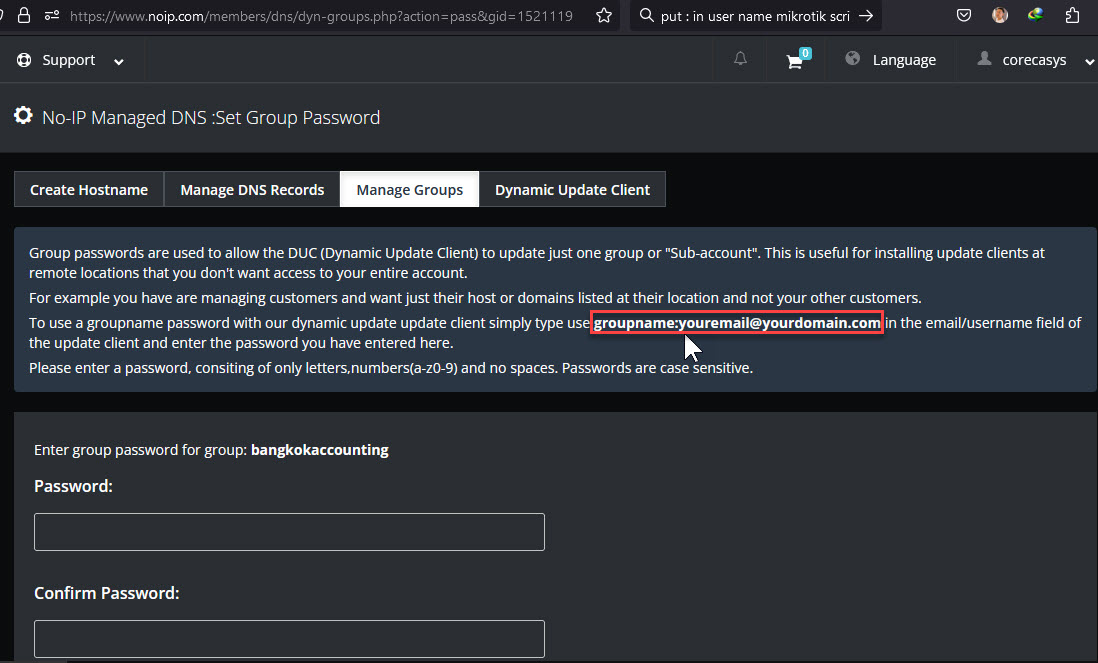
My problems is the use name is contain the symbol “:” (Colon). When I put the user name for example “nj:nj@corecasys.com”. The script will not available. Because the symbol “:” is a part of command in the script. Even I put “” in this code it still not available.
How do it put symbol ‘:’ (Colon) as a user name in my script ??? Please accept my extreme thanks for your kindness in advanced.
example my script
Set needed variables
:global username “nj:nj@corecasys.com”
:global password “password”
:global hostname “njexample.corecasys.net”
:global wanInt “pppoe-out1”
:global noipForce
:global previousIP2
print some debug info
#:log info (“DDNS: username = $username”)
#:log info (“DDNS: password = $password”)
:log info (“DDNS: hostname = $hostname”)
:log info (“DDNS: previousIP = $previousIP2”)
\
Grab the current IP address on that interface.
:global ddnsip [/ip address get [/ip address find interface=“$wanInt”] address]
:global currentIP [:pick $ddnsip 0 [:find $ddnsip “/”]]
#:log info (“DDNS: ddnsip = $ddnsip”)
:log info (“DDNS: currentIP = $currentIP”)
Remove the # on next line to force an update every single time - useful for debugging, but you could end up getting blacklisted by No-IP!
#:set noipForce true
Determine if no-ip update is needed
:if (($currentIP != $previousIP2) || ($noipForce = true)) do={
:set noipForce false
:set previousIP2 $currentIP
:log info (“DDNS: No-IP update needed”)
:log info (“DDNS: Start of Fetch”)
global tmp [/tool fetch mode=http port=80 address=dynupdate.no-ip.com host=dynupdate.no-ip.com src-path=“/nic/update?hostname=$hostname&myip=$currentIP” user=$username password=$password dst-path=“/noip2.txt”]
:log info (“DDNS: End of Fetch”)
:global result [/file get noip2.txt contents]
:log info (“DDNS: No-IP Update Result: $result”)
:put (“No-IP Update Result: $result”)
Update HE.net Tunnel
:execute script=HE-NET
} else={
:log info (“DDNS: No No-IP update needed”)
}
EDIT: added details, see next post
Thank ‘restended’. You may not understand my question. If you read it carefully. You will not said “Why you complicate your life uselessly?”. 
My email just ‘nj@corecasys.com’. In part of the ‘nj:nj@corecasys.com’. The NOIP defined that if i want to used difference password for each host name. I must created group name and follows by my email which i were applied with the NOIP. Please read carefully in picture below.
However thank for your try.
:global username "\"nj:nj\"@insertspammersitehere.com"
your code was not work.
Is not my code…
https://datatracker.ietf.org/doc/html/rfc2822#section-3.2.1
P.S.:
why http and not httpS?
fetch do not support redirect.
You read the instructions?
Like not…
Authorization: base64-encoded-auth-string should be the base64 encoding of username:password.
GET /nic/update?hostname=mytest.example.com&myip=192.0.2.25 HTTP/1.1
Host: dynupdate.no-ip.com
Authorization: Basic base64-encoded-auth-string
User-Agent: Company DeviceName-Model/FirmwareVersionNumber > maintainer-contact@example.com
For example
nj:nj@corecasys.com = bmo6bmpAY29yZWNhc3lzLmNvbQ==
and must you encode also the password inside…
My I ask why you don’t use the buildin service in MikroTik?
/ip/cloud
Probably because is not the domain “jeff.corecasys.net”…
rextended > I don’t understand your answer. My question is simple. How to solve my user name “nj:nj@corecasys.com”. Please see picture below.
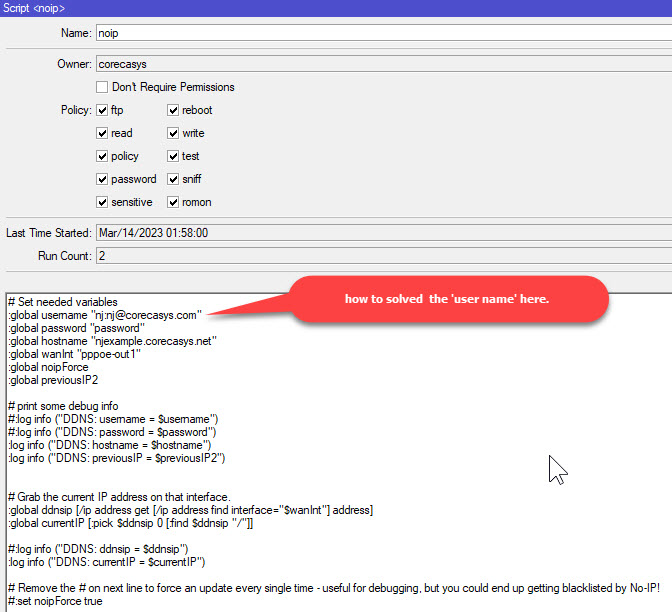
for the code as i mentioned above. It working properly if i use the normal user name standard format..
erlinden > i don’t use ip/cloud because the ip cloud format is not human reading. It’s very diffiult to remember.
I-have-already-reply-to-you-on-previous-post
But I have also readed the instruction on noip.com…
You read the instruction for group update or you are able only to copy&paste?
https://www.noip.com/integrate/request
Also why you do not ask help where you copy & paste the script? (January 14, 2014)
https://robby1609.wordpress.com/2014/01/14/simple-script-for-dynamic-ip-public-on-mikrotik-using-no-ip/
The script is 9 years old…
Or from the (probably) original authors? (Desember 15, 2012)
https://hendrainfo.wordpress.com/2012/12/15/membuat-ip-dynamic-menjadi-static-menggunakan-no-ip-com-via-mikrotik/
NO… is 11 years old…
NO… one moment…
Is stolen again from here (11 Jan 2012)
http://forum.mikrotik.com/t/no-ip-and-he-tunnel-scripts-for-v5-11/53253/1
You understand that after 12 years syntax can be changed?..
(The script is for RouterOS 5.11)