1.In fact I only need load value (load=7). How do I retreive that value ?
Do you have a good tutorials or useful examples?(similar to API_Pear2 manual last time)
With my client, it’s as easy as either
$load = $client->sendSync(
    new RouterOS\Request('/system resource cpu print .proplist=load', RouterOS\Query::where('cpu', 'cpu0'))
)->getArgument('load');
or
$util = new RouterOS\Util($client);
$util->changeMenu('/system resource cpu');
$load = $util->get(0, 'load');
(in both cases, the value is written to the variable $load)
With that client, after you pass the result from read() to parse_response(), you get an array, in which each property is a key, so you just do $ARRAY[‘load’].
2.How “$ARRAY = $API->parse_response($READ);” does work?
You can see the exact code on its page. It turns every word into a name/value pair, where each name is the key of an associative array, and the according value is the value for that property.
My client does the same thing automatically, exposing the resulting array with the getArgument() method, without making you explicitly call a method to do the parsing. That’s because in 99.99% of the cases, you want to deal with the value, not with the full word. For the 0.01% case, there’s the Communicator class.
3.What 's happen about my program or PEAR…phar?
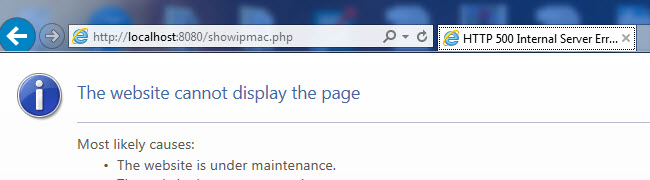
The first problem I see is that you haven’t replaced your IP address accordingly. You’re using 192.168.88.98, but you’ve left the IP in the example code of 192.168.0.1. Because the client can’t connect, it throws an exception, and because it throws an exception, and it is never caught, this results in a fatal error and error code 500, which IE then represents with a custom error page (sadly).
Try to catch the exception… and fix the IP of course… i.e.
<?php
use PEAR2\Net\RouterOS;
include_once 'PEAR2_Net_RouterOS-1.0.0b4.phar';
/require_once 'PEAR2/Autoload.php';
/require_once 'PEAR2_Net_RouterOS-1.0.0b4.phar';

try {
$client = new RouterOS\Client('192.168.88.98', 'admin', '');
} catch (Exception $e) {
    echo 'Unable to connect and/or login to the router';
}
4.In getting started , I should enabled outgoing connection with stram_socket_client().
How do I do?
stream_socket_client() is enabled by default. The explicit mention is there because many people use PHP on shared hosts, where this function is disabled for security reasons.
To enable connections with it, you add PHP and/or Apache to your server’s firewall(s), as mentioned previously in this topic, and in the notes. You previously disabled your firewall, which achieves the same effect, so that part should be OK. Besides, if the other client is working, then this is definitely not the issue.