The same problem remains … I generated a wireshark capture <> using sniffer <> of the interaction between the Router and the modem … i’ll let support figure it out … [SUP-215307]
Anything in the logging, @mozerd?
Thanks for the feedback. the Only certs I currently have are in builtin CA and they are all marked as invalid before and invalid after …
There was a lot of stuff there but I did not copy because I normally use wireshark to figure things out … now to lazy to gp through a pcap dump so I hope that support will look at the pcap file i sent them and maybe provide a solution …
CCR1009-7G-1C-1S+
RC3 did not solve the issue … still waiting for your feedback on SUP-215307
I had a NOC guy look at my situation - where he analyzed my pcap file and looked at the tik logs and he reported the following … sound about right to me
Here’s what changed in 7.23rc2 (and why your internet died):The bridge package completely rewrote how DHCP Option 82 is handled:Old setting add-dhcp-option82 was replaced by new per-bridge settings: dhcp-agent-circuit-id and dhcp-agent-remote-id.
On upgrade, MikroTik automatically migrates your old config.
This can silently change (or stop) the Option 82 data that the router inserts into its DHCP Discover/Request packets sent to the cable modem.
Many cable ISPs use Option 82 (or specific sub-options) to identify/validate the customer router. If the format or presence of Option 82 changed after the upgrade, the ISP’s DHCP server rejects the request → no IP address → no internet. This is the #1 suspect right now.
For reference sake: V7.23rc [testing] is released! - #42
For reference sake: V7.23rc [testing] is released! - #44
For reference sake: V7.23rc [testing] is released! - #37
From Log the following :

According to docs, the bridge setting gets migrated on upgrade. Can you see the migrated values? And check with your NOC guy? Bridging and Switching - RouterOS - MikroTik Documentation
Cleanup done.
Let's keep it civil, guys.
Was this extracted to a dedicated topic? Last time I checked, it was a troubleshooting session of a 7.23rc issue. Can't say how it went, but the technical debate should not be lost.
Looks like I missed something !
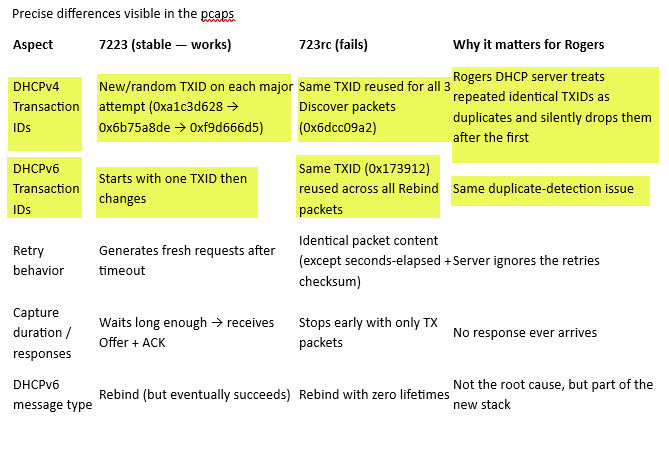
Thanks for the PCAP summary.
Interestingly, my own observations of the DHCP Discover process differ a bit, in my tests, both 7.22.3 and 7.23rc seem to behave in the same RFC-like manner regarding retries (with the upstream DHCP server turned off/unreachable in order to compare the behaviour highlighted by you).
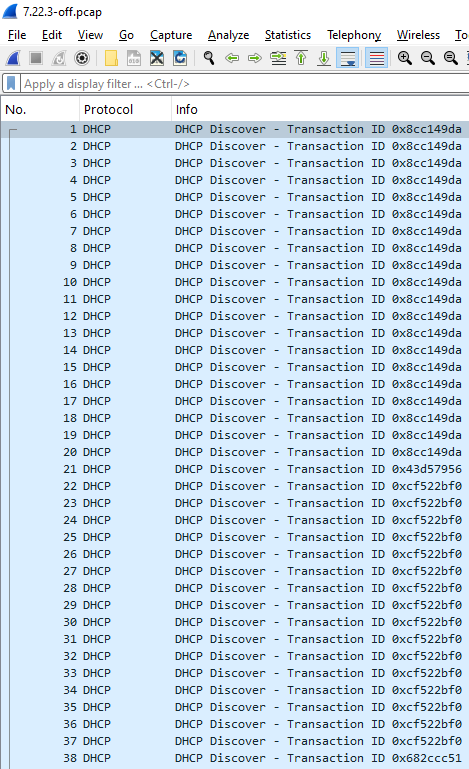
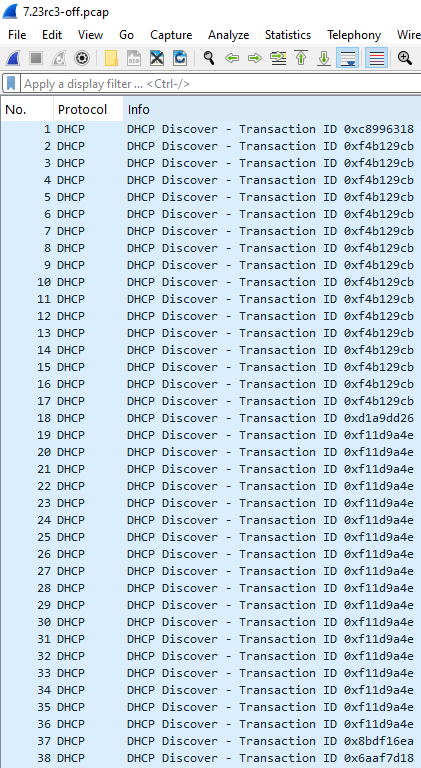
There is one undeniable difference in the payloads now, though. If you had the identity set to the default (MikroTik) before the upgrade, 7.23rc changes it based on this: *) system - make default identity based on board name;.
By default, the router sends this identity to the ISP in DHCP Option 12 (Hostname). I don't know exactly what identity string gets generated for your CCR, but your ISP might not like the change.
I see that in your export you have the Identity changed to Stargate, but I can't guess when you've set it.
That is the only found difference in the DHCP Discover packets between these two versions.
Can you provide minimalistic screenshots as these with your findings? As they contain no private information.
Or even the previously requested Option comparison, that section also doesn't contain any private information, except the hostname which nobody cares about.
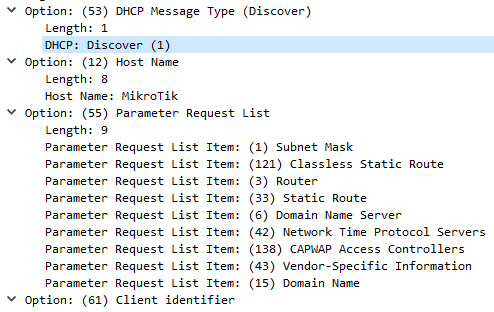

from 7.22.3
Option: (53) DHCP Message Type (Discover)
Length: 1
DHCP: Discover (1)
Option: (12) Host Name
Length: 8
Host Name: Stargate
Option: (55) Parameter Request List
Length: 9
Parameter Request List Item: (1) Subnet Mask
Parameter Request List Item: (121) Classless Static Route
Parameter Request List Item: (3) Router
Parameter Request List Item: (33) Static Route
Parameter Request List Item: (6) Domain Name Server
Parameter Request List Item: (42) Network Time Protocol Servers
Parameter Request List Item: (138) CAPWAP Access Controllers
Parameter Request List Item: (43) Vendor-Specific Information
Parameter Request List Item: (15) Domain Name
from 7.23rc3
Option: (53) DHCP Message Type (Discover)
Length: 1
DHCP: Discover (1)
Option: (12) Host Name
Length: 8
Host Name: Stargate
Option: (55) Parameter Request List
Length: 9
Parameter Request List Item: (1) Subnet Mask
Parameter Request List Item: (121) Classless Static Route
Parameter Request List Item: (3) Router
Parameter Request List Item: (33) Static Route
Parameter Request List Item: (6) Domain Name Server
Parameter Request List Item: (42) Network Time Protocol Servers
Parameter Request List Item: (138) CAPWAP Access Controllers
Parameter Request List Item: (43) Vendor-Specific Information
Parameter Request List Item: (15) Domain Name
You said
“There is one undeniable difference in the payloads now, though. If you had the identity set to the default (MikroTik) before the upgrade, 7.23rc changes it based on this: *) system - make default identity based on board name;.”
In my case the identity in 7223 has been stargate and remains stargate in version723rc3 …
From RFC 2131 (DHCP), section 4.1:
Selecting a new 'xid' for each retransmission is an implementation decision. A client may choose to reuse the same 'xid' or select a new 'xid' for each retransmitted message.
So nothing wrong here.
From RFC 8415 (DHCPv6), section 16.1:
A client MUST leave the transaction ID unchanged in retransmissions of a message.
So MikroTik is behaving correctly here too if the rebind packets are retransmissions. Reusing Transaction IDs in distinct rebind transactions would be a poor idea.
From ROS version 6.48 and through version 7.22.3 my CCR1009 behaved correctly no issue with my ISP and its Cable modem <> Low and Behold <> comes version 7.23rc, 7.23rc2, and 7.23rc3 and my ISP is rejecting the connection. No changes in my CCR1009 configuration of whatsoever nature - but massive changes in the network stack in 7.23rc.x causes the problem for me and my ISP and its cable modem … reverting back to 7.22.x solves the problem …. easy enough for EVERYONE to understand … capiche Kingfisher ? Have you been following my commentary?
Non capiche why so aggressive mode has been turned on?
The issue is very simple … not whether Mikrotik Tech is following the RFC’s – the Issue is what worked before using my CCR1009 is no longer working with the introduction of RoS version 7.23rc.x for me and my ISP … I made that very clear very early in the thread …
You did not answer my question, you focused on excerpt that you should not focus on.
If someone wants to make a constructive contribution to my issue they should at the very least understand the problem I am highlighting … that is called reading comprehension in the english language … diverting to RFC implementation is very interesting but does not address the issue of behaviour past and present.
My issue is behaviour … in the past all versions up to 7.22.3 behaved properly in my environment … with the introduction of 7.23rc.x that behaviour changed in my environment …
As of literacy in English (not my native language) I think that you keep omitting the main part of my question - bolded to emphasise it:
Non capiche WHY SO AGGRESSIVE MODE HAS BEEN TURNED ON?